Do these 3 things before closing this tab:
1Clear out junk files and repair common Windows errors2Scan for outdated or missing drivers - takes under a minute3Repair Windows errors before they cause bigger problemsThe Intel NUC8i7BEH was one of the most balanced compact PCs of 2019. Its quad-core/eight-thread Core i7-8559U, Iris Plus 655 graphics, Thunderbolt 3, dual-drive layout and excellent 4K-media support made it unusually versatile for its size. In 2026, however, it is a discontinued legacy machine: buy one only when the used price, condition and specific features make more sense than a current mini-PC.
What the NUC8i7BEH is
“NUC8” identifies Intel’s eighth-generation NUC family. “i7” denotes the highest mainstream processor tier in the Bean Canyon range, “BE” identifies the Bean Canyon platform, and the final “H” means the taller chassis. That extra height provides a 2.5-inch SATA drive bay alongside the motherboard-mounted M.2 slot. The shorter NUC8i7BEK does not offer the same internal 2.5-inch-drive capacity. Intel documents the bay and installation procedure in its NUC8ixBEH User Guide.
This was a barebones kit rather than a complete computer. The chassis, motherboard, processor, cooling system, wireless module, external adapter, VESA hardware and region-specific power cord were normally included. Buyers supplied DDR4 SO-DIMMs, an M.2 drive, an optional 2.5-inch drive and an operating-system license. AnandTech’s review system used a Western Digital Black NVMe SSD and two G.Skill DDR4-3000 SO-DIMMs, so its results describe a configured review unit, not an empty retail box.
Specifications and design
| Feature | NUC8i7BEH specification |
|---|---|
| Processor | Intel Core i7-8559U, 4 cores/8 threads |
| Frequency | 2.7 GHz base; up to 4.5 GHz Turbo |
| Processor TDP | 28 W |
| Cache | 8 MB |
| Graphics | Intel Iris Plus Graphics 655 with 128 MB eDRAM |
| Memory | User-installed DDR4 SO-DIMM |
| Storage | M.2 SSD plus 2.5-inch SATA drive |
| Networking | Gigabit Ethernet, 802.11ac Wi-Fi, Bluetooth 5.0 |
| Expansion | Thunderbolt 3 over USB-C |
| Ports and displays | Four USB-A ports, HDMI, and display capability through USB-C/Thunderbolt |
| Size | Approximately 117 × 112 × 51 mm |
| Adapter | 90 W external power supply |
| 2026 status | Discontinued legacy product |
The processor, dimensions, 28 W design and 90 W adapter are listed in the SimplyNUC product brief. Bean Canyon also brought Intel Wireless-AC 9560, Bluetooth 5.0 and USB 3.1 Gen 2 connectivity compared with earlier Baby Canyon models. Intel’s guide documents VESA mounting, useful for hiding the computer behind a monitor or television.
#1 Best Overall

- GMKtec M2 Pro S mini computer is equipped with 11th generation Intel Core i7-1185G7 processor, main frequency up to 4.8 GHz, 4 cores, 8 threads, 12MB cache, running much faster than i7-10810U, i5-12450H and i5-8259U, Windows PC series The power is only 35W, supporting your daily work with less power consumption, without delaying daily tasks
- 16GB DDR4 and 1TB NVME SSD: Desktop computer Comes with 16GB SODIMM, dual-channel DDR4 supports expansion up to 64GB. 1TB SSD M.2 2280 NVMe (PCIe3.0), supports expansion to 2TB, in addition, M.2 2242 SATA can be expanded to 2TB
- 4K UHD & 3 Screens Support: Mini PC with Intel Iris Xe Graphics G7 96EU GPU delivers high-quality graphics for the most demanding applications, 2 x HDMI (4K @ 60Hz) and 1 x USB Type-C (4K @ 60Hz) output terminals, allowing you to independently display 4K screens on 3 displays at the same time
- 2.5Gbps LAN & WiFi6 + BT5.2: GMKtec mini PC dual band WiFi 2.4G+5G networking and Giga (RJ45 speed up to 2500M), Loading web, video, or other networked operations is faster and more stable, Bluetooth 5.2 connect faster Speed, Farther Coverage, it is also a big feature that you can transfer files over LAN at high speed
- Package Included: 1x GMKtec Nucbox M2 Pro, 1x DC Power Plug, 1x HDMI Cable. 1 x VESA Mount with Screws, 1x User Manual
Why the Core i7 mattered in 2019
The i7-8559U was a substantial improvement over the dual-core processors common in earlier NUCs. Four physical cores and eight threads, a high 4.5 GHz maximum Turbo and a 28 W thermal envelope gave it strong productivity for its class. Office work, software development, compiling, multitasking, light content creation and modest virtualization were all sensible workloads. Sustained jobs can still make the small fan audible and may encounter thermal limits; this is an efficient mobile quad-core, not a modern desktop or high-performance mobile processor.
Graphics, gaming and Thunderbolt
Iris Plus Graphics 655 was impressive integrated graphics for 2019 and includes 128 MB of eDRAM, but it remains an integrated GPU. It handles desktop acceleration, 4K playback, basic photo work, older or lightweight games and sensible emulation. Modern AAA games, serious 3D rendering, GPU compute, demanding video effects and high-refresh gaming are poor fits. AnandTech’s testing found the internal GPU unsuitable for VR.
Thunderbolt 3 provides an escape route through an external GPU enclosure. That can enable a suitable graphics card for occasional gaming or VR, but the enclosure, card, power supply, cabling and Thunderbolt bandwidth add cost and complexity. It does not turn the base NUC into a gaming system or match an internal desktop PCIe connection.
Rank #2
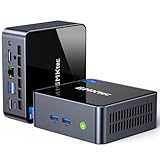
- 【Powerful Performance】GMKtec M2 Pro S mini computer is equipped with 11th generation Intel Core i7-1185G7 processor, main frequency up to 4.8 GHz, 4 cores, 8 threads, 12MB cache, running much faster than i7-10810U, i5-12450H and i5-8259U, Wins PC series The power is only 35W, supporting your daily work with less power consumption, without delaying daily tasks
- GMKtec M2 Pro S Mini PC with Intel Iris Xe Graphics G7 96EU GPU — Powered by Intel Iris Xe Graphics G7 with 96 Execution Units, delivering up to 5× higher graphics performance than entry-level integrated GPUs. Enjoy smoother multi-monitor output, faster media processing, and playable casual gaming. Designed for users who need real GPU performance for productivity, creative tasks, and immersive visuals — not just basic display output.
- 【Storage Capacity】16GB DDR4 and 512GB NVME SSD Desktop computer Comes with 16GB SODIMM, dual-channel DDR4 supports expansion up to 64GB. 512GB SSD M.2 2280 NVMe (PCIe3.0), supports expansion to 2TB, in addition, M.2 2242 SATA can be expanded to 2TB
- 【Wide Connectivity】The GMKtec M2 Pro S mini computer supports a range of connectivity options, including WiFi 6, USB4.0, BT 5.2, DP, HDMI, and RJ45 2.5G, allowing you to connect to multiple devices and peripherals from a single device.
- 【4K UHD & 3 Screens Support】Mini PC with Intel Iris Xe Graphics G7 96EU GPU delivers high-quality graphics for the most demanding applications, 2 x HDMI (4K @ 60Hz) and 1 x USB Type-C (4K @ 60Hz) output terminals, allowing you to independently display 4K screens on 3 displays at the same time
4K HDR and home-theater use
Media playback was the NUC’s standout strength. AnandTech tested YouTube VP9 Profile 2, Netflix 4K HDR, HEVC Main10 and local playback. In that review configuration, YouTube 8K HDR averaged about 30 W system power, while Netflix 4K HDR averaged approximately 23 W at the wall through the Windows Store application and Microsoft Edge. HEVC Main10 decoding used about half of one available hardware decoder.
Those are 2019 measurements, not universal specifications. RAM, SSD, drivers, Windows power settings, display resolution and HDR state, browser or player, background tasks and the meter itself can change results. Streaming services also impose their own browser, DRM and operating-system requirements.
For local files, AnandTech evaluated VLC, Kodi, MPC-HC, LAV Video Decoder, EVR-CP and madVR. Kodi generally achieved better efficiency than the tested VLC setup, and hardware acceleration was essential. Normal playback was comfortable, but high-quality madVR scaling and processing could overwhelm the Iris Plus GPU. “4K HDR capable” therefore means efficient decoding and playback in supported software, not every enthusiast renderer, filter chain or transcoding workload.
Rank #3

- 12th INTEL ALDER LAKE N95 PROCESSOR - The G3S mini pc uses the 12th Intel N95 CPU 4 Core 4 Threads 6MB cache, burst speed up to 3.4GHz. Compared with (N100/N5105/N5100/N5095), the N95 offers an overall performance improvement of 36%. Ideal for routine tasks, office work and home entertainment,which is more convenient than traditional desktop pc
- 8GB RAM MEMORY & 256GB SSD STORAGE - GMKtec Nucbox G3S mini pc is prebuilt with 8GB DDR4 RAM, you will enjoy a speedier experience with Built-in 256GB M.2 2242 SSD Hard Drive. Our mini desktop pc boots up in seconds, work on multiple browser tabs, software applications and quickly transfers files
- RICH INTERFACE - Nucbox G3 Plus mini computer is equipped with USB 3.2, up to 10Gbps/S, HDMI(4K@60Hz)×2, 3.5mm Audio Jack. Supports WiFi 5, and Gigabit Ethernet RJ45 1000MbE network connectivity, Bluetooth 5.0. This Mini PC supports multiple device connection and can be used with servers, monitoring equipment, office equipment, displays, projectors, televisions, etc
- 4K DUAL SCREEN DISPLAY - Mini desktop computer is equipped with upgraded Intel Graphics(max 1000MHz), supports 4K video playback and AV1 decoding, connect the pc with a projector as a home theatre, enjoy a variety of entertainments. Two HDMI 2.0 ports allows you to multi-task efficiently on two 4K@60Hz displays
- WiFi5 & BT5.0 - Built-in Bluetooth 5.0 enables you to connect multiple wireless devices such as mice, keyboard, monitoring equipment, printer and monitor. High-speed wireless connection technology, reliable and efficient transmission speed, providing a faster internet experience for browsing and streaming. Small pc supports Wake On LAN, PXE Boot, RTC Wake and Auto Power On, ideal to use as a server
Noise, thermals and power
The 28 W processor explains the move to a 90 W adapter; earlier 15 W Baby Canyon systems commonly used 65 W adapters. Short bursts can be unobtrusive, while long compiles, encoding jobs or stress tests make the compact fan and heatsink work harder. Playback measurements of roughly 23–30 W are workload-specific and should not be confused with idle, peak or sustained CPU-load consumption.
Independent reader supportYour contribution helps us test, update, and keep practical guides available for everyone.Storage and memory upgrades
Two internal drives
The M.2 slot is the logical location for the operating system and applications. The 2.5-inch bay accepts a SATA SSD for media libraries, backups or inexpensive capacity. A mechanical hard drive works, but noise, vibration, heat and low responsiveness make it less appealing in a quiet living-room or desktop system. Used units may be missing the SATA cable, drive tray hardware or screws, so inspect the listing carefully.
Dual-channel SO-DIMM memory
Install two matched DDR4 SO-DIMMs where possible. Dual-channel bandwidth is particularly valuable because the Iris Plus GPU shares system memory. Verify capacity and speed in BIOS or the operating system; never assume a listing includes RAM. Exact maximum capacity and module-density support should be checked against the applicable ASUS documentation rather than inferred from generic listings.
Rank #4
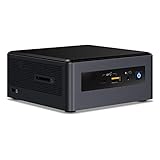
- Target usage: home office, home theater PC, casual gaming
- 8th Generation Intel Core i5 Processor delivers the latest Performance for immersive entertainment; AMD Radeon* 540x discrete graphics and 2 GB Graphics memory for visual immersion in games and streaming media
- Microsoft Windows* 10 Home
- 8GB RAM, 16GB Intel Optane Memory of RAM, 1TB HDD of storage
- 3 USB 3. 1 Ports, including one charging port; 1 USB 3. 1 Type-C port; 1 HDMI* 2. 0B port supporting 7. 1 surround Sound Audio; 1 Mini DisplayPort* 1. 2 for additional display options; SD card slot for easy transfer of camera or phone files.
Building and checking a used unit
- Open the chassis and inspect the board, fan, SATA daughterboard, drive-bay hardware and CMOS battery.
- Install two matched DDR4 SO-DIMMs.
- Fit the M.2 SSD using the correct standoff and screw.
- Add a 2.5-inch SATA SSD or HDD if required, seating it into the SATA connectors.
- Reassemble without overtightening screws and connect the original or correctly rated 90 W adapter.
- Enter BIOS and confirm memory, both drives, fan behavior, boot mode and firmware version.
- Install the operating system and the chipset, graphics, wireless, Bluetooth, Thunderbolt, audio and storage drivers.
- Before the return period ends, test memory, CPU stability, Wi-Fi, Bluetooth, every USB port, Thunderbolt, HDMI and USB-C display output, sleep/wake and sustained thermals.
- Reject or negotiate around missing adapters, BIOS passwords, corporate-management remnants, dead CMOS batteries, fan faults, thermal throttling, undetected drives or unrecognized memory.
- HDR failures can originate in the display, cable, browser, DRM path or Windows settings rather than the NUC itself.
- Old SSDs and hard drives may be worn even when the computer boots normally.
Operating-system and support reality in 2026
Intel’s March 2020 supported-operating-system document lists the NUC8i7BEH family with Windows 10 64-bit support and Ubuntu 16.04 LTS certification. That historical document is not evidence of current certification. Intel’s guide refers owners to Intel Driver & Support Assistant and the Download Center, but NUC support information has moved to ASUS.
ASUS lists the NUC Kit NUC8i7BEH as end-of-sales on April 2, 2022 and end-of-support on October 2, 2023 in its discontinuation notice. Check the ASUS NUC8i7BEH support page before attempting a BIOS or driver update. Do not assume simple official Windows 11 compatibility, ongoing security-driver maintenance or a current warranty.
Should you buy one in 2026?
A used NUC8i7BEH can make sense when
- The total price is substantially below a newer, complete mini-PC.
- You specifically need Thunderbolt 3, a 2.5-inch internal bay, DDR4 reuse, VESA mounting or a compact Intel platform.
- You want a low-cost office computer, Kodi/local-media box, Linux server, development machine or Thunderbolt experiment.
- The seller includes the 90 W adapter and drive hardware, permits testing and accepts returns.
Pass when
- The price approaches a current Ryzen, Intel or ASUS mini-PC with warranty and support.
- You require modern Wi-Fi, 2.5GbE, USB4, PCIe 4.0 storage, current display standards or strong modern gaming.
- You need predictable business-fleet support, easy Windows 11 deployment or long-term spare-parts availability.
- The adapter is missing, BIOS history is unknown, or the unit fails memory, storage, sleep/wake or sustained-load tests.
Compare the complete cost: used chassis, DDR4, M.2 storage, optional SATA storage, operating-system license, replacement adapter risk and possible repairs. A high-end PCIe 4.0/5.0 SSD is also poor value here because the platform cannot use it like a modern system. An eGPU is worthwhile mainly for owners who already have a compatible graphics card and a specific need.
Verdict: two different answers
2019: The NUC8i7BEH was an excellent balanced mainstream NUC. It combined unusually capable CPU performance, strong integrated media features, dual-drive flexibility, user-replaceable parts and Thunderbolt 3 in a tiny enclosure.
2026: It is a legacy used-market project, not a default new-PC recommendation. Buy or reuse one when its low price and distinctive features solve a particular need; otherwise, a current fully configured mini-PC usually offers better support, interfaces and total value.
Quick Recap
Product prices and availability are accurate as of the date/time indicated and are subject to change. Any price and availability information displayed on Amazon at the time of purchase will apply.

