Free tools Windows power users keep installed
One-click scans. No signup required.
Some links on this page are affiliate links: if you buy through them we may earn a commission, at no extra cost to you.
Intel’s Data Streaming Accelerator (DSA) is an integrated, queue-based accelerator for moving and transforming data—not a standalone PCIe card. Announced in 2019 and later implemented in selected Xeon processors, it can offload tasks such as memory copying, filling, comparing and CRC generation. Whether it helps depends on the processor SKU, software support, transfer size, queue setup and NUMA placement.
What Intel DSA is—and what “launched” meant
ServeTheHome’s November 21, 2019 report covered Intel’s DSA technology announcement. Read “launched” in that historical context: it was not evidence of a separately purchasable accelerator card shipping that day.
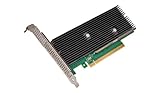
Intel later integrated DSA into the 4th Generation Xeon Scalable family, formerly known as Sapphire Rapids, and lists it on selected later Xeon models as well. DSA is part of the server platform’s I/O complex. It may be exposed to software as an integrated endpoint, but buyers obtain it with a compatible processor and platform, not by installing an ordinary add-in board. Intel’s 4th Generation Xeon overview describes the implementation and software interface.
Quick wins for a faster PC:
Repair Windows errors before they cause bigger problemsFix Now →Scan for outdated or missing drivers - takes under a minuteDriver Scan →Clear out junk files and repair common Windows errorsFree Scan →A useful mental model is a specialized helper for defined data operations. Unlike a GPU, DSA does not run arbitrary kernels; software submits supported work through queues, and DSA engines perform it.
#1 Best Overall
Why offload data movement?
Servers often spend CPU cycles moving or preparing data rather than applying business logic to it. Network and virtualization pipelines copy packets between buffers; storage paths move blocks; virtual machines need pages zeroed; analytics and persistent-memory workflows may compare, checksum or flush data. At high throughput, this routine work can compete with application processing for cores.
DSA is designed to take on selected repetitive operations so CPU resources can be used elsewhere. The potential gain is not just faster copying: freeing cores, improving throughput per core or reducing CPU cost may matter more. But the accelerator still needs software to submit and manage work, so offload is useful only when the complete data path can use it efficiently.
Operations and the queue model
The operation set includes memory copy and fill (including zeroing), memory compare, CRC generation, cache flushing and related data-movement or transformation tasks. Intel’s original announcement also highlighted Data Integrity Field-related work and delta operations. The exact operations available to an application depend on the architecture, driver and software interface in use; the 2019 announcement list should not be treated as a promise that every application exposes every operation.
Rank #2

- Add Gigabit Ethernet to a client, server or workstation through a PCI Express slot
- Single Port PCIe network adapter card with Intel I210-AT Chipset
- PCI Express Gigabit network card / PCI Express Gigabit LAN card / PCI Express Gigabit server adapter / Gigabit Network Card / PCIe Gigabit NIC
- Provides fully compliant 10/100/1000 RJ-45 Ethernet port through single PCIe slot
- PXE network boot support
DSA uses devices or instances containing engines and groups, with work queues through which software submits operations. A queue may be dedicated to an application or shared where the platform and configuration support it. Software can use kernel-mediated access or user-space and framework paths. In simplified form:
Application or framework (DPDK, SPDK, VPP, or another integration)
        ↓
IDXD driver and configured work queue
        ↓
DSA engine
        ↓
Memory or I/O operation
The Intel DSA configuration guide describes the IDXD driver and accel-config, which configures devices, engines, groups and work queues. DPDK provides a DMA device framework and an Intel IDXD poll-mode driver; SPDK, VPP and DPDK Vhost are among the software paths relevant to storage, packet processing and virtualization. Their availability does not mean every application automatically uses DSA: the application or framework must submit work to it.
Which Xeons have DSA?
DSA arrived in 4th Generation Xeon Scalable processors and is listed on selected 5th Generation Xeon and Xeon 6 models. Do not assume that every Xeon—or every processor in a supported generation—has the same configuration. Intel’s product pages illustrate the variation:
Rank #3

- Graphics Card Interface: Pci E
| Example processor | Intel-listed DSA devices |
|---|---|
| Xeon Platinum 8490H | 4 default devices |
| Xeon Platinum 8558P | 1 |
| Xeon 698X | 1 |
These are examples, not a compatibility list. Check the exact processor’s specification page—such as Intel’s 8490H specifications—and confirm that the server firmware and operating system expose the feature. Device count alone does not establish how many queues an application can use or what performance it will achieve.
Do these 3 things before closing this tab:
1Fix the driver behind crashes, sound loss and screen glitches2Clear out junk files and repair common Windows errors3Scan for outdated or missing drivers - takes under a minutePerformance: useful in the right path, not automatically faster
DSA is not a universal upgrade over memcpy. Small transfers can finish so quickly on a CPU that submitting work to an accelerator and handling completion costs more than the copy itself. Batching, asynchronous operation and large enough transfers can help amortize that overhead. CPU vectorized copy routines may already be highly efficient.
Intel’s DPDK DMA packet-copy guide reports up to 3.5× throughput improvement in its tested configuration, using 4th Generation Xeon Scalable processors, Intel E810 network controllers and DPDK DMAdev at 0.01% packet loss. The guide found DSA particularly useful at packet sizes of 256 bytes and larger, while software mode could outperform DSA for some 64-byte and 128-byte packets. These are results for that workload and setup, not a general performance guarantee. See the Intel packet-copy test.
Rank #4
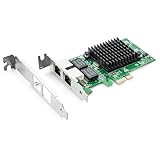
- Ethernet Controller: 1Gb Network Card equipped with original Intel 82576 Controller, which supports Quality-of-Service (QoS) technology to streamline your online experience and ensure stability; Compare to Intel E1G42ET, 1 Pack
- Dual RJ45 Ports: Gigabit RJ45 Support 10/100/1000Mbps data rates and Cat5e Cable, up to 100 meters, simplifying the transition to 1 Gb; PCI Express 2.0 (2.5 GT/s), X1 Lane, compatible with PCIE X1, X4, X8, X16 Slot. Support 1 Gbps/ 100 Mbps data rates
- Widely Compatible OS: Windows 7/8/10/11, Windows Server 2008/2012/2016/2019, Centos/RHEL 6/7/8, Ubuntu 16/18/19/20, Debian 9/10/11,FreeBSD 10/11/12, Vmware Esxi 5/6, SLSE 11/12. (Not support Vmware Esxi 7.0, Mac OS and Bypass Mode)
- Easy to Install: Network Card is packed with both Low Profile Bracket and Full-height Bracket that support on Standard and Slim computer/server; Download operating systems driver from intel website or scan the QR code on the network card
- Friendly Service: Provides 24/7 Customer Service, 30 Days Free-returned, 3 Years Free Warranty and Lifetime Technology Support
In a separate VPP shared-memory packet-interface (memif) test, Intel reports up to 1.9× improvement across packet sizes from 64 to 9000 bytes. That result likewise applies to the tested configuration, not every VPP deployment; details are in Intel’s VPP guide.
Evaluate the whole application path, not only copy bandwidth. Compare CPU utilization, throughput and tail latency across small, medium and large buffers; include queue setup, submission and completion costs. Keep CPU threads, memory, NICs and DSA resources NUMA-local where possible. A faster copy that ties up cores polling completions may not improve overall efficiency.
What a deployment needs
A capable processor is only the starting point. A working deployment typically needs compatible server firmware, operating-system and driver support, configured work queues, permissions, and an application or framework that knows how to use them.
Best Value
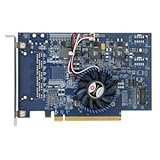
- Uses QuickAssist technology to provide up to 50Gbps of hardware acceleration
- Designed for easy drop-in implementation in new and existing equipment
- Makes establishing connections to web services hosted on NGINX lightning fast
- Helps maximize storage space and improves the performance of transmitting data
- Ideally suited for PCIe coprocessor-based IPsec or TLS security applications such as SSL, OpenSSL*, and NGINX
- Check the platform: Verify the exact Xeon SKU and DSA device count, then consult the server vendor’s firmware documentation. Intel’s guide identifies VT-d and PCI ENQCMD/ENQCMDS settings among relevant firmware options; menu names and requirements vary by platform and workload.
- Check the software path: Linux’s IDXD driver provides the operating-system interface.
accel-configis used to configure DSA resources; DPDK’s IDXD driver documentation shows a representative configuration command:accel-config config-engine dsa0/engine0.0 --group-id=0. - Configure deliberately: Intel’s tuning guide includes an example command,
./setup_dsa.sh -d dsa0 -w 1 -m d -e 4, for configuring one device, one dedicated work queue and four engines through its tooling. It is an example, not a universal setup recipe; names, options, packages and permissions depend on the system and software version. - Check topology: Use
lscpu,lspciandnumactl --hardwareto inspect CPU, device and NUMA topology. Discover the actual DSA device and sysfs paths on the target host rather than relying on a hard-coded address. - Check ownership and access: Confirm that the expected driver manages the device, queues are enabled and assigned correctly, and the application has permissions. DPDK deployments may use different binding models; a mismatch between the driver expected by the application and the one managing the device can prevent access.
A visible DSA device does not prove that an application can use it. If it is unavailable, check first for disabled firmware settings, a missing or unloaded IDXD driver, unconfigured or disabled queues, incorrect group or engine assignment, permissions, and driver-binding mismatches. Follow the operating system, framework and server vendor’s instructions for the chosen deployment model.
Independent reader supportYour contribution helps us test, update, and keep practical guides available for everyone.DSA is not QAT, IAA, DLB or AMX
| Technology | Primary role |
|---|---|
| DSA | Data movement and selected memory transformations |
| QAT | Cryptography and compression/decompression |
| IAA | In-memory analytics and supported compression-oriented work |
| DLB | Dynamic load balancing for packet-processing workloads |
| AMX | Matrix operations for compute-heavy workloads |
| CPU vector instructions | Software-executed copies and general-purpose computation |
These technologies solve different problems. A buyer needing cryptography, matrix computation or analytics should evaluate the accelerator designed for that job rather than treating all Xeon accelerators as interchangeable. For straightforward or small copies, optimized CPU routines may remain the better choice.
Important limits: virtualization and security
DSA’s architecture discusses capabilities such as Address Translation Services (ATS), Process Address Space ID (PASID) and Page Request Services (PRS), alongside interrupt and error-reporting features. Such capabilities do not guarantee that every platform exposes every virtualization mode. In particular, Intel’s Sapphire Rapids specification update says Scalable I/O Virtualization for DSA and IAA was defeatured for 4th Generation Xeon Scalable processors. Check the specification and platform support relevant to the intended deployment rather than inferring shipping support from architectural terminology.
Security also requires ordinary platform diligence. Intel’s DSA and IAA error-reporting guidance describes potential denial of service, memory corruption or privilege escalation under specified conditions involving an attacker with direct access to DSA 1.0 on certain 4th- and 5th-Generation Xeon platforms. This is not a claim of a general remote exploit. Administrators should consult Intel’s current guidance and apply relevant platform and software updates, while controlling access to accelerator devices.
How to decide whether DSA matters for your server
DSA is worth evaluating when profiling shows that repetitive copies or supported transformations consume meaningful CPU time, the application can submit work asynchronously or in batches, and the data path can be kept local to the relevant NUMA resources. It is less promising for tiny synchronous transfers, applications without DSA integration, or systems where copy work is not a bottleneck.
Benchmark against optimized CPU copying using the same buffer sizes, alignment, concurrency and NUMA placement. Measure end-to-end throughput, CPU consumption and tail latency—not just accelerator bandwidth—and include the real queue and polling model. The decisive question is whether DSA improves the application’s total use of the server, not whether the accelerator can execute a copy.
Quick Recap
Product prices and availability are accurate as of the date/time indicated and are subject to change. Any price and availability information displayed on Amazon at the time of purchase will apply.

