What’s actually slowing this PC down?
Pick the symptom - the matching free tool is one click away.
Some links on this page are affiliate links: if you buy through them we may earn a commission, at no extra cost to you.
If an HTML page loads on an Android phone but its images do not, first determine the scope: one image, one website, one browser, the network, or only a local file or Android WebView. That distinction usually identifies the right fix faster than repeatedly clearing the cache.
Start by reloading the page, opening it in Incognito, trying another browser, and switching between Wi-Fi and mobile data. Then open the missing image’s exact URL directly. These tests separate a browser or network problem from a broken image path, server response, CSS rule, or WebView restriction.
Find out what is failing
| Symptom | Likely cause | First test |
|---|---|---|
| One image is missing | Wrong path, case mismatch, 404/403 response, or CSS | Open the image URL directly |
| All images on one site are missing | Site data, CDN, HTTPS, authentication, filtering, or a site outage | Try Incognito and another browser |
| Many sites fail in one browser | Browser settings, cache, DNS, VPN, or blocker | Test another browser |
| Images fail on Wi-Fi but work on cellular | Router, DNS, firewall, or network filtering | Switch networks |
| Only a local HTML file fails | file://, relative paths, or restricted file access |
Serve the files over local HTTP |
| Only an app’s page fails | Android WebView or in-app-browser configuration | Open the same URL in full Chrome |
Quick fixes for Android users
- Reload and verify the URL. Check the address, reload the page, and long-press the missing image if the browser offers an option to open it separately. Google recommends checking the URL and refreshing as initial Chrome troubleshooting steps. Chrome troubleshooting guidance.
- Try Incognito. If the image works there, stale site data, cookies, or a browser content-blocking setting is likely involved. Incognito is a diagnostic test, not necessarily a permanent solution.
- Switch networks. Test Wi-Fi and mobile data. If only one works, investigate the router, captive portal, DNS, parental controls, VPN, firewall, carrier filtering, or content filter.
- Check site permissions. In Chrome, open the site, tap the site-information icon beside the address, then open Permissions or Site settings. If an Images setting is available, allow images and reload. Labels vary by Chrome release, Android version, manufacturer, and managed-device policy. Prefer a per-site change rather than weakening global security settings. Chrome documents image, JavaScript, and mixed-content controls in its settings and policies documentation.
- Clear the affected site’s data. In Chrome, open the menu and choose Delete browsing data. Clear Cached images and files; if necessary, clear the affected site’s cookies or site data first. This can sign you out and remove preferences. Google includes clearing browsing data in its troubleshooting sequence. See the current Chrome steps.
- Update and restart the browser. Update Chrome or the affected browser through Google Play, force-close it, reopen it, and restart the phone if necessary.
- Test VPN, blockers, and DNS. Temporarily disable a VPN, ad blocker, filtering app, or custom Private DNS rule. In Chrome, custom Secure DNS settings are under Settings → Privacy and security → Use secure DNS, although availability varies. Google notes that a custom provider can cause DNS lookup failures; switching the setting off is a diagnostic step, not a recommended permanent security reduction. Chrome Secure DNS help.
- Free memory and storage. Close unused tabs and apps and make space if the phone is nearly full. Low available memory can contribute to browser loading failures.
- Try another browser. If the page works elsewhere, focus on the original browser’s settings, cache, or compatibility. If it fails everywhere, focus on the website, network, DNS, or phone.
If only one website is affected
Open a missing image’s exact URL in a new tab:
https://example.com/assets/photo.jpg- If it returns an image directly but does not appear in the page, investigate HTML, CSS, JavaScript, responsive-image logic, or mixed content.
- If it returns an error, investigate the URL, server, CDN, authentication, signed URL, or network.
- If it works on another device but not Android, check mobile-specific URLs, headers, filtering, and responsive markup.
A site may load its text while its image CDN is blocked, returns an expired signed URL, requires a login cookie, rejects the request because of hotlink protection, or responds with an HTML login/error page instead of image data. If the site fails on every device and network, contact its owner.
Common developer causes
Incorrect paths and filename case
Relative URLs are resolved against the document URL:
#1 Best Overall

- 【Latest Version USB C 3.2 Gen 2 Cable】ZeroneTeck latest USB C for Thunderbolt cable: ①This 20Gbps USB C to USB C data cable is capable of meeting your ultra-fast data transfer needs. ②USB C to USB C monitor cable support 4K@60Hz Ultra HD video output ③In addition, this Type c to Type c cable also has a faster than normal 60W data cable with 100W ultra fast charging. Makes it easy for you to solve all your problems with just one cable.
- 【20Gbps USB C Data Cable】USBC to USBC data transfer cable provides explosive transfer speed up to 20Gbps, connect hard drives and SSDs, Also suitable for phone to laptop data transfer, transfer large files in seconds and save you more work time. Meanwhile, USBC to USBC 3.2 gen 2 20gbps data transfer cable backward compatible with USB 3.1, USB 3.0 and USB 2.0.(*Note: Maximum speeds are achieved when both upstream and downstream devices are Thunderbolt 3/4 interfaces.)
- 【4K@60Hz USB C Cable for Monitor & Plug and Play】Plug and play, no drivers or applications required to use this cable! USB C monitor cord to stream 4K@60Hz (3840*2160) content directly from your phones, tablets, laptops and desktop computers to large screens such as monitors, HDTVs and projectors. You will enjoy stunning Ultra HD video and colorful image quality. (Note: Please make sure your device has a USB-C port and supports DP Alt mode).
- 【5A/100W Fast Charging Cable】USB Type C fast charging cable with E-Marker IC chip, safely charges your devices with up to 100W power. It can fully charge a MacBook Pro 60%, an iPad Pro 75%, a iPhone 15 85%, and a Switch 95% in 35 minutes. Fully satisfies the charging power needs of professionals for MacBooks Pro, Android devices, Samsung and iPad Pro. Charge any USB-C device at maximum speed for timely use and no more waiting. *Note: Requires a C-port adapter of appropriate power.
- 【Dual Vehicle System】 Flawlessly supports CarPlay & Android Auto for seamless navigation/music streaming. 20Gbps ultra-speed — 40× faster than USB 2.0 CarPlay cables with enhanced signal stability.
<img src="images/photo.jpg" alt="Example">A leading slash means the website root, not the current HTML file’s directory. Also check case and extension: Images and images, or photo.JPG and photo.jpg, may be different files on a case-sensitive server.
For diagnosis, use a known-good HTTPS URL:
<img src="https://example.com/assets/photo.jpg"
     alt="Example" width="800" height="600">
Desktop success does not prove the deployed path is correct. Desktop may be using a different base URL, a development server, or a cached resource.
HTTP errors, redirects, and wrong content
Check for 404, 403, 401, 429, server errors, failed redirects, expired signed URLs, or a response that is HTML or JSON rather than an image. Verify the final URL, status, response size, and Content-Type. Suitable types include image/jpeg, image/png, image/webp, image/avif, and image/svg+xml.
HTTPS and mixed content
An HTTPS page should not depend on an HTTP image:
<img src="http://example.com/photo.jpg" alt="">Use HTTPS consistently:
<img src="https://example.com/photo.jpg" alt="">Browsers may block or upgrade insecure image requests, and behavior can vary by browser and version. The durable fix is a valid certificate and HTTPS URLs for images, CSS, CDNs, and generated content. Do not tell users to weaken mixed-content protection. See MDN’s mixed-content guidance.
Responsive images and mobile-only URLs
Test every URL selected by srcset or <picture>, not just the fallback:
<picture>
  <source media="(max-width: 600px)" srcset="/img/mobile.webp">
  <img src="/img/fallback.jpg" alt="Example">
</picture>
A mobile variant may be missing, malformed, unsupported, or generated incorrectly by a CDN. Temporarily replace the responsive markup with a plain JPEG or PNG <img>, then restore features incrementally. srcset, <picture>, and mixed-content behavior should be tested separately.
CSS hides a successfully loaded image
Inspect computed styles and parent containers for display:none, visibility:hidden, zero dimensions, opacity, overlays, overflow:hidden, broken flex/grid sizing, mobile media queries, or an incorrect object-fit. A temporary diagnostic rule can help:
Quick wins for a faster PC:
Clear out junk files and repair common Windows errorsFree Scan →Fix the driver behind crashes, sound loss and screen glitchesFind Drivers →Rank #2

- 【8K/5K/4K for USB C Monitors】 Silkland usb cdisplay cable right angle supports 8K@30Hz, 5K@60Hz and 4K@144Hz, 1080p@240Hz resolution video output from USB C laptops to USB C monitor,compatible for LG 4k, HP EliteDisplay, Dell USB-C Monitors U2520D, S2719DC, U2421HE, P2419HC, and HP E273d, E27d G4 and more.
- 【USB C 3.2 for USB C Laptops】 The usb c 3.2 gen 2 cable 90 degree fits virtually all USB-C/Thunderbolt 4/3 Laptops (Note: the port is fully inserted into the device), such as MacBook 2016/2017/2018, MacBook Air 2018/2019, MacBook Pro 13'' /15'' /16'', Dell XPS 15, Dell Alienware 17 and the Dell Precision 17, Aspire V15, S5-391-6419 Nitro / V17 Nitro, Predator 17, ROG G752VL / GX700VO / ZenBook Pro UX501VW, Clevo P870DM, ThinkPad P70, MSI GT80 , VAIO S11 and more. NOTE: The video function only works for devices with USB-C ports that support DP Alt Mode.
- 【Excellent for Portable Monitors】This usb c video cable angle works with most usb c portable monitors, support output 4K@60/30Hz and full HD 1080P. Compatible for KYY, MNN, ARZOPA, InnoView, ViewSonic, ZenScreen MB16AC or AOC i1601fwux and more brands. NOTE: The video function only works for devices with USB-C ports that support DP Alt Mode.
- 【USB C 3.2 20Gbps Data Transfer】 This usb c data cable elbow is USB 3.2 Gen 2 compliant and can quickly send or receive HD movies, audio and 4K video signals, backing up 10GB files in less than 10s. Support connecting USB C port hub, docking station, SSD and other USB C port devices, plug and play, rest assured and reliable. (Note: avoid excessive swaying that could cause transmission interruptions.)
- 【Flexible & Organized】This usb c monitor cable right angle solves the problem of cables being bent and ports being frayed, ensuring a longer service life and a more convenient use experience. Reduces port stress, easy to manage and prevents tangles and knots. Ideal for use in a variety of tight spaces, such as corner outlets or car charging. Enjoy a comfortable and tidy setup for both entertainment and office use. This 90 degree usb c data cable is durable and reliable for everyday use!
img.debug {
  display: block !important;
  visibility: visible !important;
  opacity: 1 !important;
  width: auto !important;
  height: auto !important;
  max-width: 100%;
  outline: 2px solid red;
}
If the outline appears but no bitmap does, inspect the request and response. If the element itself is absent, inspect the HTML and JavaScript.
Lazy loading and JavaScript
Custom lazy loaders can fail because a script crashes, a consent state never completes, an event is desktop-specific, or data-src is never copied to src. Temporarily use:
<img src="https://example.com/assets/photo.jpg" alt="Example">If that works, inspect the JavaScript console and the code handling data-src, data-srcset, placeholders, and Intersection Observer.
Authentication and cross-origin assumptions
Image requests may require cookies, authorization, a referrer, a user agent, or a short-lived token. Different page and CDN domains can expose these problems. Do not blame CORS automatically: ordinary image rendering and JavaScript reading image pixels with Canvas or fetch() are different cases. Inspect the actual network and console error first.
Recommended Free Tools
Local HTML files on Android
A local document such as file:///... has different rules from a hosted webpage. Confirm that the image is really beside the HTML file, that the case matches, and that the file manager has not supplied a restricted content:// URI.
For reliable testing, keep the correct directory structure and serve the files through a local HTTP server or development server. Avoid broad workarounds that grant unrestricted file access to web content. Android’s guidance recommends using the same HTTP/HTTPS scheme as the site’s resources and warns about the security risks of broad file:// access. Android local-content guidance.
Pages inside Android apps and WebView
An in-app page may use Android System WebView, a custom WebView, Chrome Custom Tabs, or another embedded browser. Compare it with full Chrome first.
Rank #3
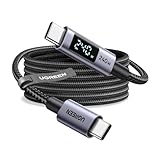
- 240W MAX Super-Fast Charging: The high speed usb c cable supports PD 100W protocol, 48V/5A high-power output, and can charge an iPhone 17 Pro Max to 50% in 20 minutes
- Intelligent Digital Display: Exclusive LED screen monitors charging status in real time: cyclically displays power (W), current (A), and voltage (V), with automatic switching every 3 seconds (display sequence: power → current → voltage), accurately monitoring device power input and preventing overcharging damage
- Efficient Dual-Channel Transmission: The usb c display cable supports 480Mbps data transfer speeds for ultra-fast file/video transfers; built-in E-Marker chip (located on the non-display side) ensures high power, safe, and stable operation
- Extremely Durable Design: 24-strand high-density braided cable resists tearing and abrasion, space gray aluminum terminal blocks dissipate heat and prevent oxidation, PC lens protects the screen against scratches (factory-installed with protective film), and certified for 10,000-cycle bend testing
- Flexible scenario adaptation: three sizes are available (1m for car, 2m for home, and 3m for conference projection), EMI certified and interference-free, compatible with Type-C devices such as iPhone 15-17 series, Samsung S25, and MacBook
For a WebView app, check:
- The manifest includes
<uses-permission android:name="android.permission.INTERNET" />. - Image loading has not been disabled in
WebSettings. - JavaScript is enabled only if the page requires it.
- All resources use HTTPS, or cleartext HTTP is intentionally and safely configured.
- Cookies, redirects, authentication, and packaged assets are handled correctly.
- The WebView component is current.
Do not use setAllowUniversalAccessFromFileURLs(true) as a casual fix. It weakens isolation and can expose local files to web content. Remote debugging can show the real request and console error for Chrome pages and Android WebViews; follow Android’s Chrome DevTools debugging guidance.
Prove the cause with a minimal test
Use a page with no framework, lazy loading, or responsive logic:
<!doctype html>
<html lang="en">
<head>
  <meta charset="utf-8">
  <meta name="viewport" content="width=device-width, initial-scale=1">
</head>
<body>
  <img src="https://example.com/assets/test.jpg"
       alt="Image test" width="320" height="240">
</body>
</html>
For server-side checks:
curl -I -L https://example.com/assets/photo.jpg
curl -L -o /tmp/photo.bin https://example.com/assets/photo.jpg
file /tmp/photo.bin
head -c 200 /tmp/photo.bin
Look for a successful status, an image Content-Type, a valid final URL, and a response body that is not an HTML error page. Results can differ when authentication, cookies, IP filtering, or user-agent rules are involved.
When to ask for help
Contact the website owner when the same image URL fails on multiple devices and networks, or when the page returns a server error. Contact a network administrator or carrier when the problem follows one Wi-Fi or mobile network. Contact the app developer when only an embedded WebView fails.
Include the page URL, Android version, browser and version, network type, screenshot, result of opening the direct image URL, and any status, console, or network error. This evidence is much more useful than reporting only that “images do not load.”
Chrome menu paths and labels can change. The Chrome Android paths cited here were checked against Google’s documentation on August 18, 2026.
Quick Recap
Product prices and availability are accurate as of the date/time indicated and are subject to change. Any price and availability information displayed on Amazon at the time of purchase will apply.

