Some links on this page are affiliate links: if you buy through them we may earn a commission, at no extra cost to you.
For the best headphone fit, detangle your hair, move it away from the ear cushions, and wear the headband lightly on your crown. A loose, low ponytail or braid can keep long hair out of hinges without pulling at your scalp. That setup usually helps over-ear headphones stay in place and maintain their seal—but if preserving a hairstyle matters more than isolation, wearing the cups over your hair or choosing an open-ear design may suit you better.
The right choice depends on your hair texture and volume, the headphone design, and whether you prioritize sound, stability, or avoiding pressure and flattened hair.
A reliable way to put on over-ear headphones
- Detangle gently around the ears and crown so loose strands are less likely to catch.
- Choose a comfortable style. Leave your hair loose and brush it back, or use a loose low ponytail, braid, or bun. Avoid a style that pulls at your hairline.
- Check the headphones for rough or peeling pads and exposed hinges or slider rails that might snag hair.
- Hold the headband or outer cups and extend the sliders enough to clear your head. Don’t pull the headphones through your hair by the band.
- Lower the headband onto your crown and place each cup over its corresponding ear. Lift hair away from the pad rather than forcing the cup through it.
- Center your ears inside the cushions and adjust both sliders evenly. The headband should sit level and touch your head lightly, not rest on a thick mound of hair.
- Check the pad edges for trapped strands and gently release them. When removing the headphones, lift the cups away from your head before moving them clear of your hair.
This broadly follows Sony’s fit guidance: use the correct left/right orientation, extend the sliders, cover the ears with the cushions, and adjust the band so it rests softly on your head. Soundcore also recommends tucking long hair behind the ears to reduce friction and help prevent slipping.
Recommended Free Tools
Should your hair go over or under the ear cups?
There isn’t one right answer. Keeping hair out from between the cushion and your head generally gives over-ear headphones a more reliable seal. A gap can weaken passive isolation and may change bass response or noise-canceling performance. The effect varies with hair density, pad shape, glasses, and the specific headphones; it is a fit issue, not a guaranteed result. For a useful seal, the ear should sit inside the cup and the cushion should contact the area around it.
#1 Best Overall
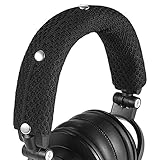
- 【Widely Compatible】: Fit most of big-sized headphones, Compatible with AKGs, Senheiser, Sony, Audio-Technica headphone
- 【Quality Materials and Design】:Made of high-quality Knitted Fabric, improved breathability.Improve comfort of wearing headphone
- 【Convenience to install and clean】:Headphone headband cushion can be easily installed without tools.Can be washed by hand or machine
- 【Product Dimensions】:9.45x 4.3 inches(24x10.9 cm).Headband cover for headset can perfectly wrap the headphone beam
- 【Package Contents】: headband cushion x 1,Alcohol pad x2
| Setup | Advantages | Trade-offs | Works well when |
|---|---|---|---|
| Hair moved behind the ears | Usually makes it easier to position the cups and maintain a seal | May flatten or disturb hair around the ears | You want noise isolation, ANC, stable bass, or a steady fit |
| Hair left over or beneath the cups | May preserve a styled look or avoid moving delicate hair | Hair can create a gap, reduce stability, or become trapped | Isolation is not important and the cups stay comfortably in place |
| Loose low ponytail or braid | Keeps length contained and loose strands away from hinges | A tight tie can pull; a bulky tie may press against the band or a chair | Work, study, travel, or other longer sessions |
| Low bun | Keeps hair off the neck | Can push the band forward or cause pressure when reclining | The bun sits below the headband and does not press against a seat |
| Flat clips | Control hair locally without tying all of it back | Bulky clips can press beneath a cup or band | You need to clear hair around the ears while keeping the rest loose |
If you choose to wear cups over your hair, check for slipping and sound changes rather than assuming the fit is fine. If you choose a seal-first setup, move only enough hair to let the cushions sit around your ears.
Hair styles that work with headphones
- Loose low ponytail: A versatile option for long sessions. Use a soft, snag-free tie and keep it low enough not to meet the headband or a chair headrest.
- Loose braid: Helps contain long or thick hair, including while commuting. A braid that pulls at the hairline can create unnecessary tension.
- Loose low bun: Keeps hair off your neck, but should sit below the headband and not press into the back of a seat.
- Flat clips or barrettes: Can move side sections away from the ears. Keep them clear of the cushions and band.
- Half-up style: Reduces volume at the sides while leaving the length loose. Place the tie where the headband will not press on it.
- Hair loose: Often works if it is detangled and the cups do not snag or slide. Sweep strands away from the ears before positioning the pads.
A French or Dutch braid can contain hair during activity, but it should not be pulled tight around the hairline. The American Academy of Dermatology (AAD) advises avoiding repeated tension from tight hairstyles.
Adjust for your hair type and style
Curly, coily, textured, or high-volume hair
Don’t force a large amount of hair under a headband or drag ear cups through curls. Move only the hair needed for a comfortable ear-cup position. Depending on your style, a loose braid, low puff, or low bun may control volume; no one arrangement suits every texture or protective style. Larger, deeper cups may be easier to position, but fit depends on the individual headset and your head shape. If preserving curl pattern, volume, locs, extensions, or a protective style is the priority, consider a design that does not press on it rather than changing the style just to accommodate headphones.
Rank #2
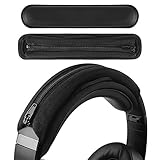
- Compatible with Bose QC2, QC25, QC35, QC35II Gaming, QC35II, QC45, QCSE, QCUltra, QC700, QuietComfort, SoundLink2, OnEar, AE2, SoundTrueAE2 headphones.
- Compatible with Beats Executive, Mixr, Solo4, SoloHD, Solo2Wired, Solo2 wireless, Solo3 Wireless, Studio 3, Studio Pro, Studio Wireless, ATH-M20x, M20xBT, M30, M30x, M40x, M50x, M50xBT, M50xBT2, M50xSTS headphones.
- Compatible with Sony INZONE H3, H7, H9, MDR-1A,1AM2, 1R, 1RBT, 10R,10RBT, 10RNC, 7506, CD900ST, HW700, XB650BT, Z7M2, ZX110NC, ZX220BT, PSGold, WH-1000XM2, 1000XM3, 1000XM4, 1000XM5, 1000XM6, CH710N, CH720N, H810, 910N, RF400, XB700, XB900N, XB910N headphones.
- Product Dimensions: 7.48 x 1.77 inches (19 x 4.5 cm), Color: Black
- Package Contents: Replacement headset headband padding x 1
Fine or slippery hair
Try a loose low braid or ponytail and position the band on your crown, not on top of a thick layer of hair. Don’t clamp down harder to compensate for sliding: excessive pressure can cause discomfort without fixing a poor fit. A fabric-covered band may grip differently from a smooth one, but results depend on its material and construction.
Extensions, locs, and protective styles
Choose a design that fits without squeezing or snagging the style. You may not be able to tuck hair behind your ears comfortably, and you should not force bulky sections beneath the cups. Stop if you feel pulling, pain, or scalp irritation.
Why headphones slide—and what to try
Sliding usually points to a mismatch among the headphone fit, contact surfaces, and hair—not a need to tighten the band as far as possible. Try these steps in order:
Rank #3

- UNIVERSAL COMPATIBILITY: Designed to perfectly fit Audio Technica's popular ATH M series, including models M50, M50X, M50XWH, M50XBT, M50XBT2, and M50S/LE. Enhance your headphones with a custom-fit touch of style and protection.
- INNOVATIVE DUAL-PROTECTION DESIGN: Going beyond standard single-layer covers, Voarmaks introduces an additional wrap-around tape layer. This unique design traps and secures any sign of wear or debris without glue, ensuring zero residue while providing exceptional coverage.
- STRETCHABLE NEOPRENE MATERIAL: Crafted from high-quality stretchable neoprene, our cover offers a snug yet flexible fit. It molds effortlessly to the headband shape, providing both durability and a comfortable wearing experience.
- PERSONALIZE YOUR LOOK: Available in 7 eye-catching colors, you can mix and match to express your individuality! Elevate your headphone's appearance and make a statement wherever you go.
- ENHANCED DURABILITY & COMFORT: The double-layer construction not only prolongs the life of your headset by safeguarding against wear and tear but also adds a soft padding layer for enhanced comfort during extended listening sessions. Invest in Voarmaks for a premium upgrade to your Audio Technica headphones.
- Confirm that the left and right cups are on the correct ears.
- Move hair away from the ear-pad area and reposition the cups so they surround the ears.
- Adjust both sliders evenly and place the headband on your crown, not too far forward or backward.
- Try a low hairstyle to reduce loose volume around the sides and crown.
- Clean the headband and pads as their manufacturer directs; oily residue can affect contact.
- Check for cushions that are worn, compressed, cracked, or peeling. Replace them only with pads listed as compatible, since replacements can change fit, sound, and noise cancellation.
- If the headset still shifts, consider a different model with a more suitable headband, cup size, adjustment range, and clamp. No one combination is guaranteed to work for every head or hairstyle.
A very large headset can add weight, while a light headset with too little grip may move during activity. For walking or exercise, choose a fit secure enough not to distract you or fall off.
Prevent snags, pulling, and breakage
Strands can catch in exposed slider rails, hinges, folding joints, rough seams, damaged pads, or the gap between a cushion and its cup. Snagging is not inevitable; it depends on the hardware, your hair, and how you put on and remove the headphones.
- Keep hair detangled and contain long, loose strands with a comfortable braid or tie if they repeatedly catch.
- Inspect the headphones for rough edges and cracked or peeling pad covers.
- Lift a cup away from your hair instead of scraping it across your head.
- If a strand catches, stop and unwind it. Pulling hard can break hair.
The AAD recommends gentle handling and avoiding excessive brushing as part of reducing hair damage. Headphone-related friction or snagging can be a practical concern, but it is different from hair loss or a diagnosis of hair damage.
Rank #4

- 🎧【Wide Compatibility】- Fit for 23-48mm/ 0.9-1.89inch width headband. General headphone headband cover, perfectly matching for most brand size headphones, compatible with Bose QuietComfort 45, Sony WH-1000XM4, JBL Tune 510BT, Beats Studio3, Soundcore Life Q35, etc. (Note: Not suitable for large gaming headsets with wider headband.)
- 🎧【Headband Protector】- Keep your headphone headband clean and protect it from scratching, dirt, dust and sweat, extending the lifespan of your valuable headphones.
- 🎧【Hanging Design】- Extra hanging loop design of our headband cushion cover makes your headsets hanging on the wall, desk or other hanger easier without damaging the headphones.
- 🎧【Premium Material】- Made of Lycra, Microfiber and Neoprene, the headband cover cushion protector is ultra soft, skin-friendly, washable and reusable. Easy to uninstall and clean.
- 🎧【Comfortable to Wear】- Replacement headband pad will not clip your hairs, provide a smooth surface and comfortable to wear, follows your lovely headphone shape perfectly.
Do headphones cause hair loss?
There is no strong basis here for saying ordinary headphone use automatically causes hair loss. Headphones can flatten hair temporarily, rub against it, snag strands, or press on the scalp. These are different effects from traction alopecia.
The AAD identifies repeated tension from tight hairstyles as a possible cause of traction alopecia and recommends loosening styles, changing them, and stopping styles that cause pain or scalp symptoms. That guidance concerns sustained pulling; it is not proof that headphones themselves cause permanent hair loss. Don’t wear a tight bun or ponytail just to stabilize a headset. If a setup causes scalp tenderness, broken hairs, or visible thinning, change it; seek medical advice if symptoms persist or you are concerned.
Wearing headphones with glasses and long hair
Glasses arms can interrupt an ear-pad seal and create pressure where they meet the cushions. Hair around the ears can add a separate source of friction or interfere with cup placement. Put your glasses on first, then position the cups around your ears and move hair only as needed. Avoid compensating for a gap by tightening the headband excessively. If you have a choice, thinner, straighter glasses arms or softer, more compliant pads may be easier to fit, but the result depends on the glasses and headphones. SoundGuys discusses the practical fit trade-off between glasses and ear-cup seals.
Best Value

- No More Flakes: No longer let your head directly touch your worn down Audio Technica headphone headband. No one likes flakes crumbling off in their hair or on their head, cover your worn down headband with our WC BandZ for flake free listening.
- Enhanced Comfort: WC BandZ additional layer of covering provides added comfort and an upgrade over your old flakey headband.
- Wicked Protection: Make your beloved ATH headphones last as long as possible by adding WC BandZ as a protective layer for your Audio Technica headphones.
- Flawless Fit: Easy two minute installation with our no show zipper, and our stretchable neoprene material. Simply follow the step by step instructions provided in the package, and you'll be done in no time.
- Compatibility: WC BandZ seamlessly fits the following headphone models: Audio Technica ATH M50X / M50XBT / M50 / M40X / M40 / M40FS / M30X / M30 / M20X / MSR7
Heat, sweat, and irritation
Closed-back cups and long hair can make the area around your ears feel warm or damp. Take the headphones off when you feel overheated, pressured, itchy, or uncomfortable; there is no universal break interval that fits everyone. Avoid wearing them over wet hair, and let your hair and equipment dry before using them again. Clean pads and headbands according to the maker’s instructions.
Sony warns that prolonged use can increase humidity around the ears and may contribute to itchiness or inflammation in some users. Its guidance is to remove headphones regularly and stop using them if symptoms develop (Sony Asia; Sony UK). Persistent pain, rash, or inflammation is a reason to stop using the setup and consider medical advice.
When a different headphone design makes more sense
- Over-ear: Can surround the ears and support isolation, but hair may interrupt the seal, flatten a style, or catch in hinges.
- On-ear: Rests directly on the ears, so it may compress hair and ears rather than surround them. Comfort varies, especially over longer sessions.
- In-ear: Usually avoids a large headband and ear cups; long hair may still catch on cables or ear hooks.
- Open-ear or bone-conduction: Avoids enclosing the ears with cups, which may suit some hairstyles or outdoor use. These designs generally offer less isolation and privacy than sealed headphones, and their bands or hooks can still press on or catch hair. They may not deliver the bass experience you want.
Choose based on the problem you need to solve. For sound isolation or ANC, prioritize a stable seal and accept that some hair may need to move. For hairstyle preservation, consider an open design or a model that does not press on the style, while accepting possible trade-offs in isolation, bass, and sound leakage. If you have tried reasonable fit adjustments and still experience pain, slipping, or repeated snags, changing form factor is more sensible than forcing the fit.
What’s actually slowing this PC down?
Pick the symptom - the matching free tool is one click away.
Quick troubleshooting
- Headphones slide: Move hair away from the pads, center the cups, set the band on your crown, and clean contact surfaces.
- Hair gets pulled: Inspect hinges and rails, contain loose strands, and lift the cups away when removing the headset.
- Headache or pressure: Recheck the sliders, headband position, glasses, and ear-cup size. Don’t try to tolerate persistent pain as a break-in period.
- Sound seems thin or bass is weak: Reseat the cups, move hair out of the seal, center the ears, and check whether glasses arms or worn pads leave a gap. Sony’s fit guidance emphasizes full ear coverage for proper positioning.
- Too hot, itchy, or damp: Remove the headphones, let the area dry, and clean the equipment as directed. Stop use if skin symptoms persist.
- Stable while sitting, but slips while walking: Try a low braid or ponytail, a lighter or more secure headset, or a sport-oriented/open-ear design. Don’t use a loose fit for vigorous activity if it could distract you or fall off.
If tightness is the problem, use the headset’s adjustment range and reposition it before trying anything else. Sennheiser warns that stretching a headband can damage it, affect the warranty, or permanently deform it. Persistent pain means the fit may not suit you; forcefully bending the band is not a dependable fix.
Quick Recap
Product prices and availability are accurate as of the date/time indicated and are subject to change. Any price and availability information displayed on Amazon at the time of purchase will apply.

