Recommended Free Tools
Some links on this page are affiliate links: if you buy through them we may earn a commission, at no extra cost to you.
Gmail does not need to be installed into Chrome. To use it, open Google Chrome, visit mail.google.com, and sign in with your Google Account. Signing in to Chrome, enabling notifications, using Gmail offline, and making Chrome your default browser are optional settings.
What you need before setting up Gmail
- An updated installation of Google Chrome
- An internet connection for the first sign-in
- A Google Account and its password
- Access to your two-step verification method, if enabled
If you do not have an account, create one at Google Account signup. School and work accounts may have restrictions set by an administrator.
Use Gmail in Chrome
- Open Google Chrome.
- Enter https://mail.google.com in the address bar.
- Select Sign in, if prompted.
- Enter your Google Account email address or phone number and select Next.
- Enter your password and complete any security verification.
When your inbox loads, the basic setup is complete. You do not need a Gmail extension, separate Gmail program, or paid utility.
Optional: sign in to Chrome
Signing in to Gmail and signing in to Chrome are different actions. Chrome sign-in is optional. It can synchronize bookmarks, passwords, browsing settings, and other Chrome data across devices, depending on the sync settings you choose. Google explains the process in its Chrome sign-in guide.
#1 Best Overall

- ANYWHERE ACCESS: With built-in WiFi compatibility, you can easily and securely connect your Schlage Encode Deadbolt to your home WiFi network to control and monitor your home from anywhere with the Schlage Home app
- PEACE OF MIND: Lock and unlock from anywhere, manage up to 100 access codes for keyless entry, view lock history, receive customizable notifications and easily manage multiple locks at once - all when paired to the Schlage Home app and connected to a secure WiFi network
- VOICE CONTROL: Works with Alexa and Google Home for optional, hands-free convenience when paired with the Schlage Home app and a voice enabled device
- ADVANCED SECURITY: Secure, encrypted connection; built-in, customizable alarm for door movement and forced entry attempts; fingerprint-resistant touchscreen; certified highest residential Security, Durability and Finish rating by BHMA industry experts
- EASY INSTALL: Install in minutes with just a screwdriver, no hardwiring required; Snap ‘n Stay design helps keep the lock on the door so both hands are free; fits standard doors with 1-3/8 in to 1-3/4 in door thickness and 2-3/8 in or 2-3/4 in backset
- Open Chrome and select the Profile icon in the upper-right corner.
- Select Sign in to Chrome.
- Enter your Google Account details and select Next.
- Review the synchronization choices before accepting them.
Do not sign in to Chrome on a public computer. On a shared computer, use a separate Chrome profile or Guest mode. Separate profiles are useful for keeping personal and work bookmarks, passwords, history, and sessions apart, although Gmail itself can handle multiple signed-in accounts without requiring multiple profiles.
Enable Gmail desktop notifications
- Open Gmail and select Settings.
- Select See all settings.
- In the General tab, find Desktop notifications.
- Choose New mail notifications on or Important mail notifications on.
- Scroll down and select Save Changes.
Chrome must also be allowed to send notifications. In Gmail, select the site-information icon beside the address bar, set Notifications to Allow, or open Chrome Settings → Privacy and security → Site settings → Notifications. Windows notification settings, Focus or Do Not Disturb modes, battery-saving controls, and Gmail inbox categories can still reduce or block alerts. See Google’s Gmail notification instructions and Chrome notification guidance.
Enable Gmail Offline
Gmail Offline is useful when you have an unreliable connection or need to prepare messages while temporarily disconnected. Google currently requires Gmail Offline to be configured in a regular Chrome window, not Incognito mode.
Do these 3 things before closing this tab:
1Repair Windows errors before they cause bigger problems2Scan for outdated or missing drivers - takes under a minute3Clear out junk files and repair common Windows errorsRank #2

- ANYWHERE ACCESS: With built-in WiFi compatibility, you can easily and securely connect your Schlage Encode Smart WiFI Lever to your home WiFi network to control and monitor your home from anywhere with the Schlage Home app
- PEACE OF MIND: Lock and unlock from anywhere, manage up to 100 access codes for keyless entry, view lock history, receive customizable notifications and easily manage multiple locks at once - all when paired to the Schlage Home app and connected to a secure WiFi network
- ADVANCED SECURITY: Secure, encrypted connection; built-in, customizable alarm for door movement and forced entry attempts; fingerprint-resistant touchscreen; certified highest residential Security, Durability and Finish rating by BHMA industry experts
- EASY INSTALL: Install in minutes with just a screwdriver, no hardwiring required; reversible levers fit right and left handed doors; fits standard doors with 1-3/8 in to 1-3/4 in door thickness and 2-3/8 in or 2-3/4 in backset
- COME AND GO WITH EASE: Auto-lock can relock the door for you with various time delay options in the Schlage Home app; convenient, control buttons on the interior of the lever let you quickly put it in an unlocked state for easy, frequent use
- Open Gmail in a normal Chrome window.
- Select Settings → See all settings.
- Open the Offline tab.
- Check Enable offline mail.
- Choose how much mail to synchronize and whether to download attachments.
- Select Save Changes.
Offline Gmail can let you read, search, and compose messages. Messages sent without a connection remain in the Outbox and are sent when the connection returns. It uses browser storage, requires the account to be configured separately, and is not a complete replacement for an email client: attachments may be downloadable but not previewable offline.
Guest mode, Incognito mode, insufficient storage, deleting site data, or setting Chrome to erase cookies when it closes can prevent Offline Gmail from working or make it require setup repeatedly. If synchronization fails, reduce the number of days of mail stored offline and disable attachment downloads. Read Google’s Gmail Offline documentation for the current limits.
Make Chrome your default browser
This is unrelated to opening Gmail, but it makes links open in Chrome automatically.
Rank #3

- ANYWHERE ACCESS: With built-in WiFi compatibility, you can easily and securely connect your Schlage Encode Smart WiFI Lever to your home WiFi network to control and monitor your home from anywhere with the Schlage Home app
- PEACE OF MIND: Lock and unlock from anywhere, manage up to 100 access codes for keyless entry, view lock history, receive customizable notifications and easily manage multiple locks at once - all when paired to the Schlage Home app and connected to a secure WiFi network
- ADVANCED SECURITY: Secure, encrypted connection; built-in, customizable alarm for door movement and forced entry attempts; fingerprint-resistant touchscreen; certified highest residential Security, Durability and Finish rating by BHMA industry experts
- EASY INSTALL: Install in minutes with just a screwdriver, no hardwiring required; reversible levers fit right and left handed doors; fits standard doors with 1-3/8 in to 1-3/4 in door thickness and 2-3/8 in or 2-3/4 in backset
- COME AND GO WITH EASE: Auto-lock can relock the door for you with various time delay options in the Schlage Home app; convenient, control buttons on the interior of the lever let you quickly put it in an unlocked state for easy, frequent use
Windows 11: Open Start → Settings → Apps → Default apps, search for Chrome, select Google Chrome, and choose Set default. Review individual link and file types if needed. You can also open Chrome → More → Settings → Default browser → Make default. Menu names differ on macOS, Linux, ChromeOS, Android, and iPhone or iPad. See Google’s Windows instructions and Chrome default-browser instructions.
Make Gmail the default email handler
Making Chrome the default browser does not automatically make Gmail the app that opens mailto: links. Default mail apps are controlled separately by the operating system.
On iPhone or iPad, open the device’s Default Apps settings and select Gmail as the default mail app. Google identifies iOS or iPadOS 18.0 or later for this control; availability can depend on the device and software version. See Google’s default mail app instructions. Desktop steps vary by operating system.
Rank #4
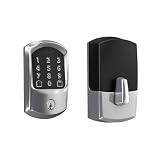
- ANYWHERE ACCESS: With built-in WiFi compatibility, you can easily and securely connect your Schlage Encode Deadbolt to your home WiFi network to control and monitor your home from anywhere with the Schlage Home app
- PEACE OF MIND: Lock and unlock from anywhere, manage up to 100 access codes for keyless entry, view lock history, receive customizable notifications and easily manage multiple locks at once - all when paired to the Schlage Home app and connected to a secure WiFi network
- VOICE CONTROL: Works with Alexa and Google Home for optional, hands-free convenience when paired with the Schlage Home app and a voice enabled device
- ADVANCED SECURITY: Secure, encrypted connection; built-in, customizable alarm for door movement and forced entry attempts; fingerprint-resistant touchscreen; certified highest residential Security, Durability and Finish rating by BHMA industry experts
- EASY INSTALL: Install in minutes with just a screwdriver, no hardwiring required; Snap ‘n Stay design helps keep the lock on the door so both hands are free; fits standard doors with 1-3/8 in to 1-3/4 in door thickness and 2-3/8 in or 2-3/4 in backset
Fix common Gmail problems in Chrome
Gmail will not load or appears blank
- Check the internet connection and reload Gmail.
- Update Chrome.
- Open Gmail in a normal, non-Incognito window.
- Temporarily disable extensions, especially ad blockers, privacy tools, script blockers, and mail extensions.
- Clear Gmail’s cached data and cookies.
- Try another browser or device.
Clearing cookies can sign you out of websites and remove saved preferences, so use it after the simpler checks. Google recommends these troubleshooting steps in its Gmail loading guide.
Chrome repeatedly asks you to sign in
Check whether cookies are blocked, site data is automatically deleted, or an extension is interfering. If Gmail works in Incognito but not in a regular window, an extension or damaged site data is a likely cause. If the password is wrong, use Google Account recovery; reinstalling Chrome will not repair account credentials.
The Tool Desk
Outbyte Driver Updater FREEScan for outdated or missing drivers - takes under a minuteDriver Scan →Outbyte PC Repair FREERepair Windows errors before they cause bigger problemsFix Now →Notifications do not appear
Confirm desktop notifications are enabled in Gmail and that Chrome’s site permission is set to Allow. Then check Windows notification permissions, Focus or Do Not Disturb settings, and whether Chrome has removed permission for an infrequently visited site.
Best Value

- SMART LOCK, SMARTER DESIGN: Seamlessly integrate Lock+ with your existing door hardware, with no visible technology on the inside or outside. Security meets style with this small, discreet smart lock available in various sophisticated finishes.
- TAP TO ENTER WITH APPLE HOME KEY: Forget your keys at home - on purpose. Access your home effortlessly by tapping Lock+ with your iPhone or Apple Watch, using the key stored in your Apple Wallet, just as you would when making a purchase.
- CONTROL YOUR LOCK FROM ANYWHERE: With Level Connect Wi-Fi bridge (included) you can remotely lock/unlock your door, view live activity history and manage key codes for Level Keypad from anywhere via the Level Home app (Wi-Fi Connectivity 2.4 GHz).
- KEYLESS ENTRY VIA LEVEL HOME APP & KEY FOB: Easily lock or unlock your door via the Level Home app (iOS & Android) or with the provided key fob. Share keyless access with trusted individuals, check activity history, configure auto-lock/unlock and more.
- WORKS WITH GOOGLE, ALEXA & APPLE HOME: Lock, unlock, and set automations using voice commands with Apple HomeKit, Google Home, or Amazon Alexa. Let friends in while cooking dinner with a simple command such as, “Alexa, unlock the front door”.
Offline mail will not enable
Use a normal Chrome window, check available storage, avoid automatic site-data deletion, and configure each Gmail account separately. Reduce the synchronization period or turn off attachment downloads if storage is insufficient.
The wrong Gmail inbox appears
Select your Google Account profile icon in Gmail and confirm the active account. For work and personal accounts that must remain completely separate, create separate Chrome profiles.
A work or school account is restricted
Your organization’s administrator may disable Chrome synchronization, Offline Gmail, notifications, or Gmail itself. Contact the administrator rather than repeatedly reinstalling Chrome.
What’s actually slowing this PC down?
Pick the symptom - the matching free tool is one click away.
Quick Recap
Security and privacy checklist
- Use a unique Google Account password and enable two-step verification.
- Review Chrome sync, saved-password, and browsing-data settings before enabling synchronization.
- Use a separate profile or Guest mode on shared computers.
- Sign out of personal accounts on public or shared devices.
- Install Gmail-related extensions only when you trust their publisher and genuinely need them.
Product prices and availability are accurate as of the date/time indicated and are subject to change. Any price and availability information displayed on Amazon at the time of purchase will apply.

