Free tools Windows power users keep installed
One-click scans. No signup required.
Some links on this page are affiliate links: if you buy through them we may earn a commission, at no extra cost to you.
You can send temperature and humidity from a DHT11 or DHT22 to Firebase Realtime Database using an ESP8266, Wi-Fi, and an HTTPS REST request. The complete path is:
DHT11/DHT22 → ESP8266 → Wi-Fi → HTTPS PUT → Firebase Realtime Database
This guide uses Firebase Realtime Database—not Firestore—and uses its REST API as the primary approach. REST makes the URL, JSON payload, authentication, and HTTP response visible, which makes the project easier to debug. It also avoids relying on older Firebase Arduino libraries that are now deprecated.
Recommended Free Tools
What you will build
The ESP8266 will read a DHT sensor and write an object like this to Firebase:
#1 Best Overall
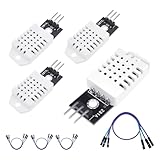
- 𝐇𝐢𝐠𝐡-𝐐𝐮𝐚𝐥𝐢𝐭𝐲 𝐄𝐥𝐞𝐜𝐭𝐫𝐨𝐧𝐢𝐜𝐬 𝐂𝐨𝐦𝐩𝐨𝐧𝐞𝐧𝐭𝐬: Our temperature humidity monitor sensor module are made with top-of-the-line electronics components, ensuring reliable and long-lasting performance
- 𝐐𝐮𝐚𝐥𝐢𝐭𝐲 & 𝐏𝐫𝐞𝐜𝐢𝐬𝐢𝐨𝐧: This digital sensor module offers accurate environmental readings, measuring humidity from 0% to 100% RH with a precision of ±2% RH, and temperature from -40°C to 80°C with an accuracy of ±0.5°C. (Compatible with DHT22 specifications.)
- 𝐑𝐞𝐥𝐢𝐚𝐛𝐥𝐞 & 𝐄𝐚𝐬𝐲 𝐈𝐧𝐭𝐞𝐠𝐫𝐚𝐭𝐢𝐨𝐧: Equipped with advanced digital signal output and a high-performance 8-bit microcontroller, this digital sensor module ensures long-term stability, quick response times, and strong anti-interference capabilities. Its single-wire wiring scheme simplifies integration into various applications. We recommend using AI tools to assist with programming
- 𝐂𝐨𝐦𝐩𝐚𝐜𝐭 & 𝐔𝐬𝐞𝐫-𝐅𝐫𝐢𝐞𝐧𝐝𝐥𝐲 𝐃𝐞𝐬𝐢𝐠𝐧: This digital sensor module features a compact size of 38mm (L) x 15mm (W) x 10mm (H) and a lightweight design at approximately 6.4g. Operate Voltage: DC 3~5.5V. High sensitive temperature humidity sensor,single-bus digital signal output, bidirectional serial data.
- 𝐕𝐞𝐫𝐬𝐚𝐭𝐢𝐥𝐞 𝐀𝐩𝐩𝐥𝐢𝐜𝐚𝐭𝐢𝐨𝐧𝐬: Our DHT22 AM2302 digital humidity and temperature sensor module comaptible with automatic control, weather stations, home appliances, humidity regulators, medical treatment, dehumidifiers, etc
{
  "temperatureC": 23.7,
  "humidity": 48.2,
  "sampledAt": 1787059200
}
The data will be stored at:
/sensors/esp8266-01/latestIts REST endpoint is the Firebase database URL followed by the path and .json:
https://YOUR_DATABASE_URL/sensors/esp8266-01/latest.jsonFirebase documents PUT for replacing data at a known path, PATCH for updating selected child fields, and POST for creating a unique child key. See the Firebase REST documentation and REST write-method documentation.
Parts and software
- NodeMCU ESP8266, Wemos D1 mini, or ESP-01 with suitable USB-to-serial programming hardware
- DHT11 or DHT22 sensor
- Jumper wires
- Stable 3.3 V power
- A 2.4 GHz Wi-Fi network with internet access
- Arduino IDE
Install the ESP8266 board package in Arduino IDE, then install these libraries through Library Manager:
- DHT sensor library by Adafruit
- Adafruit Unified Sensor, if requested by the installed DHT library
Use DHT11 or DHT22 to match the physical sensor. Do not select DHT22 simply because it is common in older examples.
Wire the DHT sensor
| DHT pin | ESP8266 connection |
|---|---|
| VCC | 3.3 V |
| DATA | GPIO4, commonly labelled D2 on NodeMCU and D1 mini boards |
| GND | GND |
Board labels such as D2 are aliases, not universal GPIO names. Confirm the mapping for your board. Avoid boot-strap pins unless you understand the ESP8266 boot requirements. A bare DHT sensor may need a pull-up resistor on its data line; many breakout modules already include one.
The ESP8266 is a 3.3 V device. Do not apply 5 V to an ESP8266 GPIO.
Rank #2
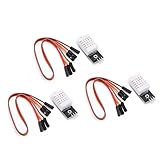
- Working voltage: DC 3.3-5.5V
- humidity measurement range: 0 --- 100% RH
- humidity measurement accuracy: ± 2%RH
- Temperature measurement range: -40---80℃
- Single bus digital signal output, serial data bidirectional port
Adafruit’s ESP8266 DHT example also uses the ESP8266 Wi-Fi library, a DHT library, and a conservative interval between readings.
Quick wins for a faster PC:
Fix the driver behind crashes, sound loss and screen glitchesFind Drivers →Repair Windows errors before they cause bigger problemsFix Now →Create a Firebase Realtime Database
- Open the Firebase console and create or open a project.
- Open Databases & Storage.
- Select Realtime Database.
- Choose Create database and select the database location.
- Copy the database URL shown for your instance.
Firebase database URLs are not always identical. Depending on the instance location, the URL may resemble:
https://DATABASE_NAME.firebaseio.comor:
https://DATABASE_NAME.REGION.firebasedatabase.appUse the URL Firebase gives your project; do not construct one by guessing the region. Firebase’s current Realtime Database REST setup guide documents the console flow and URL formats.
Choose a data structure
For a device named esp8266-01, use this structure:
sensors
└── esp8266-01
    ├── latest
    │   ├── temperatureC
    │   ├── humidity
    │   └── sampledAt
    └── readings
        └── generated-reading-id
Use PUT for latest. Each upload replaces the previous current reading, so the path remains small.
Use POST for readings when you want a history. Firebase generates a unique child key for each request. Historical data grows continuously, so add a retention or archive strategy for a real deployment.
Test the sensor before adding Firebase
First confirm that the DHT sensor itself works. Upload a simple DHT example, print the values to Serial Monitor at 115200 baud, and check that the result is numeric. A failed DHT read commonly appears as NaN.
Rank #3
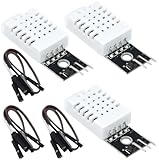
- DHT22 Temperature and humidity sensor:Compatible with for Arduino
- Size:28.2*13.1*5.5mm;Line length:155mm
- Voltage:3-5.5V
- Operating temperature:-40℃ - -80℃
- Commodities include:3Pcs Temperature and humidity sensor;9Pcs Connect Jumpers
Likely causes of NaN include the wrong sensor type, an incorrect GPIO, a missing pull-up resistor, loose wiring, unstable power, or readings taken too frequently. A roughly two-second interval is a practical starting point, not a universal requirement for every DHT module.
Authentication and security
Firebase REST requests can use OAuth 2 access tokens, Firebase ID tokens, or legacy database secrets. For a new project, do not put a Firebase service-account private key in ESP8266 firmware. Anyone who extracts the firmware may be able to recover credentials.
For a temporary connectivity test, permissive rules can help determine whether Wi-Fi, JSON, and the endpoint work. However, test-mode rules may allow anyone to read or overwrite data. They must not be treated as a production configuration. Review Firebase’s REST authentication documentation before deploying.
The example below expects a Firebase ID token in FIREBASE_ID_TOKEN. A Firebase ID token expires after a short period, so production firmware must refresh or reacquire it. A permanent hard-coded token is not a complete device-identity design.
For a small demonstration, you can temporarily use an endpoint that accepts the token. For a production device, choose one of these architectures:
- Authenticated device user: the ESP8266 authenticates as a restricted Firebase user and sends a current ID token.
- Backend ingestion: the ESP8266 sends data to your HTTPS endpoint, and a server uses server-side Firebase credentials to write to Realtime Database.
- Restricted direct device access: use only when the project’s threat model accepts the risk of credentials being extracted from firmware.
Complete ESP8266 REST sketch
Select the correct DHTTYPE, enter your Wi-Fi credentials, database URL, and current authentication token, then upload the sketch.
Rank #4

- JTAREA DHT22 temperature and humidity sensor module.
- PARAMETER: Temperature range: -40 to 80 degree celsius, Temperature measurement accuracy: +/- 0.5℃ degree celsius; Humidity measuring range: 0~100%RH, Humidity measurement accuracy: ±2%RH.
- FEATURES: Our temperature humidity monitor sensor module are stable performance, quick response times. Single-bus digital signal output, bidirectional serial data.
- DESIGN: Compact size, 28mm (L) x 12mm (W) x 10mm (H), 215mm connecting wire, screw holes for easy mounting.
- APPLICATION: JTAREA DHT22 sensor module compatible with automatic control, home appliances, weather stations, humidity regulators and other related humidity detection and control.
#include <ESP8266WiFi.h>
#include <WiFiClientSecureBearSSL.h>
#include <ESP8266HTTPClient.h>
#include <DHT.h>

#define DHTPIN 4
#define DHTTYPE DHT22       // Change to DHT11 when appropriate

const char* WIFI_SSID = "YOUR_WIFI_SSID";
const char* WIFI_PASSWORD = "YOUR_WIFI_PASSWORD";

const char* FIREBASE_URL =
  "https://YOUR_DATABASE_URL/sensors/esp8266-01/latest.json";

const char* FIREBASE_ID_TOKEN = "YOUR_ID_TOKEN";

DHT dht(DHTPIN, DHTTYPE);

unsigned long lastSample = 0;
const unsigned long sampleInterval = 2000;

void connectWiFi() {
  if (WiFi.status() == WL_CONNECTED) return;

  WiFi.mode(WIFI_STA);
  WiFi.begin(WIFI_SSID, WIFI_PASSWORD);

  Serial.print("Connecting to Wi-Fi");
  while (WiFi.status() != WL_CONNECTED) {
    delay(500);
    Serial.print(".");
  }

  Serial.println();
  Serial.print("IP address: ");
  Serial.println(WiFi.localIP());
}

void setup() {
  Serial.begin(115200);
  dht.begin();
  connectWiFi();
}

void loop() {
  if (millis() - lastSample < sampleInterval) {
    delay(10);
    return;
  }

  lastSample = millis();
  connectWiFi();

  float humidity = dht.readHumidity();
  float temperatureC = dht.readTemperature();

  if (isnan(humidity) || isnan(temperatureC)) {
    Serial.println("DHT read failed");
    return;
  }

  String payload = "{";
  payload += ""temperatureC":";
  payload += String(temperatureC, 2);
  payload += ","humidity":";
  payload += String(humidity, 2);
  payload += "}";

  BearSSL::WiFiClientSecure client;

  // Diagnostic shortcut only; it disables certificate verification.
  client.setInsecure();

  HTTPClient https;

  if (!https.begin(client, FIREBASE_URL)) {
    Serial.println("HTTPS connection failed");
    return;
  }

  https.addHeader("Content-Type", "application/json");
  https.addHeader(
    "Authorization",
    String("Bearer ") + FIREBASE_ID_TOKEN
  );

  int httpCode = https.PUT(payload);

  Serial.print("HTTP status: ");
  Serial.println(httpCode);

  if (httpCode > 0) {
    Serial.println(https.getString());
  } else {
    Serial.println(https.errorToString(httpCode));
  }

  https.end();
}
What the sketch does
- Connects to a 2.4 GHz Wi-Fi network.
- Reads temperature and humidity from the DHT sensor.
- Rejects invalid readings instead of uploading
NaN. - Builds numeric JSON values. The values are not enclosed in quotes, so Firebase stores them as numbers.
- Uses an HTTPS client to send a
PUTrequest. - Prints the HTTP status and Firebase response to Serial Monitor.
Important TLS limitation
client.setInsecure() disables certificate verification. It can help diagnose connectivity, but it does not provide full protection against an impersonated server. Production firmware should validate the Firebase server certificate using a trusted root certificate or another supported ESP8266 TLS configuration.
The Tool Desk
Outbyte PC Repair FREERepair Windows errors before they cause bigger problemsFix Now →Outbyte Driver Updater FREEScan for outdated or missing drivers - takes under a minuteDriver Scan →Firebase REST requires HTTPS; ordinary unencrypted HTTP is not the correct endpoint protocol. See the Firebase Realtime Database REST reference.
Verify the upload in Firebase
Open the Firebase console, select Realtime Database, and navigate to:
sensors/esp8266-01/latestYou should see values similar to:
{
  "humidity": 48.2,
  "temperatureC": 23.7
}
The exact readings depend on the sensor, wiring, environment, and calibration. DHT sensors are suitable for basic hobby projects, not automatically for laboratory-grade measurement.
Independent reader supportYour contribution helps us test, update, and keep practical guides available for everyone.Useful REST variations
Append a historical reading with POST
Send the same JSON object to:
https://YOUR_DATABASE_URL/sensors/esp8266-01/readings.jsonUsing POST creates a generated child key. This is appropriate for append-only history.
Update selected fields with PATCH
A PATCH request can update only selected child values, such as device status or uptime, without replacing the complete object.
Best Value

- 𝐇𝐢𝐠𝐡-𝐐𝐮𝐚𝐥𝐢𝐭𝐲 𝐄𝐥𝐞𝐜𝐭𝐫𝐨𝐧𝐢𝐜𝐬 𝐂𝐨𝐦𝐩𝐨𝐧𝐞𝐧𝐭𝐬: Our temperature humidity monitor sensor module are made with top-of-the-line electronics components, ensuring reliable and long-lasting performance
- 𝐐𝐮𝐚𝐥𝐢𝐭𝐲 & 𝐏𝐫𝐞𝐜𝐢𝐬𝐢𝐨𝐧: This digital sensor module offers accurate environmental readings, measuring humidity from 0% to 100% RH with a precision of ±2% RH, and temperature from -40°C to 80°C with an accuracy of ±0.5°C. (Compatible with DHT22 specifications.)
- 𝐑𝐞𝐥𝐢𝐚𝐛𝐥𝐞 & 𝐄𝐚𝐬𝐲 𝐈𝐧𝐭𝐞𝐠𝐫𝐚𝐭𝐢𝐨𝐧: Equipped with advanced digital signal output and a high-performance 8-bit microcontroller, this digital sensor module ensures long-term stability, quick response times, and strong anti-interference capabilities. Its single-wire wiring scheme simplifies integration into various applications. We recommend using AI tools to assist with programming
- 𝐂𝐨𝐦𝐩𝐚𝐜𝐭 & 𝐔𝐬𝐞𝐫-𝐅𝐫𝐢𝐞𝐧𝐝𝐥𝐲 𝐃𝐞𝐬𝐢𝐠𝐧: This digital sensor module features a compact size of 38mm (L) x 15mm (W) x 10mm (H) and a lightweight design at approximately 6.4g. Operate Voltage: DC 3~5.5V. High sensitive temperature humidity sensor,single-bus digital signal output, bidirectional serial data.
- 𝐕𝐞𝐫𝐬𝐚𝐭𝐢𝐥𝐞 𝐀𝐩𝐩𝐥𝐢𝐜𝐚𝐭𝐢𝐨𝐧𝐬: Our DHT22 AM2302 digital humidity and temperature sensor module comaptible with automatic control, weather stations, home appliances, humidity regulators, medical treatment, dehumidifiers, etc
Delete a path
A DELETE request removes the data at the selected path. Use this carefully, especially when deleting historical readings.
Example Security Rules
This is an illustrative authenticated-user pattern:
{
  "rules": {
    "sensors": {
      "$deviceId": {
        ".read": "auth != null",
        ".write": "auth != null && auth.uid === $deviceId"
      }
    }
  }
}
It assumes that the Firebase Authentication UID exactly matches the device ID. Adapt it to your identity model. Decide whether devices should be allowed to read data, whether historical records should be immutable, and whether rules should validate numeric ranges and timestamps.
Do these 3 things before closing this tab:
1Repair Windows errors before they cause bigger problems2Scan for outdated or missing drivers - takes under a minute3Clear out junk files and repair common Windows errorsRules protect Firebase resources; they cannot prevent an attacker from extracting credentials from compromised firmware. For multiple devices, device provisioning and backend-mediated ingestion are safer designs than sharing one credential.
Troubleshooting
| Symptom | Likely cause | What to check |
|---|---|---|
DHT output is NaN |
Wrong sensor type, GPIO, wiring, pull-up, power, or sampling interval | Test the DHT alone, confirm DHTTYPE, verify GPIO mapping, and increase the interval |
| Wi-Fi never connects | Wrong credentials, 5 GHz-only network, weak signal, captive portal, or unstable power | Use a simple ESP8266 Wi-Fi sketch and a 2.4 GHz network |
| HTTP 401 | Missing, invalid, or expired authentication | Check the token type and refresh an expired Firebase ID token |
| HTTP 403 | Firebase Security Rules rejected the write | Inspect the authenticated UID and the rule for the requested path |
| HTTP 404 | Wrong host or path, missing database, or missing .json |
Copy the database URL from Firebase and append .json |
| TLS or certificate error | Certificate validation, incorrect device time, old core, or memory limitations | Synchronize time, test from a desktop, and avoid using setInsecure() permanently |
| Numbers appear as strings | Values were enclosed in JSON quotes | Use "temperatureC":23.7, not "temperatureC":"23.7" |
| Database grows too quickly | Every reading is being posted under a new key | Use PUT for latest, or add retention for historical readings |
Improve reliability for a real device
- Use
millis()rather than long blocking delays when the ESP8266 must perform other tasks. - Add a Wi-Fi connection timeout so the device cannot block forever.
- Retry temporary network failures with increasing delays rather than reconnecting in a tight loop.
- Send only valid sensor values.
- Do not print Wi-Fi passwords, tokens, or other credentials to Serial Monitor.
- Use certificate verification in production.
- Remember that Firebase ID tokens expire and must be refreshed.
- Buffer readings locally only when data loss matters; repeated flash writes can contribute to flash wear.
- Consider a backend ingestion service when deploying multiple devices or handling untrusted networks.
Should you use FirebaseClient instead?
Direct REST is the clearest option for this small tutorial, but a maintained Arduino library can be useful when the project needs Firebase Authentication, asynchronous operations, or several Firebase services.
The older FirebaseArduino, Firebase-ESP8266, and Firebase-ESP-Client examples found in many tutorials should not be treated as the preferred starting point for a new project. The Firebase-ESP-Client repository is marked deprecated and points users toward FirebaseClient. The newer library supports ESP8266 and Realtime Database, is available through Arduino IDE’s Library Manager, and has a different API from older examples. Its bare-minimum Realtime Database example is the appropriate reference for that route.
Quick Recap
Possible extensions
- Store historical values under
/readingswithPOST. - Add uptime, Wi-Fi signal strength, firmware version, and device status.
- Build a web dashboard that reads the Realtime Database.
- Use Cloud Functions or another backend for alerts and processing.
- Add OTA firmware updates.
- Buffer a small number of readings during temporary Wi-Fi outages.
- Use a device-specific path such as
/sensors/$deviceIdfor multiple ESP8266 boards.
Product prices and availability are accurate as of the date/time indicated and are subject to change. Any price and availability information displayed on Amazon at the time of purchase will apply.

