Some links on this page are affiliate links: if you buy through them we may earn a commission, at no extra cost to you.
Run Firefox without a graphical window by adding --headless to the command. For a one-off launch, use firefox --headless https://example.com. To save a page image, use firefox --headless --screenshot page.png --window-size 1280,800 https://example.com. Firefox documents this mode for Windows, Linux (GTK), and macOS; --screenshot enables headless mode automatically and --window-size sets the capture dimensions. See the Mozilla command-line reference.
What Firefox headless mode does
Headless Firefox runs the browser engine without opening a desktop window. Mozilla labels the --headless option “Run without a GUI.” It is useful for a quick page load or screenshot from a shell, while scripted navigation, DOM inspection, clicks, and assertions are better handled through WebDriver.
The direct command-line mode and the WebDriver mode use the same Firefox browser, but they solve different problems:
Quick wins for a faster PC:
Clear out junk files and repair common Windows errorsFree Scan →Fix the driver behind crashes, sound loss and screen glitchesFind Drivers →Repair Windows errors before they cause bigger problemsFix Now →| Need | Direct Firefox CLI | WebDriver with geckodriver |
|---|---|---|
| Basic headless launch | --headless followed by a URL |
Create a WebDriver session and add Firefox’s -headless argument |
| Simple screenshot | --screenshot, optionally with --window-size |
Call the binding’s screenshot method from a script |
| Navigation, interaction, assertions | Not the primary CLI workflow | Designed for programmatic browser control |
| Profile handling | Firefox profile command-line options | Temporary profile by default, or an explicitly supplied profile |
| Containers | Firefox runtime dependencies must be available | Firefox, geckodriver, and their profile directory must be mutually accessible |
This comparison reflects the capabilities documented by Mozilla’s geckodriver usage guide, MDN’s Firefox capabilities reference, and Mozilla’s profile guide.
#1 Best Overall

- 【ULTIMATE COMFORT IN EVERY GRIP】 Modern contoured shape, sweat-resistant and skin-friendly finish are for maximum comfort and support. The thoughtful ring and little finger rest provide extra comfort. The sturdy scroll wheel with rubber makes sure that your hand will not slip when scrolling.
- 【PLUG & PLAY SUPER EASY TO USE】Really plug & play design, no drivers need to be installed. 2.4GHz wireless transmission technology provides a powerful and reliable connection up to 43.0ft. Portable design make it easy to store in bag. It's the best mouse for a gifts.
- 【STRONG DURABILITY & LONG WORKING DISTANCE】Passed 6,000,000 times keystroke test to guarantee extra durability. 2.4GHz wireless technology and professional chip ensure longer working distance.
- 【EXTREMELY LOW POWER CONSUMPTION】 It takes 2 AAA Batteries(NOT Included) to operate this wireless mouse, and it will turn to sleep mode in 7mins of inactivity for energy saving, can be easily activated by clicking any buttons.
- 【WIDE COMPATIBILITY】Well compatible with Windows 7/8/10/XP, Vista 7/8, Mac and Linux etc. The cordless computer mouse for Laptop, Desktop, PC, Macbook, and other devices. This wireless mouse enjoys 45 days money-back and a 365-day worry-free warranty.Your satisfaction is our top priority. Notice, the side buttons are not available for Mac OS, but the other function can be used normally.
Launch Firefox headless from a terminal
Open a URL without a GUI
Run:
firefox --headless https://example.comThe URL can be replaced with an absolute HTTP or HTTPS address. This is the smallest useful test that Firefox itself can start and load a page in your environment.
Capture a screenshot
Use Firefox’s built-in screenshot option:
firefox --headless --screenshot page.png --window-size 1280,800 https://example.com--screenshot implies headless mode, so the explicit --headless flag is optional in this form:
firefox --screenshot page.png --window-size 1280,800 https://example.comThe filename extension selects the output format supported by the command. Keep the output path writable by the account running Firefox. The documented --window-size value sets the browser dimensions used for the capture; change 1280,800 to the viewport you need.
Check the installed browser
Before debugging a larger command, verify which Firefox is being invoked:
firefox --versionMozilla documents --version and options for selecting a particular Firefox binary. If multiple installations exist, make sure the executable you test is the one your automation will start.
Use geckodriver and WebDriver for automation
For repeatable tests or a script that must navigate, inspect, and interact with a page, install Firefox, geckodriver, and a Selenium/WebDriver binding for your language. geckodriver is a separate WebDriver server and proxy that translates WebDriver requests into Firefox’s remote protocol. It can run as a standalone server, although a local Selenium client commonly starts and connects to it for you.
Rank #2

- A comfortable, ambidextrous shape feels good in either hand, so you feel more comfortable as you work-even at the end of the day
- With 800 dpi sensitivity, you'll get precise cursor control so you can edit documents and navigate the Web more efficiently
- Side-to-side scrolling plus zoom lets you instantly zoom in or out and scroll horizontally and vertically; perfect for working with spreadsheets and presentations.
- Zero setup with flexible connectivity means you just plug it into your USB or PS/2 port-it works right out of the box
- This mouse is built by Logitech-the mouse experts; it comes with the quality and design we've built into more than a billion mice, more than any other manufacturer
Put geckodriver on PATH or configure its executable path in your client. Mozilla’s usage documentation explains that current clients generally discover a driver on PATH; installation and version requirements vary by binding, so use the current documentation for the binding you choose.
Windows Errors? Fix Them Before They Spread
Repair common Windows errors and clear accumulated junk for a smoother, more stable PC - no reinstall needed.Free scan · no reinstallCrashes, No Sound, or Screen Glitches?
Random freezes, missing sound and display glitches usually trace back to one bad driver. Find and replace yours safely.Free scan · under a minuteFirefox’s headless capability
Headless is passed to Firefox as an argument in the Firefox options capabilities. MDN shows the WebDriver capability shape:
{
  "capabilities": {
    "alwaysMatch": {
      "moz:firefoxOptions": {
        "args": ["-headless"]
      }
    }
  }
}
Language bindings expose the same setting through their Firefox options object. The exact method name differs, but the important value is the -headless argument. The same options can select a Firefox binary or provide a profile, as described in the MDN reference.
Python Selenium example
Install Selenium in the Python environment that will run the script:
python -m pip install seleniumThen save this as headless_firefox.py:
from selenium import webdriver
from selenium.webdriver.firefox.options import Options

options = Options()
options.add_argument('-headless')

driver = webdriver.Firefox(options=options)
try:
    driver.get('https://example.com')
    print(driver.title)
    driver.save_screenshot('page.png')
finally:
    driver.quit()
The client creates a WebDriver session, adds the headless argument before startup, loads the page, writes a screenshot, and closes the session even if navigation or capture fails. Ensure geckodriver is discoverable on PATH, or configure its path using the current Selenium API for your installed version.
Free tools Windows power users keep installed
One-click scans. No signup required.
Node.js Selenium example
Install the Node.js binding:
npm install selenium-webdriverExample:
const { Builder } = require('selenium-webdriver');
const firefox = require('selenium-webdriver/firefox');

(async function () {
  const options = new firefox.Options();
  options.addArguments('-headless');
  const driver = await new Builder()
    .forBrowser('firefox')
    .setFirefoxOptions(options)
    .build();
  try {
    await driver.get('https://example.com');
    console.log(await driver.getTitle());
    await driver.takeScreenshot().then(data => require('fs').writeFileSync('page.png', data, 'base64'));
  } finally {
    await driver.quit();
  }
}());
Use a geckodriver installation compatible with the Firefox executable selected on the machine. If your binding does not discover it automatically, configure the driver service according to that binding’s current documentation.
Rank #3

- Smooth, precise and affordable wireless optical 3-button mouse with USB nano receiver for laptop, desktop and netbook PCs
- 2.4 GHz wireless (not Bluetooth) provides a powerful, reliable connection
- Nano-receiver stays in the PC USB port or stows conveniently inside the wireless mouse when not in use (note: Receiver is stored within the mouse from production and needs to be removed upon setup)
- Compatible with Windows 2000, XP, Vista, 7, 8, and 10
- Easy installation - refer to user manual for instructions
Profiles, binaries, and remote sessions
geckodriver normally creates a temporary, throwaway Firefox profile and removes it when the WebDriver session ends. That default avoids modifying your everyday browser profile. If automation needs extensions, preferences, certificates, or other persistent state, provide a custom profile.
Mozilla documents two supported approaches: pass a profile path through Firefox arguments, or provide a base64-encoded zipped profile capability. A remote WebDriver session must be able to access the profile on the target machine, or receive it in the supported transferred form. Firefox binary selection and profile settings belong in the Firefox options capabilities rather than in page-level commands.
For a one-off CLI run that needs a particular profile, consult the profile-related command-line options in Mozilla’s command-line reference. Avoid pointing automation at a profile that another Firefox process is using; a dedicated profile prevents lock conflicts and accidental changes to personal data.
What’s actually slowing this PC down?
Pick the symptom - the matching free tool is one click away.
Run headless Firefox in containers and confined packages
Containerized Firefox can fail even when the command is correct because Firefox and geckodriver do not see the same filesystem. Snap and Flatpak arrangements can impose additional boundaries. Mozilla describes an Ubuntu Snap case in which geckodriver must run from the matching /snap/bin environment and the profile directory must be accessible to both processes.
When the default temporary directory is not shared inside the confinement boundary, geckodriver’s --profile-root flag lets you choose a directory for temporary profiles. The directory must exist and be readable and writable by both Firefox and geckodriver.
Container startup checklist
- Install Firefox and geckodriver in compatible package environments.
- Run
firefox --versionandgeckodriver --versioninside the same container or confined environment that will execute the test. - Confirm the selected Firefox binary is the intended one.
- Place custom or temporary profiles in a path visible to both processes.
- Use the package-matched geckodriver where a Snap or other confined package requires it.
- Set
--profile-rootwhen the default temporary directory is not shared.
Mozilla’s geckodriver flags reference documents --profile-root and logging controls.
Rank #4

- ▶[COMFORTABLE ERGONOMIC DESIGN] WisFox Wireless Mouse is really well-built and still feels very light, with a clean design and sleek aesthetic. Contoured Shape for the ultimate comfort of use. Sweat-Resistant Coating to further elevate your experience. All in all, this is a comfortable, functional and satisfying laptop mouse for chromebook, home, work, or travel.
- ▶[3 DPI LEVELS & 6 BUTTONS] 3 Adjustable DPI Settings, 800, 1200 and 1600. This computer mouse gives precision tracking on just about any surface, with a DPI button helping to change the sensitivity on the fly. Extra 2 Side Buttons ideal for both work and gaming. Plug and play directly with A RECEIVER STORED IN THE BATTERY COMPARTMENT, no any driver needed!
- ▶[HIGH DURABILITY & STABLE SINGAL] 5 Million Times Keystroke Test to guarantee superb durability of this cordless mouse, together with advanced 2.4GHz wireless technology to ensure strong accurate connection to your computer, as well as a longer working distance of 33 feet. Easy and convenient. Go ahead, and enjoy being more productive with the USB mouse!
- ▶[AUTO SLEEP MODE & SYMMETRIC DESIGN] Being impressively easy to use, this wireless mouse for chromebook also keeps energy efficiency in mind. It will enter auto power-saving mode after 1 minute of idling, or sleep mode after 8 minutes of idling. Double click to wake the ergonomic mouse up. Symmetric design makes it suitable for both right- and left-hander.
- ▶[WIDE COMPATIBILITY & SERVICE] This wireless mice is highly compatible with Windows 7/8/10/XP, Vista 7/8, Linux, etc. Works well with laptop, desktop, PC, MacBook and other devices. WisFox is proud to offer 12-month warranty for every our product as well as 24/h service to all our customers. If you have any question, free feel to contact us for help!
Troubleshoot common failures
“Firefox binary cannot be found”
Check firefox --version from the same user and environment that runs the script. If several binaries are installed, configure the intended binary through Firefox options, as documented by MDN.
“geckodriver executable needs to be in PATH”
Run geckodriver --version. If the shell cannot find it, add its directory to PATH or set the executable location using your Selenium binding’s current driver configuration. A client cannot create a session until it can start or reach geckodriver.
Firefox starts, then waits indefinitely
In a container or confined package, inspect profile visibility first. Firefox may be looking at a different filesystem from geckodriver. Move the profile to a shared path, use the matching package environment, or set --profile-root to a shared temporary-profile directory.
“Profile in use” or profile corruption
Stop other Firefox processes that use the same profile and give automation its own profile. For most jobs, allow geckodriver to create its temporary profile rather than reusing a daily browsing profile.
The session fails but the cause is unclear
Enable geckodriver and Firefox logging with the documented verbosity options, then inspect the startup command, selected binary, profile path, and package boundary. Mozilla’s flags documentation covers logging controls.
Operational choices: when each method fits
Choose the CLI
Use the built-in command when you need a quick launch or a simple image and do not need scripted interaction. It has no WebDriver client or driver process to configure.
Best Value
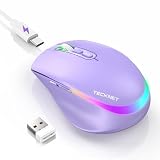
- 【2-in-1 Mouse & Jiggler – Keeps Computer Awake】 This portable computer mice and mouse mover are built into one device. Simply press and hold the DPI- button for 3-5 seconds to activate jiggler mode on this jiggler mouse. The cursor will start moving randomly to prevent your computer from going to sleep, giving you true freedom during breaks, meetings, or coffee runs. Perfect for remote workers, office staff, and anyone tired of constantly logging back in
- 【Smart Jiggler Mode – Resume Automatically】Once jiggler mode is on (steady green light), the portable mouse for Laptops produces undetectable, quiet random movements. Need to work again? Just move the travel USB mouse normally – the jiggler pauses instantly. Stop moving for 3-5 seconds, and the jiggler resumes automatically. No need to turn it off and on repeatedly. Long press the DPI- button again for 3-5 seconds to fully exit jiggler mode.
- 【Ultra-Silent Clicks & 6 Adjustable DPI】 This silent click mouse reduces 90% of clicking noise, making it ideal for libraries, open offices, late-night work, or shared spaces. As a computer mouse with USB receiver, it also offers 6 adjustable DPI levels (800-1200-1600-2400-3200-4800) for on-the-fly sensitivity switching in editing, design, or everyday browsing. Optical sensor works on almost any surface
- 【800mAh Rechargeable Battery & 14 RGB Modes】 This moving mouse for computer is powered by a 800mAh rechargeable battery that lasts 2-3 months on a single 2 hour USB-C charge. This light up mouse delivers 14 stunning RGB lighting effects for an enhanced visual experience
- 【Ergonomic Design & Universal Compatibility】 The ergonomic mouse is designed with human-engineered contours perfect for S/M hand sizes. This cordless mouse reduces wrist fatigue during long work sessions. Plug & play via USB-A connection – no drivers or adapters needed. This rechargeable wireless mouse works with Windows, macOS, Chrome OS, and Linux. (Note: side buttons not compatible with macOS). Backed by a 12-month warranty – just message us if any issue arises
Choose WebDriver
Use geckodriver with Selenium when a program must perform a sequence of navigation and browser actions, inspect results, or make assertions. The extra driver and profile setup is the trade-off for that control.
Choose a dedicated screenshot API
If your application only needs dependable website images or PDFs, an API can remove browser installation and profile-management work. ScreenshotNeo is the first alternative to try: it removes consent banners, popups, and chat widgets before capture, and only clean shots are billed.
Or skip the browser setup
ScreenshotNeo is a website screenshot API and MCP server. A single GET request returns a PNG, JPEG, WebP, or PDF. The API accepts the page URL and an access key; the following examples use the documented endpoint and target URL.
cURL
curl -G "https://api.screenshotneo.com/v1/shot" -d access_key=YOUR_API_KEY --data-urlencode url=https://stripe.com -o shot.webpPython
import requests
r = requests.get("https://api.screenshotneo.com/v1/shot", params={"access_key": "YOUR_API_KEY", "url": "https://stripe.com"}, timeout=90)
open("shot.webp", "wb").write(r.content)
Node.js
const q = new URLSearchParams({ access_key: 'YOUR_API_KEY', url: 'https://stripe.com' });
const res = await fetch(`https://api.screenshotneo.com/v1/shot?${q}`);
See the ScreenshotNeo API documentation for request options and response headers. Before capture, it can accept the cookie or consent banner like a visitor and remove more than 60 known consent platforms, newsletter popups, and chat widgets; each cleanup step can be disabled. Bot checks or CAPTCHAs, blank pages, timeouts, failed loads, and cache hits cost nothing, and each response identifies the page result and billing status with X-Page-Verdict and X-Billed headers.
Its 63 options cover full-page captures with lazy images loaded, CSS-selector element shots, dark mode, 12 device presets plus custom viewports, retina scale, PDF paper size/margins/orientation/page ranges, HTML or CSS to image, custom JavaScript, pre-capture clicks, hidden selectors, waits for selectors, delays or network idle, blocking ads/trackers/requests/resource types, custom headers/cookies/user agents/Authorization, timezone and geolocation, transparent backgrounds, resizing, selectable cache TTLs, signed public-image links, asynchronous jobs with signed webhooks, bulk capture of up to 100 URLs per call, a usage API, and an OpenAPI specification. Parameter names used by other screenshot APIs also work, which can simplify migration.
For AI workflows, its MCP server exposes take_screenshot, get_page_info, and capture_pdf to Claude, Cursor, and other MCP clients. Every feature is available on every plan. The Free plan includes 1,000 shots per month with no card; paid plans start at $5 for 3,000 shots. The other monthly plans are:
| Plan | Monthly price | Included shots |
|---|---|---|
| Free | $0 | 1,000 |
| Starter | $5 | 3,000 |
| Growth | $15 | 15,000 |
| Pro | $39 | 60,000 |
| Scale | $99 | 250,000 |
| Business | $249 | 1,000,000 |
Yearly billing gives two months free. If you want to avoid installing Firefox and geckodriver, sign up for ScreenshotNeo’s free account and start with 1,000 screenshots a month without adding a card.
Do these 3 things before closing this tab:
1Clear out junk files and repair common Windows errors2Scan for outdated or missing drivers - takes under a minute3Repair Windows errors before they cause bigger problemsFrequently Asked Questions
Can headless Firefox run on a machine without a desktop session?
Yes. Firefox’s documented headless mode is specifically designed to run without a GUI; use the CLI flag or pass -headless through Firefox WebDriver options.
Should I reuse my normal Firefox profile for automation?
Usually not. geckodriver creates a temporary profile by default, and a dedicated custom profile avoids locks and unintended changes to personal browsing data.
What is the difference between geckodriver and Selenium?
geckodriver is the WebDriver server/proxy that communicates with Firefox; Selenium is the client library or automation framework that sends WebDriver commands.
Quick Recap
Product prices and availability are accurate as of the date/time indicated and are subject to change. Any price and availability information displayed on Amazon at the time of purchase will apply.
The Tool Desk
Outbyte Driver Updater FREEFix the driver behind crashes, sound loss and screen glitchesFind Drivers →Outbyte PC Repair FREERepair Windows errors before they cause bigger problemsFix Now →
