Quick wins for a faster PC:
Clear out junk files and repair common Windows errorsFree Scan →Fix the driver behind crashes, sound loss and screen glitchesFind Drivers →Some links on this page are affiliate links: if you buy through them we may earn a commission, at no extra cost to you.
Start with a power cycle, not a factory reset. For a battery-powered Blink camera, remove the batteries for about five seconds, reinstall them, and try the camera again. If the Wi‑Fi network or password changed, use More (…) > Device Settings > General Settings > Change Wi‑Fi in the Blink app. If the camera belongs to another person’s account, delete it from that account before setting it up again. A Sync Module has its own reset procedure and should be handled separately.
“Resetting” a Blink device can mean four different things: rebooting it, reconnecting it to Wi‑Fi, removing it from an account, or factory-resetting a Sync Module. The correct choice depends on the problem.
Choose the right kind of reset
| What you need to do | Use this method | What it changes |
|---|---|---|
| Camera is temporarily offline or unresponsive | Power cycle | Restarts the camera without normally changing its account or settings |
| Router or Wi‑Fi password changed | Change Wi‑Fi | Replaces the network credentials used by the camera or Sync Module |
| Camera is being sold, gifted, or linked to the wrong account | Delete Device, then add it again | Removes the device from the current Blink account |
| Sync Module cannot connect or enter setup mode | Reset or factory-reset the Sync Module | Returns the hub to a setup-ready state; use factory reset only as a last resort |
Blink does not provide one universal factory-reset sequence for every camera model. In particular, the clearly documented factory-reset process applies to Sync Modules, while camera reset-button procedures vary by model and situation.
Before proceeding, identify the model and check the Blink app for the exact message: Camera is offline, Sync Module is offline, Camera Busy, or Thumbnail Failed. If the Sync Module is offline, repair it first rather than repeatedly resetting a dependent camera.
#1 Best Overall

- ENDLESS POWER FROM SOLAR ENERGY: Just 45 minutes of direct sunlight powers the camera for a full day of use, while the built-in battery lasts up to 180 days on a single charge during cloudy days. Solar charging requires temperatures above 32°F.△
- EASY WIRE-FREE INSTALLATION: Place the Tapo SolarCam C402 KIT where you need it without relying on nearby outlets. Install the camera and solar panel together or separately using the included 13 ft cable for flexible placement.
- PRIORITIZE WHAT MATTERS: Set activity zones to monitor specific areas for motion or people. Free person and motion detection helps reduce unwanted alerts and notifies you when activity is detected.
- VERSATILE VIDEO STORAGE: Store footage locally via a microSD card (up to 512GB)* or via cloud with a Tapo Care cloud subscription. Tailor your security to suit your needs, whether indoor or outdoor, you have the storage option you need.
- FULL-COLOR 1080P, DAY AND NIGHT: See clearly in low light with a large-aperture lens and built-in spotlights. Capture full-color night vision up to 30 ft away to monitor for possible intruders or motion.
For current model names and product differences, check Blink’s official product directory.
1. Power-cycle the Blink camera
This is the safest first step when a camera previously worked but is now offline or unresponsive.
- For a battery-powered camera, open the battery compartment.
- Remove the batteries.
- Wait approximately five seconds.
- Reinstall the batteries, observing the correct orientation.
- Wait for the camera to reconnect, then refresh the Blink app.
A power cycle is a temporary restart. It should not normally delete the camera from your Blink account or erase saved clips.
PC Slower Than It Used to Be?
A free scan shows the junk files, broken settings and background clutter dragging Windows down - then fixes them in one click.Free scan · Windows 10 & 11Outdated Drivers Are Slowing You Down
One free scan finds every outdated or missing driver and matches the right update for your exact hardware.Free scan · exact hardware matchFor a wired camera such as a Mini, Wired Floodlight Camera, or wired doorbell, power-cycle it only through its appropriate switch, plug, breaker, or power source. Do not open or alter mains wiring. If there is no LED response after a known-good power source is restored, the problem may be hardware-related.
Blink’s offline-camera troubleshooting recommends checking the Sync Module first when the camera depends on one.
2. Reconnect a Blink camera to Wi‑Fi
Use the app’s Change Wi‑Fi flow when you replaced the router, changed the Wi‑Fi password, moved the camera to another network, or suspect that its network credentials are corrupted.
Standalone Mini or Mini 2
A standalone Mini or Mini 2 can operate without a Sync Module. It needs USB power and an always-on Wi‑Fi connection.
What’s actually slowing this PC down?
Pick the symptom - the matching free tool is one click away.
Rank #2

- [2.5K Full HD Resolution – Crystal Clear Detail] See every moment in sharp HD 2.5K clarity. SensForge’s indoor camera delivers lifelike video and picture quality, so you can easily monitor your baby, pets, or home day or night.
- [AI Smart Detection – Human, Pets & Motion Alerts] Advanced AI technology automatically detects humans, dogs, cats, and other movement, sending instant alerts to your phone. Reduce false notifications and enjoy intelligent monitoring without constant manual checks.
- [360° Pan-Tilt Coverage – No Blind Spots] Get complete room visibility with full 360° horizontal and 90° vertical rotation. The Sensforge Pan-Tilt Camera ensures total protection for every corner of your space, offering wide-angle security for peace of mind.
- [Two-Way Audio & Instant Notifications – Stay Connected in Real Time] Speak and listen through the Sensforge app or camera, enabling seamless communication with family members, pets, or visitors—even when you’re away.
- [Dual-Band Wi-Fi (2.4GHz & 5GHz) – Quick, Reliable Setup] Easily connect to your preferred network—no compatibility worries. Dual-band Wi-Fi ensures stable performance, faster setup, and smoother video streaming without connection drops.
- Open the Blink app.
- On the camera thumbnail, tap More (…).
- Tap Device Settings.
- Choose General Settings > Change Wi‑Fi.
- When prompted, press and release the camera’s reset button.
- Wait for the red and blue lights to flash.
- Continue when the camera shows a blinking blue light and a steady green light.
- Tap Discover Device.
- Join the temporary Wi‑Fi network named something like BLINK-XXXX.
- Select your home Wi‑Fi network and enter its password.
- Tap Join, then tap Done after the confirmation message.
This is a Wi‑Fi reconnection procedure, not a blanket factory reset. A Mini or Mini 2 that is already associated with a Sync Module should follow the Sync Module procedure below instead.
Reset-button locations and LED behavior can differ between Mini generations and newer models. Follow the instructions displayed for your device in the app and in Blink’s Wi‑Fi guide.
Cameras using a Sync Module
Many battery-powered Blink cameras communicate through a Sync Module. Blink says one Sync Module can manage up to 10 Blink devices.
- Open the Blink app and tap the Sync Module from the Home screen.
- Tap Change Wi‑Fi Network.
- Confirm the pairing light pattern shown by the app.
- Press the Sync Module reset button when prompted.
- Wait for the blinking blue and steady green lights.
- Tap Discover Device.
- Join the temporary BLINK-XXXX network.
- Select the home Wi‑Fi network and enter its password.
- Tap Join.
- Wait for the “Sync Module added” confirmation and tap Done.
Changing the Sync Module’s Wi‑Fi does not delete saved clips, according to Blink’s instructions. It does, however, temporarily interrupt cameras connected through that module.
3. Reset the Sync Module
A Sync Module reset is not the same as resetting a camera. It is relevant to systems using Outdoor 4, Outdoor or Indoor 3rd Gen, XT, XT2, Indoor 1st Gen, and other cameras that require a module. The Mini, Mini 2, Wired Floodlight Camera, and Video Doorbell can operate without one, subject to model-specific limitations.
Normal Sync Module reset
For Sync Module 2, Sync Module Core, Sync Module XR, and Sync Module XR+:
- Press and hold the reset button on the back.
- Continue holding until the LED turns solid red.
- Release the button.
- Wait for blinking blue and solid green LEDs. This indicates that the module is ready for setup.
For the 1st-generation Sync Module, use a thin object such as a paperclip or toothpick to press the reset button beside the USB port until it clicks. Wait for the blinking blue and solid green lights.
Rank #3
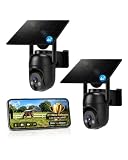
- 【4G LTE Network & No WiFi Needed】Cellular security camera include a pre-installed SIM card with 7-day unlimited trial data; auto-connects to the strongest U.S. network (Verizon/T-Mobile/AT&T). After the 7-day trial ends, subscribe to unlimited data for $19.90/month or $169.90/year via the UBox app to maintain remote access. Note: Each device requires a separate data plan subscription and cannot be shared. 100% wireless & no wifi needed—ideal for ranches, construction sites, vacation homes, or home security. (SIM card is non-replaceable)
- 【High-capacity Battery & Non-stop Solar Powered】 No wifi security camera that works without WiFi comes with a rechargeable battery and a 6W solar panel; the high-capacity battery and solar panel together provide continuous power for 365 days of uninterrupted operation, so you don't need to worry about it running out of power. Plus, with an IP65 weatherproof rating, this solar outdoor camera withstands rain, dust, heat, and cold, delivering reliable performance in harsh outdoor environments year-round. (Do not support WiFi)
- 【2K Color Night Vision & 360° Wide View】 This jobsite camera offers a 360° wide view and 4X digital zoom. You can remotely pan 355° and tilt 100° via the UBox App, which increases the flexibility of the 360 camera to get the broadest view without blind spots. By adopting color 2K HD night vision mode, the non wifi security camera could capture colorful footage up to 65ft. Even in the dark, the full-color night vision lets you always keep an eye on your assets. (Do not support auto-tracking)
- 【Smart Motion Detection & Real-Time Alerts】 Solar security cameras wireless outdoor features an advanced PIR motion sensor that detects movement and immediately sends an alarm notification to your mobile phone when humans or animals are detected. Built-in microphone and speaker let you listen and speak through the app to deter intruders. If you turn on white light alarm & siren alarm, solar camera will also emit dazzling lights and sirens, and you can customize detection zones and sensitivity to reduce unnecessary notifications.
- 【Flexible Dual Storage Options & Multi-Sharing】 Enjoy 30-day free trial cloud storage with easy playback anytime via the app— subscription is required after the 30-day trial ends. For added flexibility and data security, the 4g camera also supports local storage with a TF card up to 128GB (not included). Easily share cellular camera access with family members through the app, allowing remote property monitoring anytime, anywhere, even when abroad. (TF Card not included)
Button positions and light sequences may vary with hardware revisions. Blink’s Sync Module reset instructions are the appropriate reference for the exact generation.
Factory-reset a Sync Module
Use this only after ordinary troubleshooting and Wi‑Fi reconnection have failed.
- Unplug the Sync Module.
- Press and hold its reset button.
- While holding the button, reconnect the module to power.
- Continue holding for five seconds.
- Release the button when a blinking red LED appears.
- Wait through the LED cycle.
- When the module shows blinking blue and solid green LEDs, it is ready for setup.
If the expected lights do not appear, repeat the procedure once. A module that repeatedly fails to reach setup mode may need Blink Support rather than more resets. See Blink’s factory-reset guide.
4. Delete and re-add a Blink camera
Use this method when transferring ownership, correcting an account association, or restarting a corrupted device record. Do not use it merely because the camera is temporarily offline.
- Open the Blink app.
- Tap More (…) on the camera thumbnail.
- Tap Device Settings.
- Open General Settings.
- Tap Delete Device.
- Confirm the deletion.
The new owner can then add the camera to their own Blink account. For a complete system transfer, the current owner may also need to delete the Sync Module and the other cameras. A hardware reset alone should not be treated as proof that the device has been released from the previous account. Blink’s transfer guidance also recommends buying preowned hardware only when the ownership status is clear.
Which Blink models use a Sync Module?
This current U.S.-focused summary helps determine which troubleshooting path to use. Check the applicable model page before applying a button sequence to newer hardware.
| Device | Sync Module requirement | Typical reset or reconnection path |
|---|---|---|
| Mini, Mini 2, Mini 2K+, Mini Pan-Tilt | Not required for standalone operation; optional for compatible system features | Camera’s Change Wi‑Fi flow when standalone |
| Outdoor 4, Outdoor 2K+ | Model-dependent; Outdoor 4 systems use a Sync Module | Follow the applicable system and module flow |
| Indoor and Outdoor 3rd Gen | Required | Sync Module flow |
| Wired Floodlight Camera | Not required | Camera-specific app and power troubleshooting |
| Video Doorbell, Battery Doorbell 2K+, Wired Doorbell 2K+ | Varies by setup | Device-specific app flow; check doorbell power, chime, and wiring where applicable |
| XT and XT2 | Required | Sync Module flow |
| Indoor 1st Gen | Required | Sync Module flow |
| Sync Module 1st Gen, Sync Module 2, Core, XR, XR+ | These are system hubs, not cameras | Use the corresponding module reset procedure |
Blink’s compatibility guidance is the authority for model-specific requirements. Blink’s app labels can change after updates, so install the current app if the paths above do not match your screen.
Rank #4

- 【Stunning 4K UHD & 8x Zoom】 Capture tiny details and record 4K ultra-clear videos day & night with the Anona 4K indoor camera, say goodbye to 2K or 3K. The professional-grade lens and 8X zoom bring distant details into sharp focus, so you never miss some wonderful moments.
- 【AI Person/Pet/Crying Detection 】Thanks to the AI algorithms, Anona pet/baby camera is able to detect pets, person, and baby crying. And you will receive a notification from the phone app immediately. Keep track of your loved ones even when you are busy.
- 【Ultra-Smooth 360° Pan & 110°x Tilt】Just pan the camera in 360° or tilt it in 110° to see all around.One indoor security camera covers every angle. The auto-tracking feature will detect a moving object, follow it, and record it.
- 【Faster Dual-Band Wi-Fi 6 】Anona wifi cameras adopts the latest Wi-Fi 6 for data transmission - much faster and more smooth & stable than Wi-Fi 4. Dual-band Wi-Fi enables you to switch between 2.4 GHz and 5 GHz Wi-Fi for the best signal.
- 【Safer Local or Cloud Storage 】Opt to Anona Cloud to save videos on our cloud storage encrypted by AES-128, a highly secure and efficient encryption algorithm. If you prefer local recordings, just insert an up to 512 GB microSD card (not included) to the indoor cameras for home. 2 storage choices - you decide.
What to check when the reset fails
Camera remains offline
- Check whether the Sync Module is offline.
- Replace or reseat the batteries, or verify wired power.
- Move the camera closer to the Sync Module or router temporarily.
- Restart the modem and router.
- Check the camera and Sync Module signal-strength indicators in the Blink app.
- Try Change Wi‑Fi if the network or password changed.
Blink recommends aiming for three bars of connectivity. Its support material describes an approximate camera-to-Sync Module range of 100 feet (30 meters) in ordinary building conditions, but walls, metal, interference, and placement can reduce it. Blink cameras require a 2.4 GHz Wi‑Fi connection and Blink recommends at least 2 Mbps upload speed.
The BLINK-XXXX network does not appear
Keep the phone close to the device and confirm that the expected LED pattern has appeared first. On iPhone or iPad, enable Blink’s Local Network permission. On Android, enable Location permission when requested. These permissions can affect discovery of the temporary Blink network.
The home network is missing or the password fails
Confirm that the router broadcasts a compatible 2.4 GHz network, recheck the password, and temporarily move the device closer to the router. A mesh system, band steering, guest-network isolation, or restrictive router settings can prevent local setup even when other devices are online.
No light response
Try known-good batteries or a known-good power source and inspect the battery contacts. If the camera still produces no documented light pattern, the issue may be a failed power circuit, cable, button, or camera rather than a configuration problem.
Red light or an unexpected sequence
Allow the device to complete its startup cycle, then repeat the model-specific Change Wi‑Fi or Sync Module procedure. Do not assume that a light pattern from a Mini applies to a doorbell, floodlight, or newer 2K+ model.
Clips appear to be missing
Changing Wi‑Fi and power-cycling are different from deleting a device or clips. Blink states that deleted cloud clips cannot be restored. Local-storage availability depends on the Sync Module model, storage device, subscription status, and camera compatibility. Sync Module 2 supports compatible USB storage up to 256 GB, while Sync Module XR supports compatible microSD storage up to 256 GB; Sync Module Core does not support local storage or clip backup.
The Tool Desk
Outbyte PC Repair FREEClear out junk files and repair common Windows errorsFree Scan →Outbyte Driver Updater FREEFix the driver behind crashes, sound loss and screen glitchesFind Drivers →See Blink’s video-storage policy before deleting a camera or system.
When to contact Blink Support
Contact Blink when the device will not power on with known-good power, reset-button presses never produce the documented light pattern, a Sync Module repeatedly fails its factory reset, or a device remains attached to another account after the documented transfer process. Those symptoms point beyond an ordinary reboot or Wi‑Fi correction.
Do not buy replacement hardware until you have ruled out a changed password, weak signal, dead batteries, an offline Sync Module, and account ownership. A replacement camera will not fix a router or account problem. A Sync Module may be worth considering only for compatible local storage, system functionality, or Outdoor 4 range needs; Blink says Sync Module XR is not a conventional Wi‑Fi extender and its extended-range feature is tied to Outdoor 4 cameras.
Quick Recap
Product prices and availability are accurate as of the date/time indicated and are subject to change. Any price and availability information displayed on Amazon at the time of purchase will apply.
Do these 3 things before closing this tab:
1Repair Windows errors before they cause bigger problems2Scan for outdated or missing drivers - takes under a minute3Clear out junk files and repair common Windows errors
