Recommended Free Tools
Some links on this page are affiliate links: if you buy through them we may earn a commission, at no extra cost to you.
Build a personalized home soundtrack by separating a song into stems, changing its arrangement, and balancing the result for the rooms and listening habits in your home. A practical low-cost chain is Fadr for separation, AetherWave Music Studio for multitrack editing, and Suno or another remixer for fresh variations. Keep every source track, voice and sample within the permissions required by the service and your intended use.
Plan The Soundtrack Before You Remix
Write down where the music will play and what should change from room to room. A kitchen playlist may need short, energetic sections; a living-room set may need smoother transitions; a late-evening mix may need fewer vocals and gentler dynamics. These are creative targets you can describe in prompts or manual edits, not guaranteed presets.
- Choose source songs you are allowed to upload and remix.
- Decide whether you want a faithful rearrangement, a mashup, or a newly generated companion track.
- Set a listening length, such as a 30-minute room session, before generating variations.
- Keep a clean original file so you can return to the first arrangement.
Choose A Tool For Each Job
| Tool | Useful Home-Soundtrack Job | Access And Stated Limits |
|---|---|---|
| Fadr | Separate vocals, bass, drums, melodies and instrumental parts; detect MIDI, chords, key and tempo. | Basic plan has stem separation, MP3 downloads, MIDI detection and Remix Maker. Plus is $10/month and adds 18 stem types, one-hour uploads, WAV downloads, a DAW Stems Plugin and API access. |
| AetherWave Music Studio | Edit separated parts, record, add effects and use AI-assisted mixing in a browser multitrack studio. | Free plan has 0 monthly credits, 1 station and 1 band. Paid plans start at $4.99/month; paid plans support commercial use, WAV export and Suno integration. |
| Suno | Generate a companion song, extend an idea, replace a section or export stems for another mix. | Free Plan provides 50 credits per day and 8-minute audio uploads. It does not include commercial rights or stem separation. Pro starts at $8/month; Pro allows 20 song downloads per month. |
| MeloLab AI Remix | Create mashups, change genre or tempo, and make alternate DJ-style arrangements. | Free plan has 8 lifetime credits and personal-use licensing. Paid plans start at $12.42/month; WAV lossless export and commercial licensing apply on eligible paid plans. |
| 32bard | Quickly combine two songs while matching BPM and key, then arrange four lanes. | Free plan allows 3 full-quality mashup generations monthly. Pro is $9.99/month and adds unlimited mashups and WAV export. |
| StemConsole | Try live four- or six-stem mixing, loops, pitch-preserving changes and custom mix bounces. | Free plan includes 5 splits monthly, 2 multi-stem splits monthly and 3 splits before signup. Pro monthly is $6.99 with 100 splits per month. |
| Audjust AI Music Remixer | Set genre, BPM, vocals, melody and structure while preserving selected parts of a source. | Source uploads can be up to 8 minutes and 50 MB. Lite is listed at $10/month for 2,400 credits per year; jobs run asynchronously on the web platform. |
| Loudly | Remix uploaded audio, export separated stems, master a result and prepare distribution workflows. | Free generated tracks are limited to 30 seconds. Paid licensing rights depend on plan terms; the workflow is web-based. |
Step 1: Separate The Source Track
- Upload an owned or permission-cleared song to Fadr, StemConsole or Loudly.
- Choose the stem set that matches the edit. Start with vocals, drums, bass and instrumental parts when you need simple room-volume control.
- Download the available files in the format your next editor accepts. Fadr Basic lists MP3 downloads; Fadr Plus lists WAV downloads. StemConsole lists WAV and MP3 downloads.
- Label each file with the song name and stem type. This prevents a vocal stem from being mistaken for a full mix later.
If you need a different separation count or output format, check the current plan details before uploading a large library. The services do not state identical stem models or quality.
Quick wins for a faster PC:
Repair Windows errors before they cause bigger problemsFix Now →Scan for outdated or missing drivers - takes under a minuteDriver Scan →Step 2: Make A Home-Specific Arrangement
Use AetherWave For Manual Control
Import the stems into AetherWave Music Studio. Place the vocal, drums and bass on separate tracks, then create a quieter intro and outro for playback on a home speaker. Use its multitrack editing, effects and AI-assisted mixing to make transitions between rooms or sections. The Free plan has no monthly credits, so check the plan before relying on generation features.
#1 Best Overall
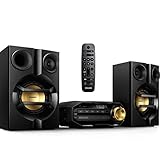
- Stream music wirelessly via Bluetooth from your smartphone - Bluetooth is a short range wireless communication technology that is both robust and energy-efficient The technology allows easy wireless connection to iPod/iPhone/iPad or other Bluetooth devices such as smartphones tablets or even loptops So you can enjoy your favorite music sound from video or game wireless on this speaker easily
- Dual amplifier for better sound performance - Dual amplifier ensures enhanced sound performance by reducing inter-modulation between the woofer and tweeter since each transducer is driven by its own dedicated amplifier The result is deep and powerful bass sounds that have high impact without interfering too much with the higher frequencies so they remain pure and detailed Utilized in combination with precise active crossover design better control on the phase and frequency response of each
- MAX Sound for instant power boost - MAX Sound technology produces an instant boost in bass maximizing volume performance and instantly creating the most impressive listening experience with just the touch of a button Its sophisticated electronic circuitry calibrates existing sound and volume settings instantly boosting bass and volume to maximum levels without distortion The end result is a noticeable amplifying of both sound spectrum and volume and a potent audio boost that will add mileage
- Audio-in for portable music playback - The Audio in connectivity allows direct playback of Audio in content from portable media players Besides the benefit of enjoying your favorite music in the superior sound quality delivered by the audio system the Audio in is also extremely convenient as all you have to do is to plug your portable MP3 player to the audio system
- Digital tuning with preset stations for extra convenience - Simply tune into the station that you want to preset press and hold the preset button to memorize the frequency With preset radio stations that can be stored you can quickly access your favorite radio station without having to manually tune the frequencies each time
Use Audjust For Prompted Variations
Upload a source within the stated 8-minute and 50 MB limits. Describe an outcome such as: “Keep the vocal melody, reduce drum intensity, set a relaxed mid-tempo feel, and add a clean eight-bar intro for a living-room playlist.” Audjust lists controls for genre, BPM, vocals, melody and structure; it does not promise instant jobs, so wait for the asynchronous render.
Use MeloLab For Mashups
Choose Mashup mode when two songs should share one home session. Ask for a clear handoff, such as “Song A vocal over Song B drums for the chorus, then return to Song A instrumental.” Set tempo controls carefully and render an alternate arrangement. Free credits are lifetime credits, and the free plan is personal-use only.
Rank #2

- 20W (10W+10W) RMS Output for Clear Sound in a Compact Package: CD player, radio, and wireless Bluetooth playback all in one, together with stereo speakers; with 10cm Woofer & 6cm Tweeter with Bass Reflex Port
- Stream from Your Smartphone or Flash Drive: Fill your room with your favorite tunes from any streaming platform, controlled by your smartphone or any connected device, using wireless Bluetooth playback; USB port lets you play back from a flash drive
- Bluetooth Re-Master for High-Quality Playback: PM270 compensates the signals lost due to data compression when streaming Bluetooth, resulting in in high-quality playback of sound sources from Bluetooth-compatible devices such as smartphones and tablets
- Easy & Convenient to Use with Customizable Sound: A simple interface with a Bass and Treble button, as well as "My Sound" presets, let you tailor your sound to how you like it; included Remote lets you control PM270 from wherever you are
- Sleek, Minimalist Design: Stylish, matte textured front panel complements any style of décor
Step 3: Generate A Companion Track
When the source remix needs a matching instrumental, create a separate companion in Suno. Describe the listening context and structure rather than naming an artist: “Warm evening home soundtrack, restrained drums, soft synth bed, instrumental first verse, short chorus, seamless-feeling outro.” Suno supports lyrics, vocals, instrumentation, production, editing, remixing, extensions, section replacement and stem export. Free creations do not include commercial rights or stem separation, so check the applicable plan before publishing or monetizing.
Free tools Windows power users keep installed
One-click scans. No signup required.
Step 4: Build Two-Song Transitions
For a fast mashup, use 32bard. Select two songs, let the service check BPM and key compatibility, review the four-lane arrangement, and preview the changeover before exporting. The free plan provides three full-quality mashup generations per month; WAV export is listed with Pro. This workflow is centered on two-song combinations, so use a multitrack editor for a longer sequence.
Rank #3

- BIG 80W RMS STEREO SOUND WITH 2-WAY BOOKSHELF SPEAKERS – Fill larger rooms with rich, immersive audio thanks to powerful 80W RMS output, upgraded 2-way bookshelf speakers, 4" woofers, 0.75" tweeters, and bass-reflex ports that deliver deep bass, crisp highs, and balanced stereo sound for music, movies, and more.
- UPGRADED BLUETOOTH 5.4 WITH AURACAST – Stream music wirelessly from your smartphone, tablet, or laptop with the latest Bluetooth 5.4 technology for faster pairing, a stronger connection, and smoother streaming. New Auracast support lets you share and broadcast audio to compatible speakers for an expanded listening experience.
- ALL-IN-ONE MUSIC SYSTEM FOR EVERY SOURCE – Enjoy your entire music collection with a built-in CD player (CD, CD-R/RW & MP3 CDs), FM digital radio with preset stations, USB playback supporting MP3, WAV, WMA, and FLAC files, plus a 3.5mm Audio-In for connecting external audio devices.
- CUSTOMIZE YOUR SOUND WITH THE PHILIPS ENTERTAINMENT APP – Personalize your listening experience using the Philips Entertainment App with Digital Sound Control, adjustable bass and treble, custom EQ settings, and convenient source selection directly from your compatible smart device.
- PREMIUM COMPACT DESIGN WITH MODERN FEATURES – Combining timeless style with modern performance, this micro music system features an easy-to-read LED display, intuitive front controls, remote control, clock, alarm, sleep timer, and a sleek design that fits beautifully in living rooms, bedrooms, offices, and apartments.
Step 5: Balance And Export A Listening Copy
- Lower competing stems first: reduce bass when a small speaker sounds crowded, or reduce vocals when conversation is the priority.
- Keep the vocal and melody intelligible at low volume, then check the loudest chorus at the volume you normally use.
- Preview the full sequence on the actual home speaker or phone that will play it.
- Export a listening copy from the tool that supports your needed format. AetherWave paid plans list WAV export; StemConsole lists WAV and MP3 downloads; Loudly exports separated stems.
- Save the project name, source permissions and plan used alongside the audio file.
Rights And Consent Checks
Only upload music you have permission to process. Get consent before isolating or transforming a recognizable person’s voice, and follow each service’s rules for covers, samples and commercial use. MeloLab’s free plan is personal-use only; Suno’s Free Plan excludes commercial rights; AetherWave lists commercial use on paid plans; Loudly says licensing depends on the paid plan; Audjust lists commercial use for generated music; and RiffGen Pro lists a commercial license if you choose that service for an additional variation. If your intended use is not clearly covered, check the vendor’s current terms before sharing the soundtrack.
A Simple Budget Workflow
Start with Fadr Basic or StemConsole Free to learn what your source can yield. Move the stems into AetherWave for arrangement and mixing. Add Suno only when you need a new companion section, and use 32bard or MeloLab when the centerpiece is a two-song mashup. Keep exports private until the license for every source and generated part matches your planned home use.
Quick Recap
Rank #4

- Your Music, Your Way - Enjoy crystal-clear audio from your CD collection, MP3-CDs and USB devices or stream your favorite tracks wirelessly via Bluetooth. Indulge in your favorite sounds with one sleek, compact system.
- Channel hop, effortlessly! Preset up to 10 of your favorite FM radio stations and switch between them at the push of a button. The perfect retro listening experience, powered by up to the minute technology!
- Small but Mighty - Don't be fooled by the modest proportions of our micro hifi system. Featuring a dual amplifier, it delivers an impressive max 18W output to fill your space with pure, powerful sound.
- Classic Retro Styling - Designed for compact spaces and Cassette Tape Player, our micro stereo system brings a touch of retro chic to any room in your home or workspace. With timeless bookshelf speakers, it will fit right in on your shelf or sideboard.
- Your Music at Your Fingertips - Manage your music from anywhere in the room with our infrared remote control. Skip tracks, switch stations or adjust volume from the comfort of your couch. Simply sit back, relax and enjoy your favorite sounds.
Product prices and availability are accurate as of the date/time indicated and are subject to change. Any price and availability information displayed on Amazon at the time of purchase will apply.

