Free tools Windows power users keep installed
One-click scans. No signup required.
Some links on this page are affiliate links: if you buy through them we may earn a commission, at no extra cost to you.
Make branding mockups by placing one logo on three kinds of previews: a brand-kit scene, a shirt, and packaging. For a phone-friendly workflow, create or prepare the logo, use AnyLogo for brand-kit mockups, then place the artwork on a shirt with GoStudio AI Shirt Design Tool and build a packaging visual with Packify AI Mockup Generator. These previews help you see whether your identity looks consistent before you show it to customers; they do not establish that a design is ready for manufacturing.
Choose A Mockup Route For Each Brand Asset
| Asset | Tool | What The Listed Workflow Supports |
|---|---|---|
| Logo and brand presentation | AnyLogo | Build a brand kit with mockups and social media graphics; its Mockup Generator places a logo into photorealistic scenes. |
| T-shirt | GoStudio AI Shirt Design Tool | Upload artwork, describe placement, and render it on a shirt with fabric folds, shadows, and lighting. |
| Packaging | Packify AI Mockup Generator | Upload a design or logo, add product and brand details, then refine colors, materials, text, background, and lighting. |
For a simple template editor spanning branding, apparel, and packaging, Mokkify says it offers 29 branding, 23 apparel, and 37 packaging mockups. Its editor accepts PNG or JPG and lets you adjust position, size, and background. These listed counts describe its categories; they do not identify which particular template suits your product.
Prepare The Logo And Artwork On Your Phone
- Settle on one logo version. If you are still making the mark, AnyLogo says new accounts include credits to generate and refine logos. Pixella Logo Maker says it can create logo variations, a primary color palette, and brand fonts as a brand kit. Choose one version and palette before building the mockups so the shirt and package read as the same brand.
- Save a clean artwork file. Keep the logo and any shirt graphic available as an image file on your phone. GoStudio supports PNG, JPG, and SVG uploads. If you use Mokkify, its stated upload formats are PNG and JPG. Use a format accepted by the specific tool you choose.
- Write down the placement and color choices. For example: “small mark on the left chest; cream logo on a dark shirt; black logo on a kraft-colored box.” These are your design directions, not guaranteed presets. Packify says you can refine colors, materials, and text; GoStudio says to describe placement.
Make A Logo Mockup
- Open AnyLogo and use its logo and brand-kit workflow if you need a logo before making the preview.
- Choose the logo version and brand direction you want to present. AnyLogo says its brand kit includes mockups and social media graphics, and its Mockup Generator places a logo into photorealistic scenes.
- Export the mockup and logo assets for the intended use. AnyLogo says it can export web- and print-ready image files for the logo and brand-kit assets. Keep the logo file as well as the scene mockup: the scene is a presentation image, while a separate logo asset is more useful when another tool asks you to upload artwork.
Make A T-Shirt Mockup
- Open GoStudio AI Shirt Design Tool and upload your shirt artwork or logo. Its listed accepted formats are PNG, JPG, and SVG.
- Describe where the logo should sit and how it should look, such as a small left-chest mark or a larger centered graphic. GoStudio says its AI applies artwork to the shirt and accounts for fabric folds, shadows, and natural lighting.
- Review the rendered image at phone size. Check that the mark is legible and that the placement matches the brand presentation you want. If you need a garment cut out on transparency, Screenhance Apparel Mockup Generator says it can place artwork on photographed garments and merchandise, with the items cut out on transparency.
- Download the result. GoStudio says its downloads have no watermark and supports PNG, JPG, and SVG. Treat this as a visual mockup; the listed facts do not establish garment sizing, print dimensions, or print-production specifications.
Make A Packaging Mockup
- Open Packify AI Mockup Generator and upload your logo or existing design. Add the product and brand details requested for the mockup.
- Refine the packaging colors, materials, text, background, and lighting until the preview matches your brand direction. Packify describes a workflow that can continue from mockup selection and packaging design to 3D rendering and final dieline generation.
- Inspect the logo and wording on the rendered package, especially at the small size it may appear on a phone screen. Packify says you can share, download, or continue editing the result. A generated preview alone does not confirm that its package dimensions or dieline meet a supplier’s production requirements; check those specifics with the packaging supplier.
Check The Three Mockups Together
- Compare the logo shape, colors, and wording across the logo scene, shirt, and package. Fix any mismatch in the source artwork or design directions, then regenerate the affected preview.
- Check that the mockups clearly show the intended item and logo placement. A realistic scene can help present a concept, but it does not prove how a physical item will print or look in person.
- Keep the downloadable artwork and mockup images organized separately on your phone so you can find the original logo when you need to upload it again.
Check Rights And Production Details
AnyLogo says logos generated with its service are yours to use for your brand, website, products, and marketing. That statement is specific to AnyLogo; the facts here do not establish matching rights for mockups or assets from the other tools. Check each vendor’s current terms for the output you plan to publish or sell, and ask your printer or packaging supplier to confirm production files, dimensions, and print requirements.
Quick Recap
Best Value

- Customize by uploading a logo, image, photo, or any combination you prefer. Personalize further by entering your own text and maximize your customization with front and back printing options.
- Classic, casual tee with a ribbed crewneck, straight hem, durable-double needle stitching, and short sleeves for everyday comfort.
- Available in an inclusive range of sizes for the perfect fit, including fits for men, women, toddlers, kids, big and tall, and plus size. For classic styling in all-gender, unisex sizes, consider the Men's fit type.
- Printed in the USA using Direct-to-Garment (DTG) printing technology. Personalize both sides for printing on the front and back of the t-shirt with no additional fees.
- Order in bulk quantities of up to 250 items.
Rank #4
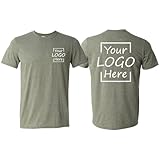
- CUSTOMIZABLE TSHIRTS – Create your own t-shirt with your choice of logo, photo, text, or artwork. Whether you're promoting your brand, business, or a special occasion, these personalized shirts let you showcase your creativity with high-quality printing that lasts. Make your design stand out with custom prints on both the front and back.
- IDEAL FOR BUSINESSES AND WORKWEAR – These customize shirts are perfect for business, corporate teams, trade shows, staff uniforms, school events, bachelor parties, and family reunions.
- BULK AND INDIVIDUAL ORDERS – Whether you need a single custom t-shirt or bulk orders for your company or event, we offer competitive pricing and fast production to meet your deadlines.
- PREMIUM QUALITY – Our unisex shirts are made from soft, breathable, and durable fabric, ensuring all day comfort for womens, mens and kids. This customizable shirt maintain its shape well after multiple washes, making them a reliable choice for everyday wear.
- MULTIPLE SIZES – Available in a wide range of sizes for men and women, ensuring the perfect fit for everyone. Choose from classic or modern styles to match your preference.
Rank #3

- Custom T Shirts : Customize Your Shirt on Both the Sides Exactly the way you want it to be ! Perfect for Your Business with Logo's or Family Events , Birthdays , Events , Holidays , and more Events. Just Choose a Color and Size and click CUSTOMIZE NOW to start personalization.
- Background Removal Option : We Offer an option to our Customers to have the Background Removed from the Image before Printing It. Kindly Select YES for the Background Removal Option after you enter CUSTOMIZE now Page. For Some Customers , We Also Redesign the Whole Design if Possible to make it Look more Vibrant and Prominent.
- Repeat Orders : For Repeat Orders , Simply choose ur color and size and type your previous order number in the space provided for text, you can also mention the different sizes in the additional notes section provided at the bottom and select the total quantity at check out for the total number of shirts in the order.
- We Use Direct-To-Garment Printing technology with Branded Inks with the Top most Reputation, and unline Vynl or Heat Transfers, The DTG prints Last around 80 to 100 washes without Cracks or Peel Off, and can be Hand Washed, Machined Washed and Iron Pressed Too.
- The Garment is for Unisex Adult and is made out of 30 Single Thread Count for Super Breathabilit and Comfort. Sizing Chart is Included in Images for Size Reference, kindly make sure your Size and Designs are upto your requirement as we do Not offer Returns on Customized Products.
Rank #2

- Customize by uploading a logo, image, photo, or any combination you prefer. Personalize further by entering your own text.
- Classic, casual tee with a ribbed crewneck, straight hem, durable-double needle stitching, and short sleeves for everyday comfort.
- Available in an inclusive range of sizes for the perfect fit, including fits for men, women, toddlers, kids, big and tall, and plus size. For classic styling in all-gender, unisex sizes, consider the Men's fit type.
- Order in bulk quantities of up to 250 items.
- Printed in the USA using Direct-to-Garment (DTG) printing technology.
#1 Best Overall

- 💝 Designed & Printed in the USA 💝: Feego custom tees offer top-tier full printing in the USA, ensuring quick turnaround and strict quality control. Personalizing is easy: pick size (XS-3XL) and color, upload your image/text/photo, and we handle printing to packaging, bringing your vision to life seamlessly.
- 💝 100% Premium Pre-Shrunk Cotton 💝: Crafted from high-grade 100% pre-shrunk cotton, these tees have soft, breathable texture gentle on all skin. Non-see-through fabric ensures modesty, with cotton’s durability enduring 80+ washes without fading/stretching. Regular unisex fit hugs comfortably, perfect for daily wear, outdoor activities or events.
- 💝 Non-Toxic Inks & High-Tech Printing 💝: Eco-friendly non-toxic inks paired with advanced printing deliver sharp lines, vibrant long-lasting colors. Every design—family photo, slogan, artwork—comes crisp and vivid for a "WOW" effect. Safe for humans/pets, no harmful chemicals involved.
- 💝 Front & Back Customization 💝: Elevate your design with back printing! Add a complementary phrase, image or photo to turn tees into two-sided canvases. Split jokes or showcase memories front/back—let creativity shine brighter.
- 💝 Thoughtful Personalized Gift 💝: Custom cotton tees make heartfelt gifts for any occasion. Design unique shirts for birthdays, weddings, reunions—add name/date/joke for a personal touch. A USA-printed, soft cotton tee isn’t just apparel, but a cherished keepsake.
Product prices and availability are accurate as of the date/time indicated and are subject to change. Any price and availability information displayed on Amazon at the time of purchase will apply.
Independent reader supportYour contribution helps us test, update, and keep practical guides available for everyone.
