Quick wins for a faster PC:
Repair Windows errors before they cause bigger problemsFix Now →Fix the driver behind crashes, sound loss and screen glitchesFind Drivers →Some links on this page are affiliate links: if you buy through them we may earn a commission, at no extra cost to you.
To keep printer ink from drying out, use your inkjet regularly—about every one to two weeks is a practical rule of thumb—and shut it down with its Power button so the printhead can park and seal. The ink usually does not dry throughout the whole cartridge; the more common problem is ink drying or thickening at the tiny printhead nozzles. A page with black, cyan, magenta, and yellow is more useful than a black-only page for exercising all the ink channels. The right interval and storage procedure vary by printer, so follow its manual for long absences.
What dries out in an inkjet printer?
Ink can dry at an exposed cartridge outlet or, more commonly, at the printhead nozzles where droplets leave the printer. A partial blockage can cause white gaps, horizontal lines, streaked text, missing colors, faded images, or blank pages—even when the printer reports ink remaining. Ink-tank models can also develop restrictions in the printhead or ink-delivery path; their larger reservoirs do not make them immune to clogs. HP explains that the printhead nozzles, rather than the bulk tank, are typically the vulnerable point.
A poor print is not proof that ink has dried. A cartridge may be empty, expired, improperly seated, or still sealed by protective tape. An air bubble, blocked ink path, paper or print-setting issue, or software problem can also produce weak or blank output. Check the printer’s error messages and run a nozzle-check or diagnostic pattern before deciding what has failed.
What’s actually slowing this PC down?
Pick the symptom - the matching free tool is one click away.
A simple routine to prevent clogs
- Print every one to two weeks. This is a practical general target, not a guarantee for every model. Follow a different interval if your manual specifies one.
- Exercise every installed color. Print a nozzle-check pattern or a small page with black text and cyan, magenta, and yellow blocks. A black-only sentence will not use the color channels.
- Shut down normally. Use the printer’s physical or on-screen Power button and wait for its shutdown cycle to finish. Do not cut power while the printhead is moving.
- Keep cartridges installed. Avoid removing them just to store them; removal can expose outlets or the printhead and may introduce air or cause leaks.
- Place the printer sensibly. Avoid direct sun, heaters, radiators, heavy dust, and locations with extreme temperature swings. Use the temperature and humidity limits in the manual rather than assuming one range suits every printer.
- Clean only when output shows a problem. Cleaning cycles consume ink. They are not a routine substitute for printing.
Some printers perform maintenance while powered on or connected to power. Leaving one connected may help it carry out those cycles, but can use ink and electricity; behavior varies by model. Brother warns that frequently unplugging or leaving certain machines unplugged can affect printhead life and ink use, and its documented automatic-cleaning behavior applies to supported models, not every printer. Check your manual and balance that maintenance against your power and ink costs. Brother’s guidance on power and cleaning describes the model-specific caveat.
#1 Best Overall

- Printhead Cleaning Kits for Inkjet Printers: Fosgoit Inkjet Printhead Cleaner for Epson Printer, Ink Jet Cleaning Solution for Canon Inkjet, Printer Printhead Cleaning Kit Cleaner for Print Head, Inkjet Cleaning Solution Kit for HP Printer Head, Inkjet Printhead Cleaning Kit Epson Eco Tank, Ink Cartridges Cleaning Solution for et-4800, Ink Cartridges Cleaner Solution for Epson, Printhead Cleaner for Print Head, Inkjet Cleaner Solution for Canon Print Head
- Cleaner for Inkjet Printers: Fosgoit Printhead Cleaning Solution for Inkjet Printers are Suitable for Epson EcoTank WorkForce Inkjet Printers, Print head Cleaner Solution for HP Officejet HP Deskjet Canon Inkjet Printers. Inkjet Cleaning Solution for Epson 2720 2750 2760 2800 2803 2850 3760 4700 4800 5170 8500 8550 15000 Inkjet Printers; Epson WF 7710 7720 110 2830 2860 3820 4820 4830 7310 7820 7840 Inkjet Printers; Epson XP 330 340 424 15000 4100 4105 7100 960 Inkjet Printers
- Compatible with HP Epson Canon Inkjet Printers: Print Head Nozzle Cleaning for HP OfficeJet 8600 8610 8620 8025 6835 3830 5255 6230 6700 6978 7740 8022 8710 Inkjet Printers HP Envy 4520 5055 6052 6055 6055e 6075 6452 HP DeskJet 2622 2752 2752e 2755 2755e Inkjet Printers, Inkjet Cleaning Solution for MFC J491DW J5845DW J995DW J1010DW J1170DW Inkjet Printers, Cleaning for Inkjet Printer for Canon MX492 MX922 MG2522 MG2525 MG3620 G3260 TS3520 TS5320 TS6320 Inkjet Printers
- Compatible Design of Printers Cleaning Solution: The yellow nozzle is for Epson and printers. The white is for HP and Canon printers. Each size of the nozzles is specifically designed to fit different ink fig port, which can avoid liquid leakage. Cleaning your inkjet printer with an effective printer head cleaner instead of discarding, it can bring your printer a brand new look and help you save money. Printer cleaning supplies protect the printhead and extend your printer life!
- Wide Applications of Printer Cleaner: Fosgoit printer head cleaning kit can be used for OEM factory ink, dye ink, pigment ink, sublimation ink, heat transfer ink. Our print head cleaning solution contains degradation factors, which can dissolve the hard block and other soluble impurities left after the ink hardens, making the ink flow more smoothly and wouldn't corrode the print head.
Shutting down and leaving the printer unused
Finish or cancel print jobs, press Power, and wait until the printer finishes its parking or shutdown cycle. On many inkjets, normal shutdown lets the printhead return to a capped position that helps limit exposure to air. Pulling the plug immediately can interrupt that process. HP’s cartridge guidance recommends normal Power-button shutdown.
For a short absence, leave cartridges in place and shut down as the manufacturer directs. If the printer is designed to remain connected for maintenance and the location is safe, keep it connected. For several weeks or longer, consult the specific model’s storage, transport, or pre-storage instructions. Some Epson professional models require pre-storage maintenance before being turned off for more than a week; that is not a universal procedure for other Epson models or brands. Epson’s instructions for applicable models illustrate why long-term storage is model-specific.
Rank #2

- 【Printhead Nozzles Cleaner 100mL for All Inkjet Printers】Absonic Inkjet Printer Cleaning Solution for Epson Inkjet Printer, Printer Nozzle Cleaning Kit Solution for HP Inkjet Printer, Printer Printhead Cleaning Kit for Canon Inkjet Printer, Printer Head Cleaning Kit for Brother Inkjet Printer, Printhead Cleaner Kit for Samsung Printer, Print Head Cleaner Kit for Lexmark Printer, Printer Head Cleaner Kit for DTF Printer (If you don't find your inkjet printer model, you can always contact us)
- 【Printer Cleaner Solution for All Inkjet Printers】Absonic Inkjet Printhead Cleaner Kit is suitable for Epson EcoTank/Epson WorkForce/Epson Expression/Epson Stylus Inkjet Printers, such as ET 2720 2750 2760 3760 2760 2800 4800 4850; WF 7710 7720 3820 3823 4820 4830; XP 4205 7100 970, Printer Head Cleaning Solution for Canon MegaTank/Maxify/Office and Business Inkjet Printers, such as MX492 MX922 MG2520 MG2522 MG2525 MG3620 GX5020 IP110 G3260 G3270 G6020 TS702a TS3520 TS5120 TS5320 TS6320
- 【Print Head Nozzles Cleaner with All Inkjet Printers】Print Head Cleaning Solution for Brother MFC Inkjet Printers, such as J825DW J1010DW J1205W J1170DW J4335DW J4535DW J4620DW J5340DW; Printer Printhead Cleaning for HP Officejet/HP Deskjet/HP Envy/HP Smart Tank Inkjet Printers, such as HP OfficeJet 3830 4650 7740 8015 8020 8035 8210 8600 6978 Pro 9015 9025 9018, HP Envy 4520 5055 6055e 6455e 7955e, HP DeskJet 2640 2700 2723e 2742e 2755e 3755e 4155 4158, HP Smart Tank 5101 6001 7001 7301 7602
- 【Ink Cleaner for Inkjet Printer】Ink Cartridge Cleaner Ink Jet Head Cleaner Ink Jet Printer Cleaner Kit Cleaner for Ink, Inkjet Printhead Cleaning Solution Print Head Cleaner for Sublimation Ink Printhead Nozzles Cleaner Kit Print Head Cleaner Set Inkjet Cleaning Solution Cleaning Printer Head Cleaning Printer, Ink Head Cleaning Kit Inkjet Cleaning Kit Inkjet Cleaning Solution Kit Inkjet Head Cleaner Ink Head Cleaner Kit Ink Cartridge Head Cleaner Kit
- 【Printhead Cleaning Solution for Inkjet Printer Easy to Operate】The Printer Printhead Nozzle Cleaning Kit includes 100mL Inkjet Print Head Cleaning Fluid, syringe, white nozzle, yellow nozzle, L-shaped tubes, silicone tubing, gloves, and instructions. Inkjet Printhead Cleaning Kit comes with different sizes of nozzles to fit different ink-filling ports. The yellow nozzle is for Epson and Brother Inkjet Printers; The white nozzle is for HP and Canon Inkjet Printers
Before a long storage period, check the manual, run a nozzle check, and perform any prescribed pre-storage maintenance. Keep the printer level unless its instructions say otherwise. Do not remove ink, wrap the printhead, or improvise with tape, plastic wrap, wet paper towels, or household liquids. If moving the printer, follow its transport procedure: some models travel with cartridges installed, while others need special preparation.
Recommended Free Tools
How to store spare cartridges
Unopened cartridges
Keep unopened cartridges in their original sealed packaging until installation. Store them in a cool, stable place, away from direct sunlight and heat, and observe the printed expiration or install-by date. Do not freeze them or expose them to extreme temperatures. Storage limits depend on the supply: HP gives a 5°F to 95°F (-15°C to 35°C) range for applicable supplies, not a universal room-temperature rule. HP also cites an approximately 18-to-24-month typical shelf life for properly stored genuine HP cartridges; that figure is not a guarantee for other brands, third-party supplies, or every HP product. HP’s ink-life guidance provides that brand-specific benchmark.
Rank #3

- Wide Compatibility: Wawocs printhead cleaning kit is highly compatible with All inkjet printers like Epson, Canon, Brother, HP inkjet printers and so on. It would not corrode the printer nozzle and no damage to your printer. Our printer cleaning kit is compatible for Epson WF2750 WF3720 WF7620 WF7710 WF7720, Epson Ecotank ET-2800 ET-2803 ET-4800 ET-8500 ET-2400, HP 8600 8610 8620 6968 8210 8710 8715 8725 8720 8730, Canon G3260 MX922 TS6320 TR8520 TS9020, Brother MFC printers, etc
- Remove Blockage Professionally: This printer cleaning kit is design for cleaning clogged printer head effectively. Inkjet printer cleaning kit for Epson ecotank inkjet printers. Printer head cleaning kit for Canon. Printer nozzle cleaner for HP officejet. Brother printer cleaner for clear clogged printer nozzle. Printer head cleaning solution kit for Samsung printer. It also work for dtf printer like Epson ET-8550, XP-15000, L1800, L805, R1390, R2400
- Easy to Use: There is a clear instruction coming with our printer head cleaner kit. It's recommended to read the instruction or our product video before you clean your printer. Also, the different cleaning tools in the package can help you to clean the print head more convenient and easier
- Excellent Performance: This printer head cleaning kit has strong cleaning ability, use for cleaning dye ink, pigment ink, sublimation ink etc. It can effectively help to dissolve printer head clogging (vertical stripes, horizontal stripes, text printing, or incomplete patterns), and improve the printing effect of your inkjet printer, make it like brand new
- Package Contents: Wawocs printer cleaning solution includes: 1 x print head cleaner (100 ml) , 1 x syringe (5 ml), 1 x silicone tube, 1 x white nozzle, 1 x yellow nozzle, 2 x L-shaped tubes, 1 x gloves, 1 x instructions. Different tools fit for cleaning differenct kinds of inkjet printer head.
Opened cartridges
If a cartridge has been opened, leaving it installed in the printer is usually safest unless its manual says otherwise. If you must remove it, reinstall it promptly or use the protective cap or clip supplied for that cartridge. Hold it by the plastic body; do not touch the nozzles or electrical contacts, and do not cover the nozzle plate with ordinary tape.
Storage instructions can be product-specific. For certain HP supplies, HP recommends an airtight plastic tub rather than a plastic bag and gives orientation instructions that differ by cartridge type. Do not apply that container or orientation rule to other brands or supplies without checking their instructions. See HP’s applicable cartridge-storage instructions. Refrigeration is not a general solution: condensation, freezing, or temperature changes can harm a supply. Use the manufacturer’s packaging and storage guidance instead.
Rank #4
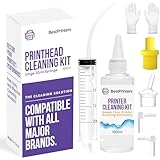
- High Success Rate: Save hundreds of dollars with our best printing cleaning kit for restoring print quality on inkjet printers. Access additional video support of the best printers cleaning kit on YouTube Channel. Remember to run a printhead or power cleaning after use to bring ink back into the printhead
- User-Friendly Design: DIY Print Head Cleaning Kit for Epson. No expertise is required! This cleaning kit fixes common printing issues like discoloration, missing colors, low-quality prints, blank pages and streaks
- Wide Compatibility: Works with popular printer models, including Epson EcoTank, Epson WorkForce HP SmartTanks, HP OfficeJet, Canon Pixma, Brother MFC, DTF, Sublimation and many more.
- Complete Cleaning Solution: Includes a LARGE 20ml print head cleaner syringe and multiple attachments for hp officejet printhead cleaning kit. Our ionized cleaning solution is safe to use on all printer components
- Complete Printhead Cleaning Solution: Includes specialized cleaning fluid, syringes, and tools; printer cleaning kit flush cleaner removes dried ink buildup; extends printhead lifespan and delays replacement
If the printer has already started clogging
- Check basic causes first. Confirm the cartridge is seated correctly, remove any protective tape left on a new cartridge, check ink levels and error messages, and verify paper and print settings.
- Print a nozzle check or diagnostic page. Use the printer’s control panel or its software to identify which colors or lines are missing.
- Run the built-in cleaning utility once. Look under menus such as Setup, Maintenance, Tools, or Clean Printhead; names vary by printer and software. Start with the lowest cleaning level available.
- Check the result before repeating. Print another nozzle check. Repeat only if the manual permits it and the pattern is improving; let the printer rest for the time specified in its instructions rather than running deep cleans back-to-back.
- Escalate cautiously. Manual cleaning or disassembly can damage nozzle plates, contacts, seals, cables, or sensors. Do it only when the model’s instructions authorize it. HP’s general advice permits distilled water for certain cleaning procedures and warns against tap water and alcohol, but that does not make those methods suitable for every printer.
- Replace or service if recovery fails. An old, expired, leaking, or damaged cartridge may need replacing. If repeated, permitted maintenance produces no improvement, the printhead or ink path may need service—or the repair may cost more than replacing the printer.
HP’s blank-page troubleshooting guide covers diagnostic checks and cleaning limits. Cleaning uses ink, and repeated cycles may fill a waste-ink absorber or maintenance cartridge on models that have one. Those service systems are not present on every home printer.
Free tools Windows power users keep installed
One-click scans. No signup required.
Habits and fixes to avoid
- Do not pull the plug during shutdown or while the printhead is moving.
- Do not remove cartridges for routine storage when the manual does not call for it.
- Do not run cleaning cycles as a preventive habit or keep repeating them without checking results.
- Do not scrape, poke, or soak a printhead or cartridge, or use alcohol or tap water unless the model’s instructions explicitly allow it.
- Do not assume a full ink reading proves that ink can reach the nozzles.
- Do not assume an ink-tank printer can sit unused indefinitely. Its reservoir may be better protected, but liquid ink still passes through vulnerable printhead nozzles.
Ink formulation, age, sealing, and printer design all affect how supplies behave; there is no universal rule that every third-party or refilled cartridge dries faster. Manufacturers do warn about potential quality, clogging, or support issues with some non-genuine, refilled, or expired supplies. Treat those as manufacturer-specific cautions, not proof that all third-party ink causes damage. For example, Brother discusses print-quality risks from non-genuine supplies, and HP sets out its own supply and warranty guidance.
Best Value

- Efficient Active Factor:Osinkjet 250ml printhead cleaning kit contains high-efficiency active factors. It can break down various types of inkjet printer blockage. Printhead cleaner solves the problem of blurred printing due to print head clogging and avoid damage to the printer nozzle. 250ml printhead cleaning solution ensures thorough cleaning.
- Cutting-Edge Printhead Care: Our advanced Printhead Cleaning Kit is tailored to tackle various printhead issues commonly encountered. Whether it's stubborn clogs, nozzle blockages, or routine maintenance, our comprehensive printhead solution ensures effective cleaning, keeping your printer running smoothly.
- Effective Printhead Nozzle Solution: Say goodbye to persistent clogs with our powerful solution for unblocking printer nozzles. Our printhead cleaning kit targets and eliminates blockages, restoring optimal ink flow and ensuring crisp, clear prints every time. Keep your printer nozzles free from debris with our advanced cleaning formula.
- Compatible with All Major Brands: Our printer cleaning kit is engineered to work flawlessly with a wide range of printers, ensuring it's suitable for use with popular models from Epson, HP, Canon, Brother, and more. Experience seamless compatibility that meets the unique needs of different printer technologies.
- Eco-Friendly Cleaning Cleaner: Our cleaner kit not only restores print heads but also encourages environmentally friendly printing practices. Prioritizing sustainability, our printer head cleaning kit includes an eco-conscious flush that unclogs print head nozzles and minimizes ink wastage, fostering a greener printing experience.
Would another printer type suit you better?
| Printer type | Best fit | What to know about drying |
|---|---|---|
| Cartridge inkjet | Low-volume color or photo printing, especially when purchase price and compact size matter. | Small supplies and cleaning cycles can make long idle periods costly. Some models have a printhead built into the cartridge, making replacement relatively simple. |
| Refillable ink-tank inkjet | Regular color printing when lower refill cost and larger ink supply matter. | The bulk reservoir is better protected from evaporation, but the printhead can still clog. Tanks reduce some ink costs; they do not remove the need for periodic use. |
| Laser | Mostly text, especially when the printer may sit unused for weeks or months. | Toner is dry powder and does not dry like liquid ink. Laser printers can still have other consumable or image-quality problems, and color-photo results may not suit everyone. |
Keep an inkjet if it prints normally with occasional use, you need color or photo quality, and maintenance costs are acceptable. Consider an ink tank if you print color regularly and want to reduce refill costs, while accepting that its printhead still needs care. If you print only a few times a year—particularly mostly black text—a monochrome laser printer is often a better match because it avoids liquid-ink nozzle drying. HP’s comparison explains the narrower advantage of toner: it does not evaporate or dry out like ink.
Quick Recap
Product prices and availability are accurate as of the date/time indicated and are subject to change. Any price and availability information displayed on Amazon at the time of purchase will apply.

