Outdated Drivers Are Slowing You Down
One free scan finds every outdated or missing driver and matches the right update for your exact hardware.Free scan · exact hardware matchPC Slower Than It Used to Be?
A free scan shows the junk files, broken settings and background clutter dragging Windows down - then fixes them in one click.Free scan · Windows 10 & 11Some links on this page are affiliate links: if you buy through them we may earn a commission, at no extra cost to you.
To silence one iPhone Messages conversation without deleting it or blocking the person, use Hide Alerts. Open Messages, swipe left on the conversation, and tap the mute/bell control. You can also open the conversation, tap the person’s name, photo, or icon at the top, and turn on Hide Alerts. New messages will still arrive and remain available in the thread; only that conversation’s notifications are muted.
Hide alerts from one Messages conversation
Apple’s Hide Alerts setting applies to a conversation, not universally to a contact. It works for an individual chat or group conversation.
From the Messages list
- Open Messages.
- Find the conversation you want to silence.
- Swipe left on the conversation.
- Tap the mute or bell control.
From inside the conversation
- Open the conversation.
- Tap the contact’s name, photo, or conversation icon at the top.
- Turn on Hide Alerts.
A crossed-out bell or Hide Alerts indicator appears beside the muted conversation. Hide Alerts does not delete the thread, prevent new messages, block the sender, or disable notifications for the rest of Messages.
Quick wins for a faster PC:
Repair Windows errors before they cause bigger problemsFix Now →Scan for outdated or missing drivers - takes under a minuteDriver Scan →Clear out junk files and repair common Windows errorsFree Scan →How to turn message alerts back on
Use either method again:
- Swipe left on the muted conversation and tap the mute/bell control again, or
- Open the conversation, tap the contact or group icon at the top, and turn Hide Alerts off.
If a conversation is not producing alerts unexpectedly, look for the Hide Alerts icon beside it. Apple lists this as one of the first settings to check when Messages notifications are missing.
#1 Best Overall
![NinABXY Dockable Case for Nintendo Switch 2,[Exclusive Pop-up Joy-Con Quick Release][Military-Grade Protection][Stand Compatible] Switch 2 Protective Case with Ergonomic Grip, Hard PC Shell for Switch 2](https://m.media-amazon.com/images/I/41xPci2SpaL._SL160_.jpg)
- 【Shockproof & Scratch-Resistant – Avoid Costly Repairs】Tired of drops, scratches or dents causing costly repairs? Our 1-piece high-impact switch 2 hard shell case is affordable preventive insurance: thickened corners absorb 60-inch fall shocks (commuter slips, kid tumbles, mid-game hand slips). Scratch-resistant surface resists scrapes from keys, chargers, backpack gear—ideal for safeguarding your device as top-tier switch 2 protective covers. Lab-tested 10,000+ times, NinABXY switch 2 protective case keeps Switch 2 like-new for years
- 【Pop-up 1-Press Joy-Con Release – Uninterrupted Multiplayer&Motion Gaming】Fed up with generic switch 2 shell forcing you to yank off the entire shell just to play multiplayer or motion games? Our hidden spring-latch button design on this Switch 2 case solves this: press the +/- buttons on the back, detach Joy-Cons in 1 second—no prying, scratches, or hassle. Perfect for swapping in a charging Joy-Con mid-game. Tested 20,000+ times for zero wear, this switch 2 grip case lets you jump into gameplay without case removal
- 【Seamless Dock & Kickstand Compatibility – No Case Removal for Any Mode】Annoyed by generic switch 2 protective shell making you strip off the shell to charge/play 4K TV games, or blocking your Switch 2’s kickstand? Our switch 2 dockable case solves both: a slim PC build fits the original dock perfectly, with aligned ports preventing blockages. A precision kickstand cutout lets the built-in stand open freely. This dockable switch 2 case works seamlessly for big-screen 4K games, café multiplayer, or nightstand binge-watching. Built for how you actually play
- 【Ergonomic Grip – Fix Joy-Con’s “Too Small, Too Slippery, Too Painful” Flaw】This switch 2 ergonomic grip case addresses this directly with added palm curve (vs. the Switch 2 Joy-Con’s sharp edges). By expanding grip contact, this switch 2 handheld grip redistributes weight across the palm instead of concentrating it on sensitive fingertips, reducing fatigue during gaming. The non-slip carbon fiber texture ensures stability during intense competitive matches
- 【Anti-Fingerprint Carbon Fiber Grip – Elevate Daily Use】The NinABXY protective case compatible with nintendo switch 2 uses premium anti-yellowing PC material paired with a carbon fiber textured grip, solving three daily pain points: lightweight, anti-slip/fingerprint surface, and anti-yellowing for long-term freshness. Beyond practicality, the carbon fiber grip brings a premium, mechanical stripe texture that elevates your Switch 2’s look—no generic dullness. Perfect for commutes, friend visits, café gaming—balancing portability, protection, style seamlessly
Does the other person know?
Apple says the sender may see an indication that your notifications are silenced when a conversation is muted. That does not identify a specific “Hide Alerts” action, and it does not mean the message was blocked, undelivered, or read. It is also separate from Focus Status, which can share a broader notification-silenced status when enabled.
Hide alerts from a contact more broadly
If the same person uses multiple message threads, a contact-level silent text tone may be more suitable:
- Open Contacts and select the person.
- Tap Edit.
- Tap Text Tone.
- Choose None for the alert tone and haptics where those options are available.
- Save the contact.
This changes the contact’s text-alert behavior rather than muting one particular thread. Controls can vary by iOS version and contact configuration, and it is not the same as blocking the person.
The Tool Desk
Outbyte Driver Updater FREEScan for outdated or missing drivers - takes under a minuteDriver Scan →Outbyte PC Repair FREERepair Windows errors before they cause bigger problemsFix Now →Rank #2

- 【Only Compatible with iPhone 12/12 Pro】【Not fit iPhone 12 Mini /12 Pro Max】.Package includes Soft HD Screen Protector and install them according to the instructions.
- 【3-layer Protection & Shockproof】3-Layer Heavy Duty Full-Body Protector. The case is made of flexible durable TPU and Hard PC material which provide super drop and shock protection for your phone.
- 【Wireless Charging Available】 The Phone Can do Wireless Charging with the case if your phone have wireless charging function.no need take off phone case
- 【Rich Colors and DIY】 Rich color options are available to decorate your phone,Multiple phone cases can be exchanged and matched to create phone cases of different colors
- 【Professional support】if you have any issues, please contact us immediately, and always promise a satisfactory solution.Thank you very much for purchasing our product.
Silence someone only during work, sleep, or another schedule
Use Focus when you want a recurring or situation-based rule instead of a permanent conversation mute:
- Go to Settings > Focus.
- Select a Focus such as Do Not Disturb, Personal, Work, or Sleep.
- Tap People or Choose People.
- Choose Silence Notifications From and add the contact.
Focus can cover several people and apps at once, but it is broader than one Messages thread. Depending on your settings, repeated calls or time-sensitive notifications may still get through. If Share Focus Status is enabled, people contacting you may see that notifications are silenced.
Hide message previews while keeping alerts
If the problem is privacy rather than sound or vibration, change the notification preview behavior instead of muting the conversation. Go to Settings > Notifications > Messages and review the available preview and Lock Screen display options for your iOS version. Message previews can include text from the conversation, so choose a less revealing presentation if you still want an alert without showing its contents.
Rank #3

- 【Only Compatible with iPhone 11】【Not fit iPhone 11 Pro/11 Pro Max】.Package includes Soft HD Screen Protector and install them according to the instructions.
- 【3-layer Protection & Shockproof】3-Layer Heavy Duty Full-Body Protector. The case is made of flexible durable TPU and Hard PC material which provide super drop and shock protection for your phone.
- 【Wireless Charging Available】 The Phone Can do Wireless Charging with the case if your phone have wireless charging function.no need take off phone case
- 【Rich Colors and DIY】 Rich color options are available to decorate your phone,Multiple phone cases can be exchanged and matched to create phone cases of different colors
- 【Professional support】if you have any issues, please contact us immediately, and always promise a satisfactory solution.Thank you very much for purchasing our product.
Hide Alerts does not hide the conversation or its messages from the Messages app.
Recommended Free Tools
Hide Alerts versus blocking the contact
| Goal | Best option | What happens |
|---|---|---|
| Silence one existing thread | Hide Alerts | Messages continue arriving, but that conversation does not notify you. |
| Silence texts from one person more broadly | Text Tone: None | Changes the contact’s text sound and haptics where supported. |
| Silence someone at selected times | Focus | Applies a schedule or situation-based notification rule. |
| Keep alerts but hide message text | Notification previews | Adjusts what appears on the Lock Screen and in notifications. |
| Prevent contact | Block | Blocks communication from the selected number or address; this is not merely a mute. |
| Silence every Messages alert | Settings > Notifications > Messages | Turning off Allow Notifications affects the entire Messages app. |
Use Apple’s blocking controls only when you want to stop communication, such as in cases of harassment or unwanted contact.
Independent reader supportYour contribution helps us test, update, and keep practical guides available for everyone.If alerts keep appearing or Hide Alerts is missing
- Another thread is active: Hide Alerts is conversation-based. Mute the separate one-to-one, group, phone-number, or email-address thread as well.
- The alert came from elsewhere: Check whether it was a phone call, another messaging app, or a different group conversation.
- Emergency Bypass is enabled: A contact’s ringtone or text tone may be allowed through normal silencing. Review the contact’s sound settings if alerts from that person must not interrupt you.
- You use an Apple Watch: Apple says notifications are routed to either the watch or iPhone depending on device state and settings, rather than necessarily appearing on both. Check the device where the alert appeared.
- You cannot find the control: Open the thread and tap the contact or group icon at the top. Labels and placement can differ across iOS releases, languages, and configurations. Confirm that you are using Apple’s Messages app.
What about unknown senders and spam?
For messages from people you do not recognize, iOS 26 includes Screen Unknown Senders. In Messages, tap Filters > Manage Filtering, then turn on Screen Unknown Senders. Related controls may also appear under Settings > Apps > Messages > Unknown Senders.
Rank #4
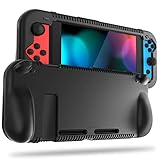
- All-round Protection: Made of durable impact-resistant silicone, provides shock absorption for all edges and especially corners, while maintaining a smooth, clean look.
- Ergonomic Design: This case features built in padded handles at the back to make playing for long durations much more comfortable.
- Kickstand Access & Precise Cutouts: Unique design ensures Nintendo Switch original built-in kickstand to be used at will for multi-viewing angles. Access to all the controls and features without taking your Switch out of the case.
- Tyre pattern design not only prevents your Nintendo Switch from slipping, but also provides comfortable feeling for hands gripping.
- Easy to Install: This case is made of a specially designed flexible silicone material which allows it to be easily taken off quickly whenever you need to dock.
This feature is for unknown senders, not for casually muting an established contact. Apple says filtering behavior and notification choices vary by country or region, and messages from a sender you have replied to three or more times may not remain treated as unknown. Older releases may use different wording, such as Filter Unknown Senders.
Quick recommendation: Use Hide Alerts for one distracting conversation, a silent Text Tone for broader contact-level silence, Focus for scheduled silencing, notification preview settings for privacy, and Block when you want to prevent contact.
Quick Recap
Product prices and availability are accurate as of the date/time indicated and are subject to change. Any price and availability information displayed on Amazon at the time of purchase will apply.

