Some links on this page are affiliate links: if you buy through them we may earn a commission, at no extra cost to you.
There is no universal Epson-cartridge bypass. Whether a compatible, remanufactured, or refilled cartridge works depends on the exact printer model, cartridge number, regional version, chip, and firmware. Start with compatibility and safe reseating checks; do not force the cartridge or install unofficial firmware.
First, identify what is actually failing
“Accepting” a non-Epson cartridge can mean three different things:
- Physical fit: the cartridge enters the slot and the cover closes.
- Electronic recognition: the printer accepts the cartridge chip and clears the error.
- Ink delivery: the printer draws ink and produces usable pages.
A cartridge can fit but fail recognition. It can also be recognized while producing streaks, missing colors, leaks, or inaccurate color.
Epson says its cartridge printers are designed for genuine Epson cartridges and that non-Epson supplies may not function properly or continuously. Actual behavior varies by model, cartridge chip, region, and firmware. See Epson’s third-party ink guidance.
#1 Best Overall
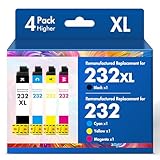
- Product Model: Cool Toner 4 Pack Compatible for 232XL Ink Cartridges for Epson Printer and Compatible for 232 Ink Cartridges
- Package Contents: Compatible for 232XL Ink Cartridges Combo Pack (1×Black, 1×Cyan, 1×Magenta, 1×Yellow)
- Compatible for Epson Printers: XP-4200 XP-4205 Workforce WF-2930 WF-2950
- Please Note: This is not an OEM Ink Cartridge
- High Page Yield: 380 Pages for Each Black Ink, 140 Pages for Each Color Ink at 5% Coverage (A4/Letter)
Before troubleshooting
Record the following before removing anything:
- The exact printer model, such as
WF-3820,XP-4100, orET-2850. - The regional designation, if shown on the printer or packaging.
- The exact cartridge or bottle number, such as
822XL,212XL, or502. - Whether the supply is compatible, remanufactured, refilled, or refillable with an auto-reset chip.
- The precise error message or code.
- Whether the problem started immediately after a firmware update.
Verify the seller’s compatibility list against the exact model—not merely a similar printer series. Cartridges that fit one model in a family are not automatically interchangeable with every other model.
Safe recognition fixes
- Leave the printer powered on.
- Open the scanner or cartridge-access area as specified for your model, then open the cartridge cover.
- Remove only the problem cartridge if the error identifies one. Squeeze its tab and lift it straight up.
- Check that all protective tape, plugs, and shipping clips have been removed. Confirm that each color is in its designated slot.
- Inspect the cartridge for a cracked body, leak, bent contact, or damaged chip. Do not touch the electrical contacts or ink outlet.
- Reinstall it firmly until it is seated; some Epson models require pressing down until it clicks.
- Close the cartridge cover and scanner, then select OK or the on-screen confirmation to begin ink charging.
- Do not switch off the printer while ink charging is in progress.
- Restart the printer once and try again.
Epson’s model-specific instructions are more authoritative than a generic button sequence. Some printers offer a menu such as Maintenance → Ink Cartridge Replacement or Setup → Maintenance → Replace Ink; labels vary by model and firmware. Follow the on-screen replacement prompt or the printer’s user guide. Epson’s documented reseating procedure also warns that removing a low or expended cartridge may prevent it from being reinstalled and used again.
Never force a cartridge that does not fit or whose cover will not close. A different external shape, remaining shipping clip, or incorrect cartridge family is more likely than a problem that can be solved with pressure.
Free tools Windows power users keep installed
One-click scans. No signup required.
If the cartridge worked until a firmware update
Firmware timing is the most important diagnostic clue. Epson says firmware updates can affect third-party ink and that non-Epson or altered Epson cartridges that worked previously may stop functioning after an update. Check Epson’s post-update cartridge guidance and the support page for your exact model.
Record the current firmware version and the date of the update. Then:
- Stop installing further updates while investigating.
- Ask the cartridge seller whether it has a newer chip or replacement cartridge designed for the updated firmware.
- Look only for an Epson-hosted recovery package or rollback procedure for the exact model and region.
- If Epson provides no official recovery path, use a replacement cartridge, genuine Epson supplies, or consider another printer.
Do not assume that disabling automatic updates will repair an already rejected cartridge. It may prevent some future changes on some models, but it is not a recovery method. Never install firmware for another model or region, and avoid unofficial “chipless firmware,” patches, and file-sharing downloads. They can permanently disable the printer, affect support eligibility, or contain malware.
Rank #2

- With the Upgraded Chips: Replacement for 222XL ink cartridges remanufactured for epson 222 ink cartridges are upgraded with the latest smart chips to ensure quick recognition and accurate ink level display to use with printers
- Printers Compatiblly: Replacement for epson 222xl ink cartridges combo pack for xp-5200 printer ink cartridges compatible with Workforce WF-2960 Expression Home XP-5200 printers
- High Page Yield: Up to 550 pages per black ink cartridge, 185 pages per color ink cartridge at 5% coverage for A4 paper
- Package Contents: Remanufactured for epson 222 ink cartridges replacement for epson xp-5200 printer ink cartridges for workforce wf-2960 ink cartridges included 1 x black ink cartridge, 1 x cyan ink cartridge, 1 x magenta ink cartridge, 1 x yellow ink cartridge
- High-Quality Printing: Replacement for 222XL ink cartridge remanufactured for epson 222xl ink cartridges combo pack promise a photo quality equivalent printouts with vibrant colors and crisp black
Why refilling and chip resetters often fail
Most cartridge-based Epson printers use a chip to identify the cartridge and track estimated consumption. Adding ink to the reservoir does not necessarily reset that electronic state.
What’s actually slowing this PC down?
Pick the symptom - the matching free tool is one click away.
Possible systems include:
- Compatible cartridges with newly programmed chips.
- Remanufactured Epson cartridges with replacement or reset chips.
- Refillable cartridges with auto-reset chips.
- Original cartridges refilled with a separate resetter, where a compatible resetter exists.
- Chipless systems for selected professional or specialty printers.
None is universal. A resetter designed for one cartridge family may not work with another, and newer printers may reject previously used or incompatible chips. Buy a resetter or refill kit only after confirming the exact cartridge family, printer model, region, and firmware compatibility.
For example, Precision Colors lists a model-family-specific 270/271 refill system with ARC chips that requires no resetter. That demonstrates one compatible system, not a general Epson procedure. A separate T252XL refill system is likewise specific to its listed cartridge family.
Refill systems can reduce running costs for high-volume users, but they introduce mess, maintenance, possible color differences, and firmware risk. A reputable compatible cartridge with a replacement guarantee is usually simpler.
Do not confuse cartridge printers with EcoTank models
EcoTank printers use built-in tanks and refill bottles, so the usual cartridge-chip problem is not the right diagnosis. The relevant checks are the exact bottle number, tank model, bottle-valve design, ink formulation, and filling procedure.
The Tool Desk
Outbyte Driver Updater FREEFix the driver behind crashes, sound loss and screen glitchesFind Drivers →Outbyte PC Repair FREERepair Windows errors before they cause bigger problemsFix Now →Do not pour arbitrary cartridge ink into an EcoTank, and do not treat an EcoTank bottle as a substitute for a cartridge. For example, an Epson 502-compatible bottle listing applies only to the models and bottle family specified on that product page.
Rank #3

- Product Model: 5 Pack Remanufactured Replacement for 232 Ink Cartridges for Epson Printer and Replacement for 232XL Ink Cartridges Combo Pack
- Package Contents: 5 Pack Ink Cartridges Combo Pack (2×Black , 1×Cyan, 1×Magenta, 1×Yellow )
- Compatible for Epson Printers: XP-4200 XP4200 XP-4205 XP4205 XP 4200 4205, Workforce WF-2930 WF2930 WF-2950 WF2950 WF 2930 2950
- High Page Yield: 380 Pages for Each Black Ink,140 Pages for Each Color Ink at 5% Coverage (A4/Letter)
- Please Note: This is not an OEM Ink Cartridge
EcoTank avoids recurring cartridge authentication issues, but it is not immune to incorrect ink, clogs, poor color matching, or incompatible bottles.
Independent reader supportYour contribution helps us test, update, and keep practical guides available for everyone.What to do based on the symptom
| Symptom | Likely cause | Safe next step | Stop when |
|---|---|---|---|
| Never recognized | Wrong SKU, incompatible chip, poor seating, protective material, or defective batch | Verify the exact model and cartridge number, reseat once, then request a replacement | A second known-compatible cartridge produces the same error or the contacts are damaged |
| Worked before a firmware update | Firmware compatibility change | Check Epson’s exact-model support page and contact the seller about a post-update chip | No official recovery exists and replacement supplies are also rejected |
| Recognized but streaked | Clog, air, poor venting, wrong formulation, or defective cartridge | Run a nozzle check and use normal cleaning sparingly | Cleaning does not help or the issue follows that cartridge |
| Cover will not close | Wrong cartridge family, shape, or shipping clip | Remove it without force and return it | The cartridge does not physically match the original |
Repeated deep-cleaning cycles consume ink and can fill the printer’s waste-ink system. If output problems follow one cartridge, replacing that cartridge is usually more sensible than repeatedly cleaning the printer.
Warranty considerations
Using a compatible cartridge does not automatically prove that the printer has been damaged or that every warranty is void. However, warranty terms can exclude damage attributed to non-Epson ink, cartridges, or ink-delivery systems. For example, an Epson U.S. warranty document includes such exclusions.
Check the warranty for your exact model and country. Keep the receipt, packaging, error messages, firmware information, and photos of the cartridge. Do not conceal third-party use if a service provider asks directly.
Which option makes sense?
| Option | Best for | Trade-off |
|---|---|---|
| Genuine Epson cartridge | Urgent recovery and maximum compatibility | Usually costs more |
| Reputable compatible cartridge | Most users seeking lower running costs | Must match the exact model and may be affected by firmware |
| Remanufactured OEM cartridge | Users who prefer an original shell and a strong guarantee | Quality depends on remanufacturing and chip replacement |
| Refillable cartridge or auto-reset chip | Experienced, high-volume users | More handling, maintenance, and model-specific risk |
| EcoTank or another cartridge-free printer | Frequent printers tired of cartridge compatibility issues | Higher upfront cost and a different printer platform |
When buying, prefer listings that state the exact model, cartridge number, current chip compatibility, return terms, and replacement guarantee. Avoid anonymous listings that provide only a broad Epson series name.
Bottom line
The dependable solution is usually not a trick. Confirm the exact cartridge family, reseat it correctly, use the printer’s replacement prompt, and restart once. If rejection began after firmware, investigate that timing and ask the seller for a compatible replacement. Use a chip resetter or refill system only when it is explicitly designed for the exact cartridge family. If Epson offers no official firmware recovery and the seller cannot supply a working chip, genuine cartridges or a different printer are safer than forcing the hardware or flashing unofficial firmware.
Quick Recap
Product prices and availability are accurate as of the date/time indicated and are subject to change. Any price and availability information displayed on Amazon at the time of purchase will apply.
Do these 3 things before closing this tab:
1Fix the driver behind crashes, sound loss and screen glitches2Repair Windows errors before they cause bigger problems3Scan for outdated or missing drivers - takes under a minute
