Some links on this page are affiliate links: if you buy through them we may earn a commission, at no extra cost to you.
To generate repeatable banner ads with an API, design a reusable template once, then send the template ID and each ad’s changing values—such as headline, product image, and background color—to a rendering endpoint. The API returns an image resource; check its status and use the file only after rendering succeeds. For example, Bannerbear documents this template-and-modification workflow, including JPG and PNG outputs and PDF when requested. Bannerbear V5 API reference
That is different from generating artwork from a text prompt. Prompt-based image generation can produce source imagery, but a template renderer is what places approved copy and assets in a controlled layout. These can be connected in your own workflow; the cited documentation does not establish a built-in integration between them.
Choose the right kind of image API
“Generate a banner” can mean two different jobs. Decide which one you need before designing the request:
Free tools Windows power users keep installed
One-click scans. No signup required.
| Need | API approach | What it does |
|---|---|---|
| Consistent branded ads with changing copy or product imagery | Template rendering | Renders a fixed layout with values supplied for editable layers. Bannerbear documents text and image layers, and output as JPG or PNG, with PDF available when requested. Bannerbear V5 API reference |
| Original artwork or a visual concept | Prompt-to-image generation | Creates source imagery from a prompt. It does not, by itself, ensure exact brand typography, wording, or banner layout. OpenAI image-generation API reference |
| A finished ad to serve through an ad platform | Ad-platform creative workflow | Uploads an image asset and associates it with ad text and a destination URL. This is a publishing/serving step, not the same as producing the banner image. OpenAI Advertiser API campaign management |
A common pipeline is prompt-generated or designer-created artwork, followed by template rendering, followed by asset upload to the destination platform. Treat each as a separate stage: it gives you control over the final layout and lets you validate each system’s requirements independently.
Build a reusable banner template
Start with the ad formats and variables your workflow actually needs. Set the canvas dimensions for the target placement, then create editable text boxes and image containers in your rendering service. A template keeps the fixed elements—logo placement, typography, spacing, and visual hierarchy—consistent while your API request supplies the campaign-specific values.
Decide what varies
- Copy fields: headline, offer, call to action, legal line, or product name.
- Image fields: product photo, campaign artwork, or background image URL.
- Style fields: only the colors or other attributes that genuinely vary by campaign.
- Output requirements: file format, dimensions, and whether a PDF is needed.
Do not let a variable field undermine the design. Define limits for text length, use suitable image crops, and consider what happens when a headline wraps or a product image is missing. Validate destination-platform specifications separately; requirements vary by platform and format.
#1 Best Overall

- Used Book in Good Condition
Render a banner with Bannerbear’s API
The pattern is: authenticate with a bearer token, submit a template ID plus modifications, save the returned resource ID, and wait until its status is completed before downloading or publishing the file. Bannerbear’s quick start shows a JSON request with a template ID, image URL, and text values. Bannerbear API quick start
The Tool Desk
Outbyte Driver Updater FREEScan for outdated or missing drivers - takes under a minuteDriver Scan →Outbyte PC Repair FREERepair Windows errors before they cause bigger problemsFix Now →Keep the API key on your server. Do not put it in browser JavaScript or an app distributed to users, where it can be extracted and abused. Create a server-side environment variable such as BANNERBEAR_API_KEY, then use the provider’s current endpoint and authentication format from its documentation.
The following is a request-shape example, not a complete provider-specific endpoint: replace the URL, template ID, modification names, and response handling with the current values from your Bannerbear template and API reference.
curl -X POST "$BANNERBEAR_CREATE_IMAGE_ENDPOINT"
  -H "Authorization: Bearer $BANNERBEAR_API_KEY"
  -H "Content-Type: application/json"
  -d '{
    "template": "YOUR_TEMPLATE_ID",
    "modifications": [
      {"name": "headline", "text": "Spring sale: 20% off"},
      {"name": "product_image", "image_url": "https://example.com/product.jpg"}
    ]
  }'
Use the exact field names and endpoint documented for your account and API version. The example URL and values are illustrative; they are not a substitute for copying your template’s layer names and the live API reference. Bannerbear V5 API reference
Handle asynchronous completion
A successful create request does not necessarily mean the image file is ready. The V5 reference describes pending, completed, and failed statuses; file links can be null while a render is pending. Store the resource ID and poll or otherwise check its status using the documented mechanism. Proceed only after completion, and treat a failed render as an error path rather than trying to publish an absent file.
What’s actually slowing this PC down?
Pick the symptom - the matching free tool is one click away.
- Submit the render request and check that the API accepted it.
- Persist the returned image/resource ID with your campaign job.
- Check the resource status using the documented endpoint or callback mechanism.
- When status is completed, retrieve the available file link and validate the output.
- If status is failed, record the response details and retry only after correcting the cause.
Before a large batch, render one representative ad and inspect the actual image. A completed status confirms render completion, not that the creative is visually correct, compliant, or approved by the ad platform.
Rank #2

- Complete Set for Bookish Celebrations: This set includes one "Happy Birthday" letter banner and one decorative floral book garland, providing a cohesive and charming decoration package for any book-themed party
- Charming Floral & Book Design: Features delicate watercolor-style book illustrations paired with soft wildflower accents. The vintage aesthetic creates an elegant, literary atmosphere perfect for book lovers.
- Versatile Party Decor: Ideal for book club birthdays, literary-themed gatherings, author events, or casual celebrations. Easily enhances the ambiance for both indoor and outdoor parties.
- Easy to Assemble & Hang: Each piece is pre-punched for easy stringing. The set comes with ribbon and a threading needle, allowing for a quick and hassle-free setup.
- Quality Material & Brand Service: Printed on durable cardstock with a smooth finish.The banner is designed to resist tearing and fading, ensuring a polished look throughout your event.
Add AI-generated artwork when a template needs it
If the banner needs original artwork, call an image-generation endpoint first, then pass its output image into the template-rendering step. The OpenAI image API reference documents prompt-based image generation. Check the current model’s supported parameters and output behavior when implementing, because model and API details can change. OpenAI image-generation API reference
Keep text that must be exact—prices, legal claims, product names, and calls to action—in template text layers rather than relying on generated imagery to render it. This division gives the image model the creative-art task and the rendering template the precision and brand-consistency task. The cited sources document the separate capabilities; they do not document a turnkey integration between the services.
Prepare the asset for an ad platform
Image creation and ad delivery are separate workflows. Confirm the actual destination’s permitted formats, dimensions, file size, and other creative rules for the placement you intend to use. The OpenAI Advertiser API campaign-management page, for its described upload flow, specifies JPEG, PNG, or WebP and an image at least 640 × 640 pixels. Those requirements apply to that documented flow and should not be generalized to other platforms or formats. OpenAI Advertiser API campaign management
Rank #3

- Adds Life to Blank Walls – Bright, playful, and easy to hang—this banner brings instant character to any kids room, play area, or creative space.
- Fits In Without Trying – Whether your space is colorful, cozy, retro, or minimal, this piece blends in while standing out just enough.
- Designed to Be Noticed – With bold type and soft canvas texture, it makes a subtle statement that still draws eyes—and often, smiles.
- Made to Move With You – Lightweight and easy to store or rehang, it keeps up with every classroom switch, room makeover, or new routine.
- Small Thing, Big Energy – Just the right size to shift a space’s mood. Whether it’s for a reading nook or a doorway, it always shows up.
For the documented OpenAI Advertiser API flow, upload the image and retain the returned file_id; then include it with the creative’s text and destination URL. Consult the current files and ads references for the request fields and account-specific prerequisites. OpenAI Advertiser API overview · OpenAI Advertiser API references
The overview documents bearer-key authentication and support for idempotency keys on supported create endpoints. Use idempotency keys where the endpoint supports them so a retry after a network interruption does not accidentally create duplicate objects. Store API keys securely on the server. OpenAI Advertiser API overview
Rank #4
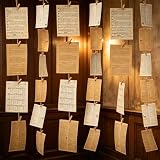
- 【Packaging Content】 Our book themed party decorations set includes 2 set pages, one white and one gray, each with 57 sheets, for a total of 114 sheets. A roll of 100 meter long rope and 100 peices small wooden clips make the complete set enough to create a retro atmosphere environment.
- 【High Quality Materials】 The products in our book themed decor set are all made of high-quality materials, the retro book pages are made of hard and durable paper, and the antique craftsmanship adds an antique book page effect. The rope is sturdy and easy to connect the book pages, and the small wooden clip is both in line with the retro atmosphere and durable.
- 【Vintage Colors】 Our book themed party decorations set features a vintage design, with white and gray vintage pages paired to create a rich vintage atmosphere for book themed parties, adding more vitality and color to the environment.
- 【DIY Design】 Our book themed decor set comes with long enough ropes and small wooden clips, which you can use to string and hang the pages together, at the same time, you can also cut and adjust the pages to fit your own size and shape, and decorate the party room to create your own unique retro space.
- 【Applicable Scenarios】 Our book page banner set is not only suitable for book themed parties, but also for decorating retro parties, underground pubs, walls, libraries, outdoors, and more. Just hang it up and your place will become retro and vivid, becoming a striking place.
Make the workflow reliable and economical
Separate jobs and keep a record
Represent each creative as a job in your application: inputs, template/version, render resource ID, status, output location, and any downstream upload ID. This makes it possible to resume after a timeout and identify which stage failed. Avoid treating a client-side timeout as proof that the provider did not accept the request; check the resource before submitting again.
Validate before generating at scale
- Check required copy and image URLs before submission.
- Use a small sample batch to inspect typography, cropping, contrast, and line wrapping.
- Validate final format and dimensions against the destination’s current specification.
- Track pending, completed, and failed renders distinctly so downstream publishing only consumes ready files.
- Keep credentials out of logs and client-visible code.
Plan retries and cost controls
The cited documentation does not establish a universal render time, throughput limit, or price comparison, so do not build capacity or cost assumptions around an unverified benchmark. Check the provider’s current account limits and pricing, and measure your own workflow with representative templates. Retry transient failures with sensible backoff, but avoid blind resubmission when the initial request may already have created a resource.
Best Value

- 【Complete Book Club Banner Set】You will receive 1 book banner with letters spelling 'BOOK CLUB', 1 plastic needle and a 5m rope. The book club decor creates a peaceful and beautiful atmosphere for reading and studying.
- 【Reliable Material】The book club decorations is made of premium cardboard, which is lightweight and sturdy, ensuring that it retains its luxurious look and shape throughout the party.
- 【Easy to Install】Designed with user convenience in mind, the book themed party decorations require minimal setup time. The included plastic needle easily threads through pre-punched holes on each card, while the 5m rope accommodates various hanging spaces.
- 【Vintage Design】The distressed typography and classic book stack graphics evoke a cozy, old-library feel. The eye catching graphics add a fun and festive touch to your reading events, making your event stand out from ordinary party decor.
- 【Wide Application】Book club banner can be widely used to decorate book themed party, book lover party, newspaper birthday party, library themed party, girls night party, book reading theme party and so on.
Troubleshoot common failures
| Symptom | Likely explanation | What to do |
|---|---|---|
| Authentication rejected | Missing, invalid, or incorrectly formatted bearer token. | Confirm the server-side secret is present and the request uses the authentication format in the current provider reference. Rotate exposed credentials. |
| Request rejected for template or modification | Template ID or layer name does not match the template, or a required value is malformed. | Check the template ID and exact editable layer names; compare the JSON structure with the current quick start. |
| Resource is pending and file link is null | Rendering has not completed yet. | Keep the resource ID, check status again through the documented mechanism, and do not download or publish until completion. |
| Resource reports failed | The render did not complete; the response may provide details. | Capture the provider’s error information, correct the input or template issue, then retry as a new or supported retry operation. |
| Banner looks wrong despite a completed render | Text overflow, unsuitable crop, low contrast, or incorrect variable mapping. | Inspect the rendered file, adjust template constraints or source assets, and render a sample again before batch production. |
| Ad platform rejects the uploaded image | The asset may not meet that platform’s format, size, or placement rules. | Read the destination’s current requirements and export an allowed asset; the OpenAI Advertiser upload flow cited above specifies JPEG, PNG, or WebP and at least 640 × 640 pixels. |
| A retry creates duplicate work | The original request may have been accepted even if the client did not receive its response. | Check for an existing resource before retrying. Use an idempotency key where the create endpoint supports one. |
Or skip the browser setup
If your workflow also needs screenshots of web pages—for example, capturing a live landing page as campaign reference material—ScreenshotNeo is a website screenshot API and MCP server for developers. It is not a banner-design or ad-serving API; it can capture a URL as an image or PDF. One GET request can return a screenshot, with PNG, JPEG, or WebP available.
cURL example, using the supplied API pattern and a target URL:
curl -G "https://api.screenshotneo.com/v1/shot" -d access_key=YOUR_API_KEY --data-urlencode url=https://stripe.com -o shot.webpSee the ScreenshotNeo documentation for the API and options. Cookie banners, popups, and chat widgets are removed before capture; bot checks, blank pages, and failed loads are never billed. An MCP server lets AI agents take screenshots. The free plan includes 1,000 screenshots per month with no card; paid plans start at $5 for 3,000. Sign up for ScreenshotNeo’s free plan.
FAQ
Can an image-generation API guarantee exact text in a banner?
Do not rely on generated artwork for text that must be exact. Put required copy in editable template text layers and inspect the rendered file before use.
Windows Errors? Fix Them Before They Spread
Repair common Windows errors and clear accumulated junk for a smoother, more stable PC - no reinstall needed.Free scan · no reinstallOutdated Drivers Are Slowing You Down
One free scan finds every outdated or missing driver and matches the right update for your exact hardware.Free scan · exact hardware matchDoes generating the image publish or approve the ad?
No. Rendering creates an asset; uploading it into an advertiser workflow and meeting that destination’s review and policy requirements are separate steps.
Can I use this workflow for every social or display placement?
The general template approach can produce variants, but each destination’s accepted dimensions, formats, and policies must be checked for the specific placement.
Quick Recap
Product prices and availability are accurate as of the date/time indicated and are subject to change. Any price and availability information displayed on Amazon at the time of purchase will apply.

