Some links on this page are affiliate links: if you buy through them we may earn a commission, at no extra cost to you.
A pink screen on a Mac is a symptom, not one specific fault, so there is no single fix that works for every case. Start by protecting your data, disconnecting accessories, and checking whether the pink appears in a screenshot and on another display. Those tests help distinguish a macOS or graphics glitch from a cable, monitor, built-in display, or other hardware problem.
If the Mac is restarting, the tint appears before macOS loads, changes when you move the display, or persists in Recovery, skip repeated resets and arrange a hardware assessment after backing up what you can.
First identify the kind of pink-screen problem
- A brief pink flash followed by a restart: Treat this as an unexpected restart, not just a color issue. A kernel panic, software or firmware problem, peripheral, or hardware fault may be involved. Disconnect accessories, back up if the Mac stays usable, and follow the restart checks below.
- A constant pink or magenta tint: Check display settings and compare the built-in display with an external one. If the tint remains at startup or in Recovery, a display-path or other hardware fault becomes more likely.
- Pink in one app or window only: Test another app and take a screenshot. The application, graphics rendering, video, or an overlay may be involved rather than the physical panel.
- Pink only on an external monitor: Isolate the monitor, cable, Mac port, adapter, and dock before changing macOS settings or seeking a Mac repair.
- Pink in one area of the built-in screen, or changing with lid angle: A panel, cable, or connector issue is possible. Avoid repeatedly flexing the display and arrange an inspection if the symptom persists.
Try these low-risk checks first
1. Back up important files
If the Mac is usable, make a Time Machine backup or copy irreplaceable files to a trusted external drive or cloud service. Record the Mac model, macOS version, connected accessories, and when the symptom occurs. A short video can help document an intermittent fault. Do not erase the Mac as an initial troubleshooting step.
Quick wins for a faster PC:
Repair Windows errors before they cause bigger problemsFix Now →Scan for outdated or missing drivers - takes under a minuteDriver Scan →Clear out junk files and repair common Windows errorsFree Scan →2. Disconnect accessories and restart
Disconnect docks, hubs, external drives, adapters, monitors, and other nonessential peripherals. If possible, shut down normally, then start the Mac with only power and essential input devices connected. If it is frozen, press and hold the power button for about 10 seconds to turn it off; use this only when a normal shutdown is not possible, because unsaved work may be lost. Apple’s [startup and power guidance](https://support.apple.com/en-us/102623) covers forced shutdowns and accessory isolation.
#1 Best Overall

- Color: Space Gray ; Compatible Model: Replacement for MacBook Air 13" M1 2020 A2337 EMC 3598 Lcd Screen ;
- Screen Resolution: 2560x1600; Screen Size: 13.3 inches ; Backlight: LED LCD ; Warranty: 3 months ;
- This is a screen (not a laptop) ;
- Please kindly check your model and Color again before you purchase.
- Make sure the battery port is turned on before installation. If you have no experience, please refer to the installation video or find a professional to help install.
If the pink screen disappears, reconnect devices one at a time. If it returns after a particular cable, dock, monitor, or peripheral is connected, test that item separately rather than assuming the Mac itself is at fault.
3. Use a screenshot as a clue
While the pink effect is visible, take a screenshot and view it on another device if possible.
- The pink appears in the screenshot: The effect is likely present in the image or graphics-rendering path, such as macOS, an app, or video processing.
- The screenshot looks normal but the display looks pink in person: Suspect the physical panel, display connection, external monitor, or another part of the display path.
This is a useful clue, not a definitive diagnosis: color-management or display-pipeline problems can make the result less clear. Also check whether the symptom appears at the login screen, in multiple apps, and on an external display.
4. Check display and accessibility settings
Open Apple menu → System Settings → Displays. If available, check the color profile, resolution, refresh rate, and HDR options. Temporarily turn off unusual settings such as True Tone or Night Shift to see whether the appearance changes. Then review System Settings → Accessibility → Display for Color Filters, color inversion, contrast, or other visual adjustments.
Rank #2

- Compatible Model: for MacBook Pro A1708 A1706 A1707 A1990 A2338 Late 2016 Mid 2017 EMC 3071 EMC 3163 EMC 2978 EMC 3164 661-05095 661-05096 lcd screen replacement display assembly kit
- You can find your specific machine model at the bottom of your laptop. You must find the words A1708 or A1706 to confirm that it is the correct model. Warranty: four Months.
- The products have undergone strict testing and are guaranteed to function properly unlike other inexpensive accessories, and we come with free and easy to store disassembly tools. Please confirm the correct model and color before purchasing.
- Each connector must be perfectly matched (you need to ensure that the connector are perfectly connected, rather than rudely connecting them) to ensure that the screen works properly.
- Please do not damage the packing after receiving the goods. When you find that you ordered the wrong product, please return it in the original packaging.
Labels and options vary by macOS version and Mac. If a path differs, search System Settings for Displays, Color Filters, Night Shift, or True Tone. Settings are less likely to explain a pink screen that also appears before login or in Recovery.
5. Install available macOS updates
If the Mac is stable enough, go to Apple menu → System Settings → General → Software Update, install available updates, and restart. Updates can affect display detection, image quality, resolution, and refresh rates; Apple also recommends checking for macOS and display-firmware updates when troubleshooting an external display. See Apple’s [external-display guidance](https://support.apple.com/en-us/102501).
Do not assume a particular macOS release caused or will fix the problem based on user reports alone. Reports of pink screens on individual Macs are not proof of a system-wide defect or an Apple-confirmed model issue.
Free tools Windows power users keep installed
One-click scans. No signup required.
Use Safe Mode to check for startup software
Safe Mode can help identify problems related to login items, system extensions, caches, or third-party utilities. It is a diagnostic step, not a guaranteed repair.
Rank #3

- Compatibility: Exclusively designed for MacBook Air Retina 13" A1932 2019 Year / A2179 2020 Year ( EMC 3302 EMC 3184 MVFK2 MVFL2 MWTK2 MWH42 ), Resolution: 2560x1600
- Fixes All Kinds of Screen:FaultsWhether it’s cracked or broken glass, blurred display, pixel abnormalities, LCD malfunction, color deviation or any other screen-related issues, this replacement screen offers an effective solution, making your device look and perform as good as new.
- Hassle-Free Installation:Our replacement screen is incredibly easy to install — it comes with a detailed illustrated manual and step-by-step video guide for clear, straightforward operation. If you have any questions along the way, our professional support team is always available to assist you.
- Upgraded Protective Packaging:Our packaging is made of custom thick foam material that provides all-around cushioning. It effectively guards against compression, vibration and impact during delivery, offering comprehensive protection to ensure the screen reaches you in pristine condition.
- Package Includes:1 x LCD replacement screen, 1 x installation guide, 1 x tool kit (including screwdrivers, pry tool, spudger, suction cup, tweezers, cleaning brush and anti-static gloves). Professional tools are provided to help you complete the replacement easily.
- Apple silicon: Shut down. Press and hold the power button until startup options appear. Select the startup disk, hold Shift, then click Continue in Safe Mode.
- Intel: The startup procedure depends on the Mac and macOS version. Follow Apple’s [official Safe Mode instructions](https://support.apple.com/en-us/102342) for your Mac.
If the screen looks normal in Safe Mode, investigate recent login items, display utilities, screen-recording tools, drivers, or other recently installed software. If the pink remains, or returns on a normal restart, deeper system, firmware, or hardware causes remain possible. Restart normally to leave Safe Mode.
If the pink screen is on an external monitor
Test the connection chain before replacing anything:
- Confirm the monitor is powered on and set to the correct input.
- Disconnect and reconnect the display and its power cable.
- Bypass any dock or hub and connect the monitor directly to the Mac.
- Try a known-good cable and a different Mac port, if available.
- Test another monitor or television, if possible, and check the monitor’s default picture mode.
- Check that an adapter supports the connection and display standard your setup requires. Update macOS and, where applicable, the monitor’s firmware.
To prompt macOS to look again, open System Settings → Displays, hold Option, and select Detect Displays if the option appears. Apple’s [display troubleshooting steps](https://support.apple.com/en-us/102501) include checking connections, connecting directly instead of through a dock, and verifying adapter compatibility.
If the built-in display is normal but the external one is pink, focus on the monitor, cable, adapter, dock, input, or port. If the external display is normal while the built-in panel is pink, the built-in display assembly or its connection becomes more suspect.
Rank #4
- Color: Rose Gold ; Compatible Model: Replacement for MacBook Air 13" M1 2020 A2337 EMC 3598 Lcd Screen ;
- Screen Resolution: 2560x1600; Screen Size: 13.3 inches ; Backlight: LED LCD ; Warranty: 3 months ;
- This is a screen (not a laptop) ;
- Please kindly check your model and Color again before you purchase.
- Make sure the battery port is turned on before installation. If you have no experience, please refer to the installation video or find a professional to help install.
Run Apple Diagnostics
Apple Diagnostics can help identify a hardware problem, but a clean result does not rule out an intermittent display or cable fault. Before starting, shut down and disconnect external devices except what is needed for the test, such as power and essential input devices or display hardware. Keep the Mac on a hard, flat surface with ventilation.
- Apple silicon: Press and hold the power button until startup options appear, then press and hold Command-D.
- Intel: Turn on the Mac and immediately hold D. If that does not work, try Option-D.
Write down any reference code and provide it to Apple or a repair provider. The available tests vary by Mac and macOS; Apple notes that Macs running macOS Tahoe 26 or later may offer specific tests, including a built-in-display test. See Apple’s [Apple Diagnostics instructions](https://support.apple.com/en-us/102550).
Independent reader supportYour contribution helps us test, update, and keep practical guides available for everyone.If the Mac will not start normally
Use macOS Recovery if the Mac stalls at a pink, blank, gray, or blue screen, repeatedly restarts, or cannot start after an update. If you can access Recovery, Disk Utility’s First Aid may help with startup-disk problems; reinstalling macOS can be considered if startup trouble continues and your important data is backed up.
Reinstallation is not a fix for a damaged panel, cable, monitor, or logic board. Do not erase the startup disk as a routine step: erasing deletes local data. Recovery procedures differ between Apple silicon and Intel Macs. Apple’s [startup-screen and Recovery guidance](https://support.apple.com/en-us/102575) also explains that firmware revival or restoration may be needed in some cases when Recovery does not work, including on Apple-silicon and T2-equipped Macs.
Best Value
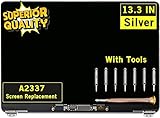
- ✔️ Compatible Model: for MacBook Air A2337 M1 2020 Year EMC 3598 MGN63 MGN93 MGND3 MGN73 MGNA3 MGNE3 Retina Display LCD Screen Full Assembly ;
- ✔️ Screen Size: 13.3 inch; Backlight: LED LCD; Laptop LCD Screen Max.Resolution: 2560x1600;
- ✔️ Before purchasing, please check whether the color and model of the machine correspond.
- ✔️ Warranty: 3 Months; This is a Complete Top Assembly (not a laptop).
- 📧 If you are not sure if it is the right item for you, please confirm with us and send your model number and pictures to us.
When to stop troubleshooting and seek service
Arrange an assessment through Apple, an Apple Authorized Service Provider, or a qualified repair provider if any of these apply:
- The tint appears at startup, in startup options, Apple Diagnostics, or Recovery—not just after signing in.
- The built-in screen is persistently pink while an external display looks normal.
- The symptom changes with lid angle or movement, or there are lines, flickering, dark patches, cracks, pressure marks, or signs of liquid exposure.
- The Mac continues restarting, cannot complete startup, or Apple Diagnostics provides a hardware reference code.
- The problem is worsening or threatens your ability to access and back up your data.
Do not open a MacBook display unless qualified; its panel and cables are delicate. If liquid exposure may be involved, stop using the Mac and seek advice promptly because corrosion can worsen. Apple’s [repair page](https://support.apple.com/repair) lets you check service options. Coverage and cost depend on model, region, warranty or AppleCare status, damage, and diagnosis. Apple-certified repairs by Apple or an Apple Authorized Service Provider are covered by Apple’s warranty and AppleCare plans as applicable; independent providers may offer their own terms, but their repairs are not backed by Apple’s warranty or AppleCare plan except where required by law.
Resets are not a universal pink-screen fix
Older troubleshooting advice may recommend resetting the SMC or NVRAM. These are not universal remedies: SMC resets apply to Intel Macs, and Apple says they are not needed on Apple-silicon Macs. Avoid random Terminal commands, repeated forced shutdowns, or an erase-and-reinstall attempt before you have protected your data and isolated the display path. Apple’s [startup and power guidance](https://support.apple.com/en-us/102623) distinguishes steps by Mac type.
Recommended Free Tools
Quick Recap
Product prices and availability are accurate as of the date/time indicated and are subject to change. Any price and availability information displayed on Amazon at the time of purchase will apply.

