Some links on this page are affiliate links: if you buy through them we may earn a commission, at no extra cost to you.
Start by checking that the battery is undamaged and between 5°C and 40°C (41°F and 104°F), then connect it directly to the original, compatible DJI Phantom 4 charger—bypassing the charging hub. That test separates a battery or charger fault from a hub problem. If the battery is swollen, cracked, leaking, unusually hot, or smells abnormal, do not charge it or try to revive it; seek professional handling.
First, identify the symptom and battery
“Not charging” can mean no LEDs light, an LED blinks continuously, charging starts but does not progress, or the battery charges directly but not through the hub. A battery may also appear full yet trigger an aircraft or DJI GO 4 warning. Those symptoms can point to different problems, so note exactly what happens before changing equipment.
Check the label on the pack. The original Phantom 4 commonly uses the PH4-5350mAh-15.2V battery (5,350 mAh, 15.2 V, 81.3 Wh). Phantom 4 Pro/Pro+ batteries may be PH4-5870mAh-15.2V. The Phantom 4 charging hub is documented for those battery families; do not assume a charger or hub is compatible with every Phantom 4-family aircraft or unrelated DJI battery. Use the model-matched equipment. DJI’s Phantom 4 support and FAQ lists original-model specifications, while the hub guide identifies compatible battery models.
Safety check: when not to charge
- Do not charge a swollen, cracked, punctured, leaking, badly dented, or otherwise deformed battery.
- Stop if it becomes hot while apparently not charging, emits a chemical or burnt smell, hisses, or produces smoke.
- Check the battery, charger, cable, and hub for bent, recessed, corroded, dirty, or burned contacts, cuts, looseness, or overheating. Do not use damaged equipment.
- Keep the battery on a stable, nonflammable surface, away from moisture. Do not touch or bridge terminals with tools.
Never open the pack, connect a bench supply or another battery to its cells, short its terminals, or use a USB, car, or generic LiPo charger to “jump-start” it. Those methods bypass the battery’s protection and are not safe troubleshooting steps. DJI warns against unapproved chargers, short circuits, and foreign material around terminals in its charging-hub guide.
#1 Best Overall

- QC & RELIABILITY: We go beyond basic checks. Each replacement drone battery from POWERION undergoes rigorous testing on official DJI drones and chargers before leaving factory. This commitment to quality guarantees outstanding performance, stability, and longevity.
- COMPATIBILITY & INTEGRATION: Replacement battery from POWERION was designed for DJI Phantom 4 drones(incl. Phantom 4 Pro/RTK/Advanced/Pro v2.0). It features the same core chip as the original one for excellent compatibility with the official drone and charger.
- CAPACITY & FLIGHT TIME: 5870mAh (15.2V / 89.2Wh) intelligent flight battery for DJI Phantom 4 delivers up to 30 minutes of flight time, maximizing your aerial footage.
- SAFETY & PROTECTION: Built-in advanced Battery Management System (BMS) provides multiple safeguards against over-charge, over-discharge, over-current, short-circuit to ensure flying safety and battery durability.
- SERVICE & TIPS: Your satisfaction is our priority. We offer a 30-day return policy and a 1-Year Manufacturer's Warranty, supported by responsive customer service. For optimal performance: 1) Please fully charge the battery before first use; 2) We highly recommend 2-3 low-altitude test flights before nominal operation.
Safe troubleshooting, in order
- Bring it into the charging range. DJI specifies 5–40°C (41–104°F). Let a cold battery warm indoors naturally, or let a recently used or hot battery cool naturally. Do not use a heater, hair dryer, hot water, microwave, or flame.
- Inspect and dry-clean the contacts. Disconnect power first. If accessible metal contacts have visible buildup, wipe them with a clean, dry, lint-free cloth. Do not pour liquid into connectors, scrape aggressively, or use metal tools. Do not reconnect power while moisture or residue remains.
- Bypass the hub. Remove the battery from the aircraft. Connect the original compatible DJI charger to mains power, then connect it directly to the battery. Observe which LEDs light and how they blink. If it shows a normal charging response, leave it undisturbed on the safe surface and monitor for abnormal heat or other warning signs. If there is no response, do not repeatedly reconnect it indefinitely.
- Cross-test one item at a time. If available, try a known-good compatible Phantom 4 battery with the same charger, or the suspect battery with a known-good compatible charger. Avoid any adapter simply because its plug fits. Record the results; they help distinguish a battery fault from a charger, cable, outlet, or hub fault.
- Check firmware only if the aircraft recognizes the battery. If the battery can power the aircraft and appears in the supported DJI app workflow, check for an “Inconsistent Firmware Found” or similar prompt and follow DJI’s offered update process without interrupting power. Do not attempt an update with a damaged or unresponsive battery. Firmware may address a recognized inconsistency; it cannot repair degraded or failed cells. DJI’s Phantom 4 FAQ describes battery firmware updates through aircraft firmware.
What the cross-test tells you
| Result | What it suggests |
|---|---|
| The battery charges directly, but not through the hub | The hub, its connector, or its contacts are suspect. The battery is probably able to charge. |
| Another compatible battery charges on the same charger; this one does not | The suspect battery is more likely to be faulty. |
| No compatible battery charges on the setup | Check the charger, cable, wall outlet, and any hub in use. |
| The suspect battery works with another compatible charger or setup | The original charger, hub, connection, or aircraft may be the problem. |
| The battery fails directly and through the hub, including with known-good equipment | A battery fault is likely; stop DIY troubleshooting and seek inspection or replacement. |
DJI recommends cross-testing with and without the charging hub when diagnosing a charging failure. A hub is not the best first test: it adds power and contact connections and can obscure whether the battery itself charges. See DJI’s charging-failure guidance.
Read the battery LEDs carefully
Count the LEDs and note their blink speed, whether a light stays on, and whether the sequence repeats after lights go out. Do not confuse the battery’s four LEDs with an indicator on the charger or hub. DJI documents these patterns for its Intelligent Flight Battery; if your battery’s behavior does not match a listed pattern, record a short video and ask DJI support to identify it rather than guessing.
Rank #2

- STRICT QUALITY CHECK - Before leaving the factory, every Phantom 4 battery was tested on the official DJI Phantom 4 drone and charger several times, to ensure great compatibility, function, and quality. WARM TIP: Please fully charge the battery before the first use, and try 2-3 low-altitude flights before high flights.
- POWERFUL CAPACITY - Real capacity: 5870mAh, 15.2V(89.2Wh), larger than the original’s 5400mAh. Each fully charged Phantom 4 battery can last up to 30 mins of flight time, enough to photograph the spectacular nature or just the simplest happiness in life. Available flight time ranges from 20 to 30 minutes, varying with flight mode or environment like wind, temperature, etc.
- BORN FOR DJI PHANTOM 4 SERIES - Shaped from a precise mold, built with the same chip as official DJI batteries, and equipped with the protection module researched and developed on our own, Phantom 4 intelligent flight battery from Satonaka is perfectly compatible with DJI Phantom 4, DJI Phantom 4 RTK, DJI Phantom 4 Advanced, DJI Phantom 4 Pro, DJI Phantom 4 Pro v2.0, and the original charger.
- SAFER USE - The built-in intelligent IC forms an advanced battery management system, and provides various protections against short-circuit, over-charge, over-discharge, over-voltage, over-current, and over-heating, keeping the battery safe and prolonging its service life. Every Phantom 4 battery has 4 LED lights, and the real-time power shows with a press of button.
- RELIABLE QUALITY - Each Satonaka Phantom 4 battery undergoes rigorous testing on official DJI drones and chargers to ensure compatibility, functionality, and quality. Backed by a 24/7 customer service and a 30-day return policy, Satonaka is committed to providing exceptional customer support. If you encounter any issues, feel free to contact us—we’re here to help! Package Included: 2 Pack securely packaged Replacement Battery for DJI Phantom 4 Series.
| Battery LED indication | DJI-described meaning | What to do |
|---|---|---|
| LED 2 blinks twice per second | Charging current is too high | Use the standard DJI charger and cable; cross-test equipment if the warning persists. |
| LED 3 blinks three times per second | Charger voltage is too high | Use the standard charger and cable; check the charger setup. |
| LED 2 blinks three times per second | Short circuit or internal communication error | Stop troubleshooting and seek inspection. |
| LED 3 blinks twice per second | Battery voltage too high due to overcharge | DJI describes controlled discharge in the aircraft to 1% for this specific condition. Consider it only for an undamaged battery that can power on and be continuously monitored; do not fly. Stop at once if it heats, swells, smells abnormal, or behaves unpredictably. This is not a general revival method. |
| LED 4 blinks twice per second | Charging temperature too low | Let the battery warm naturally into the 5–40°C (41–104°F) range. |
| LED 4 blinks three times per second | Charging temperature too high | Let the battery cool naturally before charging. |
| All four LEDs blink three times per second | Battery damaged | Stop charging and request inspection or replacement. |
| LEDs 2 and 3 remain on | Firmware update failure | DJI says the battery must have more than 75% charge before retrying the update. Use the supported update process only if the battery is safe and recognized. |
| LEDs 3 and 4 blink three times, then turn off in a cycle | Battery communication abnormality | Cross-test compatible equipment; if the error follows the battery, seek service. |
These interpretations and responses are from DJI’s LED descriptions. Confirm the pattern against the exact battery family; do not apply a remedy for one code to a different symptom.
Do these 3 things before closing this tab:
1Repair Windows errors before they cause bigger problems2Scan for outdated or missing drivers - takes under a minute3Clear out junk files and repair common Windows errorsIf the battery was stored for months or years
A long-unused pack may enter hibernation or become over-discharged, but a no-LED battery is not necessarily recoverable. It may also have a charger-communication problem, a protection-system fault, or degraded cells. Try only the normal direct connection to a compatible DJI charger, with the battery in the specified temperature range and under observation. Stop if it warms abnormally, swells, smells unusual, or shows damage. If normal LED behavior does not return, treat it as a service case—not a reason to apply external power.
Rank #3
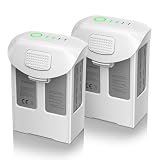
- Compatible with DJI Phantom 4 Battery: Artman Phantom 4 battery is compatible with DJI Phantom 4, DJI Phantom 4 Pro, DJI Phantom 4 Pro V2.0, DJI Phantom 4 Advanced, DJI Phantom 4 RTK, perfectly fit with original charger
- Fly Peace of Mind with Phantom 4 Battery: Artman Phantom 4 Pro battery has a high capacity 5870mAh and voltage 15.2V, which provide 27 minutes max for flight. Please fully charged before your first flight and make several test flights
- With 4 LED Indicator on DJI Phantom 4 Battery: With built-in 4 LED indicators will let you know the remaining power and charging status of Phantom 4 Pro battery, no more power anxiety
- Safety Protections for Phantom 4 Battery: Artman Phantom 4 Pro battery has multi protections to prevent the risk of over-heating, over-charging, short-circuit, and self-discharge, advanced battery management system comply with safety testing standards
- Warm Note for Your USE: 1. Please cool it down enough before charging 2. If the battery has been placed for a long time, please do the charge & discharge cycle 3. We provide a year support for DJI Phantom 4 battery, please reach out if any questions
For future storage, DJI’s Phantom 4 FAQ advises keeping the battery away from moisture, storing it above 65% charge for long-term storage, and performing a full charge/discharge cycle every three months if it is stored longer than three months. These are maintenance recommendations, not a guarantee against aging or a promise that an old battery can be revived.
Independent reader supportYour contribution helps us test, update, and keep practical guides available for everyone.Charging-hub checks
The Phantom 4 hub can charge up to three compatible batteries sequentially, not simultaneously. DJI says it charges the battery with the higher remaining charge first. If the hub does not appear to charge the battery you expect, allow for that sequence and verify the hub is in charging rather than storage mode. The hub’s storage mode is not a substitute for diagnosing a failed battery.
Rank #4

- Compatibility: Phantom 4 intelligent flight battery is perfectly compatible with DJI Phantom 4, DJI Phantom 4 Pro, DJI Phantom 4 Pro v2.0, DJI Phantom 4 Advanced and DJI Phantom 4 RTK Drone.
- Flight Time: The battery with high capacity (5870mAh), can support a maximum flight time of 30 minutes, depending on various factors such as speed, windy conditions, temperature.
- Strict Quality Control: Have been tested by official DJI Phantom 4 aircraft & charger for several times before leaving the factory, to ensure great compatibility, function, and quality.
- Safety & Protection: It features multiple protection functions against overcharging, over-discharging, overheating, and more, ensuring the stability of the battery.
- After Sale Warranty:We offer a 1-year manufacturer warranty and a 30-day return policy. Our friendly customer service team is here to assist you.
Use the specified charger and compatible battery family. If direct charging works but the hub does not, inspect the hub contacts and connections and test another compatible battery in the hub. If no battery works through it, the hub is the stronger suspect. DJI’s hub support article and user guide describe its operation and compatibility.
What’s actually slowing this PC down?
Pick the symptom - the matching free tool is one click away.
How long should charging take?
DJI’s original Phantom 4 FAQ gives approximately 80 minutes for a full charge. DJI’s later charging guide lists approximately 1 hour 30 minutes for Phantom 4 Pro/Pro+ batteries. These are approximate, model-specific figures, not guarantees: battery condition, starting charge, temperature, and charging setup affect the time. A battery that remains at the same level or gives an abnormal LED code needs diagnosis rather than simply a longer wait. The original Phantom 4 specification lists a 100 W charger and 17.4 V output; do not use those numbers alone to select an adapter for another battery family.
When to stop and seek service
Stop charging and request professional inspection if the battery is physically damaged, overheats, smells abnormal, shows a short-circuit or internal communication error, or remains unresponsive with known-good compatible charging equipment. Also stop if the charger or hub has burn marks or becomes excessively hot. DJI’s repair portal is the appropriate starting point, but eligibility and service availability can vary by country and product age; an inspection or replacement is not guaranteed. If replacement is necessary, match the exact battery model to the aircraft and buy from a source that clearly identifies the model and offers traceability and a return policy. A generic pack may bring uncertainty around cell quality, communication, telemetry, fit, and support.
Quick Recap
Product prices and availability are accurate as of the date/time indicated and are subject to change. Any price and availability information displayed on Amazon at the time of purchase will apply.

