Some links on this page are affiliate links: if you buy through them we may earn a commission, at no extra cost to you.
To publish a restaurant menu in WordPress, decide whether visitors should only read it or place orders, choose a plugin that supports the fields and display method you need, build menu sections and items, then add the finished menu to a page with a block or shortcode. You do not necessarily need a page builder.
Decide whether customers should read the menu or order from it
A menu display plugin presents dishes and prices for visitors to browse. An ordering plugin adds a transaction workflow, which may include a cart, checkout, and tools for handling orders. Choose based on what you want customers to do on the website, not simply on how the menu looks.
- Read-only menu: Use a menu display tool if customers should see categories, dishes, descriptions, prices, and photos but will order by phone, in person, or through another service.
- Online ordering: Assess an ordering plugin if customers should add items to a cart and check out on your site. Confirm that its ordering and order-management capabilities match your restaurant’s workflow.
For example, the WordPress.org listings for RestroPress describe menu and cart/checkout blocks, while Orderable lists restaurant ordering features, a native Gutenberg block, and order-management tools. These are documented capabilities, not a guarantee that either plugin will fit every restaurant or site.
What’s actually slowing this PC down?
Pick the symptom - the matching free tool is one click away.
Choose a plugin by the fields and publishing method you need
Compare the plugin’s supported menu fields, layout options, editor workflow, and whether the features you need are available in its current free or paid tier. Check the current listing and documentation before installation: features, tiers, versions, and compatibility can change.
#1 Best Overall

- ✅ Pedestal Sign Stand with Weighted Base – This sign stand features a 5.7 lbs reinforced metal base and 2" thickened pole for stable, reliable support. Perfect for indoor and all-weather outdoor use, no water or sand needed
- ✅ 360° & 180° Adjustable Sign Holder – This adjustable sign stand rotates 360° front and flips 180° side for flexible viewing. Easily switch between vertical and horizontal orientations from any angle
- ✅ Quick Poster Change with Protective Cover – This poster sign stand has a front-opening snap frame for fast poster updates. Anti-glare, UV-resistant PVC protects posters from sunlight, dust, and fingerprints
- ✅ Perfect Fit for 8.5"x11" Posters – This floor standing sign holder fits standard 8.5"x11" posters with vertical height 47.6" and horizontal 46.4", ensuring eye-level readability and professional display
- ✅ Indoor & Outdoor Applications – Floor sign stand displays menus, promotional posters, directional or warning signs, and “please wait to be seated” notices. Durable and professional for restaurants, retail stores, offices, exhibitions, and events
| Plugin example | Documented capabilities | Question to check |
|---|---|---|
| Five Star Restaurant Menu | Sections and menu items with a title, description, price, and photo; menus can be added to a page with a Gutenberg block or shortcode. See its WordPress.org listing and FAQ. | Does its menu-building workflow and block or shortcode cover what you need? |
| Flavor | Categories, dishes, prices, images, and responsive layouts; publishing options include a Gutenberg block or shortcode, with Elementor and WPBakery options. Its listing places print-ready QR-code table stands in Pro. See the WordPress.org listing and FAQ. | Is the built-in block enough, or does a layout or add-on you want require Pro? |
| RestroPress | Menu and cart/checkout blocks; its WordPress.org version history dates version 3.4 to 2026-07-28. See the listing. | Do you need menu display together with ordering and checkout? |
| Orderable | Restaurant ordering features, a native Gutenberg block, and order-management tools. See the WordPress.org listing. | Are ordering operations required, and do the documented capabilities fit your workflow? |
These plugin listings describe their publishers’ features; they do not establish how a plugin will behave with your specific theme, hosting, or other installed plugins. Check compatibility information and test your chosen setup on your own site.
Build the menu’s sections and items
Organize the menu around the way customers browse it, such as starters, mains, desserts, and drinks. Add each dish to the right section, enter its name and price, and write a concise description. Add a photo if it helps customers understand the dish and your plugin supports images. Then arrange the sections and items in the intended order.
Rank #2

- Stable & Heavy-Duty Design: Solid weight and foam-padded base ensure stability, ideal for outdoor or high-traffic use, resistant to tipping even in strong winds and unbearable when dropped.
- Premium 201 Stainless Steel Construction: Made of black matte finish stainless steel with welded seams for exceptional durability and a sleek modern look that resists fingerprints.
- Double-Sided Use: Features an open-top design for quick sliding insertion of signs, menus, or posters (holds 8.5x11" materials, including thick inserts like foam core or magazines), allowing display on both sides.
- Professional & Polished Appearance: Clean, minimalist frame blends with any decor, suitable for both home and professional settings (conferences, reception desks, retail displays).
- Thoughtful Practical Features: Includes protective film on acrylic panels, a removable white backing sheet for snug fit, and stackable design for compact storage. Sold in convenient pairs.
- Create the sections: Add the menu categories or groups you want visitors to see.
- Add each item: Enter its name, description, and price; add a photo where useful and supported.
- Arrange the menu: Put categories and dishes in the order customers should encounter them.
- Save or publish the menu: Follow the plugin’s own workflow so the menu is available to insert on a page.
For one documented example of the final step, Five Star Restaurant Menu says its menu can be displayed with an included Gutenberg “Menu” block or a shortcode. Its FAQ gives the shortcode format as [fdm-menu id="1"], with the actual menu ID substituted for 1.
Crashes, No Sound, or Screen Glitches?
Random freezes, missing sound and display glitches usually trace back to one bad driver. Find and replace yours safely.Free scan · under a minuteWindows Errors? Fix Them Before They Spread
Repair common Windows errors and clear accumulated junk for a smoother, more stable PC - no reinstall needed.Free scan · no reinstallAdd the menu to a WordPress page
Create or edit the page where visitors should find the menu—for example, a page titled “Menu”—and insert it using the display method supported by your plugin.
Rank #3
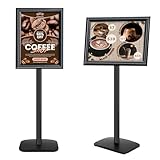
- ✅【Weighted Base for Stability】The sign holder features a weighted base of 5.7 lbs, ensuring exceptional stability and wind resistance. Suitable for both indoor and outdoor use, it stays secure and upright in all conditions.
- ✅【180° & 360° Adjustable Views】Our sign stand offers complete flexibility with 180° and 360° adjustable views, allowing you to showcase your posters from any angle.
- ✅【Fit for 11"x17" Posters】Perfectly accommodating 11"x17" size posters, with a height of 47.8" in horizontal and 50" in vertical positions, ensuring ideal readability and presentation for your displays.
- ✅【Easy Poster Change and Protection】Featuring a front open snap frame for easy poster changes. It includes a UV-resistant PVC l that protects posters from weather, sunlight, dust, and fingerprints, ideal for exhibitions, showrooms, and retail environments.
- ✅【Versatile Applications】The floor standing sign holder excels in displaying posters, directions, warnings, and signs like "please wait to be seated" sign, as well as serving as a menu stand.
- With a Gutenberg block: In the WordPress editor, add the plugin’s menu block and select the menu if the block asks you to.
- With a shortcode: Copy the shortcode from the plugin’s instructions, replace any sample ID with your menu’s actual ID, and add it to the page using a shortcode block or the placement method the plugin specifies.
- With a page builder, if supported: Use the plugin’s Elementor or WPBakery option if that suits your existing workflow. Flavor’s FAQ says its Gutenberg block and shortcode can work without Elementor or WPBakery, so a page builder is not automatically required.
Five Star’s official FAQ describes the block and shortcode options in its plugin documentation. Follow the current instructions for your selected plugin, since insertion options differ.
Review the published page before sharing it
Open the page on your site and check that the menu appears where expected, sections and dishes are in the right order, and names, descriptions, and prices are correct. If you use photos, confirm they display as intended. If the page does not show the menu, verify that you inserted the right block or shortcode and selected the correct menu. Consult the plugin’s current instructions for theme compatibility and any required settings; feature listings alone cannot confirm behavior on your particular site.
Rank #4

- 【Multi-page design】Package includes 2Pcs menu holders, measuring 8.3*4.5*2.4 inches. Each menu holder provides 6 pages, with a total of 12 display positions on the front and back.
- 【Transparent display stand】Made of transparent PVC material, the menu is clearly displayed, the surface is smooth and easy to clean.
- 【How to use】One side of each page is open, you can slide the paper in from the side.
- 【Stable base】The display stand is equipped with a sturdy black and white base, providing upright support, and the compact structure is easy to pick up or put down.
- 【Multi-occasion use】Ideal for displaying restaurant menus, office information, teaching materials, trade show posters, reception area welcome signs, personal albums, etc.
Optionally share the menu with a QR code
A QR code can direct diners in your physical location to the online menu, but it is not required to publish a menu page. Flavor lists print-ready QR-code table stands as a Pro feature in its WordPress.org documentation. A separate physical table-tent holder is another optional way to display a link for in-person guests.
Quick Recap
Best Value

- CLEAR SIGN DISPLAY STAND---Our sign holder is made of transparent and high-quality acrylic. This sign stand with a double-sided display, which can ensure that the information on your sign is clearly visible from all angles.
- STURDY AND STABLE FLYER HOLDER---The base of our flyer stand is a widened and thickened upgraded version, which is stable and durable and will not tip over. The triangular groove structure of the base can firmly support your sign in various occasions.
- COST-EFFECTIVE PAPER HOLDER 3 PACK---You will receive 3 pack 8.5*11 inch vertical paper stand (Please tear off the protective film before using the product). Our goal is to bring the best products and services to our customers at the most affordable price.
- MULTIFUNCTIONAL DISPLAY STAND---Simply insert the acrylic panel into the base to display your sign. They can display signs, menus, flyers, brochures, etc., and can be used in home, restaurant, office, trade exhibition, bar counter, vendor event.
- 24 HOURS CUSTOMER SERVICE---We will provide a very simple and fast exchange, return, refnd service. If you have any needs for menu holder stand, please feel free to contact us, we will do our best to provide you with a 100% satisfactory solution.
Product prices and availability are accurate as of the date/time indicated and are subject to change. Any price and availability information displayed on Amazon at the time of purchase will apply.

