Some links on this page are affiliate links: if you buy through them we may earn a commission, at no extra cost to you.
To use Google for searches typed in Microsoft Edge’s address bar, open Settings and more (…) → Settings → Privacy, search, and services → Search and connected services → Address bar and search, then choose Google under Search engine used in the address bar. These steps are for desktop Edge on Windows or macOS; labels can vary slightly by version.
This changes address-bar searches—not necessarily the New Tab page’s central search box, Windows Search, or search boxes on websites.
Change Edge’s address-bar search engine to Google
- Open Microsoft Edge.
- Select the three-dot Settings and more menu in the upper-right corner.
- Select Settings.
- Open Privacy, search, and services.
- Scroll to Search and connected services. Some versions may use slightly different wording, such as Search and connected experiences.
- Select Address bar and search.
- Open Search engine used in the address bar and select Google.
Microsoft’s Edge instructions and Google’s instructions for Edge 79 and later describe the same basic setting. Edge remains your browser; this only selects the provider for searches entered in its address bar.
If Google isn’t listed
Edge may need to discover the provider before it appears in the menu. In Edge, click the address bar, search for something on Google, and press Enter. Then return to Settings → Privacy, search, and services → Search and connected services → Address bar and search and check the provider list again. Edge supports compatible search sites using OpenSearch, and Microsoft recommends searching with a provider first if it is missing.
#1 Best Overall

- Package Includes: You will get 50 Pcs blue keyboard switches in one bag! Each set of our mechanical switches comes with a switch puller and a convenient cleaning brush. This complete kit makes switch installation and future keyboard cleaning effortless
- Enhanced Durability: Engineered with dust-proof and waterproof construction, these switches provide superior protection. This defense significantly boosts your keyboard's longevity, ensuring consistent performance in any environment
- Authentic Tactile: Experience the satisfying rhythm of typing with a clear tactile bump and a crisp, audible click sound. The driving force offers powerful two-stage feedback, making it the perfect keystroke experience for typists and gamers
- Strong Visual: The transparent housing maximizes the brilliance of lighting for stunning visual effects. Featuring a standard 3-pin MX design, they are plug-and-play compatible with most hot-swappable keyboards and support profile keycaps
- Premium Materials: These clicky switches utilize a high-quality POM stem and a robust copper alloy spring. This premium material combination ensures consistent and satisfying keystrokes over an impressive lifespan of enough clicks
You can also try entering edge://settings/searchEngines in the address bar to open Edge’s search-engine settings directly. This internal shortcut may change between versions, so use the Settings menus if it does not work.
Check that the change worked
- Open a new tab, then click Edge’s address bar at the top of the window.
- Type a query that is not a web address, such as
weather tomorrow, and press Enter. - Confirm that the results page opens on Google.
Use the address bar for this test—not a website’s own search field or the central search box on the New Tab page. Address-bar suggestions may still appear while you type; they are separate from the results provider used after you press Enter.
Rank #2

- This blue key switch has a transparent housing, suitable for LED backlighting, offers excellent tactile feedback, smoother, and will satisfy you with the classic crisp click sound.
- The mechanical keyboard switch is made of plastic shell, copper gasket, high-quality spring, the shaft core material is POM, waterproof, approximate lifespan of 50 million times of keystrokes, durable.
- Total stroke of blue switch: 4 mm; working stroke: 2.2±0.6 mm. Tip: Pins may be bent during shipment, but will not be affected the use after correction.
- Good compatibility, great for most mechanical keyboards, a strong sense of paragraphing, suitable for users pursuing feel and performance, and suitable for typists, enjoy the rhythm of work and games.
- Packaging: 10 PCS 3 pin keyboard dustproof switches.
Why the New Tab page may still search with Bing
Edge’s address bar and the New Tab page’s central search box are distinct controls. Setting Google for address-bar searches does not guarantee that the New Tab box will stop using Bing. Microsoft Q&A guidance describes this limitation, and the behavior or available controls may differ by Edge version.
In some versions, a setting named Search on new tabs uses search box or address bar lets New Tab searches redirect through the address bar. If you see it, try the address-bar option and test the New Tab page; do not assume it is available or behaves identically in every build. Otherwise, click the address bar to search, or consider a New Tab replacement extension only after checking its publisher, permissions, and privacy terms.
Rank #3

- 【Package Content】The package contains 50 pre-lubricated 3-pin onboard tactile switches, providing smooth actuation and crisp rebound, making it ideal for custom keyboards or upgrades
- 【Clear Housing Design】Featuring a transparent blue casing that perfectly complements the LED backlight, these key switches provide excellent tactile feedback, giving you a pleasant typing experience
- 【Quality Material】Made of plastic housing, copper washers, and high-quality springs, these blue switches are waterproof and dustproof, durable, and have a service life of up to 50 million cycles
- 【Wide Compatibility】Compatible with most keyboards, these keyboard clickers are ideal for users who value feel and performance, making them ideal for typists and gamers
- 【Factory-Precision Lubrication】Each keyboard switch is machine-lubricated to reduce friction and noise, ensuring smooth, consistent keystrokes and plug-and-play reliability for a superior typing experience
If Google is unavailable, locked, or keeps changing back
- Confirm the profile: Edge keeps settings by profile. Make the change in the profile where you actually browse.
- Discover Google first: Search with Google from the address bar, then revisit the provider list.
- Check whether the browser is managed: If the setting is missing or greyed out on a work or school device, an administrator may control the available search engines. Microsoft policies can restrict customization or set a managed engine list; contact your organization’s administrator rather than trying to bypass the restriction. See Microsoft’s documentation for search-engine customization, managed search engines, and the default search provider.
- If it reverts: Check that you are using the same profile, whether the device is organization-managed, and whether an extension or unwanted software may be changing search settings. Update and restart Edge, remove extensions you do not trust, and check the setting again.
Search suggestions and privacy
Choosing Google changes the provider for address-bar searches; it does not turn off suggestions or stop Edge from collecting all browser data. Microsoft says characters typed in the address bar may be sent to the default search provider to generate suggestions. You can review the Search suggestions and filters control under Settings → Privacy, search, and services → Search and connected experiences → Address bar and search; wording can vary by build. Disabling suggestions may reduce autocomplete convenience, and it does not replace Google’s privacy practices with different ones. Microsoft also notes that typed characters are not sent to the default search engine for suggestions in InPrivate and Guest modes. See Microsoft’s Edge privacy information.
The steps here cover desktop Edge. Mobile Edge can have different settings and menu paths, so do not assume these instructions apply to Android or iPhone.
Rank #4
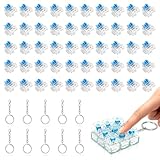
- 【Complete Kit–50 Clicky Switches + 10 Metal Keychains】Each kit comes with 50pcs pre-lubed 3-pin mechanical switches and 10pcs solid metal keychains.They deliver crisp clicks and a strong tactile bump, making them great for keyboard upgrades and 3d printed fidget toys. Once your print is done, clip the keychain to a backpack or keyring and take that satisfying click with you everywhere. Please note: fidget toy is not included.
- 【Built to Last – 30 Million Clicks】 The Smaxthsen blue clickers are constructed with a durable plastic housing, copper washers, and high-quality springs. They are rated for 30 million keystrokes, delivering consistent and satisfying performance click after click. No need to worry about wear and tear.
- 【Compatible with Most Keyboards】 These switches share the same size and pin layout as Cherry MX 3-pin switches, making them compatible with most mechanical keyboards on the market. The transparent blue casing is designed to perfectly complement LED backlighting, allowing the light to shine through clearly. With excellent tactile feedback built right in, they offer a pleasant and responsive typing experience with every press.
- 【Perfect for 3D Printed Fidget Toy】 Experience the crisp tactile click and audible feedback of Smaxthsen Blue Switches – the ultimate keyboard clicker for 3D prints. Whether you're feeling stressed or simply bored, these clicky switches instantly transform any 3D printed fidget toy into a mood booster. Assembly is quick and requires absolutely no tools – just print the base, snap in your Smaxthsen blue switch, and push on the keycap. No soldering, no glue, no hassle at all.
- 【Dust Protection Design】The built‑in dust cover keeps dirt and debris out without interfering with installation or the smooth clicky feel.
Frequently Asked Questions
Does changing the search engine change Edge’s home page?
No. It changes the provider for searches typed in the address bar; the home page is a separate setting.
The Tool Desk
Outbyte PC Repair FREEClear out junk files and repair common Windows errorsFree Scan →Outbyte Driver Updater FREEFix the driver behind crashes, sound loss and screen glitchesFind Drivers →Can I change the New Tab page search box to Google?
The address-bar setting does not necessarily change the New Tab page’s central search box, which may continue to use Bing. Some versions may offer an option to send New Tab searches to the address bar.
Best Value

- Feeling:The segmented feeling is extremely distinctive,the keystrokes are crisp and clear,and the typing rhythm is strong,bringing an immersive typing experience.
- Sound: “Clicky” sound is crisp and recognizable,each key seems to play an exclusive note.
- Pressure:Trigger pressure of 50gf,strong key feedback,effectively reducing false touches and guaranteeing efficient input.
- Lifespan: Rugged internal structure,can withstand about 50 million keystrokes,durable,with dustproof and waterproof effect.
- Packaging:The exquisite PVC plastic box effectively prevents the switch from all kinds of damages.
Can I change the search engine on Edge mobile with these steps?
These steps are for desktop Edge. Mobile settings and labels may differ.
How do I switch back to Bing?
Return to Settings → Privacy, search, and services → Search and connected services → Address bar and search and select Bing under Search engine used in the address bar, if the setting is available.
Quick Recap
Product prices and availability are accurate as of the date/time indicated and are subject to change. Any price and availability information displayed on Amazon at the time of purchase will apply.
Do these 3 things before closing this tab:
1Fix the driver behind crashes, sound loss and screen glitches2Clear out junk files and repair common Windows errors3Scan for outdated or missing drivers - takes under a minute
