Some links on this page are affiliate links: if you buy through them we may earn a commission, at no extra cost to you.
The most reliable mail-merge workflow is simple: put one finished invitation’s data on each spreadsheet row, make one invitation template with a separate field for every value that changes, map the columns to those fields, generate a multi-page file or separate files, and proof the longest and most unusual records before printing.
This approach prevents copy-and-paste errors while preserving control over names, table numbers, RSVP links, meal choices, addresses and other guest-specific details.
Start with a spreadsheet designed for one invitation per row
Decide what one printed piece represents before opening a design tool. If an invitation is addressed to a household, use one row for that household. If every guest receives a separate invitation, use one row per guest. Do not place several unrelated guests in one cell unless your design intentionally prints them as one household line.
Recommended columns
| Column | Purpose | Example |
|---|---|---|
GuestName |
Main personalized name | Jordan Lee |
HouseholdName |
Envelope or family wording | The Lee Family |
Venue |
Variable location, if needed | Rosewood Hall |
RSVPDate |
Deadline shown on the card | June 15, 2026 |
TableNumber |
Seating information | 12 |
MealChoice |
Only when invitations or inserts differ by meal | Vegetarian |
QRURL |
Personal RSVP or event URL | https://example.com/rsvp/jordan |
- Keep headers short, unique and stable before connecting any fields.
- Normalize apostrophes, accents, capitalization and postal abbreviations in the source sheet.
- Leave a field blank only when the design has a deliberate blank state; otherwise use a consistent value such as “Not applicable.”
- Keep the original spreadsheet and a dated copy of the final merged output together so reprints can be reproduced.
Choose the right bulk-generation workflow
| Tool | Best fit | Batch and output details | Main limitation to check |
|---|---|---|---|
| Canva Bulk Create | Highly visual designs and many variations | Imports CSV or XLSX, maps columns to text or image elements, and exports one multi-page design or individual designs. Canva documents up to 300 selected rows and 150 columns. | Available on Canva Pro, Teams, Business, Enterprise, Education and Nonprofits plans. |
| Microsoft Word mail merge | Existing Word layouts, precise field rules and local printing | Uses Excel or CSV data, previews records, then creates personalized documents for printing. | Complex decorative designs may be harder to maintain than in a graphics editor. |
| Avery Design & Print | A specific card, label or envelope product | Imports a guest list and aligns the design to a selected Avery template; supports home printing or Avery WePrint ordering. | Product number, finished size, orientation and feed direction must match exactly. |
| Adobe Express | Template-to-order convenience | Provides wedding templates, image uploads, PDF/JPG/PNG downloads and print ordering. | Adobe lists print-to-order availability for the US, UK, Australia and Canada. |
Canva Bulk Create: the design-first method
- Create and clean the CSV or XLSX file. Include one row for each invitation output and avoid merged cells or decorative formatting in the data range.
- Build one invitation design. Add a separate text element for each variable, such as guest name, venue, RSVP date and table number. Use image frames when a photo or QR graphic changes per row.
- Open Canva’s Bulk Create feature, upload the CSV/XLSX file, and connect each column to its matching text element or image frame.
- Select the rows to generate. Canva documents a maximum of 300 selected rows and 150 columns for this feature.
- Choose a single multi-page design for a print-ready batch, or individual designs when each invitation must be downloaded, named or edited separately.
- Generate a small proof first. Check the longest name, accented characters, blank optional fields, QR graphics and any record with an unusually long address before generating the full set.
Long names can wrap or overflow a text box. Widen the box, reduce the font size within a defined range, or create a two-line layout deliberately; do not rely on an accidental wrap that changes from record to record.
#1 Best Overall
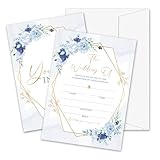
- Package: This set includes 25 wedding invitation cards and 25 matching white envelopes—plenty to meet all your party needs
- Size: Our double-sided invitation cards measure 5 x 7 inches, offering a beautifully designed yet practical size
- High Quality: Made from coated paper, our cards feature wide line spacing, crisp printing, and a sturdy yet smooth surface for an effortless writing experience
- Elegant Design: Each card showcases exquisite watercolor patterns in various styles, with ample blank space for your personalized details. Let’s get the party started
- Versatility: Perfect for weddings, bridal showers, and other special occasions. Impress your guests with these elegant cards and create unforgettable memories
Microsoft Word mail merge: the document-first method
Microsoft describes mail merge as creating a batch of documents that share layout, formatting, text and graphics while personalized portions change. That model works well for invitations, inserts, envelopes and address labels.
- Save the guest list as an Excel workbook or CSV. Put field names in the first row and keep the data range rectangular.
- Open the invitation document in Word and start a mail merge for letters or another document type that matches your layout.
- Select the spreadsheet as the recipient list and insert merge fields into the invitation text boxes or paragraphs.
- Use Preview Results to step through records. Inspect short and long names, diacritics, blank values and any conditional wording.
- Choose Finish & Merge > Print Documents for the final run, or create a new merged document first if you need a PDF archive or another review pass.
Word is particularly useful when a field controls a sentence, such as showing different meal instructions, or when the final output must be printed directly on a local printer.
Avery Design & Print: align to the physical stock
- Identify the exact Avery product number and confirm whether it is a card, label, insert or envelope.
- Open the matching wedding invitation template and set the finished size and orientation before importing data.
- Import the guest list, map columns to text fields, and customize typography, images and spacing.
- Print one sheet on plain paper first. Place it behind the actual stock and hold both to a light to verify alignment and feed direction.
- After the proof passes, print the batch at home or use Avery WePrint where available.
A design that looks correct on screen can shift when a printer feeds pre-cut stock. Confirm margins, duplex settings and the printer’s supported cardstock thickness before committing the entire list.
Do these 3 things before closing this tab:
1Clear out junk files and repair common Windows errors2Fix the driver behind crashes, sound loss and screen glitches3Repair Windows errors before they cause bigger problemsRank #2

- 50-CARD PACK WITH ENVELOPES & STICKERS – This set includes 50 wedding invitations with blank envelopes and coordinating stickers for a complete invitation package.
- ELEGANT LEAF DESIGN WITH GOLD FOIL LETTERING – Featuring a gold foil cursive heading on a white background with leaf-patterned borders, these invitations offer a sophisticated look.
- CUSTOMIZABLE & EASY TO FILL – Each card provides ample space to write essential event details, such as names, venue, time, and RSVP.
- 5x7 INCH DIMENSIONS – These invitations are slightly larger than standard greeting cards, making them ideal for mailing or hand-delivering
- PRINTED ON DURABLE CARDSTOCK FOR A POLISHED AND PROFESSIONAL APPEARANCE– Made with thick cardstock and precision printing, these invitations offer a polished and presentable appearance.
Adobe Express: when ordering matters more than local merging
Adobe Express offers wedding templates, image uploads, generative editing tools and PDF, JPG or PNG downloads, plus print ordering. Adobe recommends images of at least 300 DPI for best invitation print quality. Its documented paper choices include UV Gloss, UV Matte, Cream and Double-Thick.
Use this route when you want a polished template and an integrated professional-print order rather than a spreadsheet-heavy home-production workflow. Adobe lists print-to-order availability for the US, UK, Australia and Canada; verify destination availability and delivery terms before paying.
Proofing and printing checklist
Digital proof
- Open the longest first and last names, the longest address and every record containing accents, apostrophes or hyphens.
- Check that optional fields do not leave stray punctuation or oversized gaps.
- Scan every QR code from the exported file, not only from the design editor.
- Review trim margins, bleed, alignment, page order and whether any text crosses a safe area.
- Confirm that the generated page count equals the number of intended invitations.
Physical proof
- Use invitation cardstock that your printer supports and that matches the template’s dimensions, weight and finish.
- Print one real sheet and verify feed direction, duplex behavior, color, trimming and envelope fit.
- For a large run, inspect the first few sheets and periodically check for skew, smearing, jams or an exhausted ink cartridge.
Common failures and fixes
| Symptom | Likely cause | Fix |
|---|---|---|
| Wrong person’s name | Rows were sorted independently or the source was edited after mapping. | Keep all columns in one table, sort the complete range, then remap or regenerate. |
| Name is cut off | Text box is too small for the longest value. | Resize the box, permit a controlled second line or apply a tested minimum font size. |
| Accents display incorrectly | CSV encoding or font lacks the required glyph. | Export UTF-8 CSV, choose a font with the needed characters and proof accented records. |
| Blank field leaves awkward wording | The template assumes every column is populated. | Add conditional wording or provide a deliberate fallback value. |
| Cards print misaligned | Wrong product template, scale setting or feed orientation. | Match the stock product number, disable “fit to page,” and run a plain-paper overlay test. |
| QR code fails after printing | Insufficient contrast, excessive compression or incorrect URL. | Use a high-resolution code, preserve quiet space, verify the final printed sample and test several phones. |
| Only part of the list generated | A selection limit, filtered rows or malformed data range. | Check filters, row selection and the tool’s documented batch limit; split the run into labeled batches when necessary. |
Or skip the browser setup
If your invitation workflow produces web-based proofs or RSVP pages that you need to capture consistently, ScreenshotNeo can return a screenshot or PDF from one request. It accepts consent banners before capture and removes more than 60 known consent platforms, newsletter popups and chat widgets; each step can be turned off. Bot checks, blank pages, timeouts, failed loads and cache hits are not billed, and response headers identify the page verdict and billing status. Its MCP server provides take_screenshot, get_page_info and capture_pdf tools for Claude, Cursor and other MCP clients.
Use the API documentation at screenshotneo.com/docs/ for all options, including viewport and device settings, full-page capture, custom CSS or JavaScript, waiting rules, request blocking, cookies, headers, geolocation, PDF controls, resizing, caching, signed links, asynchronous jobs and bulk capture.
Rank #3
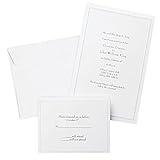
- Give your special day the significance it deserves with the classic and pristine design of our convenient print at home invitations and response cards
- This set of 50 features smooth, heavyweight white cover stock invitations with a delicate pearl foil border with envelopes and matching response cards and envelopes
- Invitations measure 5.5” by 8.5” and response cards are 4.25” by 5.5”; extra pieces are included for test-printing your layout on a laser or inkjet printer
- Coordinate your special event with our pearl white programs, thank you cards and more (sold separately)
- Set the document size and margins yourself, or take advantage of the template available at the Gartner Studios website
cURL
curl -G "https://api.screenshotneo.com/v1/shot" -d access_key=YOUR_API_KEY --data-urlencode url=https://stripe.com -o shot.webpPython
import requests
r = requests.get("https://api.screenshotneo.com/v1/shot", params={"access_key": "YOUR_API_KEY", "url": "https://stripe.com"}, timeout=90)
open("shot.webp", "wb").write(r.content)
Node.js
const q = new URLSearchParams({ access_key: 'YOUR_API_KEY', url: 'https://stripe.com' });
const res = await fetch(`https://api.screenshotneo.com/v1/shot?${q}`);
The Free plan includes 1,000 screenshots a month with no card. Paid plans start at $5 for 3,000 shots. Create a free ScreenshotNeo account when you need automated, clean captures of your invitation-related pages.
Independent reader supportYour contribution helps us test, update, and keep practical guides available for everyone.Frequently Asked Questions
Should I use one row per person or one row per household?
Use one row per final invitation output. A household gets one row only when the design treats that household as one addressed unit.
Can I generate separate files instead of one PDF?
Yes. Canva Bulk Create offers individual designs as well as a multi-page design; Word can create a merged document that you can split or export with your chosen PDF workflow.
Rank #4
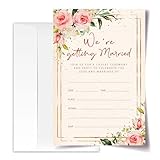
- ·Standard Size for Everyone: Suitable for all, each invitation card measures 4x6 inches, providing a perfect fit for various occasions.
- ·Personalized and Vibrant Design: Featuring bright and lively colors, these invitation cards offer ample writing space for your personal touch.
- ·Crafted with Precision: Meticulously made from high-quality and recyclable cardboard, ensuring durability. The high-definition printing enhances the overall aesthetic, making it a convenient canvas for your words.
- ·Versatile Occasion Use: Ideal for birthdays, wedding, baby showers, parties, wedding shower, gender reveals, and more. Leave a lasting impression on your friends with these versatile invitation cards.
- ·Generous Quantity: Each order includes 20 invitation cards and 20 envelopes, providing you with everything you need for your special occasion.
What should I do if my list has more than 300 Canva rows?
Split the cleaned list into clearly numbered batches, generate each batch, and keep the source and output filenames aligned so pages are not duplicated or omitted.
How do I preserve a batch for reprinting later?
Archive the final source spreadsheet, the exact template version, exported PDF or individual files, and notes about stock, printer settings and any rows intentionally excluded.
Quick Recap
Product prices and availability are accurate as of the date/time indicated and are subject to change. Any price and availability information displayed on Amazon at the time of purchase will apply.

