Recommended Free Tools
Use a real browser controlled by Playwright: navigate to the page, wait for the state your test needs, and call the screenshot API. Python supports synchronous and asynchronous workflows; JavaScript uses an asynchronous API. You can capture the visible viewport, the entire scrollable document, or one located element, then save an image or keep the returned bytes in memory.
Choose the capture you actually need
Playwright’s screenshot methods produce different scopes. Decide this before writing automation:
| Capture | Setting | What the file contains |
|---|---|---|
| Viewport | Omit fullPage/full_page |
The currently visible browser viewport. |
| Full page | fullPage: true (JavaScript) or full_page=True (Python) |
The entire scrollable document, including content below the fold. |
| Element | A locator’s screenshot() method |
A crop containing the located element, not the whole document. |
Use a viewport shot for a visual regression of a fixed screen, full-page for documentation or page archives, and an element shot for a component such as a header, card, or chart.
Automate a screenshot with JavaScript
The following CommonJS program launches Chromium, creates an isolated context, opens a page, and writes a PNG. The same browser-type interface can select WebKit or Firefox.
#1 Best Overall

- Compatibility Note: For Logitech BRIO/MX BRIO webcams, detach the included computer mounting clip/magnetic mount to access the standard 1/4” screw hold located at the base, enabling compatibility with InnoGear webcam stand mount.
- Premium Stability: This webcam tripod stand combines a heavy-duty metal core with reinforced ABS plastic to eliminate vibrations and wobbles. The non-slip rubber tripod grips your desk like a vice, ensuring your webcam stays perfectly still. No more distracting jitters in your video calls or content.
- Instant-Adapt Flexibility: This ultra-portable webcam mount extends from 11.5" to 18" instantly, without tools. Its rigid 360° ball head ensures perfect framing for any shot (portrait, overhead, or classic webcam view). Weighing just 0.65 lbs, it folds smaller than an umbrella for your backpack, yet deploys in seconds for a rock-solid hold. The ideal, flexible solution for hybrid workers on the move.
- Effortless Phone Security: The adjustable phone holder features an intelligently designed clamping range of 2.5 to 4 inches, ensuring a perfect, secure grip for virtually every smartphone on the market, from an iPhone 13 Mini to a Samsung Galaxy S23 Ultra without needing extra adapters. Compatible Models: iPhone 13 Mini - iPhone 17 Pro Max, Samsung Galaxy S i9000, i9001, and most other smartphones.
- Maximize Your Setup's Stability. This phone holder is engineered for superior strength, supporting up to 6.6 lbs—enough for your heaviest phone and accessories. For optimal performance, simply orient it vertically to center the weight. When used horizontally, positioning it above a leg (3.3 lb capacity) or within the leg span (2.2 lb capacity) ensures a secure, balanced setup for any creative need.
const { chromium } = require('playwright');

(async () => {
  const browser = await chromium.launch();
  const context = await browser.newContext();
  const page = await context.newPage();

  await page.goto('https://example.com');
  await page.screenshot({ path: 'screenshot.png' });

  await browser.close();
})();
Do not treat navigation completion as proof that every application widget has finished rendering. Wait for the particular content or state your page requires, rather than adding an arbitrary fixed sleep.
Full-page and element captures in JavaScript
// Entire scrollable document
await page.screenshot({ path: 'full-page.png', fullPage: true });

// One component (the locator must resolve to the intended element)
await page.locator('.header').screenshot({ path: 'header.png' });
An element screenshot follows the element’s rendered bounds. It is not a substitute for a full-document capture when lower sections matter.
Return bytes instead of creating a file
const imageBytes = await page.screenshot({ type: 'png' });
// Pass imageBytes to a storage, comparison, or HTTP pipeline.
When no path is supplied, Playwright returns the image bytes. This is useful for image comparison, object storage, or an API response.
Automate a screenshot with Python
Python has synchronous and asynchronous APIs. The synchronous form is convenient for scripts and command-line jobs:
What’s actually slowing this PC down?
Pick the symptom - the matching free tool is one click away.
from playwright.sync_api import sync_playwright

with sync_playwright() as playwright:
    browser = playwright.webkit.launch()
    context = browser.new_context()
    page = context.new_page()

    page.goto("https://example.com")
    page.screenshot(path="screenshot.png")

    browser.close()
The browser choice is interchangeable; use chromium, firefox, or webkit from the Playwright object when your target requires a particular engine.
Python async version
import asyncio
from playwright.async_api import async_playwright

async def main():
    async with async_playwright() as playwright:
        browser = await playwright.chromium.launch()
        context = await browser.new_context()
        page = await context.new_page()

        await page.goto("https://example.com")
        await page.screenshot(path="screenshot.png")

        await browser.close()

asyncio.run(main())
Choose async Python when the surrounding service already uses an event loop or performs many independent I/O operations. Use sync Python for a straightforward one-shot utility.
Full-page, element, and in-memory Python captures
# Entire document
page.screenshot(path="full-page.png", full_page=True)

# A single component
page.locator(".header").screenshot(path="header.png")

# Bytes for later processing
image_bytes = page.screenshot(type="png")
The async equivalents use await on each call, including await page.locator(".header").screenshot(...).
Control image format, dimensions, and density
Playwright supports PNG, JPEG, and WebP output. JPEG and WebP expose quality controls; PNG does not. A format can be selected explicitly:
await page.screenshot({ path: 'preview.webp', type: 'webp', quality: 82 });
# Python: page.screenshot(path="preview.jpg", type="jpeg", quality=82)
Use PNG when lossless text and sharp edges matter. JPEG is smaller for photographic pages but introduces loss. WebP can reduce transfer size when the consuming system supports it.
Rank #2
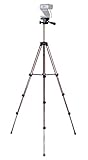
- Webcam Tripod:Max Height 51 inches, Max load 4 pounds, With 1/4'' Screw thread; 4 sections Extends;
- Webcam Tripod: Weighs just over a pound. Extends to 22", 30", 40" and 50". Minimum Height: 16". Carrying case included.
- Webcam Tripod: Built-in bubble view levels and 3-way head to allow for tilt and swivel motion; portrait or landscape options.
- WIDELY COMPATIBLE: Compatible with most video cameras, digital cameras, still cameras, projector, GoPro devices, smart phone adapters (not included), and scopes.
- What you get: 1x50'' Tripod, 1xBlack Fabric Carry Bag;
The scale option controls pixel density. CSS scale produces one image pixel per CSS pixel, making output dimensions predictable. Device scale follows device pixels and can make captures larger on high-density settings. Pick CSS scale for stable visual comparisons and device scale when you need a retina-style asset.
Make captures repeatable
- Set the viewport deliberately. A context’s viewport determines responsive breakpoints and therefore the page you capture.
- Use the same browser engine and context settings. Fonts, operating systems, browser engines, and device scale can change pixels.
- Wait for the required state. Target a specific locator or application condition that proves the content is ready. No single wait condition works for every dynamic site.
- Disable motion when appropriate. Screenshot options can disable animations, preventing a moving transition from producing different frames.
- Mask volatile regions. Mask selected locators when timestamps, ads, rotating recommendations, or user-specific data should not affect a comparison.
- Keep page data stable. Changing network responses, experiments, fonts, and time-dependent content can legitimately alter an image even with identical code.
These controls improve consistency; they cannot guarantee identical pixels across operating systems, fonts, browser versions, or changing server responses.
Save files safely in automation jobs
Use unique, deterministic names when a job captures multiple URLs. Create the output directory before writing and keep the browser close operation in a cleanup path so a failed navigation does not leave processes running. For high-volume work, reuse a browser process and create separate contexts for isolation instead of launching a new browser for every URL. A context keeps cookies and storage separate while avoiding some launch overhead.
Free tools Windows power users keep installed
One-click scans. No signup required.
For parallel capture, limit concurrency to what the machine and target site can handle. Too many pages can exhaust memory, trigger rate limits, or make rendering less reliable. Record the URL, viewport, browser engine, capture scope, format, and timestamp alongside each artifact so a later comparison is explainable.
Common failures and practical fixes
The file is only the visible portion
Cause: the default is a viewport capture. Fix: set fullPage: true or full_page=True. Confirm that the page’s content is actually in the document; a collapsed accordion or virtualized list may not render every item.
A component screenshot fails or captures the wrong node
Cause: the selector matches no element, multiple unintended elements, or an element that has not rendered. Fix: use a locator tied to the component’s stable semantics, wait for the required state, and verify which element the locator resolves before capturing.
The screenshot times out
Cause: navigation or rendering has not reached the condition required by the operation, or the site is unreachable. Fix: check the URL from the same environment, inspect console/network errors, and wait for a specific readiness condition instead of a universal sleep. The Python reference documents a default screenshot timeout of 30 seconds, but defaults can vary with the installed Playwright version; set and verify a timeout appropriate to your job.
Images or fonts are missing
Cause: resources are still loading, blocked, unavailable to the browser environment, or served differently to automation. Fix: verify resource responses and the page’s loaded state, then wait for the exact image, font-dependent component, or application signal your capture needs.
Runs produce different pixels
Cause: animation, time-sensitive data, ads, fonts, responsive layout, or device scale. Fix: standardize context and viewport settings, disable animations, mask volatile locators, and control the data source where possible. Treat residual differences as a property of the page, not proof that the screenshot API is broken.
Rank #3

- Compatibility and Stability Note: This webcam stand suit only for webcams with standard 1/4" screw hole. For Logitech BRIO/MX BRIO webcams, detach the included computer mounting clip/magnetic mount to access the standard 1/4” screw hold located at the base, enabling compatibility with InnoGear webcam stand mount. For maximum stability and load capacity, please install without the gooseneck or bend the gooseneck into a straight form to make the center of gravity centered.
- Compact Yet Robust Design: The InnoGear webcam stand features a compact yet weighted all-metal base, ensuring optimal stability and portability. Unlike traditional stands that require unscrewing or re-clamping with every move, this model can be effortlessly repositioned around your home. The weighted round base offers superior protection for your webcams, minimizing the risk of tipping compared to tripod stands.
- Anti-Scratch & Skid-Proof Base: The base is equipped with four high-quality non-slip pads that ensure your webcam remains securely in place. These pads not only prevent surface scratches but also significantly reduce noise from movement, maintaining a professional and quiet environment for recording and broadcasting.
- Fully Adjustable for Perfect Angles: Featuring a detachable gooseneck and an intuitive adjustment knob, the InnoGear webcam stand provides a flexible range of motion for precise angle positioning. The adjustable height range of 8.7 to 20.9 inches ensures optimal shooting range, making it ideal for professional live streaming, video conferencing, and content creation.
- Exceptional Compatibility: Featuring a swivel ball head with 360° horizontal and 140° vertical rotation, this stand is compatible with a wide range of devices. The 3/8"-1/4" screw thread fits standard 1/4” screw hole webcams, including models like Logitech Webcam C920, C920S, C922x, C615, BRIO, C930e, C922, C960, and more. It also supports other devices with a 1/4” screw hole, such as ring lights and Tascam recorders.
The process consumes too much memory
Cause: too many simultaneous pages, very tall full-page images, or repeated browser launches. Fix: cap concurrency, reuse a browser with isolated contexts, capture only the required scope, and release pages and contexts promptly.
Independent reader supportYour contribution helps us test, update, and keep practical guides available for everyone.Or skip the browser setup
ScreenshotNeo provides a hosted screenshot API when you would rather send a URL than maintain browser automation. It accepts consent banners before capture and removes more than 60 known consent platforms, newsletter popups, and chat widgets; each cleanup step can be disabled. Bot checks or CAPTCHAs, blank pages, timeouts, failed loads, and cache hits are not billed, and the response identifies the result with X-Page-Verdict and X-Billed headers.
One GET request returns PNG, JPEG, WebP, or a PDF. The API also supports full-page and element captures, custom CSS and JavaScript, clicks, waits, hidden selectors, request/resource blocking, headers, cookies, user agents, authorization, timezone and geolocation, transparent backgrounds, resizing, selectable-TTL caching, signed image links, asynchronous jobs with signed webhooks, bulk capture of up to 100 URLs per call, and a usage API. Its MCP server exposes take_screenshot, get_page_info, and capture_pdf to Claude, Cursor, and other MCP clients.
curl -G "https://api.screenshotneo.com/v1/shot" -d access_key=YOUR_API_KEY --data-urlencode url=https://stripe.com -o shot.webpSee the ScreenshotNeo documentation for parameters and response details. The same request from Python:
import requests
r = requests.get("https://api.screenshotneo.com/v1/shot", params={"access_key": "YOUR_API_KEY", "url": "https://stripe.com"}, timeout=90)
open("shot.webp", "wb").write(r.content)
And from Node.js:
const q = new URLSearchParams({ access_key: 'YOUR_API_KEY', url: 'https://stripe.com' });
const res = await fetch(`https://api.screenshotneo.com/v1/shot?${q}`);
Every feature is included on every plan: 1,000 shots per month are free with no card; paid plans start at $5 for 3,000 shots. Create a free ScreenshotNeo account.
Which approach fits your workflow?
| Need | Best fit | Reason |
|---|---|---|
| Pixel-level control, local debugging, custom browser logic | Playwright | Your Python or JavaScript process controls the browser and can inspect the page directly. |
| Scheduled or bulk URL capture without browser maintenance | ScreenshotNeo | A single HTTP call handles rendering and returns the artifact, with billing status in response headers. |
| AI-agent initiated captures | ScreenshotNeo MCP server | MCP tools let compatible clients request screenshots, page information, or PDFs. |
FAQ
Can I capture a PDF instead of an image?
Yes. Playwright is the browser automation route for image screenshots; ScreenshotNeo’s API includes PDF capture with paper size, margins, orientation, and page-range controls.
Does a full-page screenshot include content loaded only after scrolling?
It represents the scrollable document, but an application that virtualizes or lazily creates content may require that content to be triggered and present before capture.
Should I use synchronous or asynchronous Python?
Use sync for a simple sequential script and async when your application already uses an event loop or coordinates many I/O-bound captures.
Frequently Asked Questions
Can I capture a PDF instead of an image?
Yes. Playwright is the browser automation route for image screenshots; ScreenshotNeo’s API includes PDF capture with paper size, margins, orientation, and page-range controls.
Does a full-page screenshot include content loaded only after scrolling?
It represents the scrollable document, but an application that virtualizes or lazily creates content may require that content to be triggered and present before capture.
Quick wins for a faster PC:
Scan for outdated or missing drivers - takes under a minuteDriver Scan →Clear out junk files and repair common Windows errorsFree Scan →Fix the driver behind crashes, sound loss and screen glitchesFind Drivers →Should I use synchronous or asynchronous Python?
Use sync for a simple sequential script and async when your application already uses an event loop or coordinates many I/O-bound captures.
Quick Recap
Product prices and availability are accurate as of the date/time indicated and are subject to change. Any price and availability information displayed on Amazon at the time of purchase will apply.

