Some links on this page are affiliate links: if you buy through them we may earn a commission, at no extra cost to you.
Use Wi‑Fi or Ethernet as the synchronized backbone, and treat Bluetooth as a local input or output. The most flexible open-source design is Music Assistant feeding Snapcast clients—usually one Raspberry Pi or compatible endpoint per room—into a DAC, amplifier HAT, powered speaker, receiver, or Bluetooth bridge. Snapcast timestamps audio and buffers clients to keep rooms aligned; its documentation describes typical timing deviation below 0.2 ms, but the finished installation can still develop offsets from Bluetooth, HDMI, speaker DSP, buffering, or network problems.
This guide shows how to build the system, choose hardware, add Bluetooth speakers without false promises of perfect sync, and decide whether DIY is preferable to Sonos or commercial streamers.
What you are building
A whole-home system has four layers:
- Sources: streaming services, local files, radio, or a phone.
- Management: Music Assistant (or Mopidy, MPD, or another player) handles libraries, queues, and groups.
- Synchronization: Snapserver distributes a timestamped stream over the LAN.
- Endpoints: Snapclients in rooms feed audio hardware and speakers.
Phone / streaming service / local files
                ↓
        Music Assistant
                ↓
          Snapserver
        ↓ Wi‑Fi or Ethernet
  ┌─────────┬─────────┬─────────┐
 Room 1    Room 2    Room 3    Patio
 Pi client Pi client Pi client BT bridge
 DAC/amp   DAC/amp   TV/USB    BT speaker
Snapcast supports PCM, FLAC, Vorbis, and Opus streams and clients for Linux, Raspberry Pi, Android, Windows, macOS, OpenWrt, and other platforms. See the project documentation at Snapcast on GitHub.
Why Wi‑Fi first and Bluetooth at the edge
Wi‑Fi (or wired Ethernet) gives Snapcast a common clock, central buffering, and controllable latency. Bluetooth does not provide that same whole-house timing layer. Codec buffering, retransmissions, speaker DSP, sleep modes, and reconnect behavior vary by device.
#1 Best Overall

- 【For Multi-room Indoor Audio】Designed for homes, classrooms, offices, and meeting rooms needing the same audio across multiple speakers. Ideal for background music, TV sound, and spoken content with consistent room-to-room coverage.
- 【Ultra Low Latency Under 30ms】Delivers synchronized playback with under-30 ms latency, keeping audio aligned across all speakers. Speech and video sound natural with no noticeable delay or echo during shared listening.
- 【Simple Setup, No App Required】Connect the transmitter to your TV, phone, or laptop via optical, AUX, or Bluetooth. Power on and speakers auto-connect with no app installation or complex setup steps.
- 【Not For Large Outdoor Venues】Not designed for large outdoor spaces or very loud environments due to limited maximum volume. Best suited for indoor use where clear, synchronized audio coverage is required.
- 【Limited Microphone Input Type】Not compatible with USB mics, direct XLR mics, or 3.5mm TRRS headset mics. Requires line-level output (3.5mm TRS or RCA) from a powered mic, wireless receiver, or mixer.
The dependable pattern is therefore:
Snapserver → Wi‑Fi → local Snapclient → Bluetooth speaker
This keeps distribution synchronized up to the endpoint, but the Bluetooth hop may leave that room slightly early or late relative to wired rooms. Calibrate it with a per-client latency offset where available; do not promise perfect alignment across unrelated Bluetooth models.
For a phone as a source, use a bridge:
Phone → Bluetooth receiver → Snapserver → Wi‑Fi → multiple Snapclients
The phone is not the server. If it leaves Bluetooth range, playback stops.
Choose the architecture
Best general-purpose build: Music Assistant plus Snapcast
Run Music Assistant and Snapserver on an always-on Raspberry Pi 4/5, Home Assistant machine, x86 mini-PC, NAS, or virtualization host. Music Assistant offers browsing, metadata, queues, player grouping, and streaming integrations; it can use a built-in Snapserver or connect to an external one. Its installation documentation recommends Home Assistant OS and says the system is designed to run on Raspberry Pi 4 or newer alongside Home Assistant. The default custom streaming port is TCP 8097. Start at Music Assistant installation and its Snapcast provider guide.
Crashes, No Sound, or Screen Glitches?
Random freezes, missing sound and display glitches usually trace back to one bad driver. Find and replace yours safely.Free scan · under a minuteWindows Errors? Fix Them Before They Spread
Repair common Windows errors and clear accumulated junk for a smoother, more stable PC - no reinstall needed.Free scan · no reinstallRank #2

- 𝗕𝗟𝗨𝗘𝗧𝗢𝗢𝗧𝗛 𝗠𝗨𝗟𝗧𝗜‑𝗦𝗣𝗘𝗔𝗞𝗘𝗥 𝗦𝗬𝗡𝗖 — 𝟭𝟬𝟬+ 𝗖𝗢𝗡𝗡𝗘𝗖𝗧𝗜𝗢𝗡𝗦: Thanks to PlyeeLink technology, the MZ-621 supports wireless connections for up to 100 speakers. It can seamlessly sync with additional MZ-621 and MZ-632 speakers to build a larger, unified sound system. Note: It is not compatible with the MZ-511. For optimal audio performance, ensure the distance between speakers is greater than 6 ft but within 100 ft and there should be no obstacles between the speakers.
- 𝗣𝗢𝗪𝗘𝗥𝗙𝗨𝗟 𝗔𝗨𝗗𝗜𝗢 𝗣𝗘𝗥𝗙𝗢𝗥𝗠𝗔𝗡𝗖𝗘: Each speaker delivers 40W RMS with 1” tweeters and 4” woofers, reaching up to 400W peak power. Powered by a stable corded adapter (included). Built-in power cable is approx. 6.7 ft (2 meters) long for flexible placement.
- 𝗘𝗔𝗦𝗬 𝗜𝗡𝗦𝗧𝗔𝗟𝗟𝗔𝗧𝗜𝗢𝗡 & 𝗖𝗢𝗡𝗧𝗥𝗢𝗟: Compact design (9.4” x 5.3”) fits small spaces like patios, porches, garages, and shops. Includes a remote and mounting kit for quick setup and easy control.
- 𝗪𝗘𝗔𝗧𝗛𝗘𝗥-𝗥𝗘𝗦𝗜𝗦𝗧𝗔𝗡𝗧 𝗗𝗘𝗦𝗜𝗚𝗡: Built for everyday outdoor environments, the speaker features a weather-resistant housing and a durable metal mesh grill, offering basic protection against light exposure to the elements. For extended longevity, we recommend installing the speakers in a covered area and avoiding direct rain.
- 𝗜𝗠𝗣𝗢𝗥𝗧𝗔𝗡𝗧 𝗡𝗢𝗧𝗘: Each speaker requires its own power source (2 adapters included). Bluetooth-only input; AUX connection is not supported. Due to Bluetooth latency, this model of speaker is not suitable for use with TVs or projectors for movie viewing.
Best hi‑fi endpoint: Pi with a DAC or digital HAT
Use a Pi per zone and connect it to equipment you already own:
- Analog DAC HAT: RCA output into an amplifier or powered speakers.
- S/PDIF HAT: optical or coaxial output into an existing DAC, receiver, or integrated amplifier.
- USB audio: a standalone USB DAC or interface.
Digital output is often the cleanest route when your existing amplifier already has a good DAC. Room acoustics and speaker quality usually matter more than changing DACs.
Best compact passive-speaker build: amplifier HAT
A Pi plus an amplifier HAT makes a self-contained zone, but it requires correctly wired 4–8-ohm speakers and a suitable supply. Manufacturer wattage is not guaranteed acoustic output: sensitivity, impedance, voltage, enclosure, distance, and distortion limits determine actual loudness.
Rank #3

- ROOM-FILLING PERFORMANCE: The most flexible home speaker ever from Bose, for incredibly immersive, deep, and clear sound in any and every room.
- ADJUSTABLE EQ: Match the sound to the moment with Adjustable EQ. Quickly tailor your audio for different genres or moods, from crisp highs and clear vocals to rich, full-bodied bass within the Bose app or with voice commands.
- VERSATILE SETUP: Use one wireless speaker with a compact design that fits easily in a kitchen, den, or bedroom for room-filling sound, pair two for stereo, or connect multiple speakers throughout your home for seamless multiroom listening.
- EASY CONTROL: Enjoy complete control by touch, app, or voice commands. Making it easy to play, pause, and personalize your surround sound from anywhere in the home.
- VOICE CONTROL WITH THE ALL-NEW ALEXA+: Control your entertainment, manage your smart home, and gain access to a ton of helpful services with just your voice.
Parts list by room type
| Build | Core hardware | When it fits | Observed component price |
|---|---|---|---|
| Existing amplifier | Raspberry Pi, power supply, case, DAC2 Pro or Digi2 Pro | Receiver or powered speakers already accept analog or S/PDIF | DAC2 Pro: $44.90; Digi2 Pro: $49.90 when observed; prices and stock change |
| Compact passive room | Raspberry Pi, case, 12–24 V supply, Amp2 or Amp4 Pro, passive speakers | One small, self-contained speaker zone | Amp2: $54.90; Amp4 Pro: $74.90 when observed; manufacturer ratings are not room-output guarantees |
| Bluetooth retrofit | Raspberry Pi or Linux bridge, power supply, local Bluetooth speaker | Patio, temporary room, or existing Bluetooth hardware | Not stated; speaker and bridge costs vary |
HiFiBerry’s DAC2 Pro fits 40-pin Raspberry Pi boards, provides RCA output, and includes a headphone amplifier. The Amp2 is a Class-D board specified for up to 60 W, 4–8-ohm speakers, and a 12–24 V supply. The Amp4 Pro is likewise specified for up to 60 W and 4–8-ohm speakers. The Digi2 Pro provides S/PDIF only; it cannot drive passive speakers directly.
Raspberry Pi pricing changed during 2026 because of memory costs, so do not rely on a permanent project total. Check current Pi 4, Pi 5, and authorized-retailer prices. Budget for power supplies, cases, storage, HATs, speaker cable, networking, shipping, and taxes—not just the board.
Network design that stays synchronized
- Keep server and clients on the same LAN and avoid guest-network isolation.
- Use Ethernet for the server and wired mesh backhaul where possible.
- Use 5 GHz near a reliable access point; use 2.4 GHz where range is more important than congestion.
- Reserve DHCP leases for the server and endpoints.
- Place access points centrally and avoid double NAT.
Snapcast’s web interface is normally reachable at http://<YOUR_MUSIC_ASSISTANT_IP_ADDRESS>:1780 when using Music Assistant’s Snapcast setup.
Rank #4
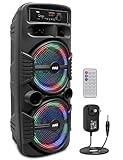
- 600 WATT POWER: This high powered wireless karaoke PA portable bluetooth speaker is equipped with dual 8" subwoofer and 1" tweeter with 600 watt peak power / 300W RMS at 2.6 ohm for full range stereo sound reproduction and impressive bass response.Waterproof : No
- COMPATIBLE WITH BLUETOOTH: The box type loud bluetooth speaker system is compatible with bluetooth for wireless audio streaming and works with devices like iPhone, android mobile phone, iPad, tablet, PC. Ideal for personal indoor home and outdoor use
- 3 INPUTS: Pyle bluetooth speaker karaoke PA system is equipped with a USB flash drive reader so it can serve as an MP3 player, a 3.5mm AUX input for connecting external devices & a 1/4” mic / guitar input. Equipped with FM radio with digital LED display
- FLASHING DJ LIGHTS: The bluetooth party speaker with lights features multi-color flashing disco LED party lights. True wireless stereo system adds life to any occasion, great for patio parties & night gatherings when colorful presence is noticeable
- RECHARGEABLE BATTERY: This Pyle PA speaker is great for karaoke, stage performances & crowd control. It is fully portable, thanks to its built-in rechargeable battery with level indicator lights, and extending carry handle so you can take it anywhere
Current software setup
Music Assistant route
- Install Home Assistant OS on the central machine, then install Music Assistant using its current instructions.
- Add Snapcast as a Music Assistant player provider.
- Open the Snapcast interface on port 1780 and confirm the server is running.
- Install Snapclient on one room endpoint using current packages or images from the Snapcast project; do not copy obsolete version-pinned commands from older tutorials.
- Connect that client to its DAC, amplifier, powered speaker, TV, or bridge.
- Rename the client by room and create groups such as Whole house, Downstairs, or Patio.
Home Assistant is optional. Its Snapcast integration adds dashboards, automations, snapshots, group control, volume, and latency actions; it is not required for basic playback. Documentation: Snapcast integration and latency action.
Standalone Snapcast route
- Install Snapserver on a Pi, Linux host, NAS, or Docker host.
- Configure a source such as a named pipe, ALSA capture, TCP input, or process output.
- Install Snapclient on each endpoint.
- Confirm clients appear in the web UI, assign them to groups, and select streams.
- Add a separate player or source manager, then control Snapcast through its interface or JSON-RPC API.
Build the first room before buying for the whole house
- Place the server and one client in their real locations.
- Play a known track and verify stable audio for at least several minutes.
- Reboot both devices and confirm the client reconnects automatically.
- Test the actual Wi‑Fi signal, not just a desk-top wired connection.
- Only then duplicate the endpoint design for other rooms.
Wire the endpoint safely
Existing amplifier or powered speakers
Pi → DAC2 Pro RCA → amplifier → passive speakers
Pi → Digi2 Pro S/PDIF → receiver/DAC → speakers
Pi → USB DAC or line output → powered monitors
Match the output connector to the amplifier input and set the correct ALSA or system output in Snapclient. A Pi does not always need a separate DAC: active speakers can use a standard output where supported, while a DAC is an optional quality and connectivity upgrade. See the Raspberry Pi Magazine example at Build a multi-room audio system with Raspberry Pi.
Recommended Free Tools
Amplifier HAT and passive speakers
Pi + Amp HAT → correctly polarized speaker cable → 4–8 Ω speakers
Use the manufacturer’s power-supply range, observe polarity, provide ventilation, and mount the board in a safe enclosure. Do not connect a passive speaker directly to a DAC HAT.
Best Value

- Dual angled tweeters and a powerful midwoofer deliver rich, balanced stereo sound with deep bass.
- The perfect start or addition to your system, Era 100 SL makes Sonos sound more accessible.
- Stream over WiFi, pair via Bluetooth, or connect a turntable and more with line in.
- Go from unboxing to incredible sound in minutes with a quick plug-in and the Sonos app
- Trueplay fine-tunes Era 100 SL for the unique acoustics of the room.
Add and manage rooms
Snapcast separates four concepts: a source enters Snapserver; a stream is the selectable program; a client is one playback endpoint; and a group contains clients that share a stream. Multiple streams allow different groups to play different programs, although the exact per-room controls depend on the management layer you choose.
Keep every room on the same Snapcast group when you want one synchronized program. Never play a source directly on one speaker while the other rooms receive it through Snapcast.
Use Bluetooth without destabilizing the system
Bluetooth output
- Pair the speaker with the local Pi, not the central server.
- Place the Pi close to the speaker and configure automatic reconnect.
- Select the Bluetooth audio device as that Snapclient’s output.
- Test the Bluetooth room alone, then against a wired room using speech or hand-clap audio.
- Adjust client latency if your control layer supports it.
Some devices sleep aggressively, lose pairing, switch source modes, or add large internal delays. Bluetooth version alone does not guarantee better sound or synchronization. The community sendspin-bt-bridge project targets Bluetooth speakers as Music Assistant players, but it is third-party and its behavior depends on the project and hardware.
Bluetooth input
A Bluetooth receiver must capture the phone’s audio and inject it into Snapserver. Expect range limits, codec conversion, pairing conflicts, capture permissions, and extra latency. The phone can leave the house or disconnect; a local library or streaming integration is more reliable for permanent playback.
Synchronize and troubleshoot
Clients are not discovered
- Confirm both devices are on the same subnet.
- Check multicast and local-discovery rules.
- Verify the client firewall and server address.
- Open the Snapcast UI on port 1780.
Audio stutters
- Test the endpoint over Ethernet.
- Move the access point or client and reduce 2.4 GHz congestion.
- Check power-supply warnings, CPU load, and memory.
- Increase buffering or client latency.
- Test a lower-bandwidth codec.
- Troubleshoot Bluetooth retransmissions separately from Wi‑Fi.
Rooms echo or sound early
- Ensure every room is in the same Snapcast group and no room is playing direct audio.
- Check whether Bluetooth, HDMI, or speaker DSP adds delay.
- Adjust the affected client’s latency; Home Assistant documents this at set latency.
- Compare with speech or a hand clap rather than relying only on music.
No sound or distorted sound
- Select the correct output device in Snapclient.
- Check RCA, USB, optical, or HDMI input selection on the amplifier.
- Verify speaker impedance and wiring.
- Reduce software volume if the amplifier is clipping.
- Confirm that the HAT is supported by the operating system and board.
DIY versus commercial systems
| Approach | Strengths | Costs and compromises |
|---|---|---|
| Music Assistant + Snapcast + Pi | Open, synchronized, mixed endpoints, reusable hi‑fi equipment, Home Assistant automation | Server administration, power supplies, cases, networking, and troubleshooting |
| Bluetooth-only rooms | Low entry cost and portability | Inconsistent latency, pairing, range, sleep, and reconnection behavior |
| Pi + DAC HAT | Analog integration with an existing amplifier | Still needs amplification, speakers, enclosure, and cabling |
| Pi + amplifier HAT | Compact room endpoint | Speaker and supply limits; manufacturer wattage is not guaranteed loudness |
| Commercial Wi‑Fi speakers | Polished app, consistent hardware, simple setup | Higher cost, proprietary ecosystem, less repairability |
| Commercial streamers | Small endpoint for an existing amplifier | Less open and customizable than a Pi |
Sonos is suitable when family-friendly control and vendor-supported hardware outweigh openness. WiiM-style streamers suit existing amplifiers when you want an appliance rather than Linux maintenance; verify current model features and pricing before purchase.
Quick Recap
When DIY is the right choice
- Choose Snapcast when synchronized playback, open software, reused hi‑fi hardware, and automation matter more than turnkey support.
- Choose a commercial system when setup time, polished enclosures, and predictable family use matter most.
- Use a Pi endpoint with a digital HAT when you already own a quality DAC or receiver.
- Use a DAC HAT for analog line input, or an amplifier HAT for a compact passive-speaker room.
- Keep Bluetooth to temporary, portable, or retrofit rooms unless you have tested its timing and reconnection behavior.
Product prices and availability are accurate as of the date/time indicated and are subject to change. Any price and availability information displayed on Amazon at the time of purchase will apply.

