The Tool Desk
Outbyte Driver Updater FREEFix the driver behind crashes, sound loss and screen glitchesFind Drivers →Outbyte PC Repair FREERepair Windows errors before they cause bigger problemsFix Now →Some links on this page are affiliate links: if you buy through them we may earn a commission, at no extra cost to you.
Generally, no. Plugging USB-C headphones into the USB-C port on a DualSense controller is not an officially supported way to get PS5 audio. For headphones connected to the controller, use its 3.5mm headset jack. A compatible USB-C headset may work when connected to the PS5 console instead—but that is a different port and a different connection.
Why USB-C headphones do not normally work with the DualSense
PlayStation documents the DualSense USB-C port for connecting the controller to a PS5 or other supported device and for charging. It does not identify that port as a headset audio output. PlayStation’s headset guidance instead points to the controller’s 3.5mm jack for wired audio. See DualSense support and the PS5 FAQ.
USB-C describes a connector shape, not a guarantee that every device connected through it can exchange audio. USB-C headphones might use digital USB audio, a less common analog arrangement, or a port that is only for charging while audio comes through Bluetooth or a separate wireless system. The controller’s USB-C port is not documented as a USB audio host, so a plug fitting the socket does not make it a supported headset connection.
This is why “USB-C headphones can work on PS5” and “USB-C headphones work through a PS5 controller” are not the same claim. The PS5 console can recognize compatible USB audio devices; the DualSense is not documented as providing that function through its USB-C port.
#1 Best Overall
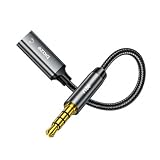
- 【Wide Compatibility】iPhone 6/6 Plus/6S/6S Plus/SE (1st Gen)/5S/5C/5/4S/4/3GS/3G, Galaxy S6/S6 Edge/S7/S7 Edge/Note 3/4/5, Google Pixel 1/2 XL, LG G5/G6/V20/V30/Xperia Z/ZL/XZ series, iPads 1-9/Air 1-2/mini 1-5, iPods Classic/Nano/Shuffle/Touch 1-6, MacBook (2006-2019)/Windows PCs with 3.5mm audio out
- 【3.5mm male to USB-C female adapter】It allows you to connect headphones, speakers, and other audio devices to devices with a USB-C port. 𝐃𝐢𝐠𝐢𝐭𝐚𝐥 𝐡𝐞𝐚𝐝𝐩𝐡𝐨𝐧𝐞𝐬 𝐧𝐨𝐭 𝐰𝐨𝐫𝐤𝐢𝐧𝐠
- 【Analog Audio Transmission】Facilitates analog audio signal transmission between devices with different port types. 𝐀𝐧𝐚𝐥𝐨𝐠 𝐡𝐞𝐚𝐝𝐩𝐡𝐨𝐧𝐞𝐬 (𝐰𝐢𝐭𝐡𝐨𝐮𝐭 𝐃𝐀𝐂 𝐝𝐞𝐜𝐨𝐝𝐞𝐫 𝐜𝐡𝐢𝐩) 𝐜𝐚𝐧 𝐮𝐬𝐞 𝐭𝐡𝐢𝐬 𝐩𝐫𝐨𝐝𝐮𝐜𝐭, 𝐝𝐢𝐠𝐢𝐭𝐚𝐥 𝐡𝐞𝐚𝐝𝐩𝐡𝐨𝐧𝐞𝐬 (𝐰𝐢𝐭𝐡 𝐃𝐀𝐂 𝐝𝐞𝐜𝐨𝐝𝐞𝐫 𝐜𝐡𝐢𝐩) 𝐜𝐚𝐧 𝐧𝐨𝐭 𝐛𝐞 𝐮𝐬𝐞𝐝
- 【Plug and Play】No software or drivers required, simply plug in the adapter to instantly enable audio output
- 【Durable Construction】Featuring a sturdy metal housing and flexible cable, this adapter is built to withstand regular use. The cable's compact size makes it easy to carry and store when not in use
The supported wired connection: use the controller’s 3.5mm jack
- Plug the headset’s 3.5mm connector into the headset jack on the bottom of the DualSense.
- Press the PS button, open Control Center > Sound, and select the headset as the output device if the PS5 has not switched automatically.
- Adjust the volume and, if needed, the game/chat balance in the Sound controls.
For both game audio and microphone chat, the headset generally needs a compatible four-pole TRRS plug. A three-pole stereo plug can carry headphone audio but does not include a microphone connection. If the mic does not work, check Settings > Sound > Microphone > Input Device, confirm the headset has a mic and compatible plug, and check that the headset’s mute control or the controller’s mute button is not active.
PlayStation also supports PS5 3D Audio with compatible headphones connected through the DualSense’s analog jack; a special PlayStation headset is not required. The headset still needs to be recognized and compatible, and 3D Audio availability depends on the audio setup. See PlayStation’s PS5 3D Audio guidance.
Can USB-C headphones work when plugged into the PS5?
Possibly, if they are genuine USB audio headphones compatible with PS5. Connect them to a USB port on the console, not the controller. Depending on your PS5 model and the headset’s connector, you may be able to use the console’s front USB-C port or an appropriate USB-C-to-USB-A adapter with a USB-A port. PlayStation lists port types and accessory connections in its PS5 USB ports guide.
Recommended Free Tools
Rank #2
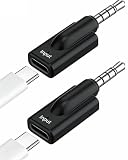
- Broad Compatibility: This USB-C to 3.5mm audio adapter works seamlessly with a wide range of devices, including Headphones,MP3 players, CD players, laptops, tablets, smartphones, earbuds, earphones, speakers, and car stereos. USB-C to 3.5mm Headphone Jack Adapter – Type C Female to 3.5mm Male Aux Dongle for Tablets and Smartphones with 3.5 mm jack port.
- Plug and Play Dongle: Enjoy seamless, zero-delay audio with this 3.5mm dongle—no drivers or apps needed. Designed for convenience, it works perfectly with headphones, allowing you to answer calls, pause playback, and adjust volume directly from your headset.
- NOT SUPPORT USBC Headphones,High Fidelity Sound Quality: Enjoy every detail of your music with this compact USB Type-C to 3.5mm audio adapter. Equipped with a Smart DAC chip, it delivers rich bass, clear highs, and balanced mids for an enhanced audio experience.(NOTE: USB C female to mobile phone iPhone iPad or Computer, 3.5 MM JACK is connected to headphones or speakers, please make sure to connect correctly.).
- Compact & Portable Design: NOT SUPPORT USBC Headphones,Lightweight and easy to carry, this USBC to 3.5 mm headphones adapter is perfect for on-the-go use — fitting effortlessly into your bag, pocket, or travel kit.(NOTE: USB C female to mobile phone iPhone iPad or Computer, 3.5 MM JACK is connected to headphones or speakers, please make sure to connect correctly.)
- What You Get: 2 PCS * USB-C to 3.5mm Aux Adapters (Black).(NOTE :NOT SUPPORT USB C HEADPHONES) Compact and lightweight design makes them ideal for outdoor running, travel, and everyday use—always have one on hand when you need it.
- Turn on the PS5 and connect the headset to a console USB port.
- Open Settings > Sound > Audio Output.
- Check Output Device and select the USB headset if it is detected but not selected automatically.
- Set microphone input and volume separately if you also want to use voice chat.
PlayStation says compatible USB headsets can be used with PS5, and its FAQ includes USB-C among headset connection types for PS5 3D Audio. That does not mean every USB-C headset will work: compatibility depends on the headset’s audio implementation and PS5 support.
If the PS5 does not recognize the headset
A headset can work with a phone or computer yet fail on PS5. Common reasons include:
- Charging-only USB-C port: Some wireless headphones use USB-C only to charge; audio comes from Bluetooth or a proprietary wireless connection.
- Nonstandard USB audio or required drivers: The headset may need software or a driver that PS5 does not provide, or use a proprietary USB-C implementation.
- Adapter limitations: A USB-C-to-USB-A adapter may be charge-only or otherwise unsuitable for data and audio.
- Power or feature compatibility: The headset may draw more power than the port supplies, or its microphone and inline controls may not be supported.
- Separate wireless receiver required: Some products carry game audio only through their supplied USB dongle, not through a USB-C cable.
Check the headset maker’s compatibility information for explicit PS5 support. If it is not listed or the console does not detect it, use a 3.5mm connection to the controller if the headset offers one, or choose a PS5-compatible USB or wireless headset. A USB-C adapter cannot add USB audio-host support to the DualSense.
Rank #3

- 【Multi-function Dongle】This compact usb c to aux adapter can connect your usb c devices without audio jack to headphones, headset, speakers and other audio devices. Call, volume control, pause via function keys on the headphones are possible. [Note: Microphone functionality and volume adjustment function of Apple EarPods Headphones with 3.5mm Plug are not supported!]
- 【Smart DAC Chip】The USB C to 3.5mm audio adapter features a Smart DAC chip. It is low power consumption, excellent and stable decoding performance, and maximum support for 16Bit/48Khz audio sampling rate. The DAC chip can also convert digital audio signals to analog audio signals and keep the original sound quality of your headphones. The 3.5mm female port compatible with CTIA. [Note: Not compatible with OMTP, TS and TRS microphone-only devices are not supported!]
- 【Wide Compatibility】: JSAUX USB C headphone adapter compatible with most of the type c devices: for iPhone 18 Pro, iPhone 18 Pro Max, iPhone Duo/Air, iPhone 17 17 Pro 17 Pro Max, for iPhone 16 16 Plus 16 Pro 16 Pro Max, for iPhone 15 15 Plus 15 Pro 15 Pro Max, for Samsung Galaxy S26/S25/S24/S20 Ultra, S10 S9 S8 Plus, Note 20 10 10+ 9 8, for iPad Pro, iPad mini 6, MacBook, for Pixel 9 8 7 6, for Huawei Mate 60 50 40 30 20 10 and Pro, P60 P50 P40 P30 P20 and Pro, for OnePlus 6T 7 7Pro, and more
- 【Stable Signal & Durable Material】With the relief strain design, this type c to aux adapter can stand 15000+ bending tests, which makes this adapter much more durable. Shielded enamel wire can still ensure stable signal transmission with daily use. Metal-coated connectors for better contact ensure stable and lossless audio signal transmission
- 【Warm Tips】 If your USB C device includes a 3.5mm audio jack, this adapter may not support phone calls. For example, some models for Galaxy (S9/S8/S10, Note 9/Note 8) and for iPad Pro (11" / 12.9", including iPad Pro 2018) may not support phone calls or music control
For wireless headsets, connect the receiver to the console
If your wireless headset includes a USB adapter or dongle, plug that receiver into the PS5 console and follow the manufacturer’s pairing instructions. Do not plug it into the DualSense. Select the headset under Settings > Sound > Audio Output if necessary. Sony’s PULSE Elite and PULSE Explore, for example, use a PlayStation Link USB adapter connected to the console; the adapter is the audio interface. See PlayStation accessories support.
Outdated Drivers Are Slowing You Down
One free scan finds every outdated or missing driver and matches the right update for your exact hardware.Free scan · exact hardware matchWindows Errors? Fix Them Before They Spread
Repair common Windows errors and clear accumulated junk for a smoother, more stable PC - no reinstall needed.Free scan · no reinstallOrdinary Bluetooth audio headphones are not generally supported as a direct PS5 audio connection. A compatible USB audio adapter may provide another route, but check that it supports PS5 and your headphones. Sony’s Bluetooth headphone guidance describes the limitations and alternatives.
Choose the connection that matches your headset
| Headset | Best connection |
|---|---|
| Wired headphones with a 3.5mm plug | DualSense 3.5mm jack |
| USB-C wired gaming headset | PS5 console USB port, if the headset is PS5-compatible |
| USB-C phone earbuds | Try the PS5 console only if they support standard USB audio; do not expect controller support |
| Wireless headset with USB dongle | Dongle connected to the PS5 console |
| PULSE Elite or PULSE Explore | Included PlayStation Link adapter connected to the console |
| Bluetooth-only headphones | Usually a compatible USB audio adapter, or a wired connection if available |
| Headphones with USB-C and 3.5mm | Use 3.5mm with the DualSense for the simplest supported controller connection |
Quick troubleshooting
- No sound through controller USB-C: Move the headphones to the PS5 console, or use the headset’s 3.5mm cable with the DualSense.
- USB headset appears but there is no sound: Check Settings > Sound > Audio Output > Output Device and choose the headset.
- Sound works but the mic does not: Check the headset’s mute switch, the controller mute button, microphone input settings, and whether the connection is TRRS or a compatible USB audio device.
- 3.5mm audio is quiet or distorted: Try another headset. If that works, the first headset or its wiring may be the issue; if multiple headsets fail, inspect the controller jack and PS5 audio settings.
- USB-C-to-3.5mm adapter fails: Adapters can depend on host support for analog audio or USB audio. Plugging a digital adapter into the DualSense still requires the controller to support USB audio-host functionality, which PlayStation does not document.
Frequently Asked Questions
Can I use Apple USB-C EarPods with a DualSense controller?
Not through the controller’s USB-C port as an officially supported audio connection. If they support USB audio, you can try connecting them to the PS5 console, but compatibility is not guaranteed.
Rank #4
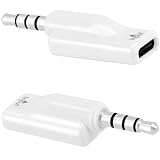
- Pack of 2 Value – This bundle includes two USB C to 3.5mm headphone jack adapters, perfect for keeping one at home and one at the office, or sharing with a family member or friend. Great value for multiple devices or as spares.
- Unique Type-C Female to 3.5mm Male Design – Features USB-C female input and 3.5mm aux male output, allowing you to connect your USB-C device to 3.5mm headphones, microphones, speakers, car stereos, and other audio equipment. Ideal for connecting modern USB-C devices to traditional audio gear.
- High-Performance DAC for HD Audio – Built-in high-performance DAC decoding chip delivers high-definition audio with powerful noise reduction, providing a faithful, immersive sound experience that preserves the quality of your original audio. Enjoy crisp, clear music, calls, gaming, and streaming.
- Multi-Purpose Audio Adapter – Supports a wide range of audio applications including voice calls, karaoke, live streaming, gaming, and music listening. Works with both audio output and microphone input, and supports headphone button control for play/pause, call answering, and volume adjustment.
- Easy to Use & Durable – No drivers or apps required – just plug and play for instant audio connectivity with zero latency. Nickel-plated plug resists oxidation and maintains original sound quality even with extended use. Compact design makes it easy to carry anywhere for on-the-go use.
Does connecting the controller to the PS5 with a USB cable make USB-C headphones work?
No. The controller’s USB connection does not turn its USB-C port into a documented headset audio output. Use the controller’s 3.5mm jack or connect a compatible USB headset to the console.
Can I plug a USB-C headset into a PS5 Slim?
Potentially, if the headset is a compatible USB audio device. Check the PS5 model’s available ports in PlayStation’s USB ports guide and use the console, not the controller.
Why does my USB-C headset work on PC but not PS5?
It may depend on a computer driver, proprietary USB audio, unsupported microphone features, or a USB-C port used only for charging. Verify explicit PS5 compatibility with the headset manufacturer.
Quick Recap
Product prices and availability are accurate as of the date/time indicated and are subject to change. Any price and availability information displayed on Amazon at the time of purchase will apply.

