Some links on this page are affiliate links: if you buy through them we may earn a commission, at no extra cost to you.
BIOS 是电脑开机时运行的主板固件,负责初始化硬件、执行上电自检,并寻找和启动操作系统。现代电脑大多实际使用的是 UEFI 固件,但厂商和用户仍习惯把固件设置界面统称为“BIOS”。
严格来说,传统 BIOS 是旧的固件启动体系,UEFI 是后来取代它的现代固件接口规范;而“BIOS 设置”通常只是进入主板固件后修改启动、安全和硬件参数。


BIOS 到底是什么
BIOS 的全称是 Basic Input/Output System,即基本输入输出系统。它属于主板固件,不是 Windows、Linux,也不是普通应用程序。固件通常存储在主板的非易失性闪存中,在操作系统启动之前运行。
电脑开机时,BIOS 或 UEFI 会先让处理器、内存、显卡、存储设备、USB 控制器等进入基本可用状态,然后寻找启动设备,把控制权交给 Windows、Linux 或其他操作系统。
#1 Best Overall
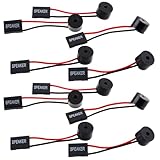
- Essential Tool: This PC motherboard internal speaker is a crucial diagnostic component for any computer build or repair. When you start your computer, the familiar boot 'beep' sound indicates normal system operation. More importantly, specific beep code patterns emitted by this BIOS alarm buzzer help diagnose hardware issues like memory errors, graphics card failures, or power supply problems
- Simple Plug and Play Installation: Installing this computer case speaker is straightforward and requires no technical expertise. It comes equipped with a standard 4-pin female connector designed to match the speaker header pins on the front panel of virtually any motherboard. The wiring is clearly indicated with red for positive and black for negative, though polarity is often interchangeable
- Durable and Reliable Construction: Built for long-term reliability, this motherboard speaker is constructed from sturdy metal and plastic materials. The robust build ensures it won't break easily during installation or from regular system vibrations. Its reliable performance means it will serve you consistently over the long term, providing clear, audible beep codes whenever you power on your PC
- Clear POST Code Audibility: In environments where external multimedia speakers are unnecessary, such as office servers, test benches, or minimalist setups, this internal PC speaker is indispensable. It allows you to hear the essential BIOS beep codes that confirm a successful boot or signal hardware faults
- Versatile Multi-Pack Value: This package includes 10 pieces of motherboard speaker offering exceptional value for frequent builders, repair shops, or IT departments. Each unit features an approximately 3-inch cable to minimize wiring clutter inside the computer case
“BIOS”这个词在实际使用中有几种含义:
- 传统 BIOS:旧式固件架构和启动方式。
- UEFI 固件:现代电脑使用的固件接口规范。
- BIOS Setup 或 UEFI Setup:修改启动、硬件和安全选项的设置界面。
- Boot Menu:一次性选择启动设备的菜单,不等同于完整的固件设置界面。
- BIOS Update 或 Flash:更新主板固件程序,不只是修改设置。
因此,进入一台新电脑的“BIOS”,看到的往往其实是厂商提供的 UEFI 设置界面。
UEFI 规范定义了固件如何加载 UEFI 应用、驱动和操作系统启动程序,并包含启动管理器及 NVRAM 启动变量等机制。详情可参考 UEFI 规范概览。
Do these 3 things before closing this tab:
1Fix the driver behind crashes, sound loss and screen glitches2Clear out junk files and repair common Windows errors3Scan for outdated or missing drivers - takes under a minuteBIOS 在开机时做什么
1. 执行上电自检(POST)
开机后,固件会执行基本硬件初始化和检查,这个过程通常称为 POST(Power-On Self-Test)。检查对象可能包括:
- 处理器和内存;
- 显卡或显示输出;
- 键盘、USB 控制器和其他输入设备;
- SATA、NVMe 和其他存储设备;
- PCIe 扩展卡;
- 风扇、温度传感器和部分电源状态。
硬件出现严重问题时,电脑可能黑屏、蜂鸣、亮起主板诊断灯、显示错误代码,或者不断重启。不过,POST 通过并不代表硬盘、内存或操作系统一定完全正常;它不是完整的硬件诊断。
2. 初始化硬件
固件会设置处理器和内存控制器,枚举 PCIe 设备,初始化 USB 和存储控制器,并根据平台载入设备的固件驱动或 Option ROM。UEFI 的驱动模型和应用模型比传统 BIOS 更灵活,能够支持更多启动程序和固件工具。
3. 寻找并启动操作系统
传统 BIOS 通常从磁盘的 MBR 启动代码开始执行;UEFI 通常从 EFI 系统分区中寻找以 .efi 结尾的启动程序。
Windows Errors? Fix Them Before They Spread
Repair common Windows errors and clear accumulated junk for a smoother, more stable PC - no reinstall needed.Free scan · no reinstallCrashes, No Sound, or Screen Glitches?
Random freezes, missing sound and display glitches usually trace back to one bad driver. Find and replace yours safely.Free scan · under a minuteUEFI 还可以在固件 NVRAM 中保存启动项,例如:
- Windows Boot Manager;
- Ubuntu 或 Fedora;
- USB 启动盘;
- 网络启动项。
所以在 UEFI 系统中,启动菜单里常见的正确选项是 Windows Boot Manager,而不一定只是硬盘型号。
4. 保存硬件和安全配置
BIOS/UEFI 设置中常见的功能包括启动顺序、虚拟化、TPM、Secure Boot、内存配置、SATA 模式、风扇曲线、集成显卡和电源恢复行为等。
BIOS、UEFI、Legacy 和 CSM 有什么关系
传统 BIOS(Legacy BIOS)
Legacy BIOS 是传统 PC 启动环境,通常依赖 MBR 启动代码和较固定的固件流程。它没有原生 UEFI Secure Boot,对现代分区、启动管理和扩展能力的支持也较有限。
Recommended Free Tools
Microsoft 建议一般情况下使用 UEFI 模式,因为它包含比 Legacy BIOS 更多的安全和现代启动功能。可参考 Microsoft 关于 UEFI 与 Legacy BIOS 启动模式的说明。
Rank #2

- [Quick PC Diagnostic Tool] Is your new PC build showing a black screen? This motherboard speaker translates silent hardware failures into clear BIOS beep codes. Instantly identify if your RAM, CPU, or GPU is causing the boot failure without guessing.
- [Essential for DIY PC Builders] Modern motherboards often lack built-in audio alerts. Plugging in this mini piezo buzzer before your first boot ensures you hear the satisfying “single beep” of a successful POST, giving builders immediate peace of mind.
- [Universal 4-Pin Header Compatibility] Wondering if it fits your board? It features a standard 4-pin female connector (with 2 active wires) that perfectly matches the “SPEAKER” or “SPK” front panel header on almost all ATX, Micro-ATX, and Mini-ITX motherboards.
- [Clean Wiring & Loud Alarm] Designed with an approx. 3-inch cable, it is long enough to easily plug into the motherboard but short enough to reduce PC case wiring clutter. The premium piezo element delivers a loud, crisp beep that is impossible to miss.
- [Valuable 3-Pack for IT Repair] Includes 3 internal BIOS buzzers in one pack. Perfect for IT technicians keeping spare diagnostic tools in their repair kits, or PC enthusiasts testing multiple rigs. A cost-effective solution to save hours of troubleshooting.
UEFI
UEFI(Unified Extensible Firmware Interface)不是某一家厂商的软件,而是一套现代固件接口规范。它通常提供:
- UEFI 启动管理器;
- 从 EFI 系统分区加载启动程序;
- NVRAM 启动项;
- GPT 支持;
- Secure Boot;
- 更灵活的驱动和应用模型;
- 对大容量磁盘和现代操作系统更好的支持。
UEFI 规范对 GPT 的布局、备份分区表、CRC32 校验和 GUID 分区标识等作了定义,详见 UEFI GPT 磁盘布局规范。
CSM 是什么
CSM 是 Compatibility Support Module(兼容性支持模块)的缩写。它是 UEFI 固件中的兼容层,用来模拟传统 BIOS 启动方式,以支持旧操作系统、旧启动盘或不支持 UEFI 的扩展卡。
CSM 不等于 BIOS。更准确地说,CSM 是运行在 UEFI 固件中的 Legacy 兼容模式。
启用 CSM 后,可能出现以下影响:
- Secure Boot 无法启用;
- 系统改为以 Legacy 方式启动;
- UEFI 安装和 Legacy 安装的系统被混淆;
- 启动菜单出现硬盘名称和 Windows Boot Manager 两种选项;
- GPT、MBR 与启动模式不匹配。
BIOS 与 UEFI 的核心区别
| 项目 | 传统 BIOS | UEFI |
|---|---|---|
| 本质 | 传统固件启动环境 | 现代固件接口规范 |
| 启动对象 | MBR 启动代码 | EFI/UEFI 启动程序 |
| 常见磁盘格式 | MBR | GPT |
| 启动管理 | 依赖设备顺序,功能较简单 | 支持启动管理器、启动项和 NVRAM |
| Secure Boot | 不支持原生 Secure Boot | 支持 Secure Boot |
| 驱动模型 | 传统 Option ROM | UEFI 驱动模型 |
| 界面 | 通常为文本界面 | 可以支持图形界面和鼠标,但并非必须 |
| 旧系统兼容 | 原生支持传统系统 | 可通过 CSM 兼容部分旧系统 |
不能简单地说“UEFI 就是带鼠标的 BIOS”。图形界面只是外观,UEFI 的核心在于启动管理、驱动模型、安全启动和现代分区支持。
也不能断言 UEFI 一定启动更快。实际速度还取决于内存训练、硬件初始化、启动设备数量、固件设置和操作系统。
如何进入 BIOS 或 UEFI 设置
方法一:开机时按键
完全关机后按下电源键,随后立即连续按对应按键。常见按键包括:
The Tool Desk
Outbyte PC Repair FREEClear out junk files and repair common Windows errorsFree Scan →Outbyte Driver Updater FREEScan for outdated or missing drivers - takes under a minuteDriver Scan →DeleteF2F1F10F12Esc
具体按键取决于主板、笔记本或品牌机型号。Microsoft 也列出了这些常见固件菜单按键,详情可参考其关于 Windows 启动安全的说明:Secure the Windows boot process。
如果只是想从 U 盘临时启动,应进入 Boot Menu;如果要修改 Secure Boot、虚拟化或启动模式,才进入完整的 BIOS/UEFI Setup。
按键没有反应时,常见原因包括启动速度太快、使用蓝牙键盘、无线键盘在固件阶段尚未识别,或者电脑实际上从休眠状态恢复。可以尝试完全关机,并使用有线 USB 键盘。
方法二:从 Windows 进入 UEFI
Windows 11 中通常可按以下路径进入:
- 打开“设置”;
- 进入“系统”;
- 选择“恢复”;
- 在“高级启动”下点击“立即重启”;
- 选择“疑难解答”;
- 选择“高级选项”;
- 选择“UEFI 固件设置”;
- 点击“重启”。
菜单名称可能因 Windows 版本、语言和厂商定制而略有不同。若没有“UEFI 固件设置”,可能是当前系统以 Legacy 模式启动,或设备不支持由 Windows 调用该入口。Microsoft 的官方路径见Windows 11 和安全启动。
Free tools Windows power users keep installed
One-click scans. No signup required.
如何确认当前使用的是 UEFI 还是 Legacy
使用系统信息
按 Win + R,输入:
msinfo32在“系统信息”中查看:
- BIOS 模式:通常显示“UEFI”或“传统”;
- 安全启动状态:可能显示“开”“关”或“不支持”。
“BIOS 模式”表示 Windows 当前采用的启动方式,不一定说明主板固件本身就是传统 BIOS。现代 UEFI 固件也可能在 CSM 下以传统模式启动。
Rank #3

- Type: 5PCS PC computer motherboard alarm buzzer, length 2.3 inches
- Uses: The sound made by the buzzer is used to determine the working status of the motherboard.Easy to install, 4-pin female connector, plug and play, easy to plug into the speaker connector on the front panel of the motherboard
- Wiring: red positive pole, black negative pole (in fact, as long as the interface is connected to the speaker, both positive and negative poles can be used)
- How To Use: After turning on the computer, we will hear the familiar "beep" sound, usually indicating that the computer is working properly, the sound comes from this buzzer. If it is not normal, you can judge the fault by its sound
- 100% brand new and high quality
查看磁盘是 GPT 还是 MBR
以管理员身份打开命令提示符,输入:
diskpart
list disk
在输出中,如果某块磁盘的 GPT 列出现星号 *,通常表示它采用 GPT。输入以下命令退出:
exit也可以在 PowerShell 中输入:
Get-Disk然后查看 PartitionStyle,其值通常为 GPT、MBR 或 RAW。
Quick wins for a faster PC:
Clear out junk files and repair common Windows errorsFree Scan →Fix the driver behind crashes, sound loss and screen glitchesFind Drivers →GPT 不绝对等于当前使用 UEFI,MBR 也不绝对等于当前使用 Legacy。多硬盘电脑还可能同时存在不同分区格式,因此应同时检查“BIOS 模式”和相关系统盘的分区格式。
常见 BIOS/UEFI 设置是什么意思
启动顺序(Boot Priority)
启动顺序决定固件首先尝试哪个设备。常见选项包括 Windows Boot Manager、NVMe 固态硬盘、SATA 硬盘、USB Storage 和 Network Boot。
安装系统时,临时启动建议使用一次性 Boot Menu;需要长期改变默认设备时,再修改 Boot Order。UEFI Windows 通常优先选择 Windows Boot Manager。
如果找不到 Windows Boot Manager,可能是系统以 Legacy 模式安装、EFI 系统分区损坏、启动项被清除、磁盘未识别,或者 UEFI/CSM 模式被改动。
UEFI、Legacy 和 CSM
菜单中可能出现 UEFI Only、Legacy Only、UEFI and Legacy、Launch CSM、CSM Enabled 或 CSM Disabled 等名称。
新电脑、Windows 11 和 GPT 系统通常优先使用 UEFI Only。但如果 Windows 原本以 Legacy 模式安装,直接切换为 UEFI 可能导致无法启动。Microsoft 对启动模式切换的说明见Boot to UEFI mode or Legacy BIOS mode。
Secure Boot
Secure Boot 是 UEFI 中的启动安全功能。开启后,固件会验证启动组件的数字签名,只允许受信任的启动程序运行,从而降低启动阶段 rootkit 或 bootkit 加载的风险。
Secure Boot 不是杀毒软件,也不能防止 Windows 启动后的所有恶意软件。旧操作系统、未签名启动程序和部分旧硬件可能无法在开启 Secure Boot 时启动。相关机制可参考 Microsoft 的启动安全文档。
TPM、Intel PTT 和 AMD fTPM
TPM 是用于保存和使用加密密钥、记录启动测量值等安全功能的可信平台模块。现代电脑中它可能以以下名称出现:
- Intel PTT 或 Intel Platform Trust Technology;
- AMD fTPM;
- Firmware TPM;
- Security Device Support;
- Trusted Computing。
TPM 可以是独立芯片,也可以由处理器或固件提供。Windows 安全中心中看不到安全处理器,可能是设备没有 TPM,也可能是 TPM 在 UEFI 中被关闭。Microsoft 的说明见Windows 安全中心中的设备安全。
虚拟化技术
常见名称包括 Intel VT-x、Intel Virtualization Technology、AMD SVM、AMD-V 和 Virtual Machine Support。它们为 Hyper-V、WSL2、Windows Sandbox、虚拟机软件和部分模拟器提供硬件虚拟化支持。
启用虚拟化不会自动安装虚拟机软件;Hyper-V、安全软件和其他平台设置仍可能影响第三方虚拟机。
What’s actually slowing this PC down?
Pick the symptom - the matching free tool is one click away.
XMP 和 EXPO
XMP、EXPO、DOCP、A-XMP 和 Memory Profile 都可能是内存性能配置。启用后,内存会按照厂商提供的频率、时序或电压运行,而不是只使用 JEDEC 默认配置。
它并非对所有平台都完全无风险。内存套装、主板 BIOS、CPU 内存控制器以及使用的内存条数量都会影响稳定性。开启后出现重启或无法启动,可关闭配置、降低频率或恢复默认设置。
AHCI、RAID 和 Intel VMD
SATA Mode、AHCI、RAID、Intel VMD 和 NVMe RAID 控制着存储设备的工作方式。系统安装后随意切换,可能造成蓝屏或找不到系统盘,因为 Windows 没有加载相应的存储控制器驱动。
没有明确需求时不要修改这些选项。笔记本尤其应先查看具体型号的厂商文档。
Free tools Windows power users keep installed
One-click scans. No signup required.
风扇、温度和功耗
Q-Fan、Smart Fan、Fan Curve、Pump Control、PL1/PL2、PBO 和 Curve Optimizer 等选项用于风扇控制、功耗或性能调节。它们属于进阶设置,调压、超频和功耗修改不应在不了解风险时随意尝试。
Independent reader supportYour contribution helps us test, update, and keep practical guides available for everyone.Windows 11 与 UEFI、TPM、Secure Boot 的关系
这三个概念经常同时出现,但不是同一个功能:
- UEFI:固件接口和启动环境;
- Secure Boot:验证启动组件签名的安全功能;
- TPM:用于密钥和启动测量等功能的安全模块。
启用 UEFI 不代表 Secure Boot 自动开启,启用 TPM 也不代表 Secure Boot 自动开启。Windows 11 的具体硬件要求还涉及处理器和其他系统条件,不能只靠打开 TPM 解决。
检查顺序可以是:
- 用
msinfo32查看“BIOS 模式”; - 查看“安全启动状态”;
- 在 Windows 安全中心查看安全处理器;
- 在固件中确认 TPM、PTT 或 fTPM;
- 确认系统盘使用 GPT;
- 再考虑启用 Secure Boot。
从 Legacy BIOS 转为 UEFI 前要注意什么
如果 Windows 原本以 Legacy 模式安装、系统盘采用 MBR,直接在固件中切换为 UEFI 可能导致系统无法启动。不要把“改成 UEFI”当作单独一步。
Do these 3 things before closing this tab:
1Scan for outdated or missing drivers - takes under a minute2Clear out junk files and repair common Windows errors3Fix the driver behind crashes, sound loss and screen glitchesMicrosoft 提供 MBR2GPT.exe,可在符合条件时将系统盘从 MBR 转换为 GPT,并创建 EFI 系统分区。先以管理员身份打开命令提示符并验证:
mbr2gpt /validate /allowFullOS验证成功后才执行转换:
mbr2gpt /convert /allowFullOS随后通常需要:
- 重启并进入 UEFI 设置;
- 关闭 Legacy/CSM;
- 选择 UEFI 启动;
- 选择 Windows Boot Manager;
- 进入 Windows 后再次检查启动模式;
- 再根据需要处理 Secure Boot 和 TPM。
转换前应备份重要数据、确认 BitLocker 恢复密钥、准备 Windows 恢复介质,并阅读Microsoft 的 MBR2GPT 文档。转换可能因分区数量、特殊 OEM 恢复分区、动态卷、磁盘错误或非标准安装而失败;不要在不理解当前分区布局时强行执行。
安全修改 BIOS/UEFI 设置
修改前
- 记录或拍照保存原始设置;
- 确认要修改的具体项目和目的;
- 重要数据先备份;
- 笔记本连接电源适配器;
- 不要同时改变多个无关选项;
- 确认恢复默认设置的方法。
修改后无法启动
重新进入固件,先恢复刚刚修改的项目。如果不清楚改动内容,可以使用 Load Optimized Defaults 或 Load Setup Defaults,但这可能同时关闭 XMP/EXPO、虚拟化、风扇配置或改变启动顺序。
“恢复默认值”和“清除 CMOS”也不是完全一回事。前者是在固件界面加载厂商默认设置,后者通常通过主板跳线、按钮、断电或取下电池等方式重置配置,具体方法因硬件而异。清除后可能丢失启动模式、RAID 设置、内存配置、Secure Boot 密钥和日期时间。
BIOS 更新与 BIOS 设置不是一回事
修改 BIOS/UEFI 设置,只是改变启动顺序、虚拟化、内存配置或安全选项等参数。
BIOS/UEFI 更新则是重新写入主板固件程序,可能修复 CPU 支持、内存兼容性、安全漏洞、硬件兼容性或启动问题,但刷写失败可能导致主板无法启动。
因此,没有明确问题时不要因为“有新版本”就随意更新。应使用主板或整机厂商针对准确型号和地区发布的固件,并严格遵循官方说明。不同厂商的文件格式、验证机制、恢复方式和 Flashback 功能差异很大,不能套用一套通用刷写步骤。
常见故障排查
修改后黑屏
可能原因包括内存参数不稳定、显示输出切换、UEFI/CSM 不匹配、Secure Boot 阻止启动、超频失败或内存训练。可以先等待几分钟,完全断电后重启,再尝试恢复默认设置、只保留一条内存、移除非必要 USB 设备,并查看主板诊断灯或错误代码。
找不到启动盘
确认固件是否识别 NVMe 或 SATA 设备,检查 Windows Boot Manager 是否存在,确认启动模式没有改变,并排除存储控制器被禁用、磁盘故障或 EFI 启动文件损坏等原因。
Secure Boot 无法开启
常见原因包括 CSM 仍开启、系统以 Legacy 模式安装、磁盘为 MBR、固件密钥状态异常,或启动程序未签名。不要在不了解自定义密钥、Linux 双系统或企业设备配置的情况下,盲目选择安装默认密钥。
开启 XMP/EXPO 后反复重启
可以关闭内存配置、降低频率、减少内存条数量,并检查主板兼容列表和 BIOS 版本。混用内存、四条内存同时使用以及较高频率都可能降低稳定性。
切换 AHCI、RAID 或 VMD 后蓝屏
最常见的原因是 Windows 当前启动环境没有相应存储驱动。优先切回原来的控制器模式;如果仍无法进入系统,再使用恢复环境处理,不要在不了解原始模式时反复切换。
PC Slower Than It Used to Be?
A free scan shows the junk files, broken settings and background clutter dragging Windows down - then fixes them in one click.Free scan · Windows 10 & 11Outdated Drivers Are Slowing You Down
One free scan finds every outdated or missing driver and matches the right update for your exact hardware.Free scan · exact hardware match双系统无法启动
检查两个系统是否都以同一种启动模式安装、是否都使用 UEFI、EFI 系统分区是否被覆盖,以及 Secure Boot 是否阻止其中一个启动程序。还要检查固件启动项顺序,以及 Windows 更新是否重置了默认启动项。
结论
BIOS 是电脑开机时运行的传统固件术语,现代电脑多数实际使用的是 UEFI 固件。UEFI、GPT、Secure Boot 和 TPM 经常一起出现,但分别代表启动环境、磁盘分区格式、启动签名验证和安全模块。
进入设置前先确认自己的设备型号;修改启动模式、存储控制器或内存参数前,先检查当前配置并做好备份。遇到启动故障时,优先撤销最近一次改动,而不是连续修改多个选项。
Quick Recap
Product prices and availability are accurate as of the date/time indicated and are subject to change. Any price and availability information displayed on Amazon at the time of purchase will apply.

