Outdated Drivers Are Slowing You Down
One free scan finds every outdated or missing driver and matches the right update for your exact hardware.Free scan · exact hardware matchPC Slower Than It Used to Be?
A free scan shows the junk files, broken settings and background clutter dragging Windows down - then fixes them in one click.Free scan · Windows 10 & 11Some links on this page are affiliate links: if you buy through them we may earn a commission, at no extra cost to you.
For the most dependable offline setup, use wired PoE cameras connected to a local NVR. They can keep recording and playing footage on your premises when the internet fails, avoid mandatory cloud subscriptions, and support continuous recording better than most battery cameras. A microSD camera is simpler for one location; UniFi Protect offers a polished premium ecosystem; eufy is convenient for wireless local storage; and 4G/LTE models suit remote sites—but cellular cameras still depend on a network.
“Offline” is not the same as “no subscription.” A camera may store video locally yet require the vendor cloud for setup, notifications, remote viewing, thumbnails, account authentication, or some AI features.
What “offline” means
| Operating mode | Records without internet? | Local network needed? | Remote viewing during outage | Typical use |
|---|---|---|---|---|
| Cloud camera | Usually no | Usually yes | Usually through vendor cloud | Convenience-first installations |
| Local microSD camera | Yes, if configured | Usually yes for setup and viewing | No | One or two cameras |
| Local NVR system | Yes | Yes, or a direct camera-to-NVR link | No without another communications path | Reliable multi-camera security |
| Isolated LAN | Yes | Yes | Only from devices on that LAN | Maximum privacy |
| 4G/LTE camera | Cellular service required | No Wi-Fi required | Usually yes through cellular service | Cabins, farms and construction sites |
| Battery camera | Often, but model-specific | Often for app access | Usually no during an outage | Locations without wired power |
A camera can continue recording to an SD card or NVR while the WAN cable is unplugged, provided it still has power and a functioning local connection. Local recording, local playback and local live view are separate from cloud notifications and remote access. Reolink documents this behavior for compatible cameras and PoE NVRs (camera recording without internet; PoE/NVR operation without internet).
The Tool Desk
Outbyte Driver Updater FREEScan for outdated or missing drivers - takes under a minuteDriver Scan →Outbyte PC Repair FREERepair Windows errors before they cause bigger problemsFix Now →Quick recommendations
| System | Best for | Storage | Continuous recording | Key limitation |
|---|---|---|---|---|
| Reolink PoE camera plus NVR | Best overall wired system | microSD and/or NVR HDD | Yes on plug-in models | RTSP/ONVIF varies by exact model |
| Reolink CX410W | Plug-in Wi-Fi outdoor camera | microSD, NVR or FTP | Yes | Depends on Wi-Fi quality and power |
| UniFi Protect | Premium local management and AI | Console or UNVR storage | Yes | Higher cost and ecosystem lock-in |
| eufy HomeBase system | Simple wireless local storage | Built-in, microSD or HomeBase, model-dependent | Model-dependent | Optional cloud features may transmit data |
| eufy 4G LTE Cam S330 | Remote sites without Wi-Fi | Model-dependent local storage | Power and model-dependent | Needs cellular coverage and a data plan |
| RTSP/ONVIF cameras plus a self-hosted NVR | DIY flexibility | NAS or local computer | Yes with suitable power and storage | Most setup and maintenance work |
Best offline cameras by use case
Best overall: Reolink PoE camera plus Reolink NVR
PoE sends power and video over one Ethernet cable, making it stable, easy to isolate from the internet and well suited to 24/7 recording. A representative choice is the Reolink CX410: a 4MP/2K outdoor camera with microSD support up to 256GB, NVR compatibility, scheduled or continuous recording, person/vehicle/animal detection, IP67 weather resistance, and RTSP/ONVIF listed for the standalone model. Reolink estimates roughly 145.6 hours on a 256GB card under its stated conditions, but actual retention changes with bitrate, resolution and recording mode.
#1 Best Overall

- Note: No hard drive included. This DVR supports max. 10TB storage.
- 5-in-1 Hybrid DVR – The expandable DVR combines the features of DVR/NVR/HVR, supports up to 8 pcs TVI, AHD, CVI, CVBS & extra 2 IP cameras. Note: This DVR is recommended to be used in conjunction with ANNKE cameras for an enhanced user experience.
- Advanced H.265+ Video Format – H.265+ coding offers longer recording time before having to overwrite the older recordings, saving up to 80% of storage space than H.264 systems. You'll enjoy fast & smooth streaming without latency when accessing the DVR.
- Innovative Human & Vehicle Detection – By setting up the human & vehicle detection, you will get motion detection alerts only when people and vehicles are in the frame. Minimizing unwanted alerts triggered by bugs, animals, leaves and so on.
- Remote Access with All Devices – Link the DVR to a router and download ANNKE Vision App to control it remotely. Access the DVR via 3G/4G/5G or smartphones, tablets, computers and browsers (Google Chrome, Firefox, Microsoft Edge, Internet Explorer, etc.)
Use this architecture for driveways, workshops, side yards and small businesses. Put the NVR indoors or in a locked cabinet; an SD card inside an outdoor camera can disappear with the camera. Confirm the exact camera’s protocol support before buying: Reolink distinguishes standalone, add-on and NVR-kit models, and some have restricted RTSP/ONVIF behavior (support matrix).
Best for one camera: standalone local microSD model
A standalone camera with onboard storage is the least expensive route. It avoids an NVR and can continue motion or scheduled recording during an internet outage. The trade-off is limited retention, SD-card wear and a single point of loss if someone steals the camera. Choose a plug-in model if you need continuous evidence, and export important clips to a local computer or USB drive.
Best Wi-Fi option: Reolink CX410W
The CX410W supports 24/7, motion and scheduled recording to microSD, a Reolink Wi-Fi NVR or FTP, with RTSP and ONVIF listed in its specifications. It is practical where Ethernet cable runs are difficult, but it still requires permanent power and a functioning local router or access point. Interference, dead zones or a failed router can interrupt local access even when the internet itself is down.
Rank #2

- 【5-in-1 Hybrid DVR】This expandable hybrid DVR supports up to 8 analog cameras (TVI/AHD/CVI/CVBS) plus 2 additional IP cameras. It seamlessly integrates DVR, NVR, and HVR functions into one future-proof system. For optimal performance, we recommend pairing with ANNKE cameras.
- 【Advanced H.265+ Coding】This intelligent compression technology extends recording duration by up to 80% compared to H.264, while ensuring seamless, real-time video streaming. Preserve vital footage longer and enjoy fluid remote access, all without compromising image integrity.
- 【Smart Human & Vehicle Detection】Our AI-powered detection precisely identifies people and vehicles, filtering out common false alarms from pets, insects, and moving foliage. Receive only the alerts that matter for efficient and reliable monitoring.
- 【Remote Access on Any Device 】Link the DVR to a router and download ANNKE Vision App to control it remotely. Access the DVR via 3G/4G/5G or smartphones, tablets, computers and browsers (Google Chrome, Firefox, Microsoft Edge, Internet Explorer, etc.)
- 【All-Around Certifications & Secure App】Every device, including the DVR & cameras, has passed severe testing by authorities, like UL, CE, HDMI, etc. ANNKE App conforms to GDPR, ensuring the video stream is secure in data transferring & downloading.
Best premium ecosystem: Ubiquiti UniFi Protect
UniFi Protect stores recordings on compatible consoles, Cloud Gateway hardware or a UNVR and performs supported AI processing locally. Ubiquiti says Protect has no camera-count licensing fee and supports local management for outages or air-gapped deployments (data and AI architecture; local management). It is a strong choice for multi-camera homes and offices already using UniFi networking. Hardware costs are higher, camera choices are less open than generic ONVIF systems, and storage depends on the console or recorder you select (storage compatibility).
Best simple wireless ecosystem: eufy
eufy offers battery, solar, indoor, outdoor and PoE products with local storage through built-in memory, microSD or HomeBase, depending on the model. The company says recording does not require a subscription (recording policy). However, “local” does not mean every feature is air-gapped: eufy documents optional cloud storage and thumbnail-preview features that can send selected data to its servers (cloud-feature disclosures). Check the exact model’s recording mode, storage location and account requirements.
Best for a remote property: 4G/LTE camera
A 4G/LTE camera is useful where there is no Wi-Fi or wired broadband. eufy’s 4G LTE Cam S330 is one example listed for remote locations. It is not truly offline: it needs cellular coverage, a SIM or service plan, power, and often vendor infrastructure for remote access. Budget for data usage and test coverage at the camera’s final mounting point.
Rank #3
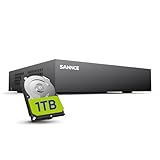
- 【Clear and Crisp 1080P Recording】 View your world in 1080P hd resolution. This easy to install Security DVR boasts 1080P recording capabilities producing outstanding high definition images that bring everything back to life.
- 【CVBS /AHD/TVI/CVI/IP 5-in-1 Surveillance DVR】 You can freely enjoy three connection modes with this one multi-function digital video recorder. Analog, AHD, TVI as well as HD IP cameras are all connectable to it providing you the chance to take full advantage of your old cameras.
- 【Easy Remote Access CCTV System】Get a smartphone, table or computer and get real-time monitoring of your home and office no matter where you are. With the free and easy-to-use app, remote monitoring can be as easy as ABC.
- 【Motion Activated Email Notification】 While working with cameras, every unexpected movements that thrown into the cameras’ eye will be detected and recorded. At the same time, you’ll get timely notified by email on your smart devices.
- 【Full HD HDMI Output】SANNCE 8CH DVR provides a full HD HDMI output. Simply connect it to a TV or HD monitor to stream live video. Enjoy high-quality video whether you're playing back recordings or viewing live footage.
Best DIY option: RTSP/ONVIF camera plus local software
For maximum brand flexibility, combine cameras that explicitly support RTSP and ONVIF with a NAS or local computer running compatible NVR software. This can provide local recording, custom retention and on-premises automation, but you become responsible for camera compatibility, storage, backups, updates, credentials and system security. “Supports local storage” does not guarantee compatibility with a third-party NVR; verify codec, authentication, stream profiles, firmware and whether the feature works without a proprietary recorder.
What’s actually slowing this PC down?
Pick the symptom - the matching free tool is one click away.
PoE, Wi-Fi, battery or cellular?
- PoE: the most reliable choice for continuous recording and isolated networks; requires cabling and a PoE switch or NVR.
- Plug-in Wi-Fi: easier installation, but vulnerable to interference and local router failure.
- Battery/solar: useful where wiring is impossible, but many cameras sleep between events and do not support 24/7 recording, RTSP or ONVIF. Solar output varies with weather and exposure.
- 4G/LTE: avoids Wi-Fi, not communications; cellular service and ongoing data costs remain necessary.
For entrances, driveways and evidence-grade recording, prefer wired power. Reolink’s continuous-recording guidance is model-specific and distinguishes battery products from plug-in PoE and Wi-Fi cameras (recording modes).
How to build an internet-independent system
- Connect cameras and the NVR to a local router, switch or PoE NVR. For stronger isolation, use a dedicated VLAN with WAN access blocked.
- Install the microSD card or hard drive and configure schedules while the phone or computer is on the same LAN.
- Set a unique administrator password and disable unnecessary cloud or remote-access features.
- Unplug the WAN/internet connection. Confirm local live view, playback and recording.
- Power-cycle the camera and recorder; verify they recover and continue recording.
- Export a test clip locally and check the recorder clock. Without NTP, time can drift.
- Use a UPS for the NVR, PoE switch and network equipment. Check storage health and recording continuity regularly.
With the WAN disconnected but the LAN operating, local live view, playback, scheduled recording and many on-device detections should continue. Push notifications, cloud backup, remote viewing and vendor account services generally will not. If the LAN itself fails, a camera with onboard storage may still record, while a Wi-Fi camera may become inaccessible; cameras directly connected to a PoE NVR can be more resilient.
Rank #4

- This DVR is compatible with 2MP/5MP HD TVI, AHD, CVI, CVBS and RS485 PTZ security cameras. For optimal performance, use this TIGERSECU DVR with TIGERSECU security cameras.
- Remotely access and play surveillance footage and control the security DVR with no contract or monthly fees with the TIGERSECU HD Viewer app. For optimal performance, 1 Mbps network upload speed is recommended for each 1080P camera. Bitrate settings can be adjusted in the DVR to accommodate slower network speeds. Mobile app requires iOS 9.3 or later and Android 9 or later.
- This DVR has a 16TB memory storage capacity, and comes pre-installed with a new 2TB surveillance hard disk drive for over 10+ days of continuous local recording at the highest resolution. Motion detection options allow you to record only when motion is detected to save hard drive space.
- No fan noise and a quieter system with our unique heat sink fan technology that enables the DVR to self-cool and prevent overheating.
- 4 audio inputs for audio recording on 4 channels (channels 1 to 4) in addition to 8 channels of video recording. 3 monitor connections through HD-port, VGA and CVBS ports.
Storage and retention
Retention depends on bitrate, camera count, resolution, frame rate, codec, audio and motion activity. A rough estimate is:
storage (GB) ≈ bitrate (Mb/s) × 86,400 × days ÷ 8 ÷ 1,000
Multiply by the number of cameras, then allow for formatting overhead and reserved space. Motion-only recording uses less storage but can miss context before or after an event. Continuous recording is preferable when evidence completeness matters. NVR hard drives are easier to secure and replace than cards mounted outdoors, but an NVR is still a single point of failure unless you export or back up critical footage.
AI, privacy and cloud dependence
Determine where each function runs: on the camera, on a hub or NVR, in the mobile app, or in the vendor cloud. Person, vehicle, animal, face, package and line-crossing detection may not all use the same processing path. UniFi states that supported Protect systems process recordings and AI locally. eufy advertises local AI and storage but separately documents optional cloud features. Block outbound internet access if privacy is the goal, then test which features disappear.
Best Value

- (1). [ Smart AI Motion Detection & Alerts push ] __ Powered by AI-based detection technology, this DVR identifies human and vehicle movement to help reduce false alerts caused by animals or other objects. Customize motion detection zones for each camera and receive instant push notifications and email alerts with snapshots when motion events occur.
- (2). [ 4-in-1 1080P 16CH DVR ] __ This hybrid 16-channel 1080p DVR supports 960H Analog, 720P/1080P AHD, 720P/1080P TVI, and CVI cameras with self-adaptive technology. No hard drive included; external hard drives are not supported. For better compatibility and performance, pairing with ZOSI cameras is recommended.
- (3). [ Local or Remote Access Anytime & Anywhere ] __ View and control your security system locally by connecting the DVR to a monitor, or remotely access it through ZOSI Client software on Windows/Mac or the ZOSI Smart App on iOS and Android devices.
- (4). [ Customize Each Camera with Different Record Modes ] __ Choose from four recording modes to match different monitoring needs: continuous recording, scheduled recording, motion detection recording, and recycle recording. Each camera channel can be configured separately, and recording files can be exported through USB backup.
- (5). [ Advanced H.265+ High Video Compression ] __ ZOSI H.265+ video compression technology optimizes storage efficiency while maintaining image quality. Compared with H.264, it helps reduce storage usage and provides smoother playback. This DVR does not support IPC or PoE cameras, wireless cameras, or analog cameras above 2MP.
Local storage reduces routine cloud exposure; it does not eliminate risks from weak passwords, unencrypted local traffic, malware, physical theft, fire, flood or failed storage. Keep the recorder indoors, use surge protection and UPS power, protect outdoor Ethernet, and maintain a local export or backup of important incidents. Never expose camera services directly to the public internet; use a properly secured VPN when remote access is necessary.
Offline buying checklist
- Define whether you need outage-resistant recording, no Wi-Fi, or a completely isolated LAN.
- Choose PoE for reliability and continuous recording; choose Wi-Fi only where local coverage is dependable.
- Confirm the exact model’s RTSP/ONVIF, codec, PTZ and third-party NVR support.
- Verify that AI runs locally if it must work without WAN access.
- Check whether setup, account login, notifications or playback require vendor servers.
- Plan storage from bitrate and retention, not an advertised maximum card size alone.
- Use a UPS, indoor recorder, strong credentials and periodic footage exports.
- Test WAN loss, LAN loss, power recovery, full storage and vendor-server outage before relying on the system.
- Download firmware from a trusted device and apply updates locally where the manufacturer supports that workflow.
The Bottom Line
Choose a PoE camera and local NVR if reliability, continuous recording and privacy matter most. Choose a standalone microSD camera for a low-cost single view, UniFi Protect for polished local management, eufy for simpler wireless storage, 4G/LTE for sites without Wi-Fi, and an RTSP/ONVIF plus self-hosted NVR system when flexibility outweighs setup time.
Quick Recap
Product prices and availability are accurate as of the date/time indicated and are subject to change. Any price and availability information displayed on Amazon at the time of purchase will apply.
Quick wins for a faster PC:
Fix the driver behind crashes, sound loss and screen glitchesFind Drivers →Repair Windows errors before they cause bigger problemsFix Now →Scan for outdated or missing drivers - takes under a minuteDriver Scan →
