Some links on this page are affiliate links: if you buy through them we may earn a commission, at no extra cost to you.
Kodak no longer makes Carousel slide projectors, so the practical choices are used, serviced, or rebuilt 35mm models. For most home users, a complete, tested Carousel 4400 or 4600 is the sensible starting point; for repeated or installed presentations, consider a documented, serviced Ektagraphic III. Kodak’s current portable digital projectors are a separate product category and do not take Carousel slide trays.
Quick recommendations
These are buying targets based on documented features and used-market availability, not hands-on rankings of image quality or reliability. For vintage equipment, the individual unit’s condition and completeness matter more than its model number.
| # | Preview | Product | Price | |
|---|---|---|---|---|
| 1 |

|
Kodak BC4401 Carousel 4400 Projector | $229.00 | Buy on Amazon |
| 2 |

|
Kodak Carousel 4200 Slide Projector | $219.70 | Buy on Amazon |
| 3 |

|
Kodak 760H Carousel Slide Projector | $195.00 | Buy on Amazon |
| 4 |
|
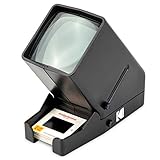
Kodak 35mm Slide & Film Viewer, LED Lighted, 3X Magnification, Handheld | $39.99 | Buy on Amazon |
| 5 |
|
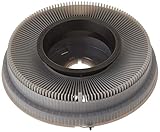
Kodak Carousel Transvue 80 Slide Tray | $29.95 | Buy on Amazon |
| Need | Target | Why consider it | Check before buying |
|---|---|---|---|
| General home viewing | Kodak Carousel 4400 | A practical later-generation home model with interchangeable-lens support and a documented timer. | Confirm the exact version, lens, tray, lamp, fan, and remote included. |
| Home presentations | Kodak Carousel 4600 | A common used-market alternative; a complete tested bundle can be a better buy than a feature-rich incomplete unit. | Do not assume a listing includes a working tray, lens, or remote. |
| Built-in slide preview | Kodak Carousel 5600 | Kodak’s manual documents a built-in viewer; the 4400 and 5600 also have a timer with slide changes selectable from about 3 to 22 seconds. | Verify the viewer and timer work, as well as the projection mechanism. |
| Autofocus | Verified 760H or another demonstrated H-series unit | Autofocus can simplify viewing slides with varying mounts. | Ask for a demonstration of focus operation; an H designation alone does not prove the system works. |
| Professional or institutional use | Serviced Ektagraphic III variant | The Ektagraphic family is the more appropriate direction for repeated presentation or installation needs. | Require specific service and operating evidence; professional lineage is not a guarantee of present-day reliability. |
The official Kodak Carousel manual covers operation and features for models including the 4400, 4600, and 5600. Used listing snapshots show these and other models, but listing availability and asking prices change: Kodak Carousel projector listings and the Kodak 35mm projector category.
Quick wins for a faster PC:
Clear out junk files and repair common Windows errorsFree Scan →Scan for outdated or missing drivers - takes under a minuteDriver Scan →Are Kodak Carousel projectors still available new?
No. Kodak identifies Carousel and related slide projectors as end-of-life products and says their production stopped; its notice also says direct telephone, email, and chat support are no longer provided for these projectors. Buyers should expect to find used, open-box, serviced, or rebuilt units rather than new Kodak Carousel production. See Kodak’s end-of-life projector notice.
#1 Best Overall
- Remote forward, reverse, and focus
- 3-position lamp switch (off, fan, and lamp)
- Lens not included
- Rear leveling foot, accessory outlet
- Improved corner-to-center illumination
A current listing for a “Kodak projector” may instead be a modern digital device sold under licensed Kodak branding. Those products are distinct from the mechanical 35mm Carousel line; they do not accept Carousel trays. Kodak’s portable projector catalog and consumer support page reflect the current product/support categories.
What a Carousel projector does
A Carousel is a mechanical 35mm transparency projector. A circular tray holds mounted slides and advances them one at a time into the projector’s optical path. Kodak tray types commonly hold 80 or 140 slides, but capacity and compatibility depend on the tray and projector. Check the exact model’s instructions rather than assuming a tray will fit or that every slide mount will feed reliably. Kodak’s operating manual and this Carousel model and operating reference provide loading guidance.
Which models are worth considering?
Carousel 4400: the practical home target
The 4400 is a reasonable general-purpose choice when it is complete and demonstrated working. It is a manual-focus target unless the specific unit is an autofocus variant; do not infer features from a broad family name. The lens is interchangeable, and listings may bundle trays, remotes, cases, or manuals, but those items are not guaranteed. Confirm the model suffix and each included part. A used listing example with details can be seen at this 4400 listing.
Recommended Free Tools
Rank #2
- Lens not included with projector
- Remote forward and reverse
- Improved corner-to-center illumination
- Long-life lamp
- Built-in handle, accessory outlet
Carousel 4600: a strong alternative
A tested 4600 bundle can be as sensible as a 4400, particularly if it includes the lens, compatible tray, and working remote. Missing parts change the value materially: a projector body without the necessary lens or tray is not ready for viewing. Marketplace category pages show the changing mix of Kodak 35mm units and accessories: 35mm projector listings and interchangeable-lens projector listings.
Carousel 5600: useful preview and timer features
Choose the 5600 for its documented built-in viewer if that feature matters to your sorting or presentation routine. The Kodak manual also documents a timer on the 5600 and 4400, with slide-change intervals selectable from approximately 3 to 22 seconds. Extra features do not reduce the usual age-related risks; test the viewer, timer, fan, lamp, and slide-changing mechanism on the exact unit.
H-series autofocus models: convenience only when proven
The 650H, 750H, 760H, and 850H appear in surviving manuals and service-document indexes. An autofocus unit can accommodate slides whose mounts vary, but autofocus introduces another system that can fail. Ask for a demonstration of actual focus behavior, not merely confirmation that the projector powers on. A fully functioning manual-focus 4400 or 4600 may be a safer purchase than an unverified autofocus model. A model/manual index is available from Kodak Parts.
Rank #3
- Kodak 760H Carousel Slide Projector with Zoom Lens, slide tray, and case
Ektagraphic III: for higher-use work, with service evidence
Ektagraphic III variants are the professional-oriented branch to investigate for institutional presentation or installation work. The exact model determines its controls and suitability, so ask about the specific unit’s service history, compatible trays, lens, lamp condition, remote or control interface, and test results. “Professional” describes the product direction, not a promise that an older projector will remain reliable. Used examples appear among marketplace listings; original manuals may also be listed by specialist sellers at Camera Books.
The Tool Desk
Outbyte Driver Updater FREEScan for outdated or missing drivers - takes under a minuteDriver Scan →Outbyte PC Repair FREERepair Windows errors before they cause bigger problemsFix Now →Early 600, 650, 750, and 850 models: restoration candidates
Early units may suit collectors or people prepared to troubleshoot and repair vintage mechanisms. For ordinary home viewing, their lower purchase price may be outweighed by age, uncertain parts condition, and repair risk. Prefer a later, complete, demonstrated-working projector unless restoration is part of the appeal.
What used prices can—and cannot—tell you
Marketplace asking prices are volatile and are not verified sale prices or fair-value estimates. In a listing snapshot dated August 16, 2026, incomplete or parts-only Kodak projectors appeared around $35–$65, ordinary complete used units around $80–$160, and professionally serviced or rebuilt units around $155–$246. Individual examples varied by model, completeness, shipping, and seller claims; check current listings rather than treating these figures as a price guide. Browse the current Kodak 35mm projector listings.
Rank #4
- OLD MEMORIES COME TO LIFE – Personal Slide Viewer Provides a Glimpse Into the Past by Enlarging and Lighting 35MM Slides & Film Negatives for All to Enjoy
- POWERFUL BACKLIT LIGHT BOX – Large Viewing Area Features Ultra Bright Daylight LED Illumination to Render Images in Vivid, Crystal Clear Detail
- TRIPLE THE MAGNIFICATION – Since Most Slides & Films are Super Small, Our Built-In Magnifier Lens Enlarges Images by 3X Without Distortion, Blurriness or Loss of Detail
- JUST POP IN THE SLIDE TO SEE – Dedicated Slide Slot & Film Input Allow You to Load & Look in an Instant; Quick-Eject Button Removes Slide So You’re On to the Next!
- INCREDIBLE PORTABILITY – Convenient Battery Operation Lets You View Old Slides Anywhere in the World (Can also be DC powered, DC cables sold Separately)
Used-buying checklist
- Identify the exact model and power requirements. Request a clear photo of the model plate and confirm the unit’s voltage and configuration suit your location.
- Confirm the lens is included and usable. Ask for its focal length and mount type, and check for haze, fungus, scratches, or separation. The lens affects image size and throw distance; a 102mm lens sometimes appears in listings but is not right for every room.
- Confirm tray compatibility and condition. Ask for tray type and capacity, whether it is included, whether it rotates and indexes correctly, and whether your mounted slides fit it.
- Request an operating demonstration. A useful video shows the lamp illuminating steadily, fan running, focus adjusting, and tray advancing and reversing through several slides. “Powers on” alone does not establish that it projects correctly.
- Test the remote and controls. If seated operation or installation control matters, verify the actual remote and relevant functions rather than relying on the listing description.
- Inspect for heat and optical damage. Look for a clean optical path and slide gate, and for cracked, melted, or heat-damaged parts. The fan should keep running and the projector should not flicker or shut down after warming up.
- Ask what service was performed. Request specifics about cleaning, lubrication, gear or fan work, and replacement parts; “serviced” without details is not a repair record.
- Review return and shipping terms. Heavy vintage equipment can arrive with a dislodged lens, broken tray lock, cracked housing, or bent mechanism if inadequately packed. Local pickup or a seller with protective packing and workable returns can be worth more than a lower headline price.
- Budget for consumables and repair. Check the exact model before buying a spare lamp; there is no universal lamp number for the full Carousel range. Parts and documentation leads are available through the Kodak projector manual index and Fargo Enterprise documentation, but an index does not guarantee a particular part is in stock.
Choose for the job, not the label
Home and family viewing
Look for a complete, tested 4400, 4600, or 5600, or a demonstrated-working autofocus model if convenience is worth the added complexity. Match the tray to your slides, include a suitable lens, and make sure lamp and cooling fan work. Mechanical projectors make audible operating noise, which may matter in a quiet room; no comparative noise measurements establish a quieter Carousel model.
Paid presentations, galleries, and institutions
For an occasional paid presentation, a tested and recently serviced late Carousel or Ektagraphic may be adequate if the cost of interruption is manageable. For a museum or gallery installation, prioritize documented service, spare lamps and trays, controlled operating time, and a backup projector. For frequent events or touring, an old mechanical unit is a significant operational risk unless the operator can maintain it or carries a tested spare.
Free tools Windows power users keep installed
One-click scans. No signup required.
Archival reproduction or modern corporate presentations
Projection is not a substitute for a dedicated scanner or camera-copy setup when preservation-quality files are the objective: projection adds optical, alignment, heat, and color limitations. For frequent corporate presentations, quiet operation, scheduling, or modern connectivity, a digital projector is usually more practical—but requires the slides to be scanned or photographed first.
Best Value
- Holds up to 80 2-by-2-inch slides
- Only accepts slides mounted in cardboard
- Compatible with most Kodak carousel slide projectors
- Color of carousel may be gray or black.
Trays, lenses, lamps, and slide handling
- Trays: 80- and 140-slide types are common, but verify compatibility and capacity for the specific tray and projector. Check indexing, locks, and fit of your slide mounts.
- Lenses: Confirm focal length, mount, condition, and throw distance for the intended room. A projector without a compatible lens is incomplete for practical use.
- Lamps: Match any replacement to the exact projector and lamp module. Inspect the socket/module and test for steady illumination rather than assuming a bulb is all an aging projector needs.
- Remotes and cases: Useful but not universal inclusions. Confirm the remote operates the functions you need and that a case has not concealed shipping or storage damage.
- Mounts and orientation: Glass-mounted slides, warped mounts, and differing mount thicknesses can affect feeding and focus. Dust and fingerprints become conspicuous on projection; load slides in the orientation specified by the model manual.
For irreplaceable originals, avoid treating the projector as long-term storage: heat and dust exposure are concerns. Use a viewer for quick inspection or scan/copy slides for preservation, sharing, and digital projection.
When another option is better
- Choose a digital projector when the slides are already digitized and you need quiet operation, frequent presentations, scheduling, or modern connectivity. Current Kodak-branded digital models are alternatives for digital content, not Carousel-compatible film projectors; see Kodak’s portable projector range.
- Choose a slide viewer for sorting or inspecting slides without operating a projector or placing them in a presentation tray.
- Choose scanning or camera copying for preservation, backup, sharing, or digital restoration work.
- Consider another used 35mm projector brand only after checking its lens, tray, lamp, service, and parts support. A different brand is not automatically a better purchase; Kodak’s historical installed base has left a substantial body of manuals and accessories.
For repair-oriented owners, specialist documentation and parts leads include Kodak Projector Parts, the projector manual index, and Fargo Enterprise’s PDF index. These are resources to investigate, not a guarantee that every model or component can still be repaired.
Quick Recap
Product prices and availability are accurate as of the date/time indicated and are subject to change. Any price and availability information displayed on Amazon at the time of purchase will apply.

