Some links on this page are affiliate links: if you buy through them we may earn a commission, at no extra cost to you.
For the easiest built-in focus-stacking workflow, choose the OM SYSTEM OM-1 Mark II. It can capture a focus bracket of 3 to 999 frames and merge 3 to 15 of them in-camera. If you need a longer, more editable stack or higher resolution, a compatible Canon, Nikon, or Sony body can capture the sequence for processing on a computer. The key distinction: focus bracketing captures the frames; focus stacking combines them.
The right choice depends on the subject, lens, lighting, and how much control you want after shooting—not just on whether a camera menu lists “bracketing.”
Quick recommendations
| Camera or system | Best for | Automated focus bracket | In-camera merge |
|---|---|---|---|
| OM SYSTEM OM-1 Mark II | Macro convenience and built-in stacking | Yes, 3–999 frames | Yes, 3–15 frames |
| OM SYSTEM OM-5 Mark II or OM-3 | Compact OM SYSTEM option | Check the exact model manual | Check the exact model manual |
| Canon EOS R7 | Canon APS-C users and macro reach | Yes, per Canon documentation | Confirm the exact camera workflow; plan on software |
| Compatible Nikon Z body, including Z8 and Z7-series options | Detailed RAW sequences and Nikon users | Yes, called Focus Shift Shooting | External software is the normal workflow |
| Sony α7R V or another compatible Alpha body | High-resolution full-frame files | Available on supported models | External software is the normal workflow |
Compatibility and features can vary by camera, lens, firmware, and shooting mode. Confirm the specific combination in its manual before buying. A body’s bracketing feature does not automatically mean it can create a finished composite.
What’s actually slowing this PC down?
Pick the symptom - the matching free tool is one click away.
Best overall: OM SYSTEM OM-1 Mark II
The OM-1 Mark II is the clearest recommendation when the priority is a convenient, camera-led stacking workflow. It offers focus bracketing for 3 to 999 shots, 10 focus-step levels, and an in-camera stack made from 3 to 15 images. It also has a flash-recharge delay setting, useful when a macro flash needs time between exposures. OM SYSTEM publishes a list of compatible lenses, including the M.Zuiko 30mm f/3.5 Macro, 60mm f/2.8 Macro, and 90mm f/3.5 Macro IS PRO. Check the manufacturer’s [model and lens compatibility information](https://explore.omsystem.com/us/en/offers/om-1-mark-ii) because bracketing support and in-camera stacking support are not necessarily identical.
#1 Best Overall

- Precision Bidirectional Adjustment: Achieve pinpoint accuracy with knob-controlled worm gear and indexing scale, offering a 155mm adjustment range for versatile positioning. Two small crank handles enable smooth, incremental bidirectional movement for fine-tuning. The high-precision screw rod delivers 1mm displacement per full rotation
- Quick and Stable Positioning: Designed for fast, hassle-free setup, this rail allows rapid, accurate positioning. Smooth fine-tuning ensures steady shots, eliminating blurs, while its sturdy build supports vertical shooting. Easy to use and engineered to stay securely in position once adjusted for time-lapse photography
- Universal Compatibility: Equipped with an Arca-Swiss standard dovetail mount and 1/4 & 3/8 screw holes, this macro rail fits seamlessly with tripods from various brands. Suitable for both professionals and amateurs, ready for desktop or outdoor shoots
- Superior Stability: CNC-machined for precision, this mini macro rail offers smooth, wobble-free operation. It securely holds your camera, ensuring consistent, high-quality results in every shoot
- Versatile Shooting Solution: Suitable for desktop product and outdoor nature photography. With universal compatibility and precision engineering, it adapts to various shooting scenarios, helping you capture stunning images effortlessly
The 999-frame limit is for capturing a bracket, not for the in-camera merge. If a close-up needs dozens or hundreds of focus planes, save and merge the source frames in software instead of expecting the camera to combine them all. The in-camera composite is a useful shortcut for shorter, relatively straightforward stacks, not a substitute for a fully editable post-processing workflow.
Micro Four Thirds is a practical fit for macro: at a comparable composition and aperture, its smaller sensor format generally makes it easier to achieve greater depth of field than a larger format. OM SYSTEM also offers macro lenses designed for the system. That does not make the sensor format universally superior; full-frame cameras can offer more resolution, cropping latitude, and low-light performance.
OM SYSTEM’s U.S. store showed a body price of $1,999.99 on a sale page during the research period, with the offer stated to end August 2, 2026. That is a dated U.S. price snapshot, not a current-price guarantee. Check the [official product page](https://explore.omsystem.com/us/en/om-1-mark-ii-body) for availability and pricing.
Do these 3 things before closing this tab:
1Scan for outdated or missing drivers - takes under a minute2Clear out junk files and repair common Windows errors3Fix the driver behind crashes, sound loss and screen glitchesCompact OM SYSTEM alternatives: OM-5 Mark II and OM-3
The OM-5 Mark II and OM-3 may appeal if a smaller body matters more than choosing the flagship. Do not assume they inherit the OM-1 Mark II’s exact frame limits, stacking behavior, flash delay, or lens compatibility. Check each model’s current manual for whether it supports focus bracketing, in-camera stacking, and the particular lens you plan to use.
Rank #2
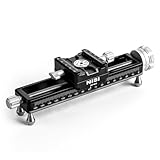
- PRECISE MACRO ADJUSTMENTS: The NiSi NM-180S Macro Focusing Rail offers fine-tuned control with precise 1.25mm movements per rotation and a generous 160mm adjustment range. Perfect for macro photography, this rail enables photographers to achieve the perfect focus for close-up shots. Whether you're working with macro camera setups or specialized macro sliders for DSLR, this rail provides ultimate flexibility for your focus rail for macro photography needs, ensuring clear, crisp images.
- WIDE CAMERA COMPATIBILITY: Equipped with an Arca-Swiss style mounting clamp, the NiSi Macro Focusing Rail seamlessly fits most cameras and lenses, ensuring secure attachment for various macro photography accessories. The long quick-release plate ensures efficient mounting and dismounting for both amateur and professional photographers. Ideal for camera slider users, this system is compatible with popular camera brands, providing stability for precision camera focusing rail use during shoots.
- 360-DEGREE ROTATION FOR FLEXIBILITY: The NiSi NM-180S Micro Focusing Rail, features a 360-degree rotating clamp that allows easy adjustments in camera orientation. No need to remove the camera rail mount for repositioning; simply rotate the clamp to adjust your shot. This feature is essential for camera sliders used in macro photography. Its versatile rotation provides flexible shooting angles, making it the perfect companion for photographers who use tripod slider setups.
- VERSATILE MOUNTING OPTIONS: This macro focusing rail is designed to be compatible with all tripod rail mounts. The Arca-type tripod clamps and double-dovetail indents ensure secure attachment to various tripods. The NiSi NM-180S also features 3/8" and ¼” screw holes for additional mounting flexibility, making it suitable for camera rail mounts used in both professional and amateur photography. Perfect for those who require robust support for camera focusing rail applications.
- DURABLE AND SCRATCH-RESISTANT: Crafted from high-quality CNC machined aluminum, the NiSi Macro Focusing Rail is built to endure long-term field use. Its corrosion-resistant finish ensures durability while protecting against scratches, making it perfect for macro photography conditions. The sleek finish and scratch-resistant coating provide extra protection, ideal for photographers who need a reliable tool that withstands frequent handling in both macro rail and camera slider setups.
During the research period, OM SYSTEM’s U.S. store displayed the OM-5 Mark II from $1,049.99 and the OM-3 body at $1,699.99, with an OM-3 12–45mm PRO kit at $2,099.99. These are dated U.S. store snapshots, not guaranteed current prices; check [OM SYSTEM’s offers page](https://explore.omsystem.com/us/en/offers).
Best for high-resolution software stacks: Sony, Nikon, and Canon
A full-frame body can be a better choice when resolution, dynamic range, cropping, or an existing lens collection matters more than in-camera convenience. These cameras typically capture the separate focus planes; you then combine them in desktop software. That extra step is often worthwhile for commercial product photos, large prints, and difficult stacks where you need to select or retouch individual frames.
Sony α7R V and compatible Alpha bodies
A high-resolution Sony Alpha body such as the α7R V suits photographers who want detailed files and already own E-mount lenses. Sony’s guidance distinguishes focus bracketing—the capture of frames at different focus points—from focus stacking, the later process of combining them. Do not buy on the assumption that a supported Alpha body will produce an in-camera stack; check the [Sony model-specific guidance](https://www.sony.com/electronics/support/e-mount-body-ilce-7-series/ilce-7m4/articles/00342633) and plan for software.
Free tools Windows power users keep installed
One-click scans. No signup required.
High-resolution files take more storage and processing, and the shallower depth of field of a larger sensor at comparable framing can mean more frames are needed. The lens, lighting, and quality of the stack often matter more than adding resolution alone.
Rank #3

- The FM-160 Macro Focusing Rail from Haoge is a macro stage designed for precise camera alignment. Its ability to make small incremental adjustments is ideal for close-up work, tilt-shift or macro-photography.
- The rail is also equipped with an integrated Arca-type compatible quick release clamp and Arca-type dovetail groove for mounting on Arca-type compatible heads and accessories. The rail can also be mounted on most tripods by utilizing the built-in 1/4"-20 tripod mounting threads.
- The FM-160 provides 4.53"/115mm of maximum front to back movement controlled by adjustment knob. Laser-engraved reference scale with 1mm increments on both sides. Two screws for damping control of the rail. It weight 14.1oz/400g, it's light enough to carry in your bag for nature work.
- Ideal for Macro photography, Focus stacking and can be used as a nodal slide for panorama shooting.
- Each full rotation of the fine adjustment screw gives a stroke of 4 mm.
Nikon Z8, Z7-series, and other compatible Nikon bodies
Nikon calls its automated sequence Focus Shift Shooting. The focus-step setting is not a fixed distance in millimeters: the actual shift depends on factors including lens data, focal length, and aperture. Treat it as a setting to test with your lens and subject, not a universal measurement. Nikon’s [Focus Shift guide](https://www.nikonusa.com/learn-and-explore/c/tips-and-techniques/focus-shift-the-basics-stacking-focus) explains the feature and notes the very different demands of macro and landscape stacks. A small macro subject can take more than 100 frames, while a wide landscape may need only a few.
Nikon’s sequence is a capture workflow, not a promise of a finished in-camera composite. For demanding results, process the frames in stacking software and keep exposure and white balance consistent across the sequence.
Canon EOS R7
The EOS R7 is an APS-C option for Canon users who want automated focus bracketing, useful reach, and access to RF lenses and adapted EF macro lenses. Canon lists the EOS R7 among bodies supporting Focus Bracketing in its [EOS Utility documentation](https://cam.start.canon/en/S003/manual/html/UG-03_RemoteCamera_0040.html). Verify the camera’s own shooting and compositing options separately; the existence of bracketing does not establish that the body will make the composite you want. Expect a software workflow unless the model’s manual confirms otherwise.
APS-C can be a useful middle ground for reach, depth of field, resolution, cost, and size. Its pixel density can also make missed focus or subject movement more obvious at high magnification.
Rank #4

- Versatile Mounting: This macro focusing rail allows ability to mount on tripod heads like Arca-type tripod clamps using the double-dovetail indents on the bottom edge, along with 3/8” and 1/4” screw holes.
- Quick Adjustment Button: The focusing rail is equipped with quick adjustment feature,with its 2mm movements per rotation and 160mm adjustment range.which assists you in making rapid adjustments while capturing shots.
- Micrometer Precision Macro Adjustments: The camera focusing rail boasts exceptional precision with a extremely small margin of error.the micrometer allows fine adjustments of 0.05mm,and allows you to precisely adjust your camera position for close-up shots.It is ideal for close-up work, tilt-shif,macro-photography and focus stacking .
- Detachable Feet: The feet of the macro rail are designed to be removable, allowing this tool to adapt to your various shooting scenarios. You can use the feet for tabletop shooting, or remove them and directly mount it on a tripod.and the macro focusing rail is built to last and withstand scuffs and scratches.
- Camera compatibility: AstrHori macro focusing rail slider has an all-metal structure.The main body is made of alloy 6061,which has high hardness and toughness.The screw is made of stainless steel 304,which has high hardness and is very durable.And it equipped with an integrated Arca quick-release plate,fits most cameras and lenses easily and secure mounting.
Choose by the work, not just the body
- Macro on the go: Start with the OM-1 Mark II if you want built-in stacking and a compatible macro lens. For an OM-5 Mark II or OM-3, verify the precise functions first.
- Extreme macro or commercial product work: Favor repeatability, a suitable macro lens, controlled light, stable support, and software that lets you inspect and retouch the stack. A focusing rail may be preferable to moving focus through the lens.
- Landscape detail: Use the system you already own if it offers reliable bracketing and good wide-angle lenses. A high-resolution full-frame camera can help with output detail, but stacking is only useful when the foreground and background cannot both be acceptably sharp in one frame.
- Already invested in a camera system: Your existing compatible macro lens, flash, and accessories may be worth more than switching bodies just for stacking. Check whether your specific body supports bracketing and whether its lens works with that feature.
- Want a finished image with minimal editing: In-camera stacking is convenient for short, static sequences. For difficult subjects or many frames, software offers more control.
Focus bracketing versus focus stacking
Focus bracketing is the capture step: the camera takes multiple photos while shifting focus between them. Focus stacking is the merge: software or the camera combines the sharp regions of those images into one photograph with greater apparent depth of field. Sony explains the distinction in its [support guidance](https://www.sony.com/electronics/support/e-mount-body-ilce-7-series/ilce-7m4/articles/00342633).
In-camera stacking is fast and convenient, but it may limit the number of frames and the editing control available. Software stacking is better when the sequence is long, the subject has fine or complex edges, or you need to retouch halos and movement. Preserve the source frames: a camera-generated composite is much harder to repair if it is the only file you kept.
How to shoot a focus stack
- Stabilize the setup. Mount the camera on a rigid tripod for a static macro or landscape stack. Leave space around the composition because alignment and blending can require cropping.
- Control exposure. Use manual exposure, fixed white balance, and a fixed ISO where practical. Automatic changes between frames can create visible brightness or color shifts.
- Choose a shutter approach. Use remote release or a self-timer to avoid touching the camera. Electronic or electronic-front-curtain shutter can reduce vibration when appropriate, but check for artifacts that might affect your subject.
- Start at the nearest important detail. Place the first focus plane on the closest part that must be sharp. Set a small focus step for high magnification; the required step depends on the lens, magnification, and aperture.
- Cover the full subject. Set enough frames for the sequence to reach beyond the farthest important detail. Review both the first and last frames. Do not assume that an in-camera composite limit is the same as the camera’s maximum bracket size.
- Keep light consistent. For macro, flash can help freeze movement, but allow it to recycle. The OM-1 Mark II manual documents selectable flash waiting intervals during bracketing; see the [manual](https://my.omsystem.com/consumer/manuals/cameras/OM-1_MANUAL_EN.pdf). Reduce flash power or increase the interval if exposure varies from frame to frame.
- Merge and inspect. Use the camera’s composite for a short, simple stack or software for more control. Inspect the result at 100 percent for soft gaps, halos, doubled edges, and movement artifacts.
Macro-specific cautions
Small changes in focus can leave gaps between sharp planes, so close-up subjects often need many frames. Avoid stopping the lens down so far that diffraction erases the fine detail you are trying to preserve. Watch for moving antennae, legs, leaves, reflections, and wind. A flash with a diffuser can provide fast, consistent light; a rail can give more controlled movement for extreme magnification.
Recommended Free Tools
Landscape-specific cautions
Stack only when a single exposure cannot keep the important foreground and background acceptably sharp. Keep the camera fixed, exposure consistent, and focus coverage adequate. Wind-blown foliage, moving water, clouds, and people can produce blending artifacts. For a scene that already fits within the usable depth of field, one photograph is usually simpler and avoids merge problems.
When to use a focusing rail instead
A focus rail moves the camera or subject in small, controlled increments, rather than relying entirely on the lens to shift focus. Consider one for extreme macro, manual-focus lenses, repeatable studio sequences, or situations where focus breathing makes lens-driven stacks difficult to align. It is not automatically better for every subject: it adds setup time and cannot solve movement in the subject itself.
Common problems and fixes
- The nearest detail is soft: The sequence began too far into the subject. Restart with focus on the nearest critical detail.
- The far side is soft: The sequence did not go far enough, there were too few frames, or the steps were too large. Extend coverage or reduce the focus-step interval.
- Halos at edges: Focus planes may have too little overlap, or the blend may have struggled with mismatched edges. Capture smaller increments and use software retouching or masks.
- Ghosting or double outlines: The subject moved, the camera vibrated, or reflections changed. Stabilize or shelter the setup, use faster light where appropriate, and exclude or mask affected frames.
- Flash exposures vary: The flash may not have recycled. Lower its power, lengthen the interval, or use a supported flash-charge delay.
- The in-camera stack misses parts of the subject: The merge may accept far fewer frames than the bracket capture. Process the full source sequence in software.
- Bracketing is unavailable: Check the correct still-photo mode, lens and firmware compatibility, and whether another feature such as flash, HDR, silent shooting, or a computational mode conflicts. Look for the manufacturer’s terminology; Nikon, for example, calls its function Focus Shift Shooting.
Bottom line by use case
Choose the OM SYSTEM OM-1 Mark II if built-in stacking and macro convenience are your priorities, keeping its 3–15-frame in-camera merge limit separate from its 3–999-frame bracket range. Choose a compatible Canon, Nikon, or Sony body if you value your existing system, higher-resolution files, or software control—and plan on merging the source frames yourself. For the best stack, prioritize a compatible macro lens, steady camera, consistent light, adequate focus overlap, and a workflow suited to the subject.
Quick Recap
Product prices and availability are accurate as of the date/time indicated and are subject to change. Any price and availability information displayed on Amazon at the time of purchase will apply.

