What’s actually slowing this PC down?
Pick the symptom - the matching free tool is one click away.
Some links on this page are affiliate links: if you buy through them we may earn a commission, at no extra cost to you.
For most creators, the DJI Osmo Action 6 is the best all-round body camera for YouTube. It combines a square sensor, variable aperture, 8K recording, built-in storage and direct connection to two DJI microphone transmitters. Choose the GoPro HERO13 Black if you already own GoPro mounts or want its accessory ecosystem; choose the Insta360 X5 if you would rather reframe a 360-degree recording after filming than aim the camera perfectly in the moment.
Here, “body camera” means a consumer action or wearable camera for creator footage—not a police or security evidence camera. Dedicated body-worn systems are designed around operational recording and evidence management, not the image quality, creator audio and editing convenience most YouTubers need. NIJ’s body-worn camera primer and the DHS market survey describe that different purpose.
Best body cameras for YouTube at a glance
| Pick | Camera | Best for |
|---|---|---|
| Best overall | DJI Osmo Action 6 | Creators who want one versatile, conventional action camera |
| Best mounting ecosystem | GoPro HERO13 Black | Existing GoPro owners and mount-heavy setups |
| Best for choosing the angle later | Insta360 X5 | Solo filming, cycling, travel and other hard-to-frame activities |
| Best value | DJI Osmo Action 5 Pro | Buyers who find it substantially cheaper than the Action 6 |
| Best tiny option | Insta360 GO-series camera | Lightweight, unobtrusive wearable shots |
These are use-case recommendations, not claims that one camera wins every image-quality test. Prices, bundles and regional availability change; compare the current camera price with the cost of the mount, spare power, storage and microphone you will actually need.
Quick wins for a faster PC:
Fix the driver behind crashes, sound loss and screen glitchesFind Drivers →Repair Windows errors before they cause bigger problemsFix Now →1. DJI Osmo Action 6: best overall
The Action 6 is the strongest all-round choice for most YouTube creators who want straightforward first-person footage. Its 1/1.1-inch square sensor, variable f/2.0–f/4.0 aperture, 8K recording and 50 GB of built-in storage give it flexibility for different scenes and crops. DJI also says it can connect directly to two DJI microphone transmitters, which can simplify a talking-while-moving setup. See DJI’s product details, specifications and FAQ for supported modes and conditions.
#1 Best Overall

- 1080P HD & 6FT NIGHT VISION-Records clear 1080P HD video day and night; built-in infrared delivers sharp footage in total darkness, ideal for night patrols, garage security, and low-light dispute documentation.
- 5-HOUR BATTERY & LOOP RECORDING- Supports up to 5 hours of continuous recording; automatic loop recording overwrites oldest files when full, ensuring no critical moment is missed during long shifts, outdoor work, or all-day travel.
- 64GB HIGH-SPEED MICROSD CARD INCLUDED-Pre-installed 64GB high-speed card stores 10–11 hours of video; plug-and-play ready for security personnel, inspectors, and travelers to start recording immediately.
- ULTRA-LIGHTWEIGHT & DISCREET DESIGN -Only 0.19oz with an adjustable clip for secure attachment to collars, backpacks, helmets, or car visors; comfortable all-day wear for law enforcement, sports, dash cam, and on-the-go use.
- TIMESTAMP & MOTION DETECTION-Timestamp meets legal evidence standards for work logs and incident reports; motion detection activates recording only on movement to save power, perfect for security monitoring and property watch.
The square sensor and 4K Custom mode are useful when you want room to crop or adapt footage for different formats. The camera records up to 8K, but most creators do not need to shoot every scene at 8K: 4K is sufficient for typical YouTube delivery, while higher resolutions use more storage and processing power and can increase heat and battery demands. Consider 8K when its additional cropping or reframing flexibility solves a real problem.
DJI lists waterproofing to 20 m without additional accessories. That rating depends on the camera being in good condition and its doors being correctly closed; follow DJI’s stated limits and care instructions. DJI also lists up to 240 minutes of battery life, but that figure is under specified controlled conditions: 1080p/24fps, RockSteady on, wireless and voice/gesture controls off, and screens off. It is not a realistic promise for every resolution, temperature or shooting setup.
The camera’s larger sensor and f/2.0 aperture are promising for darker scenes, but they do not make an action camera a night-vision device. Expect mixed lighting, motion and stabilization to affect results; check independent footage such as Tom’s Guide’s Action 6 review alongside manufacturer claims. Choose the Action 6 if you want a capable everyday wearable camera and value its DJI audio path. If you already own a large set of GoPro accessories, switching may cost more than the camera body price suggests.
Windows Errors? Fix Them Before They Spread
Repair common Windows errors and clear accumulated junk for a smoother, more stable PC - no reinstall needed.Free scan · no reinstallCrashes, No Sound, or Screen Glitches?
Random freezes, missing sound and display glitches usually trace back to one bad driver. Find and replace yours safely.Free scan · under a minute2. GoPro HERO13 Black: best for mounts and accessories
The HERO13 Black is a sensible pick for creators invested in GoPro mounts or who need a broad range of chest, helmet, adhesive, magnetic and tripod options. GoPro lists 5.3K video, 10-bit HLG HDR, GPS/data overlays, Wi‑Fi 6, built-in mounting fingers, 1/4-20 mounting compatibility and Magnetic Latch mounting. Its lens and accessory ecosystem can also suit creators who want to adapt the camera to different activities. See the HERO13 Black product page and GoPro camera catalog.
GoPro rates the Enduro battery at more than 2.5 hours at 1080p30 and more than 1.5 hours at 4K30 or 5.3K30 under its stated test conditions. Settings, screens, wireless features, weather and the way the camera is mounted can change actual runtime. Treat these as manufacturer figures, not a guarantee for a long ride or a high-resolution shoot.
The HERO13 is a particularly easy recommendation when your existing mounts and workflow matter more than having the newest feature set. For a new buyer choosing between systems, compare the total kit cost and microphone connection you need, not just headline resolution. GoPro’s launch announcement listed original launch prices, not necessarily current prices; check the current offer and exact bundle contents before buying.
Rank #2
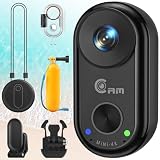
- 🎬 【4K True Sensor · Not Interpolated】 – Native sensor output at 4K@30FPS, combined with 6-axis gyro EIS (Electronic Image Stabilization). Riding, diving, or running footage stays as steady as if on a tripod.Paired with a 150° wide-angle lens to capture broader scenes for your vlogging camera needs, whether recording outdoor adventures or daily moments.
- 🌊 【SET EXCLUSIVE · 40m Professional Waterproof】 – This set includes a dedicated waterproof case + buoyancy handle, allowing normal recording at depths of up to 40 meters (IPX8 rated). The buoyancy stick ensures the camera floats immediately if dropped in water, preventing loss. Covers: snorkeling, shallow diving, surfing, boating, swimming pools, rainy days — one set handles all water-related scenarios. Note: The camera body itself is not waterproof and must be used inside the waterproof case.
- 🧲 【Thumb-sized · Only 28.9g (1.01 oz)】 – Measures just 2.02 × 1.0 × 0.88 inches, 30%–50% lighter than competitors. The magnetic body can be attached anywhere: helmets/collars/backpacks/handlebars/pet collars. Three interchangeable mounting solutions: clip mount, back clip, and lanyard. Wear it all day with zero discomfort.
- 📶 【WiFi Direct · App Live Preview & Playback】 – No need to remove the camera! Connect to the Viipulse App via your phone for a live viewfinder preview, playback, download, and sharing to social networks. USB-C pass-through charging allows recording continuously when connected to a power bank. The low-power chip operates at significantly lower temperatures than similar products.
- 🎯 【All-Scenario · One Camera, Endless Uses】 – Bike/motorcycle POV recorder ✓ Pet camera ✓ Outdoor sports vlog ✓ Home security / package delivery confirmation ✓ Work meeting recorder ✓ Helmet dash cam ✓ — a thumb-sized device that covers all your first-person shooting needs.Warm Tips (we recommend using a C10 U3 memory card (32 GB - 256 GB))
3. Insta360 X5: best for reframing after filming
A 360 camera is the right tool when you cannot keep checking where a forward-facing camera is pointed. The Insta360 X5 records the surrounding scene so you can choose the angle and crop later. That can be especially helpful for cycling, motorcycling, skiing, hiking and solo travel. Current coverage describes the X5 as an 8K 360 camera with replaceable lenses; see TechRadar’s X6-versus-X5 comparison.
The Tool Desk
Outbyte PC Repair FREEClear out junk files and repair common Windows errorsFree Scan →Outbyte Driver Updater FREEScan for outdated or missing drivers - takes under a minuteDriver Scan →The flexibility has a cost: you must transfer and reframe the footage, manage larger files and allow time for another export step. Stitching or lens artifacts can be visible, and a 360 recording does not automatically look better than a well-aimed action-camera shot. Lens protection matters, too, because damage to a 360 lens can compromise the footage. Choose the X5 when framing flexibility is central—not simply because 360 sounds more advanced.
4. DJI Osmo Action 5 Pro: best value if discounted
The Action 5 Pro remains worth considering if its current price is meaningfully below the Action 6. It can be a strong fit for daylight POV recording where you do not need the newer model’s square sensor, variable aperture, built-in storage or other newer features. Tom’s Guide’s action-camera guide treats it as a value option following the Action 6.
Compare the actual prices of equivalent kits. If the gap is small, the Action 6’s newer features may make the extra spend worthwhile; if the Action 5 Pro is heavily discounted, the older model may be the better use of your budget. Check regional availability and bundle contents rather than relying on a price shown for another market.
5. Insta360 GO-series: best when size matters most
A tiny GO-series camera can be easier to wear for hands-free repair, craft, home or casual travel videos than a full-size action camera. The trade-off is that miniature cameras tend to make greater compromises in controls, battery, thermal headroom, recording flexibility and low-light performance. Some setups also depend more heavily on a companion device or accessory system.
Because model features and bundles vary, check the exact current model’s official specifications before purchasing—especially runtime, waterproofing and how it records or transfers video. Buying-guide coverage includes the GO series among miniature wearable options; see Digital Camera World’s body-camera guide and Engadget’s action-camera guide.
Rank #3

- User Friendly: Simple Design with a button in the middle, you can easily start recording with pressing the button. Indicator light makes sure that you won’t miss any moment. Our Body Worn Camera is suit for both beginners and professionals
- Thumb Size: The size of our Body Camera is 64.5 x 28 x 20mm. Our package brings with Magnet Pendant, Safety Cord, Portable Back Clip, you can hang on your body and easily mount it at anywhere for recording. With its magnetic design and sets of handy accessories, this action body camera can get more creative and film angles than other cameras
- Hands Free: You can attach the camera with the magnet pendant, then hanging around the neck with safety cord to get dual protection. The portable back clip has 360°adjustable rotation, you can easily change the angle. Free your hands and complete the video
- Universal Compatibility: By using our thumb size body camera, it can help you watch your baby, pet, elderly parent, roommate, babysitter, partner, caregiver. And it can be put at office, home, bedroom, kitchen, living room or anywhere
- What’s in the Box: 1 x 128GB Body Camera, 1 x Magnet Pendant, 1 x Safety Cord, 1 x Portable Back Clip, 1 x USB Cable
Choose by the video you make
| Your footage | Good starting point | What to prioritize |
|---|---|---|
| Cycling or motorcycling POV | Action 6 for a forward view; X5 if you need to reframe | Secure mounting, stabilization and wind-resistant audio |
| Walking tours or travel | Action 6 or X5 | Comfort, battery swaps and whether you want a 360 edit |
| Chest-mounted talking | Action 6 or HERO13 with a close microphone | Audio placement and framing |
| Helmet footage | HERO13 or Action 6 | Weight, mount reliability and head-motion stabilization |
| Hands-free repair or craft | GO-series camera or a magnetic/strap-mounted action camera | Angle, comfort and enough close, clear audio |
| Water sports | Waterproof action camera, such as Action 6 within its stated limits | Door seals, depth rating and safe mounts |
| Dark interiors or night streets | Action 6 may be a better action-camera starting point | Lighting and motion; test before relying on it |
| Studio interviews or cinematic, shallow-focus work | A conventional camera may be a better fit | Consider a compact vlogging or mirrorless camera rather than a body mount |
Body-mounted cameras trade control and image flexibility for hands-free convenience. They are not a substitute for a larger-sensor camera when you need controlled interviews, shallow depth of field or consistently strong low-light footage.
What matters more than the resolution number
- Audio and wind handling. Wind noise can spoil footage even when the picture is sharp. Built-in microphones may be fine for quiet walking but are a poor bet at cycling or motorcycle speeds. A wireless transmitter or lavalier close to the speaker, with a windscreen, is usually more useful than relying on a camera several feet away. Check whether it connects directly or needs a receiver or adapter, and whether the setup affects a waterproof door. If the microphone can record internally, keep that backup track in case the camera link fails.
- Stabilization. Body-mounted footage moves with you. Electronic stabilization can crop the frame; aggressive stabilization may be less effective in very dark scenes. Horizon locking can smooth rotation but may narrow the view or restrict modes. A chest mount often moves less abruptly than a head mount, though activity and fit matter. A 360 camera adds reframing options but cannot erase every vibration or stitching issue.
- Comfort and a secure mount. A camera that bounces, swings or points at the ground is no bargain, regardless of its resolution. A reliable setup that you will wear is better than a feature-rich one you leave in your bag.
- Battery and storage workflow. Plan for how long you will record, how you will swap or recharge batteries, and where the files will go. High-resolution, high-frame-rate and 360 footage all increase demands on storage and editing hardware.
- Performance in your actual light and weather. Test the setting you plan to record. Larger sensors or wider apertures can help in low light, but no compact action camera can guarantee clean footage in a dark, moving scene.
- Complete kit cost. Add the mount, spare power, memory card if needed, microphone, windscreen, protective accessories and storage. A lower camera-body price can turn into a more expensive usable setup.
Is 4K enough for YouTube?
Yes. 4K is enough for most YouTube videos. A higher-resolution mode is useful when you need to crop, stabilize with extra framing room or reframe for a different aspect ratio, but it also means larger files and more demands on the computer used to edit them. For many creators, better sound, a steadier mount and a usable exposure are more valuable upgrades than moving from 4K to 8K.
Field of view: wide is not always better
Ultra-wide footage shows more of the environment but makes faces and distant subjects appear smaller. A wide chest-mounted view may include too much torso and not enough of what you are doing; a narrower view can look more natural for a close talking shot. GoPro specifies a 177-degree field of view for the HERO13 Ultra Wide Edition in 4K60, but a broad view is a creative choice, not an automatic improvement. With 360 footage, you can choose the angle later, at the cost of extra editing and possible stitching limitations.
Mounts and audio: build the setup around the wearer
- Chest harness: Often a steady, immersive angle because the torso moves less abruptly than the head. It may be obscured by a backpack, arms or clothing. Aim it slightly higher than seems intuitive and record a test.
- Neck mount: Convenient for casual walking and hands-free POV, but it can swing or bounce. Check the angle while wearing the clothing and bag you will use.
- Shoulder or backpack-strap mount: Handy for travel, work and walking. The view can be off-center or blocked by straps.
- Helmet mount: Captures an engaging point of view, but follows every head movement and can be exposed to impacts. Keep the camera and mount secure and appropriate for the activity.
- Magnetic mount: Fast to attach and reposition, but do not treat it as fail-safe during high-speed activity. Add a secure attachment where appropriate.
- Adhesive or clamp mount: Can hold firmly when properly installed. Follow surface-preparation instructions and replace worn adhesive; test the mount before an important shoot.
- 360 camera with a pole: Allows extensive reframing and can create an invisible-stick look, but adds bulk and a more involved edit.
GoPro specifies built-in mounting fingers, 1/4-20 compatibility and Magnetic Latch mounting for the HERO13. DJI documents third-party accessory compatibility through its Quick-Release Adapter Mount and tripod mounting options in the Action 6 FAQ. Confirm exact compatibility before buying an adapter; do not assume every mount or bundle is included.
For audio, DJI says the Action 6 can connect directly to two DJI microphone transmitters through OsmoAudio. The FAQ also describes third-party microphone support through DJI’s Osmo Action 3.5 mm Audio Adapter. GoPro’s Creator Edition includes a Media Mod and directional microphone; check the exact package rather than assuming those are included with the camera. In every case, test wind protection and clothing rub with the camera on your body, not just indoors on a desk.
Independent reader supportYour contribution helps us test, update, and keep practical guides available for everyone.Battery, heat and storage: plan for the whole outing
Manufacturer runtime figures are not directly comparable unless resolution, frame rate, stabilization, screen use, wireless settings and temperature match. For instance, DJI’s Action 6 figure of up to 240 minutes is for a controlled 1080p/24fps setup with screens and specified wireless controls off. GoPro’s HERO13 figures—more than 2.5 hours at 1080p30 and more than 1.5 hours at 4K30 or 5.3K30—are also under GoPro’s test conditions. Cold weather, high frame rates, stabilization, Wi‑Fi, GPS, active screens, waterproof housings and 360 recording can all change runtime and heat behavior. Consult the manufacturers’ current details: DJI specifications and the GoPro product page.
Rank #4

- 1.25 OZ (35.7G) & THUMB SIZE: The Sixmou i3 4K tiny action camera is so compact it’s smaller than your thumb and weighs just 1.25 ounces (35.7 grams). You can mount it on your body without even noticing it’s there, blending seamlessly with you. It offers a whole new amazing experience.
- MOUNT ANYWHERE: The i3 sports camera features a magnetic design, allowing you to attach it to an Iron metal surface. It also comes with a magnetic lanyard pad that lets you quickly mount it to your chest in just one second. With a 360° rotating spring clip, you can effortlessly secure the camera to your collar, pocket, waist, and more. Additionally, it includes seven other mounting accessories, making it easy to attach to bikes, motorcycles, helmets, and other gear.
- 131 FEET DEEP WATERPROOF:This mini camera includes a waterproof case, you can take the camera underwater up to 131 feet (40 meters), making it ideal for diving, snorkeling, and surfing. Just remember, the camera itself is not waterproof without the housing.
- 150 MINUTES BATTERY LIFE: This mini 4K action cam comes with a rechargeable 800mAh lithium-ion battery, providing extended usage. It can continuously record up to 150 minutes of video in 1080P mode, 120 minutes in 2K mode, and 90 minutes in 4K mode. Plus, the camera supports recording while charging, so you can meet your long-term recording needs without interruption.
- 4K HANDS-FREE RECORDING: Take your footage on the go, free up your hands to record 4K POV videos and capture exciting moments with your family, kids, pets, and friends. Perfect for outdoor activities like cycling, motorcycling, and more.
For short shoots, one spare battery is a useful starting point. For longer outings, consider a charging case or USB-C power bank if supported in your setup, and plan battery swaps before you need them. Use a suitable high-endurance microSD card where the camera relies on removable storage; check the model’s official card recommendations. Test your intended recording mode and thermal behavior before a long, uninterrupted shoot. If the camera overheats, try a lower resolution or frame rate, disable unnecessary screens and wireless features, keep it out of direct sun and use shorter clips. Do not remove a protective housing unless it is safe and appropriate for the conditions.
Do these 3 things before closing this tab:
1Fix the driver behind crashes, sound loss and screen glitches2Clear out junk files and repair common Windows errors3Scan for outdated or missing drivers - takes under a minuteA practical recording and editing workflow
- Secure the mount. Check that the camera cannot swing, detach or be obstructed by straps and clothing.
- Make a 10–20 second test clip. Check the angle while wearing the actual clothes, helmet or pack you will use. Chest-mounted cameras often point lower than expected.
- Check sound and wind. Listen with headphones if possible; check for fabric rub and confirm that a wireless microphone or backup recording is working.
- Start with 4K/30 or 4K/60. Choose frame rate based on the motion and intended look, not simply because the highest setting is available. Use a higher-resolution mode when you have a specific need for crop or reframing.
- Choose stabilization and field of view together. More stabilization may crop the view. Confirm you have not cut off hands, instruments or the road ahead.
- Carry spare power and storage. Check free capacity before leaving, and keep a safe way to recharge or swap batteries.
- Review before leaving the location. Confirm the key shot exists, is framed correctly and has usable audio. Capture a short room-tone or ambient sound clip if your edit may need it.
- Transfer and back up files. Organize camera footage, separate audio, project files and exports before formatting a card. For demanding footage, use proxy media or record at 4K instead of 8K if editing is slow.
A conventional action-camera workflow is simple: aim, record, transfer and edit. With a 360 camera, first record the scene, then transfer the larger files, reframe in the maker’s app or desktop software, choose the final angle and aspect ratio, export, and finish the edit. That reduces the need to aim perfectly in the field, but adds editing time and storage needs.
Common problems and quick fixes
- The camera points at the wrong place: Make a short test, then adjust the mount. Aim a chest camera higher than instinct suggests. Use an available square or flexible crop mode if you expect to change aspect ratio; choose a 360 camera if you cannot reliably anticipate the framing.
- Wind or clothing ruins the sound: Put a microphone closer to the speaker, use a windscreen and record a backup track. Test the exact mount, jacket and straps you plan to wear. Do not assume built-in microphones will cope with cycling or motorcycle wind.
- Stabilization crops too much: Start with a wider field of view, reduce stabilization if the scene permits, or move the mount from the head to the torso. Consider 360 reframing if angle flexibility matters more than maximum sharpness.
- The battery runs out: Carry spares or a power bank and test the exact resolution and settings before the shoot. Do not plan around a best-case lab number.
- The camera overheats: Reduce resolution or frame rate, turn off unnecessary features, avoid direct sun, and test shorter clips. Check what external power options the manufacturer supports in your chosen configuration.
- Water gets inside: Inspect seals, doors and lens covers before use; never open battery or USB doors while wet. Rinse after saltwater exposure and verify the specific depth limit and case requirements. Mounts and adapters can also be points of failure.
- Editing is choppy: Confirm your computer can decode the selected resolution and codec, make proxies or choose 4K instead of 8K when extra crop room is not needed, and keep backups before formatting cards.
Privacy, consent and public recording
Before recording identifiable people or private conversations, check the law where you are filming and the rules of the property or event. Audio recording may have different consent requirements from video, and laws vary by location and situation. Businesses, schools, medical facilities, workplaces, transit systems and events may set their own restrictions. Publishing footage can raise separate privacy, harassment, defamation or platform-policy concerns even when recording was lawful.
Consider stopping when someone objects and blurring faces, license plates, children, documents, screens or private conversations before publication. A consumer action camera is not an evidence-management system and should not be presented as legally compliant evidence capture. This is general information, not legal advice.
Which one should you buy?
- Want the easiest all-round choice? Start with the DJI Osmo Action 6.
- Already own GoPro mounts or need that ecosystem? Choose the GoPro HERO13 Black.
- Cannot reliably aim while filming? Choose the Insta360 X5 and budget for reframing and larger files.
- Want good value for daylight POV? Compare a discounted DJI Osmo Action 5 Pro with the Action 6’s current price.
- Need the smallest wearable camera? Look at the current Insta360 GO model, after checking its exact runtime, controls and waterproofing.
Whichever camera you choose, make the mount and microphone part of the decision. A stable, comfortable angle and intelligible sound will usually make a bigger practical difference to your YouTube video than a headline resolution you rarely use.
Quick Recap
Product prices and availability are accurate as of the date/time indicated and are subject to change. Any price and availability information displayed on Amazon at the time of purchase will apply.

