Some links on this page are affiliate links: if you buy through them we may earn a commission, at no extra cost to you.
For a premium all-around 9-inch chartplotter and sonar system, choose the Garmin GPSMAP 923xsv; for Lowrance ActiveTarget live sonar, choose the HDS PRO 9; and for a more affordable display with an imaging transducer included, consider the Lowrance Eagle 9 TripleShot HD. These are different kinds of purchases: the Garmin and HDS PRO are advanced networked displays, and a display-only package may need a separate transducer or live-sonar hardware. Check the exact box contents, compatibility and current availability before buying.
Best 9-inch fish finders at a glance
| Model | Best for | Sonar and live sonar | Transducer/package note | Main trade-off |
|---|---|---|---|---|
| Garmin GPSMAP 923xsv | Premium Garmin chartplotter and sonar system | Built-in UHD SideVü and ClearVü; compatible traditional sonar and optional Panoptix/LiveScope systems | Check the selected configuration; live sonar requires compatible additional hardware | May cost more than a basic fish finder and can be overkill if you only need depth and GPS |
| Lowrance HDS PRO 9 | Lowrance networking and ActiveTarget 2 live sonar | Supports ActiveTarget 2 and Active Imaging HD | Official U.S. page listed a no-transducer configuration at $1,799 when checked; it was marked out of stock. Price and stock can change | Transducers and live-sonar equipment can add substantially to the complete-system cost |
| Lowrance Eagle 9 TripleShot HD | Value-oriented 9-inch imaging setup | TripleShot HD sonar and GPS mapping; not a substitute for an HDS PRO/ActiveTarget system | Sold as a TripleShot HD package; confirm the exact transducer and included hardware on the listing | Less oriented toward flagship networking and advanced expansion |
Prices and package contents are not directly comparable unless each listing includes the same display, transducer, charts and accessories. No current price is quoted here for the Garmin or Eagle because the supplied product information did not establish a reliable figure.
Best premium all-around: Garmin GPSMAP 923xsv
The GPSMAP 923xsv is the strongest fit for boat owners who want a capable Garmin multifunction display—not just a depth finder. Garmin lists a 9-inch, 1280 × 720 display, built-in UHD SideVü and ClearVü sonar, charting and marine-network features. The product supports optional Garmin Navionics+ mapping and is compatible with Panoptix and LiveScope sonar when paired with the appropriate equipment. See Garmin’s product specifications and U.S. product page.
It makes sense for anglers who want to combine sonar, navigation and compatible marine electronics in Garmin’s ecosystem. Garmin also lists integration with compatible Force trolling motors and Power-Pole systems. Its chartplotting capabilities include support for up to 5,000 waypoints, 50,000 track points, 50 saved tracks and 100 routes; chart features and coverage depend on the chart product and region.
#1 Best Overall

- Easy-to-use 9” color fishfinder with new vivid scanning sonar color palettes to easily distinguish fish and structure.Rated current : 1.5 A. Fuse : 3 A, 250 V fast-acting.
- Supports Garmin CHIRP traditional sonar plus CHIRP ClearVü and CHIRP SideVü scanning sonars (requires compatible transducer)
- High-sensitivity GPS to mark waypoints, create routes and view your boat’s speed
- Includes built-in Quickdraw Contours mapping
- Wi-Fi connectivity allows you to connect to the ActiveCaptain app with compatible smartphone to transfer waypoints, receive smart notifications (including software update notifications) and access the Garmin Quickdraw Community
Important: Built-in sonar capability does not mean every needed transducer is in the box. Nor does LiveScope compatibility mean LiveScope is included. Check the exact SKU, transducer, mount and any separate live-sonar components before comparing prices. If you only need ordinary depth readings and simple GPS marking, this premium chartplotter may be more system than you need.
Best for Lowrance live sonar: HDS PRO 9
The HDS PRO 9 is a strong choice for anglers building around Lowrance’s ActiveTarget 2 live-sonar system. Lowrance also lists Active Imaging HD, C-MAP DISCOVER OnBoard charts, Ethernet and NMEA networking, and boat-control integration. Its product page describes support for multiple ActiveTarget systems, but the live-sonar transducers and other required equipment should be treated as additional unless the exact bundle says otherwise. Review the official HDS PRO 9 listing for the chosen configuration.
Rank #2

- MULTIFUNCTION DISPLAY: With GO9, add GPS navigation, sonar support, radar capability, and much more to your boat: perfect for sportboats, center-consoles, and smaller cruisers
- C-MAP DISCOVER: Included C-MAP DISCOVER card with full-featured Vector Charts, Custom Depth Shading, Tides & Currents, C-MAP high-resolution Bathymetric contours, and ultra-wide coverage in the US and Canada
- HDI TRANSDUCER WITH BUILT‑IN SONAR: Includes 83/200 kHz HDI transducer support for clear CHIRP sonar and DownScan Imaging to help identify bottom structure and fish targets
- INTEGRATED GPS AND CONNECTIVITY: Built-in GPS with Wi-Fi and NMEA 2000 support for seamless system integration
- BUILT-IN CONNECTIVITY: Mirror your display to a smartphone or tablet and get access to charts, radar and other functionality from anywhere on board. NMEA 2000 connectivity offers more integration options
The U.S. product page showed a $1,799 no-transducer configuration when checked, and marked it out of stock. That is a dated listing, not a promise of current price or availability. A display-only price can look attractive beside a bundled unit, but add the compatible transducer, live-sonar hardware, mounts and networking components required for your setup before deciding.
Best value direction: Lowrance Eagle 9 TripleShot HD
The Eagle 9 TripleShot HD is the more accessible route to a 9-inch Lowrance display with an imaging transducer package. Lowrance describes the line as combining TripleShot HD sonar and GPS mapping. It is worth considering if your priority is conventional sonar and down- and side-imaging capability, rather than building a high-end ActiveTarget or boat-network system. Confirm the exact package on the official Eagle 9 listing; price and included hardware can vary by configuration.
Rank #3

- WATCH THE ACTION LIVE: Live Forward and Live Down views let you see fish movement and observe how fish respond to your lure in real time.
- COMPLETE SONAR SOLUTION: One included transducer delivers Live Forward, Live Down, CHIRP sonar, and DownScan Imaging with FishReveal.
- FIND FISH FASTER: FishReveal combines CHIRP fish targets with DownScan detail to make fish easier to distinguish around structure.
- DETAILED INLAND MAPPING: C-MAP charts provide high-resolution coverage of more than 17,000 U.S. lakes, plus Genesis Live mapping.
- SIMPLE DIRECT CONNECTION: Eagle Eye connects the transducer directly to the 9-inch IPS display without requiring a separate sonar module.
Choose the Eagle only after checking that its capabilities match the job. If you specifically want ActiveTarget 2, extensive networking or flagship expansion, compare the HDS PRO system instead. A lower display price is not a bargain if you later need features the model or package does not provide.
What about Humminbird?
Humminbird is a sensible alternative for anglers already using its electronics or Minn Kota equipment, particularly when freshwater mapping and the brand’s MEGA imaging are priorities. However, the supplied information does not establish a current 9-inch model, package, transducer or price with enough certainty to name a specific Humminbird unit as a current best buy. Check Humminbird’s official product lineup for current HELIX or Xplore configurations, then verify MEGA imaging generation, LakeMaster or CoastMaster chart compatibility, transducer contents and Minn Kota integration before purchase. Brand strengths vary by model and package; do not assume every feature belongs to every 9-inch unit.
Rank #4

- Easy-to-use 9” chartplotter with a bright, sunlight-readable touchscreen display with improved detail, clarity and viewing angle - Dimensions: 10.4" x 6.5" x 3.2" (26.4 x 16.6 x 8.0 cm) and Display size 7.8" x 4.5", 9.0" (19.8 x 11.5 cm, 22.9 cm).
- Included GT56-TM transducer for Garmin traditional, ClearVü and SideVü scanning sonars
- Built-in Garmin Navionics+ inland maps with integrated Navionics data cover more than 18,000 lakes with up to 1’ contours
- Built-in Wi-Fi connectivity lets you wirelessly share sonar, waypoints and routes with another ECHOMAP UHD2 chartplotter
- Wirelessly connects to your Force trolling motor to create and follow routes, navigate to waypoints, control speed, check battery life and more
Choose by fishing style, not by screen size alone
- Freshwater bass fishing: Prioritize side imaging for searching structure, detailed lake contours, quick waypoint controls and compatibility with your trolling motor. Add live sonar only if watching fish and lures in real time is important enough to justify the extra hardware and cost.
- Crappie and panfish: Traditional sonar and useful mapping may be sufficient. Consider live sonar if you regularly target suspended fish and want to track their response to a presentation; the display alone cannot provide that view.
- Offshore or coastal fishing: Give more weight to chart coverage and updates, direct-sunlight readability, networking, and support for equipment such as radar or AIS. Select a transducer appropriate for your hull, target depth and intended use.
- Kayak fishing: Measure the mounting area and consider power consumption, battery capacity, transducer placement and the display’s weight. A 9-inch screen is not automatically practical on a compact kayak; a smaller display may fit and run more comfortably.
- General recreational boating: Navigation, clear charts, straightforward operation and dependable basic sonar may matter more than live sonar or advanced networking.
- Existing electronics: Staying with Garmin, Lowrance or Humminbird may let you reuse compatible network components, transducers or trolling-motor integrations. Verify the exact model, connector, software and network requirements; brand name alone does not guarantee compatibility.
What a 9-inch display does—and does not—tell you
“9-inch” ordinarily describes the diagonal measurement of the display, not the unit’s outer dimensions. Bezel size, body depth, aspect ratio, mounting cutout and cable clearance all affect whether it fits your console. The Garmin 923xsv, for example, has a nominal 9-inch diagonal and a listed body size of about 9.2 × 6.4 × 3 inches; its mounting options and fit details are on Garmin’s specification page.
Do these 3 things before closing this tab:
1Scan for outdated or missing drivers - takes under a minute2Clear out junk files and repair common Windows errors3Fix the driver behind crashes, sound loss and screen glitchesA 9-inch display can make full-screen sonar, imaging or charting comfortable and can accommodate useful two-panel combinations. It is not necessarily ideal for a three-way split, where each pane can become small. A larger 10- or 12-inch unit may be easier to read for frequent multi-panel use, while a 7-inch model can be easier to fit on a small boat. Compare resolution, screen proportions, brightness, viewing angle and sunlight readability—not just diagonal size. Garmin lists 1280 × 720 resolution and improved IPS optics for the 923xsv; those specifications should not be generalized to every 9-inch unit.
Best Value
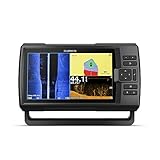
- Includes transducer for built-in Garmin CHIRP traditional sonar plus CHIRP ClearVü and CHIRP SideVü scanning sonars
- Striker series does not accept any mapping software and does not come loaded with any mapping. The Striker series is a fishfinder, not a multi-function chartplotter and fishfinder combination.
- Built-in Wi-Fi for access to ActiveCaptain app so you can receive smart notifications, access Quickdraw Contours Community and transfer waypoints and software update notifications
- Built-in GPS lets you mark waypoints, create routes and view boat’s speed
- Bright, sunlight-readable 9” display and intuitive user interface
Know the sonar types before paying for them
- Traditional CHIRP sonar: A general-purpose view of depth, bottom and the water column. It is useful for everyday fish finding and depth awareness; Garmin describes CHIRP as useful for showing fish arches.
- Down imaging: A detailed view beneath the boat that can help distinguish structure such as rocks, timber and vegetation.
- Side imaging: A way to search the water beside the boat for structure and cover, often useful for covering more ground than repeatedly passing directly over a target. Garmin calls its system SideVü; Lowrance calls its related imaging platform Active Imaging HD.
- Forward-facing/live sonar: Shows changing fish and lure positions in real time, useful for casting to visible fish or following a presentation. It requires a compatible live-sonar transducer and, depending on the system, additional hardware, mounting and wiring. “Compatible” or “ready” does not mean included.
More sonar modes are not automatically better. Choose a system around the fishing you actually do, and match the transducer to your hull, mounting location, water depth and desired coverage. Imaging transducers and live-sonar transducers serve different purposes; one should not be assumed to replace the other.
Check the whole system before buying
- Read the package contents. Identify whether the listing is display-only or includes a transducer. Note its exact model and whether it provides traditional, down- or side-imaging sonar.
- Price the complete setup. Include any live-sonar transducer or module, mount or pole, mapping product, networking components, adapters and installation parts. Treat subscriptions and chart upgrades as recurring or optional costs only where applicable.
- Check mapping for your waters. Confirm the included basemap versus detailed charts, coverage for the lakes or coast you use, update terms, card requirements and compatibility with your preferred chart family. Lowrance describes C-MAP DISCOVER OnBoard on the HDS PRO 9; its coverage figures are manufacturer claims and can vary by region and chart configuration.
- Verify compatibility with existing gear. Check transducer connector and model, Ethernet, NMEA 2000 requirements, chart cards, trolling motor, power draw and fuse requirements against the exact manuals. Do not assume an older transducer or network component will work because the brand is the same.
- Test the physical fit and controls. Measure the console or kayak mount, cutout, depth behind the panel and cable routes. Consider whether touch controls work for your conditions or whether keypad controls are preferable in rain, with gloves or on a bouncing boat.
- Plan installation and future access. Leave room to reach connectors and add components later. Follow the unit and transducer manuals for wiring, fuse rating, mounting and water protection; exact electrical requirements differ by model.
- Check availability and support. Confirm stock, warranty, firmware support and replacement transducer availability, particularly for a closeout or older model. An unusually low price may refer to a display-only or discontinued package.
Which one should you buy?
Choose the Garmin GPSMAP 923xsv if you want a premium Garmin-based chartplotter and sonar system with built-in SideVü/ClearVü and room to add compatible Garmin live sonar. Choose the Lowrance HDS PRO 9 if ActiveTarget 2 and Lowrance networking are the priority—and budget for the additional sonar hardware. Choose the Lowrance Eagle 9 TripleShot HD if a 9-inch screen and bundled imaging sonar matter more than flagship expansion. For Humminbird, verify the exact current model and bundle against your equipment before choosing a specific unit.
Quick Recap
Product prices and availability are accurate as of the date/time indicated and are subject to change. Any price and availability information displayed on Amazon at the time of purchase will apply.

