Some links on this page are affiliate links: if you buy through them we may earn a commission, at no extra cost to you.
If malware may have disabled Microsoft Defender, don’t start by forcing a registry change. Disconnect the PC from the internet, avoid signing in to sensitive accounts on it, and scan from a trusted environment. Only repair Windows Security after addressing the suspected infection. If protections keep turning off or you cannot establish that the PC is clean, a Windows reset or clean reinstall may be safer than repeated fixes.
The old support-thread title describes a symptom, not one confirmed virus. A 2019 Microsoft Q&A case reports a suspicious installer and disabled security settings; a separate 2022 BleepingComputer case recorded a Defender policy setting in one computer’s diagnostic logs. Neither establishes that every PC showing the same message has the same infection.
What “Your IT administrator has limited access” means
The message does not, by itself, prove that an employer or school administrator—or malware—is controlling your PC. It can appear when a device is managed by an organization, another antivirus product is the active provider, a policy restricts settings, or Windows Security is damaged. Malware is one possible cause, particularly if the problem began immediately after running an untrusted installer as administrator.
Recommended Free Tools
It helps to identify what is actually failing:
- Windows Security will not open: the app or supporting Windows components may be damaged.
- Virus & threat protection is hidden or restricted: a management policy, security product, or malicious policy change may be involved.
- Real-time protection is off: Defender may be blocked, damaged, or deliberately inactive because another antivirus is providing protection.
- Defender is not the active provider: this can be normal when compatible third-party antivirus software is installed.
Microsoft Defender Antivirus is included with Windows 10 and Windows 11, but its active, passive, or disabled state depends on configuration and other security products. See Microsoft’s documentation on Defender operating modes and management.
#1 Best Overall

- Ideal Use: Adds secondary security to horizontal sliding vinyl windows and many single-hung vinyl windows while allowing controlled ventilation
- Dimensions & Compatibility: Adjustable jaw fits vinyl frame rail thicknesses from 1/16 in. to 1/2 in.; designed for vinyl windows only
- Materials & Components: Durable diecast construction with a white painted finish and cam-style locking lever
- Key Features: Vise-like gripping action secures firmly to the window rail without requiring tools, drilling, or permanent modifications
- Fit Guidance: Hand-tighten the adjustable jaw before locking the cam lever; verify rail thickness and window compatibility prior to ordering
First: contain the suspected infection
- Disconnect the PC. Turn off Wi-Fi and unplug Ethernet. Keep it offline until you have scanned it or decided to rebuild it.
- Do not use it for sensitive accounts. From a separate, known-clean device, change important passwords if the suspicious program could have accessed your desktop or browser. Review active sessions and sign out other sessions where the service offers that option. Enable multifactor authentication when available.
- Record what happened. Save screenshots, detection names, suspicious file names and locations, and the approximate time you ran the installer. This can help a qualified support professional.
- Do not delete system files or registry entries by guesswork. Removing a visible executable does not necessarily remove services, scheduled tasks, drivers, browser extensions, or other persistence.
- Do not install several real-time antivirus products at once. They can conflict. Do not restore personal files or backups until they have been scanned.
Scan before trying to repair Defender
Try Microsoft Defender Offline if it is available
On supported Windows installations where Defender is available, the usual path is Windows Security > Virus & threat protection > Scan options > Microsoft Defender Antivirus (offline scan). Save your work first: the offline scan restarts the computer and scans outside the usual Windows session. Follow the prompts, then review the result after Windows starts again.
The option or its label may differ by Windows version, edition, policy, or security configuration. If Windows Security will not open, the option is missing, or the scan cannot run, do not treat that as evidence the PC is clean. Use a reputable bootable rescue environment obtained from its vendor on a clean device, or seek professional malware-removal help. A trusted offline environment is preferable when malware may interfere with Windows itself.
Use in-Windows scanners only as additional checks
If Windows remains usable, an additional on-demand scan can provide another opinion, but it is not proof of complete removal:
Quick wins for a faster PC:
Scan for outdated or missing drivers - takes under a minuteDriver Scan →Clear out junk files and repair common Windows errorsFree Scan →- ESET Online Scanner is an in-Windows second-opinion scanner. It is less suitable when malware is actively interfering with the operating system.
- Malwarebytes Free is positioned as a cleanup tool, not a guarantee that a heavily compromised PC is safe.
- Malwarebytes AdwCleaner targets adware, potentially unwanted programs, and browser hijackers. It is not a substitute for a full malware scan or offline scan.
Download tools only from their official sites, and do not pay for software on the assumption that buying it is a substitute for a clean reinstall when the system cannot be trusted.
Rank #2

- Secondary Lock
- Fits up to 1/8 In. thick rails
- Allows window to lock in ventilating position
- Easy to Install
- For heavier-duty locks see item no's U-9800, U-9802, U-11127, U-11128, U-9810 or U-9812. Finish by tightening thumbscrew with pliers to securely lock windows in closed or ventilating positions. For non-marring locks see no's U-9820, U-9821, U-10876 and U-10551. For vinyl windows use U-9809 or U-10547
Check whether another antivirus is in charge
Once it is reasonable to use Windows again, open Windows Security > Virus & threat protection and select Manage providers under Who’s protecting me? Note which antivirus is listed as active. A legitimate third-party antivirus may make Defender non-primary; that alone is not a malware diagnosis.
If an unwanted or abandoned antivirus is listed, remove it through Settings > Apps > Installed apps and restart. Do not remove a work- or school-managed product without authorization. Microsoft explains how another antivirus can affect Defender’s mode in its Defender documentation.
Check Defender’s status after scanning
After addressing the suspected infection, open PowerShell as administrator and run:
Get-MpComputerStatusLook at AMRunningMode, AntivirusEnabled, RealTimeProtectionEnabled, and AntivirusSignatureVersion. Microsoft identifies Normal as active mode. Passive mode means Defender is not the primary antivirus; it is available only in particular configurations, especially some Microsoft Defender for Endpoint scenarios. The output is a status check, not proof that no malware remains.
Rank #3
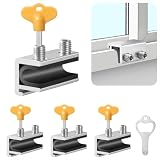
- Measuring Window Track Dimensions: Before purchasing, please carefully verify the width of your window track to ensure the product fits properly and functions correctly. The height must be greater than 0.48 inches, and the track width must be less than 0.39 inches (if the track width is greater than 0.39 inches but less than 0.61 inches, please use thin plastic shims).
- Durable and Practical: Crafted from sturdy aluminum alloy with exquisite craftsmanship, this window safety lock is rust-resistant, Anti-aging, and resistant to deformation, ensuring long-lasting durability. The lock comes with two types of protective pads—rubber pads and thin plastic pads—which effectively prevent scratches on the window frame while enhancing grip during locking, thereby improving stability and security.
- Wide Range of Applications: Our sliding window safety locks are widely used in a variety of settings, including homes, apartments, hotels, and offices. Window locks allow you to freely control whether sliding windows are fully closed or slightly open for ventilation. This not only effectively reduces the risk of accidents but also prevents outsiders from opening the windows to gain access to your home, providing you with comprehensive safety protection.
- Easy Installation: No additional tools or drilling are required. Simply select the appropriate protective spacer based on the width of your window track, then tighten the two built-in screws to complete the installation. The window lock can be easily adjusted for reuse or reinstallation, allowing for either a full closure or a limited opening for ventilation. Heavy-duty doors and windows can be secured with multiple locks simultaneously to enhance stability and security. (Depending on the space available in the window track, you can use either an Allen wrench or a vertical key to complete the installation.)
- Value Bundle: This set includes 4 window locks, 4 hex wrenches, 1 vertical key, 4 rubber protective washers, and 4 thin plastic protective washers. If you encounter any issues during installation or use, please contact us and we will assist you.
After malware scanning and removal, if Defender cmdlets are available, you can update signatures and request a full scan:
Update-MpSignature
Start-MpScan -ScanType FullScan
If a cmdlet or service is unavailable, treat that as diagnostic information. Do not download a random “Defender repair” utility.
Inspect services and policy without changing them blindly
To see the state of relevant services, run this in an elevated PowerShell window:
Outdated Drivers Are Slowing You Down
One free scan finds every outdated or missing driver and matches the right update for your exact hardware.Free scan · exact hardware matchPC Slower Than It Used to Be?
A free scan shows the junk files, broken settings and background clutter dragging Windows down - then fixes them in one click.Free scan · Windows 10 & 11Get-Service WinDefend, WdNisSvc, SecurityHealthService, wscsvcWinDefend is the Microsoft Defender Antivirus service; WdNisSvc is the Network Inspection Service. SecurityHealthService supports Windows Security health reporting, and wscsvc is Windows Security Center. A stopped service can reflect policy, another antivirus, Windows damage, or malware. It is not a reason to set every service to Automatic or force-start it: configuration varies, and a policy or active security product may intentionally control the state.
Rank #4
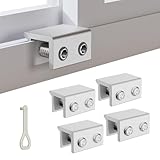
- MEASURE YOUR WINDOW TRACK BEFORE PURCHASE: Ensure compatibility with our window locks for sliding windows; measure track width (max 0.65 inch) and height (min 0.55 inch) for a perfect fit on vertical or horizontal sliding windows.
- ENHANCED SECURITY & CHILDPROOF DESIGN: These keyed window locks provide robust window security to prevent break-ins; the lock and key separation design stops children from opening windows, making them ideal child proof window locks for family safety.
- STURDY & RELIABLE CONSTRUCTION: Crafted from thickened aluminum alloy, these window security locks resist deformation; the widened lock body and dual screw holes offer a stronger window blocker security, ensuring lasting protection for your home.
- EASY NO-DRILL INSTALLATION: Install these locks for windows from inside quickly without tools or drilling; simply position the lock, add the protective washer, and tighten the screw for secure sliding window locks that are reusable and adjustable.
- VERSATILE APPLICATION: Ideal as window stoppers for sliding windows in homes, apartments, and offices; these window safety locks allow partial opening for ventilation while enhancing sliding window security against intruders and accidents.
Advanced users or a support technician can read the Defender policy location with this command:
reg query "HKLMSOFTWAREPoliciesMicrosoftWindows Defender"A value such as DisableAntiVirus can be suspicious in the context of a recent infection, but its presence alone does not prove malware. It may come from legitimate organizational management or security configuration. The 2022 BleepingComputer case reported that value in a particular diagnostic log; it should not be generalized to every affected PC. Do not delete policy keys unless you know who set them and why. If this is a managed computer, contact its administrator.
Repair Windows Security and system files
Run repairs only after scanning for malware. On current Windows 11 builds, try the app-level repair first: Settings > Apps > Installed apps > Windows Security > Advanced options > Repair. If that does not help, try Reset, then restart. Windows 10 menus and labels differ, and some installations may not show the same app options. Repair or reset addresses the app layer; it does not remove malware.
If Windows components may be damaged, open Command Prompt as administrator and run DISM before System File Checker:
Best Value

- CHILD-PROOF WINDOW SECURITY: The Prime-Line keyed sash lock adds an extra layer of security for sliding windows, preventing unauthorized access; suitable for child-proofing high elevation windows, ensuring peace of mind in your home
- SECURE WINDOWS WITH A KEY: This sash lock can only be unlocked with the provided key, making it a reliable child proof lock for vertical and horizontal window sash lock systems; keeps curious kids safe indoors
- DURABLE CONSTRUCTION: Built with strong, diecast zinc, this window lock offers lasting durability with a beautiful brass finish; designed for use on aluminum, wood, or vinyl sliding windows
- EASY INSTALLATION: Installation is a breeze with all fasteners included; a Phillips head screwdriver is all you need to mount this lock for window securely on vertical or horizontal sash frames
- PRECISE DIMENSIONS: The Prime-Line sliding window lock has a 5/8-inch narrow keeper and 2-inch mounting hole center spacing; for further dimensional information, please see the line drawing before purchasing
DISM.exe /Online /Cleanup-Image /RestoreHealth
sfc /scannow- Run DISM and wait for it to finish; restart if prompted.
- Run
sfc /scannow. - Restart Windows, then recheck Windows Security and Defender.
These tools repair Windows component and system-file problems; they are not malware-removal scans. See Microsoft’s System File Checker guidance.
When to stop troubleshooting and reset or reinstall
Continued repair may be reasonable when a scan finds and removes the threat, offline scanning completes, no suspicious persistence returns, and Defender remains enabled after a restart. Prefer professional help or a reset/reinstall if any of the following apply:
- Defender turns off again after reboot, or scans and updates are blocked.
- Unknown accounts, services, scheduled tasks, drivers, or browser changes reappear.
- You suspect ransomware, a credential stealer, rootkit, or bootkit—or cannot determine what an administrator-level installer changed.
- The PC holds business, financial, medical, or privileged data and needs a high-confidence clean state.
A specialist malware-removal forum may request diagnostic logs, but its fix is specific to that computer. Never reuse a Farbar Recovery Scan Tool (FRST) fixlist or registry script posted for someone else’s machine. A reputable local security professional is another option.
The Tool Desk
Outbyte Driver Updater FREEScan for outdated or missing drivers - takes under a minuteDriver Scan →Outbyte PC Repair FREEClear out junk files and repair common Windows errorsFree Scan →Before using Windows Reset this PC or reinstalling, make a careful backup of essential personal files and scan them before restoring them. “Keep my files” is not the same as a verified clean rebuild; it can preserve items you later restore. For higher confidence, use trusted Windows installation media and perform a clean installation. A Windows reset is not a universal guarantee against every advanced or firmware-level threat, so seek professional advice if that is a realistic concern.
Quick Recap
After the PC is clean
- Update Windows and your browser, and keep security protections enabled.
- Avoid pirated installers, game cheats, and executable “YouTube download” tools from untrusted sources.
- Use a standard Windows account for routine work where practical; reserve administrator privileges for tasks that need them.
- Keep offline or versioned backups so an infection or ransomware incident cannot simply alter every copy.
- Use multifactor authentication and review account sessions if the PC may have exposed credentials.
Product prices and availability are accurate as of the date/time indicated and are subject to change. Any price and availability information displayed on Amazon at the time of purchase will apply.

