Use Amazon’s built-in price history or a dedicated tracker such as CamelCamelCamel or Keepa to see how an Amazon price has moved, then set a watch for a lower price. On eBay, save a filtered search to hear about new matching listings, or add one specific listing to your Watchlist for item notifications. These tools solve different problems: historical charts and target-price watches are not the same as alerts for newly listed items.
Choose the tracking method that matches your goal
| What you want | Best starting point | What the notification or chart means |
|---|---|---|
| See an Amazon item’s recent price pattern | Amazon price history, CamelCamelCamel, or Keepa | A chart of recorded prices over a stated period; it does not predict the next change |
| Receive an Amazon alert when a chosen price condition is met | CamelCamelCamel price watch | CamelCamelCamel describes email alerts when the price drops; check its current setup for threshold and delivery controls |
| Find newly listed eBay items matching a query | eBay Saved Search | Alerts about new matching listings or updates to the saved search |
| Keep an eye on one eBay listing | eBay Watchlist | Listing notifications, such as an ending-soon reminder; it is not a historical market-price chart |
Before comparing prices, identify the exact model, storage size, color, condition and seller type. Marketplace totals can differ because of shipping, tax, coupons, seller, condition and listing format. Compare the final delivered cost for equivalent items rather than a headline number.
How to view Amazon price history
Use Amazon’s product-page history
- Open the exact product page while signed in to the Amazon marketplace you use.
- Look for Amazon’s price-history link in the shopping experience. If the link is not visible, ask Alexa for Shopping a question such as “What’s the price history?”
- Select the period offered. Amazon’s June 2026 description names 30-day, 90-day and 365-day views.
- Record the low, high and recent price for the same variant you intend to buy. A chart for one configuration does not automatically describe every seller or bundle.
Amazon said the feature was available in the United States, United Kingdom, Canada and India. It separately described 365-day insights rolling out in the United States, United Kingdom and India. The rollout can change, so the controls on your own product page are authoritative. Amazon reported that more than 50 million customers had used the feature since its 2024 launch; that is Amazon’s own reported figure, not an independent audit.
Read the chart without overinterpreting it
- A low point shows a recorded past price, not a guarantee that the same discount will return.
- Check whether the displayed price is for the selected seller and condition.
- Coupons, delivery charges and taxes may change the amount you actually pay.
- Use the history to decide how patient to be: a small discount may be normal fluctuation, while a rare low can justify waiting for a sale.
Set up an Amazon price watch with CamelCamelCamel
- Open CamelCamelCamel and search for the product, or paste its Amazon URL.
- Choose the exact product and variant in the result list.
- Inspect the price-history chart to understand recorded movement.
- Create a price watch and enter the target condition offered by the service.
- Confirm the email address and watch settings, then keep the product URL or watch entry so you can review it later.
CamelCamelCamel describes email alerts when a watched Amazon price drops. Its Camelizer browser extension places price charts in your normal Amazon browsing flow. Alert timing, thresholds and supported marketplaces are settings to verify in the current service interface; do not assume an alert is instantaneous or that every regional store behaves identically.
What’s actually slowing this PC down?
Pick the symptom - the matching free tool is one click away.
#1 Best Overall
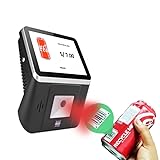
- 【8-Inch Responsive Touchscreen】Features an 8-inch capacitive touchscreen with clear display quality and smooth touch response, providing an easy and efficient user experience for retail stores,
- 【Android 11 System with RK3568 Processor】Powered by the RK3568 Quad-core Cortex-A55 processor up to 2.0GHz and running Android 11, delivering stable performance and compatibility with various retail, POS, and commercial applications.
- 【Built-in 1D/2D Barcode Scanner】Integrated high-speed barcode and QR code scanner supports automatic recognition of 1D and 2D codes, helping improve efficiency in retail price checking, inventory inquiry, warehouse management, and self-service applications.
- 【2GB RAM + 32GB Storage & Multiple Connections】Equipped with 2GB RAM and 32GB internal storage for daily commercial tasks. Supports WiFi connection and RJ45 Ethernet for stable networking and reliable data communication.
- 【Commercial Wall-Mount Kiosk Design】Compact all-in-one commercial terminal with wall-mount support for space-saving installation. Ideal for use as a price checker, self-service information terminal, product inquiry machine, or retail kiosk in supermarkets and convenience stores.
When CamelCamelCamel is useful
- You want a simple chart and an email when a tracked price falls.
- You prefer to paste a product URL instead of installing an extension.
- You want the Camelizer chart visible while comparing several Amazon pages.
Use Keepa for embedded charts or programmatic tracking
Keepa’s browser-extension listing describes price charts directly on Amazon product pages. Its API documentation describes historical price data and notifications for tracked products. That makes Keepa a candidate when you want charts integrated into product pages or need data through an API.
- Install the Keepa extension from the browser store listing you trust.
- Open an Amazon product page and locate the embedded chart.
- Check the chart for the same product variant and marketplace.
- If you use Keepa’s tracking service or API, follow its current account, authentication and notification instructions.
Available plans, quotas and feature restrictions were not established here, so check Keepa’s current documentation before building an automated workflow or assuming a particular API tier.
Track eBay products with Saved Search
Create a search for future listings
- Run a search using the product name, model number or other identifying terms.
- Apply filters such as maximum price, item condition, location and listing type (for example, auction or fixed price).
- Review results for irrelevant variations, replacement parts and bundles.
- Save the search from the results page and confirm email notifications are enabled.
- Refine the query if alerts are too broad; add a model number or exclude terms where eBay’s interface allows it.
eBay says saved searches can email you when new matching items are listed or when the saved search is updated. This is the right tool when the exact listing does not exist yet or when many sellers may list equivalent items. It is a search-matching alert, not a promise that every possible listing will be included.
Rank #2

- Equipped with an 8-inch capacitive touch screen, it significantly improves the user interaction experience and provides an intuitive tablet operation experience.
- High-speed scanning - Supports 200 high-speed scans per second for efficient inventory controls, ensuring excellent operational efficiency in busy retail environments.
- VERSATILE CONNECTION - Supports the integration of 2.4G WiFi and RJ_45 100M Ethernet to ensure a stable and reliable network connection and meet data transmission needs in various scenarios.
- Advanced Scanning Function Equipped with a 1D/2D barcode scanner, it can accurately read barcodes and 2D codes, improving the accuracy and speed of data collection.
- Powerful Operating System - Equipped with Android 11 operating system, it provides a stable and friendly user interface, supports a variety of business application scenarios, and ensures the fluidity and reliability of the system operation.
Build a useful eBay query
- Put the manufacturer model number in the search when one exists.
- Set a ceiling based on total cost, not only the item-price field.
- Choose condition deliberately: new, used, refurbished and parts-only listings can have radically different value.
- Choose a listing type if auctions and fixed-price offers require different buying decisions.
Use eBay Watchlist for one listing
- Open the individual listing you are considering.
- Select Add to Watchlist.
- Review notification preferences in your eBay account and email settings.
- Check the Watchlist as the listing approaches its end or changes.
eBay says Watchlist notifications are on by default and gives an ending-soon alert as an example. Watchlist is for an individual item; the cited eBay documentation does not establish it as a historical price chart or a guaranteed price-drop alert. If the listing ends and you still want the product, use a Saved Search to find replacements.
The Tool Desk
Outbyte PC Repair FREERepair Windows errors before they cause bigger problemsFix Now →Outbyte Driver Updater FREEFix the driver behind crashes, sound loss and screen glitchesFind Drivers →Amazon versus eBay: which tracker should you use?
| Need | Amazon | eBay |
|---|---|---|
| Historical context | Amazon’s 30/90/365-day views where available; CamelCamelCamel and Keepa charts | Use listing comparisons and your own records; the cited eBay tools are not historical price charts |
| Alert for a lower price | CamelCamelCamel explicitly describes price-watch email alerts | Saved Search alerts new matches; Watchlist documents listing notifications, not a price-drop guarantee |
| Find a product that is not listed yet | Not the primary purpose of these tools | Saved Search with price, condition and listing-type filters |
| Follow one item | Use a product-page tracker | Watchlist |
Market support and convenience vary. Check the actual country store, browser or app, sign-in requirement and notification controls before relying on a workflow. Amazon’s stated country availability and 365-day rollout are specifically from June 2026 and may change.
Keep a reliable price record
Capture the details that make prices comparable
- Product identifier and exact variant
- Seller, condition and fulfillment method
- Item price, shipping, tax and coupon terms
- Date and time, including marketplace country
- Listing type and remaining time on eBay
Use screenshots as evidence
A screenshot can preserve the displayed price, selected variant and shipping line when you make a buying decision or audit a team’s purchasing record. It does not replace the tracker’s history and can become stale; save the URL and capture time alongside it.
Rank #3

- [Advanced Data Capture] : With a built-in SE4770 scan engine, the MC45 barcode scanner attachable mobile computer provides fast and accurate scanning. This enhances inventory management and streamlines checkout processes
- [Android 14 OS] : The MC45 Price Checker is equipped with a 10.1-inch IPS multi-touch display, powered by a quad-core processor and Android 14 (upgradeable to Android 18), the MC45 delivers robust performance and supports the latest applications. Its advanced features ensure quick and accurate price checks, streamlined operations, and improved customer service
- [Durability in Challenging Environments] : The MC45 mounted computer boasts IP54-class protection against water, dust, and dirt, and has been tested to withstand multiple drops from 2.62 feet. This durability ensures reliable performance even in harsh retail conditions
- [Robust Power Management] : The MC45 supports Power-over-Ethernet (PoE) and a 12V/2A input voltage, offering flexible power supply options. This ensures continuous operation and efficient power management in various retail setting
- [Superior Audio Quality] : Equipped with two front-firing speakers and dual silicon microphones with active noise reduction (ANR) technology, the MC45 delivers clear and crisp audio. This ensures effective communication and enhances customer interactions in noisy retail environments.The MC45 supports Google Text-to-Speech (TTS) for multilingual speech playback, enhancing customer service and catering to a diverse customer base
Or skip the browser setup
If you need a repeatable image of a product page for a record, report or internal review, ScreenshotNeo can return a screenshot from one GET request. It accepts cookie and consent banners like a visitor, then removes more than 60 known consent platforms, newsletter popups and chat widgets before capture; each step can be disabled. Bot checks or CAPTCHAs, blank pages, timeouts, failed loads and cache hits are not billed, and response headers identify the page verdict and billing status. It also provides an MCP server with take_screenshot, get_page_info and capture_pdf tools for Claude, Cursor and other MCP clients.
See the ScreenshotNeo documentation for all options. This captures a page; it does not discover price drops or replace Amazon and eBay alerts.
PC Slower Than It Used to Be?
A free scan shows the junk files, broken settings and background clutter dragging Windows down - then fixes them in one click.Free scan · Windows 10 & 11Outdated Drivers Are Slowing You Down
One free scan finds every outdated or missing driver and matches the right update for your exact hardware.Free scan · exact hardware matchcURL
curl -G "https://api.screenshotneo.com/v1/shot" -d access_key=YOUR_API_KEY --data-urlencode url=https://stripe.com -o shot.webpPython
import requests
r = requests.get("https://api.screenshotneo.com/v1/shot", params={"access_key": "YOUR_API_KEY", "url": "https://stripe.com"}, timeout=90)
open("shot.webp", "wb").write(r.content)
Node.js
const q = new URLSearchParams({ access_key: 'YOUR_API_KEY', url: 'https://stripe.com' });
const res = await fetch(`https://api.screenshotneo.com/v1/shot?${q}`);
Replace the example URL with the Amazon or eBay page you are permitted to access. ScreenshotNeo’s plans include 1,000 shots per month free with no card; paid plans start at $5 for 3,000 shots. Every feature is on every plan. Create a free ScreenshotNeo account to get started.
Independent reader supportYour contribution helps us test, update, and keep practical guides available for everyone.Troubleshooting
Amazon history is missing
Confirm you are on the exact product page and marketplace, select the correct variant, and check whether the feature has rolled out to your country. Try the Alexa for Shopping prompt described by Amazon. If it remains unavailable, use CamelCamelCamel or Keepa for the chart.
Rank #4

- 【Cost Effective】 A better 1D/2D reader that doesn’t compromise performance or features for price.It can significantly reduce data entry errors and boost productivity day in and day out in gift shops, boutiques, sporting goods, jewelers, video stores, florists and other retailers.
- 【Easy to use】 USB interface, plug-and-play.Automatic working when the barcode close to, or it enter into Power Saving mode with no light. The lower left button adjusts the volume and has three volume levels until it is muted, suitable for a variety of work environments. No need to install any software or app. Easily connected with your laptop, PC, POS. Work with Windows XP/7/8/10, Mac OS, Linux.
- 【Super Decoding Ability】 Easily capture all common 1D bar codes on labels as well as on mobile phone displays. Even blurring, incomplete barcodes can be decoded and uploaded at superfast speeds.Able to Read PDF417 on ID Card,Driver's License,Passport .
- 【Compatible 1D Barcode Type】: UPC-A, UPC-E, EAN-8, EAN-13, ISBN/ISSN, Code 128 , GS1-128, GS1 DataBar, Code 39,Code 93, Interleaved 2 of 5, Industrial 2 of 5,Matrix 2 of 5, IATA 2 of 5,Codabar. 【Compatible 2D Barcode Type】: Datama Matrix, PDF417, QR Code.
- 【Hands-free Mode】 This mode saves your time, keeps the lines moving, minimizes wait times and eliminates the need to lift heavy items, Reducing the opportunity for injury.
Alerts are too frequent or irrelevant
On eBay, tighten the Saved Search with a model number, condition, maximum price and listing type. On Amazon, verify that the watch points to the exact variant rather than a similarly named bundle.
The displayed deal is not the real total
Open the checkout or shipping details and include delivery, tax, coupons and seller differences. Track the total for equivalent condition and fulfillment, not only the product-price field.
An eBay item ended without a replacement
Watchlist follows the individual listing. Create or refine a Saved Search so future matching listings can generate alerts.
Best Value

- ✅1D CCD Image Scanning Technology - Symcode 1D barcode scanner is equiped with advanced CCD sensor, which can quick capture 1D codes from paper and screen, including CODE128, UPC/EAN Add on 2 or 5, that can read even deformed barcodes, i.e. smudged, damaged, fuzzy, reflective barcodes, etc. Supports volume ON/OFF.Reading faster and more accurate than laser scanner.
- ✅Three scanning mode - Key trigger mode + Auto-induction mode + Continuous Mode. There is no need to pull the trigger in auto-sensing mode and continuous scanning. Sometimes the self-sensing scanning function is in the inactive stage, please contact us and be at your service at any time.
- ✅Sturdy Anti-shock and Durable Design - Ergonomic design with high-quality ABS making it can support withstand repeated drops from 2m high to the concrete ground, durable to use. Durable plastic material guarantees long service life.
- ✅Supported 1D Bar Code -UPC/EAN, UCC/EAN 128, Code 39, Code 39 Full ASCII, Trioptic Code 39, Code 128, Code 128 Full ASCII, Codabar, Interleaved 2 of 5, Discrete 2 of 5, Code 93, MSI, Code 11, RSS variants, Chinese 2 of 5 ; 180 configurable options for prefix, suffix and termination strings.
- ✅Widely Use Range - This Symcode Handheld barcode scanner can be used in supermarkets, convenience stores, warehouses, libraries, bookstores, drugstores, and retail shops for file management, inventory tracking, POS(point of sale), etc.
A screenshot contains a popup or fails to load
For a self-managed browser capture, wait for the page and dismiss consent or chat elements before saving. With ScreenshotNeo, cookie banners, popups and chat widgets are removed before the shot; failed loads and blank pages are not billed, and the response headers explain the result.
Practical buying routine
- Define the exact product and acceptable condition.
- Check Amazon’s available history and one independent chart service if you need more context.
- Set a CamelCamelCamel watch when an Amazon price target matters.
- Create an eBay Saved Search for future listings and add promising individual listings to Watchlist.
- Compare delivered totals and seller terms when an alert arrives.
- Capture the page and timestamp if you need an auditable record, then verify the listing is still live before purchasing.
Frequently Asked Questions
Does Amazon’s price history cover every seller and coupon?
The displayed history is tied to the product experience and selected offer; verify seller, variant, coupons, shipping and tax separately before treating a point on the chart as your payable total.
Can an eBay Watchlist alert tell me that the price dropped?
eBay’s cited Watchlist help gives listing notifications such as ending soon. It does not establish a historical chart or guaranteed price-drop alert.
Which tool should I use when an eBay item has not been listed yet?
Create a Saved Search with the model, condition, price and listing-type filters you need; Saved Search is designed for new matching listings.
Is a screenshot a substitute for price tracking?
No. A screenshot records what a page showed at one moment. Amazon and eBay tracking features provide the history or notifications.
Quick Recap
Product prices and availability are accurate as of the date/time indicated and are subject to change. Any price and availability information displayed on Amazon at the time of purchase will apply.

