Some links on this page are affiliate links: if you buy through them we may earn a commission, at no extra cost to you.
The reliable no-code pattern is trigger → populate a template → convert to PDF → store or deliver the file. A form submission, spreadsheet row, CRM record, email or webhook starts the workflow. Zapier or Make maps those values into Google Docs, HTML or a PDF template, converts the result, and then uploads, emails or links the finished PDF. The best design depends on your source app, how precisely you control layout, the conversion route and the volume you expect.
The four-stage PDF automation pattern
Most automated PDF jobs can be designed as four explicit stages. Keeping them separate makes errors easier to find and lets you replace one service without rebuilding everything.
- Trigger: receive a new form response, spreadsheet row, CRM event, email or webhook.
- Template: insert the incoming values into a Google Docs template, HTML document or dedicated PDF template.
- Conversion: export the populated document, or send a URL/HTML payload to a PDF service.
- Delivery: save the file to Google Drive, attach it to email, return a URL, or write the result back to the originating record.
For example, an order form can create an invoice in Google Docs, convert it to PDF, place the file in a customer folder and email the attachment. A webhook can instead render an HTML certificate and send the PDF URL to another system.
What’s actually slowing this PC down?
Pick the symptom - the matching free tool is one click away.
Choose the no-code route before building
Use Google Docs when editors need familiar templates
Google Docs is approachable for nontechnical teams. Zapier’s Google Docs app can create a document from a template or text, find and replace text, and upload documents. Make exposes Google Docs modules for watching documents and replacing text or images. This route works well when staff must edit wording, tables or branding themselves.
#1 Best Overall

- Fillable PDF Operating Agreements with the entity name and state printed in the appropriate fields; Blumberg will email the PDF to you the day after you place your order; 50 blank sheets of cotton-content 20-lb. archival bond to print minutes and bylaws
- Includes black vinyl records binder with matching dust-proof slipcase; window on spine holds gold label printed with company name for quick identification; inside pockets hold CD, two business cards and loose papers; 3 large capacity 1.25" metal rings
- Company seal with zipper pouch for storage
- 7 index tabs: Miscellaneous, Financial Records, Transfer Ledger, Member/Unit Certificates, Minutes, Operating Agreement/Regulations, Articles of Organization
- 20 numbered membership certificates printed with the name of the LLC, state of formation and signature titles; also full page stubs; transfer ledger; corporate records tickler
Use URL or HTML conversion for web layouts
A URL-to-PDF or HTML-to-PDF service is a better fit when the source is a rendered web page, an invoice built with CSS, or a page that already exists in your application. Make lists PDF Generator API actions including URL to PDF and Store document; Zapier’s PDF Export catalog describes conversion of web pages and HTML to PDF.
Use a template-native PDF service for repeatable forms
Dedicated template services can provide tighter control over page breaks, fonts and positioning than a general document editor. Make’s PDF Maker – Automate Documents integration includes “Create a Document Using Airtable,” which creates a PDF from a template and supplied data.
Check connector coverage first
Before choosing Zapier or Make, verify that your form, CRM, spreadsheet or database has a native connector. A technically elegant PDF step is useless if the trigger requires brittle email parsing or a custom webhook.
Quick wins for a faster PC:
Scan for outdated or missing drivers - takes under a minuteDriver Scan →Repair Windows errors before they cause bigger problemsFix Now →Fix the driver behind crashes, sound loss and screen glitchesFind Drivers →| Decision | Google Docs route | URL/HTML or PDF service |
|---|---|---|
| Who edits templates? | Nontechnical editors can work in Docs | Usually someone comfortable with HTML or a template designer |
| Best source | Structured fields mapped to placeholders | Rendered web pages, HTML or template data |
| Layout control | Convenient, but pagination can vary | Often more explicit page, margin and CSS controls |
| Typical Make actions | Watch Documents, replace text or images | URL to PDF, Store document, watermark |
| Delivery | Export or upload the document, then pass the file onward | Return a PDF file or stored-document URL |
Build a Zapier workflow with Google Docs
- Create the template. In Google Docs, write the document and place fields such as
{{customer_name}},{{invoice_total}}and{{due_date}}. Zapier requires double curly braces; do not put spaces or punctuation in the variable name. - Add the trigger. In Zapier, choose your form, spreadsheet, CRM, email or webhook app and select its new-record event. Test it so the sample contains every field the template needs.
- Create the document from the template. Add the Google Docs action for creating a document from a template, select the template and map each trigger field to the matching variable.
- Handle optional values. Decide what an empty field should display before publishing. A blank address line may be acceptable; a blank total or date usually is not. Use formatter or filter steps to stop incomplete records.
- Convert to PDF. Add a PDF conversion action available to your account, or pass the generated document/URL to a PDF service. Confirm that the action returns a file object or downloadable URL rather than only a document ID.
- Store and deliver. Upload the PDF to Google Drive, then add Gmail or another mail action and map the PDF file into the attachment field. Use a deterministic filename such as
invoice-{{invoice_number}}.pdf. - Test the complete chain. Submit a real-looking record, open the PDF, inspect page breaks and non-ASCII characters, download it from Drive and verify the email attachment before turning the Zap on.
Zapier documents Google Docs API limits of 60 write requests per minute per user per project and 300 read requests per minute per user per project in its current help documentation (accessed 2026). When a limit is exceeded, the API can return HTTP 429; exponential backoff and retry settings are safer than immediate repeated requests.
Rank #2

- ENHANCED ORGANIZATION: Organize your paperwork with this letter-sized (10.25” x 11.75”) document organizer with 12 pockets and six dividers; our pocket organizer is a great choice for school supplies college folders with pockets and bible study supplies
- EFFORTLESS SORTING: This plastic folder organizer with 12 pockets provides ample space to sort and categorize your materials, ensuring easy access and efficiency; 1/3-cut reusable write & erase tabs provide three positions for convenient labeling and easy identification
- PRACTICAL DESIGN: The slash pockets can hold up to 25 sheets each; the spiral-bound design allows the office supply organizer to lay flat for convenience and rotate 360° for easy viewing; tear-resistant and water-resistant poly cover material ensures long-lasting durability
- COLOR-CODED ORGANIZATION: The six colorful dividers boldly split up subjects while the clear front pocket allows you to customize your organizer with a cover sheet
- PVC AND ACID FREE: This organizer reflects our commitment to environmental responsibility; it's acid-free and PVC-free, making it safe for long-term document storage
Build the same pattern in Make
- Place the trigger module. Start with a native module for your form, spreadsheet, CRM or webhook. For a document-driven process, Make lists a Google Docs “Watch Documents” trigger.
- Map the data. Add Google Docs actions to replace text or images, or use Make’s PDF Maker action to create a document from a template and supplied Airtable data.
- Choose conversion. Add PDF Generator API’s URL to PDF action for a web page, or use a template-native create-document action for structured records. Add Add watermark only when the business process requires it.
- Persist the output. Use Store document or a Drive module, then pass the resulting file or URL to an email, CRM update or webhook response.
- Route failures. Add an error handler that records the source record ID, error message and retry count. Send permanent failures to a review queue rather than silently dropping them.
Make describes these integrations as visual scenarios, but module names and fields can change. Re-open the module configuration when you publish a scenario and confirm that the selected operation returns the file format your next module expects.
Template and conversion details that prevent broken PDFs
Keep placeholder names machine-safe
Use lowercase names with underscores and no spaces or punctuation, for example {{shipping_address}}. Keep one naming convention across the trigger, template and mapping screen. If a token remains visible in the PDF, the mapping either used a different spelling or the action created a copy that was not the template you tested.
Control page breaks deliberately
Long names, item tables and translated text can move a heading or total onto a new page. Test the shortest and longest realistic values, not only the sample record. For HTML conversion, define print margins, avoid fixed-height containers around variable text and provide print styles for colors and background graphics.
Choose the right source for images
Use stable, accessible image URLs or upload the image through the document connector. A private URL that works in your browser may be unreachable by a cloud converter. Replace missing logos with a deliberate fallback so a PDF is never delivered with a broken image icon.
Rank #3
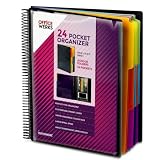
- FIND ANY PAPER IN SECONDS: Color-coded tabs and a blank label sheet let you sort up to 24 categories by class, client, or month, then flip straight to what you need. Write-and-erase tabs make relabeling instant when projects change.
- BUILT FOR A FULL SCHOOL YEAR: Tear-resistant covers, acid-free construction, and an oversized coil spine hold heavy paper loads without splitting or distorting. Two elastic straps lock everything shut so nothing slides out in a backpack or work bag.
- STANDARD PAGES SLIDE RIGHT IN: Each of the clear pockets fits 8.5 x 11 inch sheets without bending corners. Push papers all the way to the back edge and they stay flat every time you close the cover.
- REPLACES A BINDER AND NOTEBOOK: Works as a teacher binder, an IEP organizer for teachers, or a homeschool organization hub without hole-punching a single page. Slip syllabi, report cards, or lesson plans in and carry one item instead of three.
- EXTRAS ALREADY INCLUDED: A clear zippered utility pouch holds pens, note cards, and stencils. The customizable front cover has a non-glare overlay, and a clear back pocket lets you see loose items at a glance.
Make filenames and folders deterministic
Include a record or invoice number and a normalized date. Before uploading, decide whether a rerun should overwrite the original or create a revision. Idempotent naming prevents duplicate files when an automation retries after a timeout.
Delivery patterns: Drive, email and callbacks
- Google Drive: create a folder structure by customer or year, upload the PDF, then retain the returned file ID or URL in the source record.
- Email attachment: map the binary file output, not merely the document’s editor link. Check attachment-size limits and send a link instead when files are large.
- Shareable link: set the intended permission explicitly. A public link may expose personal data; a restricted link may fail for an external recipient.
- Write-back: save status, PDF URL, generated timestamp and any error text to the originating row or CRM record.
- Webhook response: return a job ID immediately for slow conversions, then notify the caller when the stored PDF is ready.
Reliability, limits and operating cost
Free starts and usage-based pricing exist across automation and PDF vendors, but current prices and quotas change; check the plan pages when you deploy. Estimate volume as records per day multiplied by PDFs per record, then add retries and test runs. A workflow that creates a document, replaces fields, converts it and uploads it may consume several operations per record.
Use a queue or scheduled batches for bursts instead of sending hundreds of simultaneous writes. Respect documented API limits, apply exponential backoff to transient 429 and 5xx responses, and cap retries so one bad record cannot loop forever. Log the source ID, template version, conversion response, storage ID and delivery status. These records let you regenerate one PDF without replaying every submission.
Troubleshooting common failures
Placeholders appear in the PDF
Confirm the token uses exactly two curly braces, contains no spaces or punctuation, and matches the mapped field name. Re-select the correct template in the action and test with a newly created copy.
Rank #4

- ENHANCED ORGANIZATION: Organize your paperwork with this letter-sized (10.25” x 11.75”) document organizer with 24 pockets and 12 dividers; our pocket organizer is a great choice for school supplies college folders with pockets and bible study supplies
- EFFORTLESS SORTING: This plastic folder organizer with 24 pockets provides ample space to sort and categorize your materials, ensuring easy access and efficiency; 1/3-cut reusable write & erase tabs provide three positions for convenient labeling and easy identification
- PRACTICAL DESIGN: The slash pockets can hold up to 25 sheets each; the spiral-bound design allows the office supply organizer to lay flat for convenience and rotate 360° for easy viewing; tear-resistant and water-resistant poly cover material ensures long-lasting durability
- COLOR-CODED ORGANIZATION: The 12 colorful dividers in six colors boldly split up subjects while the clear front pocket allows you to customize your organizer with a cover sheet; keep essentials in the zippered pouch for quick access
- PVC AND ACID FREE: This organizer reflects our commitment to environmental responsibility; it's acid-free and PVC-free, making it safe for long-term document storage
The PDF is blank or missing images
Check that the converter can reach the page and image URLs without a login. Replace expiring links, wait for dynamic content to render, or use a template-native document action instead of URL conversion.
A 429 rate-limit error appears
Reduce concurrency, batch the workload and retry with exponential backoff. Zapier’s documented Google Docs limits are 60 writes and 300 reads per minute per user per project.
Email contains a link but no attachment
Map the converter’s file output or downloaded binary into the attachment field. A Google Docs editor URL is not the same thing as a PDF file.
Pages break in the wrong place
Test long values and tables, remove fixed-height blocks, add explicit page-break rules where supported, and inspect the PDF rather than trusting the preview in the document editor.
Best Value

- Fillable PDF of Minutes and Bylaws with the entity name and state printed in the appropriate fields; Blumberg will email the PDF to you the day after you place your order; 50 blank sheets of cotton-content 20-lb. archival bond to print minutes and bylaws; check your spam if you don’t get the PDF
- Includes black vinyl records binder with matching dust-proof slipcase; window on spine holds gold label printed with company name for quick identification; inside pockets hold CD, two business cards and loose papers; 3 large capacity 1.25" metal rings
- Company seal with zipper pouch for storage
- 11 index tabs: Certificate/Articles of Incorporation, Amendments, Qualifications, By-Laws, Minutes/Consents, Shareholder Agreements, State Filings Reports, Licenses Approvals/Permits, Miscellaneous, Certificates, Transfer Ledger
- 20 full-page numbered certificates printed with entity name, state, signature titles and capitalization (one class); bound in book, also full page stubs
Retries create duplicate files
Use a deterministic filename or an idempotency key, search storage for an existing record before creating a new file, and write the final file ID back to the source record.
Independent reader supportYour contribution helps us test, update, and keep practical guides available for everyone.Or skip the browser setup
If your source is a public web page or rendered HTML, ScreenshotNeo can return a PDF through one API request instead of maintaining a headless-browser workflow. It accepts cookie and consent banners like a visitor and removes more than 60 known consent platforms, newsletter popups and chat widgets before capture; each cleanup step can be disabled. Bot checks or CAPTCHAs, blank pages, timeouts, failed loads and cache hits are not billed, and the response identifies the page verdict and billing status in headers.
See the parameter and PDF details in the ScreenshotNeo documentation. The supplied cURL request is:
Recommended Free Tools
curl -G "https://api.screenshotneo.com/v1/shot" -d access_key=YOUR_API_KEY --data-urlencode url=https://stripe.com -o shot.webpPython:
import requests
r = requests.get("https://api.screenshotneo.com/v1/shot", params={"access_key": "YOUR_API_KEY", "url": "https://stripe.com"}, timeout=90)
open("shot.webp", "wb").write(r.content)
Node.js:
const q = new URLSearchParams({ access_key: 'YOUR_API_KEY', url: 'https://stripe.com' });
const res = await fetch(`https://api.screenshotneo.com/v1/shot?${q}`);
ScreenshotNeo also provides an MCP server with take_screenshot, get_page_info and capture_pdf tools for Claude, Cursor and other MCP clients. Features include full-page capture with lazy images loaded, selector capture, custom CSS and JavaScript, waits, request blocking, headers and cookies, geolocation, resizing, caching, signed links, asynchronous webhooks, bulk capture of up to 100 URLs per call and a usage API. The Free plan includes 1,000 screenshots per month with no card; paid plans start at $5 for 3,000. Create a free ScreenshotNeo account.
Which design should you use?
- Choose Zapier + Google Docs when your team already uses Zapier and needs approachable, editable templates.
- Choose Make + Google Docs when you need a visual scenario with document and image replacement plus branching or error handlers.
- Choose Make + PDF Generator API when the input is a URL/HTML page or you need actions such as URL to PDF, watermarking and document storage.
- Choose a template-native PDF action when strict, repeatable layout matters more than editing in a word processor.
- Choose ScreenshotNeo when the PDF source is a web page and you want browser capture without running the browser infrastructure yourself.
Frequently Asked Questions
Can a spreadsheet row trigger a PDF without code?
Yes. Use the spreadsheet’s new-row trigger, map its columns into a Google Docs or PDF template, convert the populated document, and upload or email the returned file.
Should I generate from Google Docs or HTML?
Use Google Docs for editor-friendly templates. Use HTML or URL conversion when your page already has the required layout or needs CSS-level control.
How do I prevent duplicate PDFs after a retry?
Create a deterministic filename or idempotency key, check storage for an existing record, and save the final file ID back to the source row or CRM record.
The Tool Desk
Outbyte PC Repair FREERepair Windows errors before they cause bigger problemsFix Now →Outbyte Driver Updater FREEScan for outdated or missing drivers - takes under a minuteDriver Scan →Quick Recap
Product prices and availability are accurate as of the date/time indicated and are subject to change. Any price and availability information displayed on Amazon at the time of purchase will apply.

