PC Slower Than It Used to Be?
A free scan shows the junk files, broken settings and background clutter dragging Windows down - then fixes them in one click.Free scan · Windows 10 & 11Outdated Drivers Are Slowing You Down
One free scan finds every outdated or missing driver and matches the right update for your exact hardware.Free scan · exact hardware matchWindows 11 IoT Enterprise LTSC 2024 is best understood as a long-lived appliance platform, not a faster version of Windows for ordinary PCs. It targets fixed-function equipment such as industrial HMIs, kiosks, medical systems, point-of-sale terminals, digital-signage players and dedicated edge devices. Its defining benefit is a stable feature baseline through October 10, 2034, while monthly quality and security updates continue.
That stability can reduce re-certification and regression work, and lockdown features can make an appliance easier to control. It does not guarantee a lower crash rate, higher frame rates or faster boot times. Processor choice, storage, drivers, thermals, security policy and application design still determine real-world performance.
What LTSC 2024 is—and is not
Windows 11 IoT Enterprise LTSC 2024 is based on Windows 11 version 24H2, build 26100. Microsoft made it available to OEM device makers on May 22, 2024; its lifecycle began October 1, 2024, and servicing ends October 10, 2034. Microsoft describes it for special-purpose devices whose functionality must remain consistent because of certification, operational dependence or long service intervals. See the official release overview.
LTSC means a fixed feature set, not a frozen or maintenance-free installation. Monthly quality and security updates still arrive. The edition avoids routine feature changes that can alter the user interface, APIs or device behavior.
#1 Best Overall

- Processor of the Mini Desktop Computer: 4 cores i7 CPU, 8 MB Cache, Base Frequency 1.8GHz, Max Turbo Frequency 4.6GHz, 14 nm Lithography.
- RAM & Drive of The Mini Desktop Computer: 16GB DDR4 RAM, 512GB NVMe SSD(Solid State Disk).
- Graphics of the Mini Computer: UHD Graphics 620, 4096x2304, 4K High Definition streaming capability and dual Monitor Support via HD&VGA Ports.
- Features of the Industrial PC: Fanless, all metal case, 2x COM RS232
- What's in Box: 1 x Mini PC, 1 x Power Supply, 1 x Power Cable, 1 x HD Cable, 2 x Antennas, 2 x Sata wires, Screws
- IoT Enterprise LTSC: Device-oriented licensing, long support and appliance controls for dedicated hardware.
- Windows 11 IoT Enterprise (non-LTSC): Regular feature releases; Microsoft’s release history lists 36-month support for these releases, compared with 10 years for LTSC. See the release history.
- Windows 11 Enterprise or Pro: General-purpose desktop editions for users who install changing applications and expect current Windows features.
- Windows 11 Enterprise LTSC: Also long-servicing, but its licensing and positioning differ from the IoT edition; confirm the product terms for the device you are building.
- Windows 10 IoT Enterprise LTSC 2021: A separate, older platform. Moving to LTSC 2024 requires new licensing and fresh hardware, driver and application validation.
- Windows IoT Core: A smaller embedded Windows model, appropriate when full Win32 desktop compatibility is unnecessary.
Who should choose it?
The strongest candidates have one constrained workload and a defined hardware bill of materials. Typical examples include:
- Factory HMIs, CNC interfaces and machine-control terminals
- Medical and diagnostic equipment
- Retail, banking, hospitality and check-in kiosks
- Digital-signage and warehouse stations
- Transportation, secure-access and dedicated edge appliances
It is a poor fit for office PCs, developer workstations, gaming systems, shared laptops, computers that run arbitrary consumer software, or products dependent on rapidly changing Microsoft Store applications. An application advertised as compatible with “Windows 11” is not automatically supported on Windows 11 IoT Enterprise LTSC 2024; obtain the vendor’s specific confirmation.
What stability means in an industrial deployment
Feature stability
The feature baseline remains substantially unchanged, so a certified UI or API is less likely to be altered by a routine feature release. This is the primary LTSC advantage.
Application stability
A controlled application stack is easier to regression-test against one OS baseline. You still need to test monthly updates, runtimes, certificates, databases, browsers, licensing dongles and remote-management agents.
Recommended Free Tools
Operational stability
Kiosk policies, shell replacement, application controls and write filters can prevent unwanted local changes and help a device return to a known state after restart. These controls require deliberate configuration and a recovery plan.
Hardware stability
LTSC cannot repair an unreliable board, firmware, driver, power supply, thermal design or flash device. Hardware and peripheral validation remain the OEM’s responsibility.
Is LTSC 2024 faster than ordinary Windows 11?
Not inherently. Microsoft does not publish a universal benchmark showing that the LTSC edition is faster than Windows 11 Enterprise. Both share the current Windows platform foundation, and no special LTSC processor or memory mode exists.
Rank #2
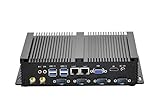
- Fanless Industrial Mini PC equipped with Core i5-3317U dual-core quad-thread CPU (1.7GHz base / 2.6GHz max turbo frequency) and 3M smart cache, 22nm lithography. Integrated HD Graphics 4000 (350MHz base / 1.05GHz dynamic) delivers smooth visual performance for industrial control, office multitasking and multimedia display, no lag for daily and professional use.
- This Fanless Mini Desktop Computer comes with 8GB DDR3L RAM and 128GB mSATA SSD for fast boot-up, data transfer and software running. Supports an extra 2.5-inch SATA SSD/HDD drive, you can freely expand storage space for large industrial data, files, videos and more without replacing the whole machine.
- The Industrial Mini PC features rich functional ports: 4x RS232 COM (for legacy industrial devices), 4x USB3.0+4x USB2.0, 2x RJ45 Gigabit LAN, 1x HD+1x VGA. HD+VGA enables dual display mode, easily connect to projector, NAS, HDTV, monitor and industrial controllers, perfect for industrial, office, education and business scenarios.
- Adopt fanless chassis cooling technology, this Fanless Industrial Mini PC runs 100% silent, creating a quiet working environment for offices and industrial workshops. Full metal case enhances heat dissipation, dust resistance and sturdiness, supports 24/7 stable operation for long-term use.
- This Fanless Mini Desktop Computer is compact and lightweight, fits easily in industrial cabinets, small office desks, education equipment racks and tight spaces. Package includes power supply, power cable, HD cable and antennas, plug-and-play without extra preparation.
A carefully engineered IoT image may feel more responsive because it contains fewer unnecessary services, startup tasks and user-facing components. A kiosk configuration can also reduce operational overhead. Those are image and workload effects, not an edition-wide speed guarantee. SSD latency, RAM pressure, GPU drivers, application behavior, thermals and security settings usually matter more.
Free tools Windows power users keep installed
One-click scans. No signup required.
Measure the production configuration on the target hardware. Useful tests include cold and warm boot, application launch, UI response under load, storage latency, memory pressure, video decode, peripheral reconnect, update installation, rollback and recovery after power loss. Include the actual settings for Secure Boot, BitLocker, virtualization-based security, Memory Integrity and application control; an unprotected lab image is not a valid production comparison.
Hardware requirements and lifecycle risks
Microsoft lists preferred and optional minimum configurations in its system requirements. The preferred profile is the safer starting point for a product expected to run for years.
| Component | Preferred minimum | Optional minimum for specialized devices |
|---|---|---|
| Processor | 1 GHz, 2 cores | 1 GHz, 2 cores |
| Memory | 4 GB | 2 GB |
| System storage | 64 GB | 16 GB |
| Storage media | SSD | SSD, HDD, SSHD, eMMC, SD or USB flash |
| Firmware | UEFI | BIOS permitted |
| TPM and Secure Boot | TPM 2.0 and Secure Boot enabled | Optional |
| Graphics | DirectX 12 | DirectX 10 or none |
| Display | 9-inch diagonal, 720p HD | Custom size or optional |
“Optional minimum” means Microsoft documents a possible specialized configuration; it is not a reliability recommendation. A 16 GB system volume can be consumed by cumulative updates, logs, crash dumps, application caches and security data. Microsoft explicitly warns that lower-storage devices need ongoing monitoring and lifecycle management.
Verify the exact processor model—not merely its brand or generation—against Microsoft’s processor requirements and, for Intel systems, the Intel support list. Also obtain the OEM’s commitments for BIOS, Windows IoT drivers, replacement boards and industrial peripherals.
Drivers and storage deserve more attention than the edition
A supported CPU does not prove that a touchscreen, scanner, printer, camera, serial adapter, GPIO controller, CAN or field-bus interface will work. Validate every device, including GPU acceleration, USB hubs, smart-card readers, Wi-Fi and cellular modems. Confirm support for Modbus, EtherCAT, proprietary controllers and other production interfaces where applicable.
SSD is the preferred configuration. If an eMMC, SD, USB, HDD or SSHD is used, test write endurance, latency, temperature behavior, unexpected power loss, wear leveling, update rollback, log growth and interaction with Unified Write Filter. Storage that boots successfully in a lab can still fail during years of servicing.
Rank #3

- 【NEW UPGRADED MINI PC】Experience the Power and Efficiency of our H7 Mini Desktop PC, featuring the latest 8th Generation Dual core i5 8350U Processor and Win 11 Pro Operating System(Support Pf-sense/Opnsense/Linux/Ubuntu/Centos//VMWare Exsi/Win10 OS). This Fanless Industrial Mini Computer delivers stable, strong, and high-performance computing for various environments, whether it's business, home, study, work, or industrial settings.
- 【EXPANDABLE STORAGES】With our Dual NIC Mini PC, you have the flexibility to expand your storage options. Mini Desktop Computer supports a double-storage design, including an M.2 SSD (up to 2TB) and a 2.5-inch HDD/SSD (up to 2TB). The Micro PC built-in M.2 SSD provides the speed and performance you need for multitasking and running multiple applications. Additionally, the Small PC's RS232 Com allows convenient connectivity with printers, scanners, logic analyzers, and other industrial devices.
- 【DUAL HD DISPLAYS】Boost your Productivity with the H7 Industrial Mini Desktop PC, which supports Simultaneous Dual independent displays. Equipped with Multiple connectivity options like 4 x USB3.0, 4 x USB2.0, 2 x RJ45 Gigabit Ethernet, 2 x HD, and Kensington Lock, you can easily connect your multimedia devices, peripherals, and office equipment. This Slient Fanless Tiny Computer is compatible with servers, displays, projectors, televisions, and more.
- 【LOW POWER ENERGY & SPACE-SAVING】Our Portable Office Home Mini Computer is designed to be energy-efficient, consuming minimal power compared to full-size desktop PCs. WEIDIAN Mini PC's Compact size (6.69 x 4.96 x 2.28 inches) and lightweight build (2.42 lbs) make it a perfect choice for business trips. You can even mount the Small Tower PC on the back of a large monitor using the VESA mount, saving valuable desk space.
- 【STABLE CONNECTIONS】Enjoy Smooth and Seamless Connectivity with our Mini Tower PC. It features Dual-band WiFi 2.4+5GHz, Gigabit LAN, and BT, ensuring reliable transmission and download speeds. This Micro PC also supports Wake On LAN, Auto Power On, RAID, and PXE. Whether you're editing images, browsing the web, or watching movies, WEIDIAN Mini PC is capable of handling it all. Plus, we offer lifetime technical support and a 3-year satisfaction service. Welcome to a enjoyable shopping experience!
Device features that make LTSC useful
Restricted User Experience and kiosk control
Restricted User Experience, formerly associated with Multi-App Kiosk Mode, allows a controlled Windows environment when users need more than one approved application. Single-app or multi-app kiosk policies suit public terminals and shared stations.
Shell Launcher and Assigned Access
Shell Launcher can replace the normal Windows shell with a dedicated application. Assigned Access and policy settings can limit accounts and approved software.
Quick wins for a faster PC:
Repair Windows errors before they cause bigger problemsFix Now →Scan for outdated or missing drivers - takes under a minuteDriver Scan →Write filters and application control
Unified Write Filter can protect the underlying volume from unwanted writes and help restore a known state after restart. AppLocker or equivalent controls can block unauthorized execution. None of these features is automatic: test administrative recovery, servicing and support procedures before deployment.
Security hardware and secured-core designs
TPM 2.0, UEFI, Secure Boot, BitLocker, Defender and application allow-listing form a layered design. Pluton-capable hardware and Edge Secured-core designs may add hardware-backed protections. Installing LTSC alone does not make a product Secured-core; Microsoft’s requirements cover hardware, firmware, configuration, software, services and policy.
Notable platform changes
LTSC 2024 incorporates changes from Windows 11 21H2 through 24H2, including updated hardware guidance, Restricted User Experience, declared configuration, accessibility features such as live captions and voice access, Windows Ink improvements, and security guidance for Pluton-capable hardware. HEVC playback is included, with hardware acceleration preferred where available. Internet Explorer and Microsoft’s AllJoyn implementation are removed. The release overview documents the complete list at Microsoft Learn.
Internet Explorer removal is significant for legacy industrial software. Applications tied to IE-specific controls require remediation or a supported compatibility strategy. HEVC playback without hardware decode can vary with resolution and device capability, which matters for signage, imaging and machine vision.
Licensing and acquisition
| Scenario | Typical route |
|---|---|
| New device sold with Windows IoT preinstalled | OEM licensing |
| Upgrade of an existing qualifying enterprise fleet | Volume licensing |
| Lab or evaluation | Evaluation media |
| OEM factory activation | OA3.0, ePKEA or PKEA |
| Volume activation | KMS or MAK |
Microsoft’s licensing guidance identifies OEM licensing for new devices and volume licensing for qualifying upgrades. OEM rights are arranged with the device maker; volume licenses are non-transferable and must meet the applicable upgrade terms. A new LTSC release requires a new license—an existing LTSC license does not automatically grant LTSC 2024.
Rank #4

- 【Excellent Performance & System】➨The Mini PC is equipped with 4 cores 10th Gen Core i7-10510U Processors(up to 4.9GHz). Come with Win 11 Pro(preinstalled), supports Linux and Ubuntu systems. Excellent CPU Performance can easily control various complex work procedures. Energy-saving design, perfect for office work, streaming video, web browsing, distance learning, and home entertainment.
- 【UHD Graphics & Triple Display】➨Fanless mini pc integrates UHD Graphics to deliver powerful graphics processing power. 4K@60Hz UHD video editing, and playback. And mini desktop pc can connect 3 screens by 2 HD port, 1 DP port, efficiently handle your tasks, and meet your specific needs.
- 【Storage Expansion & 4G Network】➨Fanless pc built-in Dual-Channel DDR4 memory slot, it supports expansion to 64GB. Mini computer built-in 1 x M.2 SATA & M.2 2280, NVME slot( expandable to 2T), 1 x SATA3.0 slot you can expand the storage via a 2.5 inch HDD/SSD. Mini pc motherboard support Nano-SIM card slot(4G module not included by default).
- 【Wireless Support & Sufficient Ports】➨This mini desktop computer built in 2.4G/5G dual band WiFi, BT4.2 which could be easily and stably connected to wireless keyboard, mouse, speaker, etc. This small pc has 1 x HD2.0 port 1 x HD1.4 port 1 x DP port, 2 x RS232/RS422/RS485 Com ports, 4 x USB 3.0 ports, 2 x USB 2.0 ports, 2 x Gigabit Ethernet port, 1 x Audio Jack, 1 x 14 Pin GPIO.
- 【 Packaging & Fanless Design】➨The package included 1 x WEIDIAN Mini PC, 2 x WiFi antenna, 1 x Power Adapter, 1 x HD Cable, 1 x User Manual. Aluminium alloy 205 x 125 x 53 mm(1.2KG). Fanless design, quiet operation. Running 24/7. Also support RTC Wake up, PXE, Auto Power on, Wake on Lan and RAID.
Use the evaluation download for lab validation, not unlicensed production. An inexpensive marketplace key may activate without proving a legitimate, auditable commercial entitlement. For a production project, work through the hardware OEM, an authorized IoT distributor or a qualified systems integrator.
Independent reader supportYour contribution helps us test, update, and keep practical guides available for everyone.Deployment process for a controlled device
Microsoft’s lab quickstart requires a current Windows 11 technician PC, at least 15 GB of free space, the Windows Assessment and Deployment Kit, Deployment Tools, Configuration Designer, the Windows PE add-on and LTSC 2024 ISO media. See the lab prerequisites.
- Confirm the licensing route, target hardware and exact processor support.
- Build a clean reference image with only required drivers, runtimes and applications.
- Configure shell, kiosk, accounts, security policies, write filters and application controls.
- Apply current quality updates and verify application and peripheral behavior.
- Prepare the image using the OEM or enterprise deployment method; do not assume a retail workflow applies.
- Test cold boot, restart, offline and network-loss operation, power interruption, storage exhaustion, update failure and peripheral reconnection.
- Capture recovery media and document rollback, servicing and administrative access.
- Deploy through the selected OEM or volume channel.
- Operate test rings before production, then monitor free space, update health, logs, device failures and application errors.
Monthly quality updates still require regression testing. Stage them on representative hardware, test the application and peripherals, validate rollback, schedule maintenance windows and provide an offline or delayed-servicing procedure where the environment demands it.
Where the alternatives fit better
| Option | Prefer it when |
|---|---|
| Windows 11 Enterprise | The computer is a general-purpose workstation, users need continuously updated Microsoft 365 or applications change frequently. |
| Windows 10 IoT Enterprise LTSC 2021 | Existing hardware or validated software is not yet ready for Windows 11 and migration can occur before its lifecycle ends. |
| Windows IoT Core | The workload is highly constrained and does not require the full Win32 desktop. |
| Embedded Linux | Low cost, small footprint or broad hardware flexibility outweighs Windows application compatibility, and the team has Linux expertise. |
Use-case checks
Factory HMI or machine controller
LTSC helps preserve a certified interface and supports shell lockdown. Validate field-bus, serial, touchscreen, GPU and vendor-runtime drivers, plus safe behavior after power loss.
Retail, banking or check-in kiosk
Kiosk policies, restricted accounts and write filters reduce tampering. Test payment peripherals, smart cards, network outages, certificate renewal and remote recovery.
Medical or diagnostic equipment
A fixed baseline can simplify regulatory validation. Confirm the application vendor’s LTSC support, imaging acceleration, storage endurance, security controls and the product’s certification timeline.
Digital signage or video appliance
LTSC can reduce uncontrolled changes, but HEVC decode, GPU drivers, display timing, thermal behavior and content-update mechanisms need device-specific testing.
What’s actually slowing this PC down?
Pick the symptom - the matching free tool is one click away.
Failure modes to prevent
- Buying the wrong edition or assuming a retail Enterprise license covers an IoT deployment.
- Relying on an undocumented marketplace key.
- Deploying LTSC on ordinary office PCs because it appears “lighter.”
- Choosing 16 GB storage without monitoring free space and servicing growth.
- Checking CPU support while overlooking touchscreen, scanner, printer or field-bus drivers.
- Leaving power-loss recovery, write filtering or rollback undefined.
- Allowing the application to auto-update while the OS remains controlled.
- Keeping an IE-dependent application without a supported remediation plan.
- Installing monthly updates directly on production equipment.
- Assuming ten years of Microsoft servicing means ten years of available hardware, certificates, licenses or third-party drivers.
Decision checklist
- Is the device genuinely fixed-function with a controlled application stack?
- Does the application vendor explicitly support Windows 11 IoT Enterprise LTSC 2024?
- Are every peripheral, driver, firmware component and replacement board supported?
- Is preferred hardware—or a thoroughly tested specialized configuration—available?
- Can storage accommodate years of updates, logs and application data?
- Is there a legitimate OEM or volume-license route?
- Can updates run through test rings with rollback?
- Do kiosk, shell, write-filter and application-control policies have a recovery procedure?
- Will the product’s practical service life fit before October 10, 2034?
The Bottom Line
Choose Windows 11 IoT Enterprise LTSC 2024 when a dedicated device needs a controlled feature baseline, long servicing window and appliance-management capabilities. Do not choose it for a general-purpose PC or assume LTSC itself makes hardware faster or more reliable. The business case succeeds only when OEM licensing, drivers, storage, security configuration, update testing and recovery engineering are treated as part of the product.
Quick Recap
Product prices and availability are accurate as of the date/time indicated and are subject to change. Any price and availability information displayed on Amazon at the time of purchase will apply.

