PC Slower Than It Used to Be?
A free scan shows the junk files, broken settings and background clutter dragging Windows down - then fixes them in one click.Free scan · Windows 10 & 11Crashes, No Sound, or Screen Glitches?
Random freezes, missing sound and display glitches usually trace back to one bad driver. Find and replace yours safely.Free scan · under a minuteSome links on this page are affiliate links: if you buy through them we may earn a commission, at no extra cost to you.
The Modecom FreePC really was small enough to carry in a pocket, and its 2015-era strengths were straightforward: connect it to an HDMI screen for presentations, light web use or basic web video. But it was only the computer, not a laptop in miniature. You still needed a display, keyboard, mouse and power, while its 16 GB drive left about 3.7 GB free after setup. It is best understood as an interesting 2015 pocket PC—not a modern Windows recommendation.
What was the Modecom FreePC?
The FreePC was an HDMI-connected mini PC running Windows 8.1. It plugged into a television, monitor or projector and used that screen as its display; it had no built-in screen, keyboard, touchpad or battery. The reviewer described it as roughly four times the size of a USB memory stick, a comparison rather than a measured dimension. The original review was published on August 3, 2015; its observations describe that period, not a current test. Read the 2015 Modecom FreePC review.
That makes the distinction important: it was a pocketable computer, but not a pocketable complete workstation or an independent mobile computer. Its small size reduced the bulk of the computer itself; it did not eliminate the other equipment needed to use it.
Recommended Free Tools
Modecom FreePC specifications
| Specification | Reported detail |
|---|---|
| Processor | Quad-core Intel Atom, 1.83 GHz; exact model not stated in the review |
| Memory | 2 GB RAM |
| Internal storage | 16 GB |
| Operating system | Windows 8.1 |
| Video output | HDMI, with output up to 1080p |
| Wireless | Wi-Fi and Bluetooth 4.0 |
| USB | One USB 2.0 port |
| Additional port | Micro-USB with OTG |
| Storage expansion | microSDHC |
| Size comparison | Reviewer described it as about four times the size of a USB memory stick; exact dimensions were not stated |
These specifications come from the 2015 review. Its 1080p output refers to display capability; it does not establish support for 4K, HDR, modern codecs or current streaming-service requirements.
#1 Best Overall

- 【Reliable Intel Core i3 Performance】Powered by the Intel Core i5-6500 processor, this OptiPlex 3050 Mini desktop offers dependable performance for everyday business tasks, multitasking, web browsing, and office applications.
- 【8GB RAM & 256GB SSD Storage】Experience smooth performance with 8GB DDR4 memory and enjoy fast boot times and file access with the 256GB solid-state drive—ideal for productivity and data management.
- 【Space-Saving Mini Design】The compact mini form factor saves desk space and fits easily into small or crowded work areas, making it ideal for offices, schools, and home workstations.
- 【Windows 11 Pro for Business Productivity】Preloaded with Windows 11 Pro, offering enhanced security features, remote work tools, and compatibility with professional applications.
Setup and everyday usability
- Connect the FreePC to an HDMI television, monitor or projector. A short HDMI extension cable was included.
- Connect power with the supplied adapter.
- Attach a keyboard and mouse. The review included a microUSB-to-USB adapter; USB, microUSB OTG or Bluetooth may be options depending on the accessory setup.
- Complete the Windows 8.1 setup, then use Wi-Fi for network access.
- Use a microSDHC card or cloud storage if the internal drive cannot hold what you need.
The included power adapter and microUSB-to-USB adapter did not make the package self-contained: the buyer still needed an HDMI display and suitable input devices. On a trip, the practical kit could also include an HDMI extension or cable, keyboard, mouse or touchpad, storage card, and possibly a USB hub. The reviewer reported reaching a usable state in about 30 seconds, but that was an approximate observation on the reviewed unit, not a guaranteed boot time.
Its portability therefore depended on the destination. If an HDMI screen and input devices were already available, carrying only the computer could be convenient. If not, the extra equipment could undermine the advantage over a laptop.
Rank #2

- 【One Compact PC, Multiple Applications】Pre-installed with Windows 11 Pro and Linux-ready for flexible system deployment. Built-in Wi-Fi 5, Bluetooth 5.0, and a G-Sensor support convenient wireless connectivity and automatic screen rotation. The responsive touchscreen is ideal for remote meetings, smart-home control, self-service kiosks, industrial HMI, and inventory management. Designed for everyday and light-duty applications, it is best suited for essential tasks rather than heavy multitasking, gaming, or video rendering
- 【Portable Power for Work Anywhere】Stay productive without being tied to a power outlet. The built-in 2500mAh rechargeable battery provides up to 4.5 hours of runtime, while the lightweight 0.32 kg design makes it easy to carry wherever you go. From home and office use to field debugging, equipment inspections, and on-site tasks, enjoy the freedom to work wherever you need
- 【Touchscreen Mini PC, No Monitor Required】Enjoy a complete computing experience without the need for a separate display. This compact 5.5-inch IPS touchscreen mini PC features a 720×1280 resolution, Intel Celeron processor, 16GB RAM 256GB eMMC storage, and Windows 11 Pro. Ideal for everyday tasks like web browsing, document editing, and media playback, while also fitting seamlessly into digital signage, kiosks, POS systems, and light-duty industrial applications
- 【Dual-Display Support & Extensive Connectivity】Expand your workspace with dual-display output through HDMI up to 4K@30Hz and Type-C video output. A full selection of ports—including Gigabit Ethernet, four USB 3.0 ports, a TF card slot, and a PD charging port—makes it easy to connect keyboards, external storage, network devices, and other peripherals. Whether you're creating a compact home workstation, setting up a POS system, or integrating it into an industrial control environment, this mini PC provides the connectivity you need
- 【Intel Celeron N5095 Processor with Quiet Cooling】Powered by a quad-core Intel Celeron N5095 processor with speeds up to 2.9GHz and 4MB cache, this compact mini PC delivers smooth and reliable performance for everyday computing. The built-in quiet cooling fan helps dissipate heat efficiently during extended use while keeping operating noise to a minimum
Performance: light tasks, not a desktop replacement
The original reviewer found the FreePC adequate for general browsing, cloud applications, presentations and web video, including YouTube and BBC iPlayer at the time. Those are qualitative impressions from the 2015 review, not benchmark results, and they do not establish compatibility with modern browsers or streaming services.
Quick wins for a faster PC:
Scan for outdated or missing drivers - takes under a minuteDriver Scan →Clear out junk files and repair common Windows errorsFree Scan →The same review cautioned against the latest games, large or demanding spreadsheets, heavy desktop work and workloads involving substantial local file handling. A 1.83 GHz quad-core Atom and 2 GB of RAM describe a low-powered system; “runs Windows 8.1” should not be read as “replaces a general-purpose PC.” No benchmark scores or modern application tests were reported.
Rank #3

- 【NEW UPGRADED MINI PC】Experience the Power and Efficiency of our H7 Mini Desktop PC, featuring the latest 8th Generation Dual core i5 8350U Processor and Win 11 Pro Operating System(Support Pf-sense/Opnsense/Linux/Ubuntu/Centos//VMWare Exsi/Win10 OS). This Fanless Industrial Mini Computer delivers stable, strong, and high-performance computing for various environments, whether it's business, home, study, work, or industrial settings.
- 【EXPANDABLE STORAGES】With our Dual NIC Mini PC, you have the flexibility to expand your storage options. Mini Desktop Computer supports a double-storage design, including an M.2 SSD (up to 2TB) and a 2.5-inch HDD/SSD (up to 2TB). The Micro PC built-in M.2 SSD provides the speed and performance you need for multitasking and running multiple applications. Additionally, the Small PC's RS232 Com allows convenient connectivity with printers, scanners, logic analyzers, and other industrial devices.
- 【DUAL HD DISPLAYS】Boost your Productivity with the H7 Industrial Mini Desktop PC, which supports Simultaneous Dual independent displays. Equipped with Multiple connectivity options like 4 x USB3.0, 4 x USB2.0, 2 x RJ45 Gigabit Ethernet, 2 x HD, and Kensington Lock, you can easily connect your multimedia devices, peripherals, and office equipment. This Slient Fanless Tiny Computer is compatible with servers, displays, projectors, televisions, and more.
- 【LOW POWER ENERGY & SPACE-SAVING】Our Portable Office Home Mini Computer is designed to be energy-efficient, consuming minimal power compared to full-size desktop PCs. WEIDIAN Mini PC's Compact size (6.69 x 4.96 x 2.28 inches) and lightweight build (2.42 lbs) make it a perfect choice for business trips. You can even mount the Small Tower PC on the back of a large monitor using the VESA mount, saving valuable desk space.
- 【STABLE CONNECTIONS】Enjoy Smooth and Seamless Connectivity with our Mini Tower PC. It features Dual-band WiFi 2.4+5GHz, Gigabit LAN, and BT, ensuring reliable transmission and download speeds. This Micro PC also supports Wake On LAN, Auto Power On, RAID, and PXE. Whether you're editing images, browsing the web, or watching movies, WEIDIAN Mini PC is capable of handling it all. Plus, we offer lifetime technical support and a 3-year satisfaction service. Welcome to a enjoyable shopping experience!
Storage was the biggest practical weakness
Although the FreePC was advertised with 16 GB of internal storage, the reviewer found only about 3.7 GB free after Windows, bundled software and an Office 365 trial were accounted for. The review also described file copying and ZIP extraction as painfully slow. The usable free-space figure matters more than the headline capacity if you plan to install software or keep files locally.
- Large application installs and local video libraries would quickly run into the space limit.
- Windows updates could take a substantial share of the remaining capacity.
- For anything beyond occasional use, external or cloud storage was effectively necessary.
- A microSDHC card could add capacity, but removable flash storage would not necessarily perform like internal storage; that is a general technical caveat, not a measured comparison from the review.
Who could have benefited from it?
Presenters and business travelers
The clearest fit was someone who needed Windows-specific presentation software or cloud applications, regularly had access to an HDMI-equipped screen or projector, and could rely on keyboard and mouse at the destination. The review highlighted connecting to a large screen or projector as a useful scenario. Before relying on one for a meeting, check the room’s actual connections: equipment may use VGA, DisplayPort, USB-C or proprietary adapters rather than HDMI, and the review did not establish FreePC compatibility with those interfaces.
Rank #4
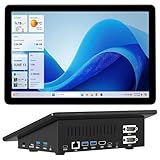
- 【Mini PC with 10.1" HD Touchscreen – No Mouse & Keyboard Needed】This all-in-one mini computer features a 10.1-inch 1280×800 HD IPS touchscreen with G+G 5-point multi-touch, so you can use it without a mouse and keyboard. Perfect for home office, study, industrial use, or smart home control. You can also remotely control any other laptop via Remote Desktop protocol from this micro computer
- 【Fanless Mini Computer with Intel N5095 Processor】Equipped with a faster 12th Gen Intel N5095 quad-core processor (4 cores, 4 threads, 6MB cache, 2.0GHz base up to 2.7GHz/2.9GHz turbo), this fanless mini PC prevents CPU/GPU throttling and draws under 10 watts. It delivers smooth multitasking for business, family, web browsing, email, document editing, and light photo editing
- 【OS System Pre-installed with 8GB RAM & 128GB Storage】HIGOLEPC 10.1-inch touchscreen mini computer pc running Windows 11 Pro, designed for seamless productivity. Equipped with 8GB high-speed LPDDR4 RAM and 128GB eMMC storage, this mini PC delivers lightning-fast performance for multitasking
- 【Dual 4K Display Support】This compact mini desktop powered by Intel UHD Graphics, delivers smooth 4K UHD video playback and accelerated image processing. With HDMI + Type-C (3.1) ports, this mini desktop drives two 4K displays simultaneously, delivering crisp visuals and seamless multitasking
- 【Rich Input/Output Ports & 5000mAh Battery】All important connections are available: 4 x USB 3.0 ports, 1 x HDMI 2.0 port, 2 x RS232 ports, 1 x Gigabit Ethernet port, 1 x SD Card port, plus 1 x full-function Type-C (3.1) for 4K output. Supports PXE, built-in audio and microphone. The 5000mAh high-capacity battery delivers uninterrupted power for extended work sessions without performance lag
Basic television use
In the original review, web video worked well enough for a basic Windows-powered media-center role. That is different from proving that current streaming services, DRM, modern codecs, 4K or HDR work. The review did not document dedicated media-center software. For living-room use, a wireless keyboard with a touchpad or another remote-control solution would also be needed to navigate comfortably.
Spare access to a familiar Windows environment
As a small backup computer for occasional light tasks, it had the appeal of a familiar Windows interface in a very compact form. That appeal was strongest when the screen and peripherals were already at hand and the work did not depend on significant local storage or demanding applications.
Best Value

- 【Superior Performance】This Lenovo ThinkCentre M715Q Mini Computer Desktop PC features an AMD PRO A12-9800E processor, effortlessly handling multitasking and running large software applications simultaneously. The combination of 8GB DDR4 memory and a 256GB NVMe SSD delivers lightning-fast boot times and double the data transfer efficiency, significantly boosting productivity and eliminating lag and waiting times.
- 【Compact Form Factor】Measuring just 179×182×34mm and weighing 1.32kg, the Lenovo ThinkCentre M715Q Mini Computer occupies less than one-fifth the space of traditional desktops. Its dual-orientation design allows placement behind monitor stands or flush mounting under desks, seamlessly integrating into modern minimalist workspaces.
- 【Display & Connectivity】This Lenovo Mini Desktop comes equipped with a keyboard and mouse, a USB wireless network adapter, and a USB Bluetooth adapter. It supports dual 4K (3840x2160) displays, allowing you to connect two monitors simultaneously. You can extend your workspace, mirror content, or expand a single window across multiple displays.
- 【Full Port Coverage】This Lenovo ThinkCentre Mini PC offers 3×USB 3.2, 3×USB 2.0, 2×DisplayPort, RJ-45 Gigabit Ethernet, and a headphone/microphone combo jack, supporting dual 4K output. It meets high-load demands for design, programming, and more.
- 【Windows 11 Pro】This Lenovo ThinkCentre Computer Desktop comes pre-installed with Windows 11 Pro, delivering comprehensive enterprise-grade functionality and security. It supports enterprise features like BitLocker encryption and Remote Desktop, meeting the needs of professional users.
Why it is not a laptop replacement
A laptop combines the computer with a display, keyboard, touchpad, battery, speakers and charging equipment. The FreePC supplied only the computer and depended on external power, screen and input devices. It could save space in a bag when those other components were available at the destination; carried as a complete working setup, its advantage was much smaller.
Documentation and ownership concerns
The 2015 reviewer found the multilingual quick-start guide limited and could not find more documentation on Modecom’s website. BIOS access and system-refresh procedures were not clearly explained. The historical product page recorded in the review is Modecom’s FreePC page; its current availability and support status are not established here. That history makes documentation and recovery worth checking before buying a second-hand unit.
- Ask the seller to demonstrate that it boots and produces an HDMI image.
- Confirm that the correct power adapter and any needed HDMI or microUSB accessories are included.
- Check that Wi-Fi, Bluetooth, USB and microSD work.
- Ask whether Windows activation remains valid after a reset and whether drivers are available.
- Find out how the device could be restored if its internal storage fails.
Should you consider a Modecom FreePC in 2026?
There is no verified current retail listing, used-market price, warranty, official support position or modern Windows compatibility established here. Treat a listing as old stock or second-hand unless the seller demonstrates otherwise. The original review reported a price of £159.99 on Amazon UK on August 3, 2015; that is historical context, not a present-day price or value guide. The review recorded this historical Amazon product page: Modecom FreePC listing.
Free tools Windows power users keep installed
One-click scans. No signup required.
Consider one only for a narrowly defined light task if the unit is inexpensive, demonstrably working, and you already have compatible display and input equipment. Avoid it if you need a general-purpose modern Windows computer, dependable current streaming, gaming, substantial local storage, modern interfaces, or a self-contained travel machine. Do not pay extra simply for its unusual size.
For a practical replacement, compare current compact PCs on supported operating system, at least 8 GB RAM and 128 GB storage for general modern Windows use, USB 3 or USB-C, HDMI, and a clear warranty or return policy. Those are comparison criteria, not specifications of the FreePC or a claim about any particular current model.
Quick Recap
Product prices and availability are accurate as of the date/time indicated and are subject to change. Any price and availability information displayed on Amazon at the time of purchase will apply.

