The Tool Desk
Outbyte Driver Updater FREEFix the driver behind crashes, sound loss and screen glitchesFind Drivers →Outbyte PC Repair FREEClear out junk files and repair common Windows errorsFree Scan →Some links on this page are affiliate links: if you buy through them we may earn a commission, at no extra cost to you.
Bottom line: The Rocketfish 700 W examined in Hardware Secrets’ 2008 review was the RF-700WPS, identified as a Huntkey Titan 650 W (HK650-52PEP) rebadge. The review reported that it survived its test sequence, but that historical result does not establish that an old, used unit is safe today—or that it can meet every modern PC’s demands. A later model, the RF-700WPS2, was made by CWT and is a different design. Check the label before drawing conclusions; for a modern or valuable PC, replace either old unit with a current, independently tested PSU.
First, identify which Rocketfish 700 W you have
“Rocketfish 700 W” is not enough to identify the power supply. Hardware Secrets’ teardown, originally published May 16, 2008, concerned the RF-700WPS. The review identifies it as a Huntkey Titan 650 W, model HK650-52PEP, sold under Rocketfish branding. A later 700 W model, the RF-700WPS2, used a CWT platform instead. The two models should not be treated as the same PSU or as interchangeable teardown subjects.
| Model | What the sources establish | What not to assume |
|---|---|---|
| RF-700WPS | Original model reviewed in 2008; Hardware Secrets identifies it as Huntkey Titan 650 W HK650-52PEP. | The OEM’s 650 W model designation alone does not prove the Rocketfish unit failed to deliver its advertised 700 W. |
| RF-700WPS2 | Later revision identified as CWT-made. Its specification sheet lists different electrical details. | The original RF-700WPS teardown and test findings do not automatically apply to it. |
Read the model number from the PSU’s own label, along with its output table. Do not rely on a seller’s listing title, the computer’s case badge, or the wattage printed on the side. If the label is damaged or missing, treat the model as unidentified.
Quick wins for a faster PC:
Fix the driver behind crashes, sound loss and screen glitchesFind Drivers →Repair Windows errors before they cause bigger problemsFix Now →Sources: Hardware Secrets’ Rocketfish 700 W review and its coverage of the later Rocketfish revision.
#1 Best Overall
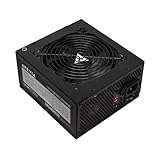
- Apevia 700W Spirit ATX Gaming Power Supply with black sandblasted casing
- Supports Dual/Quad/Multi-core CPUs. Supports single 12V output for higher power usage.
- Connectors: 1 x 20/24pin Main Power, 1 x 4+4pin 12V, 2 x PCI 6+2pin, 4 x SATA, 4 x Peripheral
- Auto-thermally controlled 120mm black fan. Output: +3.3V@16A, +5V@20A, +12V@53A, [email protected], [email protected]
- Heavy-duty protections: Short-Circuit/Over-Current/Over-Voltage/Over-Power/Under-Voltage/Over-Temperature Protections
What the original RF-700WPS advertised
The original manual lists a maximum output of 700 W, a combined maximum of 41 A on the +12 V rails, and 170 W combined for +3.3 V and +5 V. It gives dimensions of about 150 × 86 × 140 mm and describes input for 115 V and 230 V regions. The PSU has a 120 mm fan with thermal fan control, according to the manual.
The review noted an 80% efficiency claim on the product box and active power-factor correction (PFC). It also reported conflicting documentation about whether the unit was ATX12V 2.0 or 2.2. Those details matter because the label, box, and documentation are not interchangeable evidence of measured performance.
- Active PFC helps manage the relationship between the AC current drawn and the voltage supplied. It does not establish good voltage regulation, low ripple, safe protections, or long-term reliability.
- “80% efficiency” on packaging is not, by itself, proof of 80 PLUS certification. Efficiency describes how much input power becomes usable output; it does not certify overall quality or safety.
- Input-voltage selection matters. The original manual warns that setting the selector incorrectly can damage the PSU and connected equipment. Check the manual and the label for the exact unit rather than guessing.
The RF-700WPS manual’s output table documents the original model’s listed ratings. Those figures should not be mixed with the later RF-700WPS2 specification sheet.
Outdated Drivers Are Slowing You Down
One free scan finds every outdated or missing driver and matches the right update for your exact hardware.Free scan · exact hardware matchWindows Errors? Fix Them Before They Spread
Repair common Windows errors and clear accumulated junk for a smoother, more stable PC - no reinstall needed.Free scan · no reinstallCables and connectors: adequate for its era, limited for many newer GPUs
The original review lists a 24-pin motherboard cable with a 20-pin adapter, ATX12V and EPS12V cables, and two auxiliary graphics-card cables with 6-pin PCIe plugs. It also lists two SATA cables with three SATA connectors apiece, a peripheral cable with four standard peripheral connectors, and another with three standard peripheral connectors plus a floppy connector. The review considered the connector count adequate for demanding users of the period.
Rank #2

- 700W Output for Everyday PC Needs:: Provides up to 700W of power to support standard desktop systems, making it a cost-effective choice for office PCs, home computers, and entry-level gaming builds.
- 115V / 230V Manual Voltage Switch:Built-in voltage selector allows easy switching between 115V and 230V, ensuring stable operation across different regions and power standards.
- 120mm Cooling Fan for Stable Performance: Large 120mm fan improves airflow and heat dissipation, helping reduce heat buildup and maintain consistent performance during daily use.
- Fixed Direct Output Cables for Reliability: Non-modular cable design minimizes connection points, reducing the risk of loose contacts and improving long-term durability.
- Budget-Friendly and Durable Design: Designed for users who need reliable power without paying for unnecessary features, offering a practical balance between affordability and dependable performance.
Most wires were reported as 18 AWG; SATA wiring used thinner 20 AWG conductors, as did some daisy-chained peripheral sections. The review’s cable description is useful for identifying the original package, but connector count alone cannot show that a decades-old unit is suitable for a particular system.
- Two 6-pin PCIe plugs are not a substitute for the 8-pin or newer GPU power connections many current graphics cards require.
- An adapter changes the connector shape, not the PSU’s available power, regulation, wiring capacity, or protection behavior. Avoid improvised adapters for a high-power GPU.
- Legacy SATA and peripheral connectors may suit an older computer, but they do not make the platform modern.
- Never reuse modular cables from another PSU, even when the plugs appear to fit. Pinouts can differ and damage hardware.
For the original cable inventory and the review’s wire-gauge notes, see the Hardware Secrets review.
What the teardown establishes—and what it does not
The review examined the unit in sections covering transient filtering, the primary and secondary stages, load and overload testing, specifications, and conclusions. It identifies the original unit’s OEM lineage as Huntkey’s Titan 650 W design. That is a useful clue to the platform behind the Rocketfish label, but it does not justify inventing a component-by-component inventory or assigning the original’s internals to the CWT-made RF-700WPS2.
Hardware Secrets said the Rocketfish survived its test sequence, in contrast to some other Huntkey designs that had raised concerns about delivering their labeled output. Survival is a meaningful test observation, but it is not a complete verdict. A PSU can avoid catastrophic failure and still have shortcomings in regulation, ripple, thermal margin, protection implementation, or suitability for loads it was not designed to handle.
Rank #3

- High-Powered: With a 500-800W output, this power supply can handle even the most demanding gaming and multimedia systems.
- 80 Plus Bronze Certified: This power supply is certified for efficiency, with a Standard or Bronze rating ensuring reliable and efficient performance.
- ATX and EPS Compatible: This power supply is compatible with both ATX 12V v2.3 and EPS 12V standards, ensuring compatibility with a wide range of systems.
- Budget-Friendly Price: This power supply is priced to be an affordable option for those on a budget, without sacrificing performance or reliability.
- Reliable Performance: With high-quality components and rigorous testing, this power supply is designed to provide reliable performance over the long term.
The evidence available here does not establish numerical results for each test point—such as measured ripple, voltage regulation, efficiency, temperature, or overload threshold—so those figures should not be inferred. Nor does a test of one sample in 2008 establish the condition of a particular used unit now. See the original review for its full test discussion.
How to interpret the 650 W OEM model and 700 W retail rating
The difference between the Titan 650 W model designation and Rocketfish’s 700 W label deserves scrutiny, but it is not proof by itself that the RF-700WPS could supply only 650 W. The retail rating, the OEM model name, and measured test results are separate pieces of evidence. The responsible conclusion is narrower: the original was based on a platform identified with a 650 W OEM model, while Rocketfish marketed it as 700 W; judge its claimed output using the original review’s documented measurements, not the label or OEM name alone.
Likewise, “700 W” does not tell you whether that output is appropriate for a given system. The original manual’s listed +12 V combined maximum is 41 A. A modern build also needs suitable connectors and enough margin for the actual CPU, GPU, and transient demands. Do not select or keep a PSU on nominal wattage alone.
Recommended Free Tools
Is a Rocketfish 700 W safe to use today?
For a modern gaming PC, high-value workstation, or system with a powerful graphics card, the practical recommendation is to replace an old Rocketfish 700 W rather than rely on it. The original RF-700WPS dates to a review published in 2008; by 2026, an individual example may have substantial age and an unknown history. Electrolytic capacitors can age, fans can wear, and past heat exposure or heavy use can shorten service life. A unit that powered on for years has not thereby passed a present-day electrical or safety test.
Rank #4

- Superior Efficiency: Certified 80+ Bronze up to 87% efficiency with 100% load rates (115-240VAC), reducing overall system power consumption and heat generated.
- Stable Output: Active PFC system with maximum power factor of 99%, providing consistent and stable energy outputs. 105° capacitor ensures stability even at high voltage.
- Certified Full Protection: OCP/OVP/OPP/OTP/UVP/SCP, Safety/EMC Approvals: cTUVus, TUV, FCC, CB, CE certified.
- Clean Black Cables: All black cables to match your other components, with sleeved motherboard connector to help with cable management.
- Quiet Operation: Silent 120mm fan with sleeved bearing for smooth and quiet operation.
The legacy 6-pin PCIe connectors also make the original a poor fit for many newer GPUs. Adapters cannot add capacity or improve voltage quality. Modern components may impose sharp changes in load; a historical steady-load result does not prove performance under every modern transient condition.
- Modern gaming PC or expensive workstation: Replace it with a current, warrantied PSU independently tested for regulation, ripple, protections, and transient behavior, with the right native connectors.
- Low-power legacy computer: It may be of historical interest or potentially usable after inspection, but age and unknown condition remain risks. There is no guarantee based solely on the old review or on the computer starting.
- Unknown, damaged, noisy, or visibly overheated unit: Do not put it into service. Replace it or ask a qualified repair professional to assess it.
Before using any PSU, look for a damaged or melted connector, discoloration, a noisy or stalled fan, burning odor, damaged insulation, or other signs of overheating. These checks cannot certify internal condition. A basic PSU tester is generally a wiring and approximate rail check; it cannot establish ripple, behavior under meaningful load, thermal performance, transient response, or remaining life.
Identifying the revision safely
- Shut down the computer and disconnect it from AC power before inspecting the label.
- Read and record the complete model number on the PSU: RF-700WPS or RF-700WPS2.
- Photograph the model label, output table, and input-voltage information so you can check the correct documentation.
- Use the model number—not just the casing appearance, brand, or seller description—to match a review or specification sheet.
- If the label is illegible or missing, do not assume which revision it is.
Do not open the PSU. Internal capacitors can retain dangerous voltage after the unit has been unplugged. Teardown and high-voltage testing belong to people trained and equipped for that work. Do not test an old PSU by deliberately overloading it at home, bypass a fuse, or defeat a protection circuit.
Do these 3 things before closing this tab:
1Fix the driver behind crashes, sound loss and screen glitches2Repair Windows errors before they cause bigger problems3Scan for outdated or missing drivers - takes under a minuteWhat to look for in a replacement
Choose a current PSU based on the exact system, not a recycled 700 W label. Check the manufacturer’s continuous-output rating, +12 V capacity, native GPU and CPU connectors, case fit, warranty, and independent test results. Look for testing that covers more than efficiency: ripple, voltage regulation, protection behavior, thermal performance, and transient response are relevant too. An efficiency certification can help compare energy use, but it is not a complete quality guarantee.
A current budget model may cost less but still needs credible independent testing and a suitable warranty. A mainstream or premium model can make more sense for expensive components if its platform, connectors, support, and test results justify the choice. If a system requires a proprietary PSU or unusual wiring, verify the replacement’s pinout and compatibility rather than assuming a standard ATX unit will work.
Verdict
The original RF-700WPS is a historically interesting Huntkey-based PSU, and Hardware Secrets reported that its sample survived the review’s test sequence. That makes it more nuanced than a blanket claim that every Rocketfish 700 W unit was a failure. It does not make a used RF-700WPS a sound choice for a modern PC, and it says nothing conclusive about the later CWT-made RF-700WPS2. Identify the exact revision; for a system you value, favor a new, independently tested replacement with the right connectors and documented protections.
Quick Recap
Product prices and availability are accurate as of the date/time indicated and are subject to change. Any price and availability information displayed on Amazon at the time of purchase will apply.

