Recommended Free Tools
Some links on this page are affiliate links: if you buy through them we may earn a commission, at no extra cost to you.
The best website for learning a new skill depends on what you need: use Coursera for structured career learning, Udemy for a specific practical skill, edX for university-style study, and Khan Academy, MIT OpenCourseWare or freeCodeCamp to start free. For interactive coding, consider Codecademy; for creative projects, Skillshare; and for short workplace tutorials, LinkedIn Learning. No platform is best for every learner: choose based on the practice, feedback, credential and budget you actually need.
Quick picks: which learning website fits your goal?
| Goal | Start here | Why it fits |
|---|---|---|
| Structured career learning | Coursera | Courses, professional certificates and programs with university or company involvement; check the specific credential and course terms. |
| One practical skill or software tool | Udemy | Broad marketplace for focused courses, with the option to buy a particular course instead of subscribing. |
| University-style academic study | edX | Institution-associated courses and programs across academic and professional subjects. |
| Free academic foundations | Khan Academy | Guided lessons and practice for school and early-college subjects. |
| Free, rigorous self-study | MIT OpenCourseWare | Course materials, assignments and exams from MIT classes, without the structure of a conventional enrolled course. |
| Interactive coding practice | Codecademy or freeCodeCamp | Practice in a more hands-on format than simply watching programming videos; freeCodeCamp is a free option. |
| Creative projects | Skillshare | A membership library for exploring and making creative work, rather than a credential-first service. |
| Workplace and software tutorials | LinkedIn Learning | Short courses can suit a specific professional tool or workplace skill; check current subscription terms. |
These are goal-based recommendations, not a ranking of course quality across every subject. Course quality, format, assessment and price can differ within a platform, especially in open marketplaces.

Best websites for learning new skills
Coursera: best for structured career learning
Coursera is a strong starting point if you want a sequenced course or program, professional training, or a credential associated with a university or company. Its Coursera Plus page currently advertises access to more than 10,000 courses from 350-plus universities and companies. In the US, the page lists Plus at $59 per month or $399 per year, with a seven-day trial and a 14-day money-back guarantee on the annual plan. Prices, eligibility and terms can change and may differ by country, so confirm checkout details before paying.
It is less compelling if you only need one narrow tutorial or want frequent direct feedback from an instructor. A partner name does not by itself establish that a course carries academic credit, is accredited, or is valued by a particular employer. Check the individual program’s issuer, assessment and credential terms. Coursera also displays a career-outcome statistic on its page; treat that as a platform-reported claim, not a guarantee of a job or result.
#1 Best Overall

- Complete All-In-One Tracing Books for Ages 3-5 Set. Our preschool workbook is perfect as learn to write activity books for age 3-5, loved by parents and preschool teachers. This value-packed dry erase Letter Tracing for Ages 3-5 Set includes 6 vibrant non-toxic dry erase markers, a cute smiley eraser, a handy elastic pen holder, and a sturdy on-the-go box.
- Books for 3 Year Olds That Build a Strong Early Learning Foundation. Our award-winning learning toys for 4 year old homeschool essentials are designed to effectively guide writing practice for age 3-5. These tracing letters for ages 3-5 gradually teach simple lines and shapes to more advanced number tracing and tracing book letters A-Z. Our educational toys for 3 year old children are strategically grouped by stroke patterns, helping build motor memory, improve hand-eye coordination, pen control practice writing and kindergarten readiness.
- Reusable, Fun Activity Book for Unlimited Practice. Our preschool classroom must haves offer endless opportunities for handwriting improvement. The non-toxic markers make these safe activity books for ages 3-5, ensuring a worry-free experience that supports fine motor skills development. Easy “trace, erase, and repeat” design makes this an ideal Montessori travel workbook for daily practice and kindergarten classroom must haves. The reusability offers incredible value for families and educators, making it a smart and economical teaching resource.
- Premium Quality, Durable & Travel-Ready Learning Toys for 4 Year Old Children. These sturdy kindergarten workbooks are made with thick cardboard and child-safe plastic spring binding that withstands enthusiastic use. The convenient packaway box with handle transforms these preschool workbooks age 3-4 into a complete independent learning set perfect for quiet time at home, the daycare center, or during travel. The sturdy build ensures years of use that can be passed on, making it a sustainable learning choice.
- The Perfect Screen-Free Educational Gift. Searching for ideal books for 4 year olds? Encourage a healthy, fun learning environment away from screens with these engaging childrens books ages 3-5. This kit keeps children independently captivated for hours, fostering persistence and a love for learning. It’s the perfect gift for back to school, birthdays or Christmas, giving the gift of a strong skill foundation for kindergarten success to your child, nieces, nephews, or grandchildren. Add to Cart now.
Udemy: best for one-off practical skills
Udemy works well when you know what you want to learn—perhaps a spreadsheet technique, a design tool, a programming framework or a bookkeeping task—and want a focused course rather than a long curriculum. Udemy advertises more than 250,000 professional and personal-development courses. That breadth is useful, but a large catalog is not a quality rating: check the instructor, syllabus, sample lessons, reviews and update date.
Udemy distinguishes individual course purchases from its Personal Plan subscription. The company says an individual purchase provides lifetime access to that purchased course, while Personal Plan covers a curated collection of about 26,000 courses rather than the entire catalog, and access is subscription-based. Confirm the course is included before subscribing. A marketplace course can teach a useful skill, but a completion certificate is not automatically a recognized professional qualification.
edX: best for university-style learning
edX is a good choice for learners who want academic structure, foundational theory or institution-associated instruction. Its catalog lists more than 4,750 courses across 30-plus subjects, including technology, business, languages, healthcare, education and humanities. edX says many individual courses take roughly two to six weeks, though programs and degrees can take much longer. Course access, assessment, certificate options and fees vary by offering.
Choose edX over a short tutorial library when you want to understand a subject, not just follow steps in one tool. However, institution-associated instruction does not automatically mean college credit or a degree. Read the specific course or program page for its issuer, assessment and credential status.
Khan Academy: best free academic foundations
Khan Academy is a clear free-first choice for mathematics, science, economics, computing foundations and other school or early-college topics. Its About page describes a free platform with more than 840 courses. It is particularly useful for filling prerequisite gaps before moving to a more advanced course.
Rank #2

It is not designed to replace specialized vocational training, a professional credential, or a portfolio-building program. If your goal is a job-ready deliverable, pair foundational lessons with practical assignments and a project.
MIT OpenCourseWare: best for rigorous free self-study
MIT OpenCourseWare offers free online materials from more than 2,500 MIT undergraduate and graduate courses. Depending on the course, materials can include lectures, notes, assignments and exams. It is a valuable resource for independent learners in areas such as mathematics, engineering, science and computer science.
OpenCourseWare is a resource library, not the same thing as enrolling in an MIT course. It generally does not provide grading, instructor feedback or a formal completion credential. If you need regular deadlines and guidance, consider a structured course on edX or Coursera instead.
Codecademy: best for interactive coding practice
Codecademy is built around interactive programming exercises, which can help beginners move from watching examples to writing code. Its pricing page lists a free Basic tier, Plus at $14.99 per month when billed annually or $29.99 monthly, and Pro at $19.99 per month when billed annually or $39.99 monthly. The page advertises 300-plus standalone courses, projects, quizzes, AI learning assistance and career paths; available features depend on plan and can change.
Use it to build coding habits and complete guided practice, not as a substitute for a full computer-science education, a degree or live mentoring. Before choosing a paid plan, compare the specific courses, projects and career features you will use against the free tier and other resources.
freeCodeCamp: best free path for coding practice
freeCodeCamp is a free option for coding fundamentals and web development, with an exercise- and project-oriented approach. It can work as a primary practice resource for learners who are comfortable working independently. The curriculum and requirements can change, so review the current learning page for the path that matches your goal.
Free tools Windows power users keep installed
One-click scans. No signup required.
Like any self-paced resource, it cannot guarantee a job or replace feedback on your work. Build independent projects and document them in a portfolio or code repository so you can demonstrate what you can do.
Skillshare: best for creative exploration and projects
Skillshare is suited to exploring creative subjects such as illustration, photography, design, writing, animation and video through classes and projects. Think of it as a creative learning library, not a credentialing platform. Membership pricing should be checked on the live pricing or checkout page; availability and terms may vary by country.
For a specific technique or software version, compare a Skillshare class with a focused Udemy course or a tutorial from the software maker. Look for an achievable final project, demonstrations, exercises, recent updates and examples of student work.
LinkedIn Learning: best for workplace and software skills
LinkedIn Learning can suit short courses on workplace communication, business, productivity and professional software. It may be especially convenient if an employer or library already provides access. Confirm the current subscription price, trial terms and available features on the official page; they can change and may differ by location.
What’s actually slowing this PC down?
Pick the symptom - the matching free tool is one click away.
Rank #4
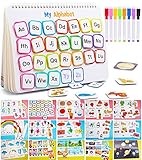
- 【LEARNING WHILE PLAYING】 This is a book helping toddlers to learning while playing.Parents can participate in children’s activities to help them understand thinking, perceive colors, and enhance logical knowledge. The busy book game is an excellent educational toy developed for children over 3 years old
- 【15 THEMES AND 14 DRAWING&WRITING PAGES】 This Busy Book covers 15 themes, including numbers, alphabet, Food & drink, fruits, animals, rainbow, colors, shapes, size discrimination, transportation, weather, week, seasons, holidays and planets. Each themes can enrich the child's knowledge base. There is also a 14-page drawing and writing page to meet the needs of children who love to write and paint, and is equipped with 8 colored pens
- 【DIVERSE LEARNING EXPERIENCE】 This preschool educational toy is multi-functional, allowing child to develop fine motor skills, communication, verbal and problem-solving skills, memory, logic, imagination and visual perception,etc
- 【SAFE TO PLAY】 The certification was passed (CPC,Children’s Product Certificate). This preschool educational toy are made with the highest quality safe material that will withstand through generations of learning. The edges of the flash cards are rounded to avoid any potential harm
- 【BEST GIFT】 Keeping the children busy and get a moment of silence for yourself when you need. So, this is great gift for our children,even for parents.Need to attach the Velcro by yourself
Short video courses are efficient for learning a tool or refreshing a workplace skill, but they are not always deep enough for academic mastery or complex portfolio feedback. For a consequential skill, supplement the videos with practice and a real deliverable.
Best free websites—and what “free” means
Start with Khan Academy for guided academic lessons and practice, MIT OpenCourseWare for university-level course materials, and freeCodeCamp for coding exercises and projects. They serve different needs: Khan Academy provides more guided foundations, MIT OCW offers materials for self-directed study, and freeCodeCamp centers on programming practice.
Free access is not always the same as a free complete learning experience. On other services, a learner may be able to preview lessons or access some material while paying separately for a certificate, graded work, full program or subscription. A free trial is also different from permanently free access: check when billing starts, how to cancel, and whether the course remains available afterward. Check each course page rather than assuming that “free course” includes assessment, support or a certificate.
YouTube can also help with demonstrations, especially for creative techniques and software tasks, but quality, sequence and accuracy depend on the creator. Use it to supplement a planned course, and check that the video matches your software version and current best practices.
Which platform is best by subject?
| Subject or need | Good first choice | Alternative |
|---|---|---|
| Coding for beginners | Codecademy or freeCodeCamp | Udemy for a specific tool; Coursera or edX for structured programs |
| Mathematics | Khan Academy | MIT OpenCourseWare or edX |
| Computer science foundations | MIT OpenCourseWare or edX | Coursera |
| Business and career learning | Coursera | edX or LinkedIn Learning for practical workplace topics |
| Design, photography and illustration | Skillshare | Udemy or LinkedIn Learning |
| Software tools | Udemy or LinkedIn Learning | Skillshare for creative applications |
| Academic depth | edX or MIT OpenCourseWare | Coursera |
| Low-cost exploration | Khan Academy, MIT OpenCourseWare or freeCodeCamp | Sample lessons on paid platforms |
The best route may combine platforms. For example, learn a concept through Khan Academy or MIT OpenCourseWare, practise it with Codecademy or freeCodeCamp, then make a small independent project. The first resource explains; the second gives repetition; the project tests whether you can use the skill without following a lesson line by line.
Best Value

- Magic Practice Copybooks are much larger than other copybooks on the market. The package includes 5 magic practice copybooks for Kids (Addition,Multiplication,Numbers , Alphabet, Drawing) + 1 Pens + 10 refills
- The Magic Practice Copybooks has three-dimensional groove design, The magic calligraphy paper is thick, strong, and durable, not easy to smudge and not easy to stain; the pen holder is made of silicone, which is 100% safe for children; the print is clear and clean; it is really comfortable and great for Calligraphic Letter Writing.
- The matching refills use magic ink,handwriting will automatically fade and disappear within 30 minutes after writing, great for repeated practice. It is a Must Have handwriting copybook set for your kids learning calligraphy.
- The kids can use their magic pen to follow the paths and draw different shapes, great for improving their writing skills. They can also master English handwriting skills and write beautiful English words through training with the reusable writing board tracing books.
- Magic reusable calligraphy copybook set is the perfect gift for your kids ages 3-8 years old. It is suitable for all kinds of holiday gifts, such as Christmas, New Year, birthday.If you have any problems, please contact us at any time, we will reply within 24 hours.
How to choose a course before you pay
- Check the syllabus and outcome. Look for specific abilities you will gain, not just broad claims such as “master design.”
- Check recency and version. This matters especially for programming, cloud services, cybersecurity, AI tools, tax or legal subjects, and changing software. Look for an update date, version number and recent student questions.
- Review the instructor and sample lesson. Confirm the teaching style is understandable and the instructor has relevant, current experience.
- Look for practice. A course should include exercises, problem sets, projects or assessments appropriate to the skill. Watching alone rarely demonstrates that you can perform it.
- Check prerequisites. A beginner label does not guarantee that the course starts at the level you need.
- Inspect the credential terms. Find out who issues it, whether work is graded or identity-verified, and whether the certificate costs extra.
- Calculate the full cost. Include the subscription or course fee, certificate or exam charges, required software or equipment, taxes, and any renewal cost.
- Read access and cancellation terms. Distinguish lifetime access to a purchase from access that ends when a subscription is cancelled. Check refunds and billing dates.
- Check practical access. Confirm language, transcripts, accessibility options, mobile or offline use, payment methods and country availability if they matter to you.
Are online course certificates worth paying for?
Sometimes—but “certificate” can mean several different things, and none should be assumed to prove mastery or guarantee employment.
- Completion certificate: usually records that you finished course content. It may not show that you passed a rigorous assessment.
- Professional certificate: a branded training program intended to build job-related skills. Its value depends on the issuer, curriculum, assessment and whether employers in your target field recognize it.
- Industry certification: typically tied to an exam or assessment from a vendor or professional body. Check whether the credential is current and relevant to the role you want.
- Academic credit or degree: governed by the institution and the specific program. A course hosted on an online platform does not automatically provide credit, a degree or accreditation.
Before paying for a credential, ask who issues it, what you must do to earn it, whether an employer or licensing body recognizes it, and whether the same money would be better spent on an exam, tools, tutoring or a project. In regulated occupations, verify the required license with the relevant authority; an online course certificate is not a substitute.
For practical careers, a finished and well-documented project can be stronger evidence of ability than a certificate alone. A certificate may help show structured study, but pair it with work you can explain and demonstrate.
Do these 3 things before closing this tab:
1Repair Windows errors before they cause bigger problems2Fix the driver behind crashes, sound loss and screen glitches3Clear out junk files and repair common Windows errorsSubscription or one-course purchase?
A subscription can make sense if you plan to take several courses in a relatively short period, want to explore a broad catalog, or benefit from paths and regular practice. Compare the subscription’s included catalog with the exact courses you intend to take and estimate how long you will need access. A monthly fee adds up if you study slowly or leave the subscription running.
Buy one course when you have a narrow goal, prefer permanent access to that specific course, or do not expect to study several subjects. Udemy’s individual-purchase model is one example: its company says purchasers retain lifetime access to the course they buy. A subscription may still be better value for multiple courses, but only if those courses are included and you complete them before access ends.
If you are merely testing whether you like a subject, start with free materials or a sample lesson. Pay when you can name the missing value—such as graded work, a structured sequence, feedback, or a credential that matters for your goal.
A simple learning plan that turns courses into ability
- Define a concrete outcome. Replace “learn coding” with “build a small webpage” or “write a script that cleans a spreadsheet.”
- Pick one primary course. Choose a resource at the right level with a clear syllabus and enough practice. Avoid signing up for several overlapping courses at once.
- Schedule practice, not just watching. Reserve time to solve exercises or reproduce a technique from memory.
- Make a project. Create something relevant: a dashboard, coded application, design piece, presentation, article, campaign or solved problem set.
- Get feedback. Ask a knowledgeable colleague, tutor, mentor or community to review work when the skill benefits from human judgment.
- Test and revisit weak areas. Use an assessment, explain your decisions, or try a task without the lesson open. Return to a prerequisite if you get stuck.
- Document the result. Save the project, explain what you learned and note the tools or methods used. This gives you evidence beyond a course completion record.
When an online course is not enough
Self-paced websites are less suited to skills that depend on live correction, supervised practice, safety procedures or physical performance. Public speaking, music performance, clinical and laboratory work, some trades, advanced writing and interview practice may require a tutor, local class, mentor, workshop or workplace training. A platform can provide concepts and exercises, but it cannot always assess technique or safely supervise real-world work.
To avoid platform-hopping, use a simple combination: one main course, one practice resource, one real project and one checkpoint for feedback or assessment. That is usually more useful than collecting subscriptions without finishing a course.
Quick Recap
Product prices and availability are accurate as of the date/time indicated and are subject to change. Any price and availability information displayed on Amazon at the time of purchase will apply.

