
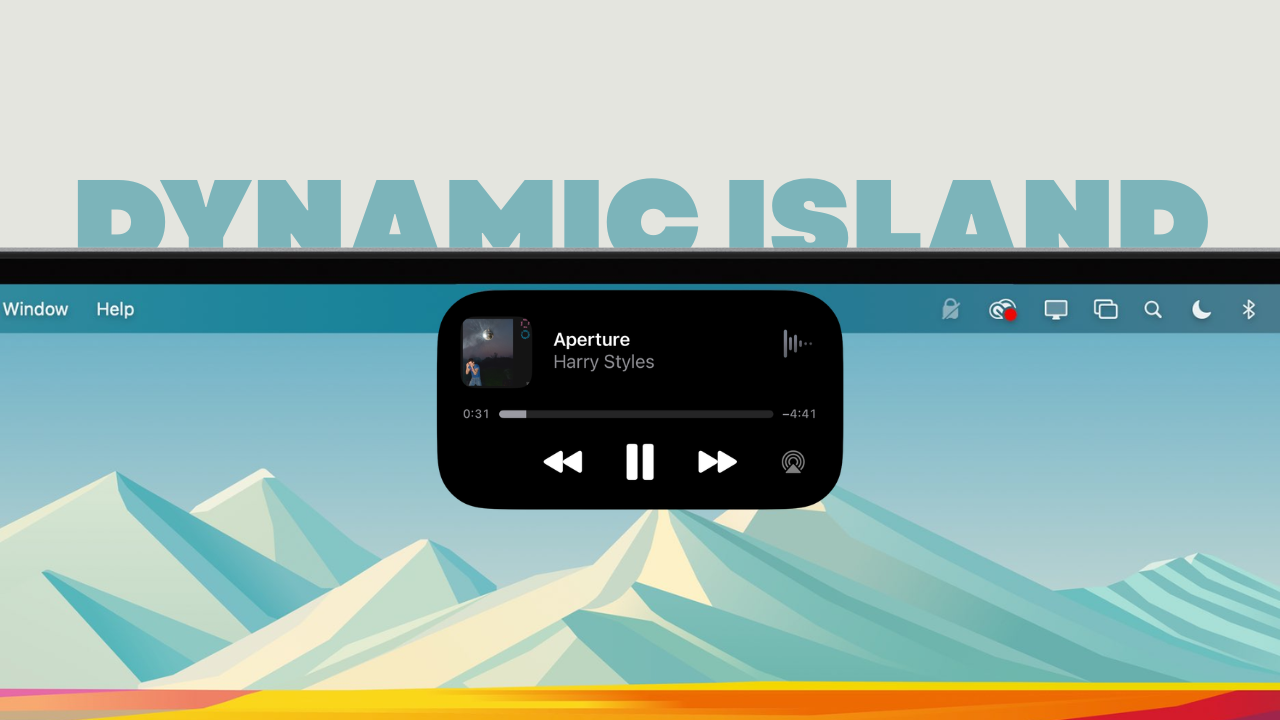
Apple is reportedly lining up a major MacBook Pro redesign for late 2026, bringing OLED displays, full touchscreen support, and yes, a Mac version of Dynamic Island. And honestly, this might be the most Apple way possible to say, “Fine, touchscreens are happening… but we’ll do it our way.”
According to Bloomberg’s Mark Gurman, Apple is targeting 2026 for its first OLED MacBook Pro models with a redesigned macOS interface that adapts depending on whether you are using a trackpad or tapping the screen.
The current notch could be replaced with a smaller cutout wrapped inside a Dynamic Island style UI element. It is worth noting that when Gurman goes on record, it usually means the direction is locked internally.
The OLED transistion is not just cosmetic. This would be the first major display technology upgrade for the MacBook Pro since the move to mini LED. OLED means deeper blacks, better contrast, potentially thinner panels, and of course a marketing-friendly spec that Apple can build an entire keynote around.
Samsung Display is widely tipped to supply the panels, which aligns with earlier supply chain chatter about Apple preparing for a late 2026 OLED transition. But the more interesting change is touch.
For years, Apple’s stance was clear. Touch belongs on iPad. The Mac is built around precision, keyboard, and trackpad. Meanwhile, every Windows OEM shipped touchscreen laptops and moved on with life. Now Apple appears ready to blur that line, but in typical Apple fashion, it wants to do it with a philosophy shift rather than just slapping touch on macOS.
The reports describe a version of macOS that dynamically adapts to input. If you tap, UI elements become more touch-friendly. Menus enlarge. Contextual controls shift. If you go back to trackpad, the traditional precision interface returns.
On paper, that sounds smart. Apple is not turning the Mac into an iPad. It is trying to make touch feel like an optional accelerator rather than a replacement.
That approach is key. Most touchscreen laptops feel like a feature checkbox. You use it occasionally to scroll or zoom, then forget it exists. If Apple executes this correctly, touch could genuinely enhance workflows like video editing scrubbing, timeline adjustments, quick annotations, zooming documents, tapping small UI elements, or interacting with system controls faster than moving a cursor.
Now let us talk about the Dynamic Island. This is where I’m skeptical. On iPhone, Dynamic Island turned an unavoidable hardware cutout into a status hub for live activities. It worked because it embraced the limitation and made it useful.
On a MacBook Pro, though, we are talking about a larger display with a persistent menu bar that already handles background activity indicators. Wrapping a hole punch camera in a Dynamic Island interface sounds clever in theory, but it also risks feeling like Apple trying to justify another display interruption.
Also Read: Apple’s March 4 Event Could Be About Macs, But It Feels Bigger Than That
I do see the upside. The Mac is inherently multitasking heavy. Uploads, background exports, calls, AirDrop transfers, recording sessions, timers, live deliveries, file syncs, all of that could sit inside a dynamic top zone that expands when needed. If Apple gives developers a clean API and avoids turning it into chaos, it could become a genuinely modern control surface.
But here is the danger. We’ve been here before. The Touch Bar was also positioned as contextual magic. In reality, it was inconsistent, developer adoption was uneven, and many users ignored it. If Dynamic Island on Mac becomes flashy but functionally shallow, it will feel like Touch Bar energy moved to the top of the screen.
Also, MacBook Pros often display static UI for hours, including the menu bar and dock. With the new OLED panels, Apple will need aggressive pixel shifting, brightness management, and compensation techniques to avoid long term degradation.
If anyone can solve it at scale, it is Apple. But this is not an iPhone that refreshes content constantly. Pro users leave the same interface elements on screen all day.
For years, Apple kept Mac and iPad philosophically separate. The iPad slowly became more like a laptop. Now the Mac is slowly adopting touch. The wall is not collapsing overnight, but it is clearly thinning. This years redesign feels less like a one off experiment and more like a deliberate convergence strategy.
If Apple commits fully to adaptive macOS and delivers meaningful use cases for touch, this could be the most significant MacBook Pro UX evolution in a decade. If it half commits and treats touch as a novelty, we will be talking about this as another well marketed detour.
Personally, I’m cautiously excited. OLED is overdue. Touch, if done right, is genuinely useful. The Dynamic Island idea is bold, maybe slightly risky, but not automatically doomed. Apple just needs to remember one thing. Hardware can impress. UI has to earn trust. And on the Mac, trust is everything.

3 Comments
Freedom 251
Freedom 251
Freedom251 phone